

Genius рада объявить Media Pointer 1000. Этот мультимедийный указатель с красным лазерным лучом для точного наведения сочетает в себе функции, необходимые для презентации и управления мультимедиа на расстоянии. Эти две функции сопровождаются дополнительной функцией контроля времени, что позволяет вам использовать каждую доступную секунду вашей презентации.
Когда вы используете функцию измерения времени, Media Pointer 1000 вибрирует за 30 секунд и 5 секунд до выбранного времени будильника, давая вам достаточно времени, чтобы завершить то, что вы делаете плавно и быстро. Оставшееся время можно контролировать через ЖК-экран, и будильник настроен как любой цифровой будильник.
Этот мультимедийный указатель имеет два режима представления: представление и управление мультимедиа. Режим презентации можно активировать с левой стороны, где он также может быть отключен. Как уже упоминалось, выбранный режим соответствующим образом меняет функциональность кнопок.
Режим презентации можно использовать при использовании PowerPoint для презентации. В этом режиме вы можете изменять и закрывать слайды. Кнопки в этом режиме включают: следующую страницу, предыдущую страницу, F5 / ESC и пустую страницу. Мультимедийный режим используется для управления воспроизведением звуков и видео. Видео может быть остановлено, расширенное и громкость может быть скорректирована. Кнопки в режиме мультимедиа включают: увеличение громкости, уменьшение громкости, воспроизведение / остановка, быстрая перемотка вперед и назад.
Media Pointer 1000 — 2, 4 ГГц беспроводная связь с пультом дистанционного управления на расстоянии до 10 метров. Красный лазерный луч помогает точно указать в PowerPoint или на графике без необходимости стоять рядом с ним.
Media Pointer 1000 может быть подключен к вашему настольному ПК или ноутбуку. Соединение осуществляется через приемник micro USB, который может храниться вместе с обеими батареями AAA внутри указателя.
Media Pointer 1000 уже доступен в Испании по рекомендованной цене 49, 90 евро.
- Поддержка интерфейса: USB Wireless: 2, 4 ГГц Вес: 157 г Размер (Д х Ш х В): 105 мм х 38 мм х 18 мм
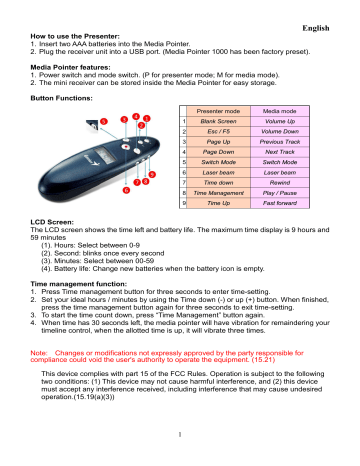
English
How to use the Presenter:
1. Insert two AAA batteries into the Media Pointer.
2. Plug the receiver unit into a USB port. (Media Pointer 1000 has been factory preset).
Media Pointer features:
1. Power switch and mode switch. (P for presenter mode; M for media mode).
2. The mini receiver can be stored inside the Media Pointer for easy storage.
Button Functions:
Presenter mode
Media mode
1
Blank Screen
Volume Up
2
Esc / F5
Volume Down
3
Page Up
Previous Track
4
Page Down
Next Track
5
Switch Mode
Switch Mode
6
Laser beam
Laser beam
7
Time down
Rewind
8
Time Management
Play / Pause
9
Time Up
Fast forward
LCD Screen:
The LCD screen shows the time left and battery life. The maximum time display is 9 hours and
59 minutes
(1). Hours: Select between 0-9
(2). Second: blinks once every second
(3). Minutes: Select between 00-59
(4). Battery life: Change new batteries when the battery icon is empty.
Time management function:
1. Press Time management button for three seconds to enter time-setting.
2. Set your ideal hours / minutes by using the Time down (-) or up (+) button. When finished,
press the time management button again for three seconds to exit time-setting.
3. To start the time count down, press “Time Management” button again.
4. When time has 30 seconds left, the media pointer will have vibration for remaindering your
timeline control, when the allotted time is up, it will vibrate three times.
Note: Changes or modifications not expressly approved by the party responsible for
compliance could void the user's authority to operate the equipment. (15.21)
This device complies with part 15 of the FCC Rules. Operation is subject to the following
two conditions: (1) This device may not cause harmful interference, and (2) this device
must accept any interference received, including interference that may cause undesired
operation.(15.19(a)(3))
1
Was this manual useful for you?
Yes
No
Thank you for your participation!
* Your assessment is very important for improving the workof artificial intelligence, which forms the content of this project
Useful files and SOFTWARE Media Pointer Black USB
For many products, to work with the Media Pointer Black USB, you may need various
additional files: drivers, patches, updates, installation programs, a list of error codes, an electronic diagram or a photo.
You can download these files online for a specific model Media Pointer Black USB or add your own for free download by other visitors.
| Name | Type | Count |
|---|---|---|
| N/A | Drivers | 3 |
| N/A | Electronic circuit | 3 |
| N/A | Photos | 1 |
| N/A | Installation scheme | 1 |
| N/A | Datasheet | 2 |