
-
Contents
-
Table of Contents
-
Bookmarks
Quick Links
OWNER’ S MANUAL
WIRE CONTROLLER OF AIR CONDITIONER
MODEL: KJR-12B/DP(T)-E
KJR-12B/DP(T)-E(C)
KJR-12B/DP(T)-E(H)
KJR-12B/DPC(T)-E
KJR-12B/DP(T)-F
RCW8(P/N:7ACEL1706)
Thank you very much for purchasing our product.
Before using your unit, please read this manual carefully and keep it for future reference.
Related Manuals for Carrier KJR-12B/DP-E
Summary of Contents for Carrier KJR-12B/DP-E
-
Page 1
OWNER’ S MANUAL WIRE CONTROLLER OF AIR CONDITIONER MODEL: KJR-12B/DP(T)-E KJR-12B/DP(T)-E(C) KJR-12B/DP(T)-E(H) KJR-12B/DPC(T)-E KJR-12B/DP(T)-F RCW8(P/N:7ACEL1706) Thank you very much for purchasing our product. Before using your unit, please read this manual carefully and keep it for future reference. -
Page 3
● This manual gives detailed description of the precautions that should be brought to your attention during operation. ● In order to ensure correct service of the wired controller please read this manual carefully before using the unit. ● For convenience of future reference, keep this manual after reading it. -
Page 4: Table Of Contents
CONTENTS 1. SAFETY PRECAUTION…………….1 2. SUMMARIZE………………..2 3. FUNCTION SUMMARY…………….2 4. NAME AND FUNCTION OF INDICATORS ON THE WIRE CONTROLLER……………….. 3 5. INSTALLATION METHOD…………….4 6. NAME AND OPERATION OF THE BUTTON ON THE WIRE CONTROL- LER………………….5 7.
-
Page 5: Safety Precaution
1. SAFETY PRECAUTIONS The following contents are stated on the product and the operation manual, including usage, precautions against personal harm and property loss, and the methods of using the product correctly and safely. After fully understanding the following contents (identifiers and icons), read the text body and observe the following rules.
-
Page 6: Summarize
Warning Please entrust the distributor or professionals to install the unit. The installers must have the relevant know-how. Delegate Improper installation performed by the user without perm installation W W arning arning ission may cause fire, electric,shock, personal injury or water leakage.
-
Page 7: Controller
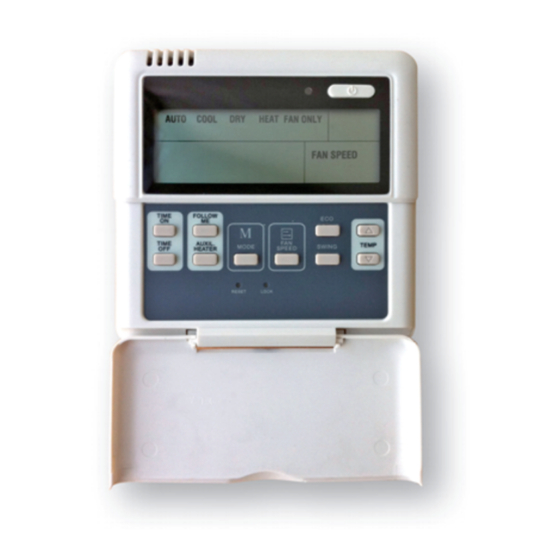
4. NAME AND FUCTION OF INDICATORS ON THE CONTROLLER Operation mode indication Follow me function ON/OFF indication Fan speed indication Lock Timer ON/OFF Temperature display zone ① Operation mode indication: When adjust setting off time or only off When press » MODE » button, the follow- time is set , the «OFF»…
-
Page 8: Installation Method
the same as setting temperature. It is speed. available under cooling, heating, auto ⑥ Lock: mode. When the » LOCK » button is pressed, ④ ON/OFF indication : the icon appear and other buttons is When is on, the icon display, unable, press again, the icon disappear.
-
Page 9: Name And Operation Of The Button On The Wire Controller
When a wire controller is needed, a small 5-way terminal should be added,fix an infrared emitter with gumwater near the receiver on the switch board. Connect its anode and cathode to A and B,and +5V, GND, RUN to C, D, E on the switch board. 6.
-
Page 10
⑦ ON / OFF BUTTON ① MODE BUTTON ② TIMER ON BUTTON ⑧ ADJUST BUTTON ▲ SLEEP TIMER ON I-FEEL ③ TIMER OFF BUTTON ⑨ ADJUST BUTTON ▼ MODE FAN SPEED TEMP TIMER OFF SWING ④ HEATER I-FEEL BUTTON ⑩ SWING BUTTON HEATER BUTTON ⑤… -
Page 11
⑤Electrical heater button/Heater button : ① Mode botton: If press this button in heat mode, electri- When press this botton,the operation cal heater function become ineffective. mode change following ⑥ Reset button(hidden): sequence: →AUTO → COOL→DRY→HEAT→FAN Use a 1mm stick to press in the little hole , then the current setting is canceled . -
Page 12: Using Method
⑩ Swing button: 7. USING METHOD First press, start swing function;second AUTOMATIC OPERATION press, stop swing. (Match to some model with swing function). Connect to power,indoor operation lamp Economy operation button / Sleep flash. button: 1. Press «MODE» button, select » AUTO press this button, the indoor unit «…
-
Page 13: Dry Operation
3. Press «FAN SPEED» button to select 2. Press » timer » on button repeatedly to high/mid/low/auto. adjust time setting. 4. Press «ON/OFF» button, indoor unit 3. If press this button and hold on, the operation lamp on, it works in selected time will increase at 0.5h, after 10h, it mode.
-
Page 14: Change Timer
3. Timer off time must be longer than 8. TECHNICAL INDICA- timer on time. TION AND REQUIRE- 4. 0.5 second after setting, the wire MENT controller send information.the setting is finished. EMC and EMI comply with the CE certification requirements. CHANGE TIMER If there is a need of changing timer time, press corresponding button…
-
Page 15
Version: MDV06U-002HW 202000100068…
-
Contents
-
Table of Contents
-
Bookmarks
Quick Links
WIRED CONTROLLER OF
AIR CONDITIONER
KJR-12B/DPBG(T)-E, KJR-12B/DPBG(T)-E(H)
OWNER´S MANUAL
Please read this manual carefully before operation and keep it for future reference.
MAN-O-KJR12B-0615
intensity.mx
Related Manuals for intensity KJR-12B/DPBG(T)-E

Summary of Contents for intensity KJR-12B/DPBG(T)-E
-
Page 1
WIRED CONTROLLER OF AIR CONDITIONER KJR-12B/DPBG(T)-E, KJR-12B/DPBG(T)-E(H) OWNER´S MANUAL Please read this manual carefully before operation and keep it for future reference. MAN-O-KJR12B-0615 intensity.mx… -
Page 2: Table Of Contents
CONTENTS 1.SAFETY PRECAUTION—————————————————1 2.SUMMARIZE —————————————————————— 2 3.FUNCTION SUMMARY—————————————————-2 4. NAME AND FUNCTION OF INDICATORS ON THE WIRE CONTROLLER —————————————————————3 5.INSTALLATION METHOD————————————————4 6.NAME AND OPERATION OF THE BUTTON ON THE WIRE CONTROLLER —————————————————————-5 7. USING METHOD ————————————————————7 AUTOMATIC OPERATION ——————————————7 COOLING/HEATING/FAN ONLY OPERATION ——————8 DRY OPERATION ——————————————————8 TIMER SETTING——— ————————————————8 TIMER ON AND TIMER OFF BOTH ——————————9…
-
Page 3: Safety Precaution
SAFETY PRECAUTION Please read the safety precaution carefully before using. Do observe the following safety precautions,for they are very important. Before you come to the text, please be familiar with the following markers and icons, and comply with the precautions. Markers Icons Markers…
-
Page 4: Summarize
If you want to move or re-install your Wire Controller, please contact with local dealer. Do not disassemble your Central Controller at will. If it is needed, please contact the local dealer. FORBID A random disassembly may cause abnormal operation or heating, which may result in fire.
-
Page 5: Controller
NAME AND FUCTION OF INDICATORS ON THE CONTROLLER O p e r a t i o n m o d e i n d i c a t i o n F o l l o w m e f u n c t i o n O N / O F F i n d i c a t i o n F a n s p e e d i n d i c a t i o n L o c k…
-
Page 6: Installation Method
4.ON/OFF indication : When it is on, the icon display, otherwise it is extinguished 5.Fan speed indication :There are four fan modes : low, middle, high, auto.For some models,no middle fan then the middle fan is seen as high speed. 6.Lock:When the»LOCK»button is pressed,the icon appear and other buttons is unable, press again, the icon dis- appear.
-
Page 7: Name And Operation Of The Button On The Wire Controller
NAME AND OPERATION OF THE BUTTON ON THE WIRE CONTROLLER ON/OFF BUTTON MODE BUTTON FAN SPEED SELECTION AJUDSTMENT BUTTON TIMER ON BUTTON TIMER FOLLOW DIRECT TIMER OFF BUTTON AJUDSTMENT BUTTON TIMER TEMP MODE TURBO SPEED ECONOMY OPERATION BUTTON VERTICAL SWING BUTTON FOLLOW ME BUTTON RESET LOCK…
-
Page 8
Function,just set it to «0.0» . 3. Timer off button: Press this button, timer off function is active. Then every press, the time increase 0.5h, after 10h, 1h increasement after each press. If cancel this function, just set it to «0.0» . 4 . -
Page 9: Using Method
10. Adjust button : Set indoor temperature up. If press and hold on, it will increase at 1°C(2°F) per 0.5 second. 11. Adjust button : Set indoor temperature down . If press and hold on,it will decrease at 1°C(2°F) per 0.5 second.
-
Page 10: Cooling/Heating/Fan Only Operation
can not be changed. Auto is displayed on LCD. Press ON/OFF button again to stop. 4.Economy operation is valid in auto mode. COOL/HEAT/FAN MODE OPERATIO N 1.Press «MODE» button, select «COOL», «HEAT» or «FAN ONLY» mode. 2.Press temperature adjust button to select setting temp. 3.Press «FAN SPEED»…
-
Page 11: Timer On And Timer Off Both
Timer off only: 1.Press «TIME OFF» button, it display «SET» on LCD, and display «H» and ON, it is waiting for timer on setting. 2.Press «TIME OFF» button repeatedly to adjust time setting. 3.If press this button and hold on, the time will increase at 0.5h, after 10h, it increase at 1h.
Выбираете товар
Добавьте интересующие вас товары в корзину
Оформляете заказ
Заполните все поля формы, чтобы получить предложение
Получаете предложения
В ближайшее время с вами свяжется менеджер для уточнения деталей
Видео
Видео
Похожие товары
Отзывы
Достоинства
Комфорт настройки, несколько действий и все готово.
Хороший дизайн, который западёт в душу каждому.
—
Недостатки
Проблемами и не пахнет!
Комментарий
Долгое время пользовались таким же продуктом от другого производителя, до тех пор пока он не приказал долго жить. Хотели пойти купить их же продукт, но решили изучить рынок. Нам казалось, что Разное нашего предыдущего бренда — хороший продукт, пока не наткнулись на таких парней как General Climate. Сначала были удивлены характеристиками, затем еще больше удивлены количеству положительных отзывов об их продуктах. Ну поржали, подумали типо отзывы куплены, но любопытство все же взяло верх. После покупки респект General Climate. Заказали на официальном сайте их клевую модель — General Climate kjr 12b general climate.
Как получили сразу же активно начали пользоваться. Понравилось, что в kjr 12b general climate есть . И много других характеристик.
upd: модель kjr 12b general climate незаменима!!!
upd upd: General Climate kjr 12b general climate все еще приносит нам ежесекундную радость!
Читать все отзывы
Этот товар в других городах
Компания GENERAL CLIMATE осуществляет промышленное изготовление различного климатического оборудования для эффективного кондиционирования, а также вентиляции и охлаждения любого типа помещения. Основывая промышленный холдинг международного уровня в 2002 году, руководители и инвесторы поставили цель – выйти в лидеры по производству промышленных кондиционеров, чиллеров, фанкойлов канального и кассетного типа и другой техники.
В наши дни GENERAL CLIMATE имеет все возможные стратегические связи с известными производителями оборудования для изготовления промышленных систем кондиционирования на территории стран Европы, Китая и РФ. Помимо этого, в компании сосредоточен большой интеллектуально-управленческий потенциал: среди наших кадров лучшие специалисты, инженеры, маркетологи и консультанты в области продаж мирового уровня.
Такие уникальные условия создают благоприятную почву для формирования мощного производства надежных, конкурентоспособных и высококачественных климатических систем.
Среди главных преимуществ заказа на изготовление или покупку систем промышленного кондиционирования, фанкойлов, чиллеров, кондиционеров и другого оборудования в GENERAL CLIMATE можно выделить:
- индивидуальный и максимально точный расчет всех параметров;
- высокое качество;
- максимальная выгода.
Заказать, купить или узнать цену на чиллеры, фанкойлы, кондиционеры и иное оборудование можно, связавшись с нами по указанным контактным данным.