
GPSMAP 695/696
Портативный авиационный приемник
Руководство пользователя
Внимание!
Если карта региона или области записана и разлочена (привязана к внутреннему номеру) на SD-карту, то никакие другие карты на эту SD-карту добавлять нельзя или каким-либо другим способом менять на ней файлы из папки Garmin.
Авторские права © 2008 Garmin Ltd. или дочерние компании. Все права защищены Данное руководство отражает работу Системного Программного Обеспечения
версии 0002.0 или выше. При сравнении информации, содержащейся в данном руководстве, с более ранними или поздними версиями программного обеспечения можно обнаружить некоторые различия.
Garmin International, Inc., 1200 East 151st Street, Olathe, Kansas 66062, U.S.A. Тел.: 913/397.8200 Факс: 913/397.8282
Garmin AT, Inc., 2345 Turner Road SE, Salem, OR 97302, U.S.A. Тел.: 503/391.3411 Факс: 503/364.2138
Garmin (Europe) Ltd, Liberty House, Bulls Copse Road, Hounsdown Business Park, Southampton, SO40 9RB, U.K.
Тел.: 44/0870.8501241 Факс: 44/0870.8501251
Garmin Corporation, No. 68, Jangshu 2nd Road, Shijr, Taipei County, Taiwan Тел.: 886/02.2642.9199 Факс: 886/02.2642.9099
Адрес веб-сайта: www.garmin.com
Кроме тех случаев, когда иное явно выражено в данном документе, никакая часть данного руководства не может быть воспроизведена, копирована, передана, распространена, загружена или сохранена на любом носителе и для любой цели без явного письменного разрешения компании «Гармин». Компания «Гармин» дает разрешение на загрузку одной копии данного руководства и любой редакции данного руководства на жесткий диск или другой электронный носитель для личного использования при условии, что такая электронная или печатная копия данного руководства или его редакции содержит полный текст сообщения об авторских правах, и что любое несанкционированное коммерческое распространение данного руководства или любой его редакции будет строго запрещено.
Garmin® и Garmin GPSMAP ® являются зарегистрированными торговыми марками компании Garmin Ltd. или ее дочерних компаний. FliteCharts и SafeTaxi® являются торговыми марками компании Garmin Ltd. или ее дочерних компаний. Эти торговые марки не могут быть использованы без явного разрешения компании Garmin.
Jeppesen® является зарегистрированной торговой маркой Jeppesen, Inc. XM® является зарегистрированной торговой маркой XM Satellite Radio, Inc.
|
Декабрь 2008 г. |
190-00919-00 Ред. D |
Отпечатано на Тайване |
|
2 |
GPSMAP 695/696 Руководство пользователя |

Предупреждения, правила безопасности и замечания
ВНИМАНИЕ: При установке прибора GPSMAP 695/696 располагайте устройство таким образом, чтобы оно не загораживало поле зрения и не мешало управлению самолетом.
ВНИМАНИЕ: Показания индикаторов на странице приборной панели основаны на данных GPS и могут отличаться от показаний приборов в самолете.
ВНИМАНИЕ: Прибор GPSMAP 695/696 предназначен для использования только в качестве вспомогательного устройства для навигации VFR. Не пытайтесь использовать это оборудование для задач, требующих точных измерений направления, расстояния, местоположения или топографии.
ВНИМАНИЕ: Функция предупреждений о рельефе НЕ предназначена для прогнозирования навигации и защиты от столкновений с землей. Функция “Terrain Proximity” прибора GPSMAP 695/696 НЕ предназначена для использования в качестве основного источника данных для защиты от столкновений с землей и не освобождает пилота от ответственности за постоянное наблюдение за окружающей местностью во время полета. Функция “Terrain Proximity” может использоваться только в качестве вспомогательного источника данных для предупреждения столкновений с землей. Эта функция не одобрена для использования в приложениях, требующих применения сертифицированной системы предупреждения столкновений с землей. Информация о рельефе предоставляется сторонними фирмами. Компания “Гармин» не в состоянии провести независимую проверку точности этих данных.
ВНИМАНИЕ: Отображаемые навигатором значения минимальной безопасной высоты (MSA) могут быть использованы только в качестве приблизительных данных; не полагайтесь на эту информацию как на единственный источник данных о препятствиях и рельефе. Всегда сверяйтесь с текущими аэронавигационными картами для определения минимальной безопасной высоты.
ВНИМАНИЕ: Высота, рассчитанная GPS-приемниками навигатора GPSMAP 695/696, представляет собой геометрическую высоту над средним уровнем моря. Эта высота может значительно отличаться от показаний альтиметров. Высота GPS не должна использоваться для вертикальной навигации.
|
GPSMAP 695/696 Руководство пользователя |
3 |

ВНИМАНИЕ: Не используйте информацию базовой карты (данные о суше и воде) для основной навигации. Базовая карта предназначена в качестве дополнения к другим утвержденным источникам навигационных данных и должна рассматриваться лишь в качестве дополнительных материалов для повышения информированности о текущей ситуации.
ВНИМАНИЕ: Не применяйте устаревшие базы данных. Необходимо проводить регулярное обновление баз данных, используемых системой GPSMAP 695/696, чтобы используемая Вами информация всегда была актуальной. Пилоты, использующие устаревшие базы данных, несут ответственность за возможные последствия.
ВНИМАНИЕ: Информация о трафике предоставляется только в качестве вспомогательных данных для визуальной оценки транспортных потоков. Пилоты должны управлять самолетом на основе инструкций АТС (управление воздушным движением) или точного визуального обнаружения пересекающихся потоков движения.
ВНИМАНИЕ: Метеосводки, полученные по спутниковому приемнику XM Weather, не должны использоваться в качестве источника данных при пересечении областей плохой погоды. Эта информация одобрена для использования только при обходе зон плохой погоды, но не для пересечения этих областей.
ВНИМАНИЕ: Метеорологические данные NEXRAD предназначены только для целей долгосрочного планирования. Из-за возможных задержек в передаче данных и относительном устаревании информации метеорологические данные NEXRAD не следует использовать для обхода областей плохой погоды при краткосрочном планировании.
ВНИМАНИЕ: Прибор Garmin GPSMAP 695/696 обладает очень высокой степенью функциональной надежности. Однако пользователь может придти к выводу, что функции мониторинга и/или автоматического тестирования, применяемые при всевозможных сбоях системы, не являются практичными. В редких случаях прибор GPSMAP 695/696 может работать со сбоями без какой-либо индикации неисправного состояния. Пилот несет на себе ответственность за обнаружения таких сбоев путем перекрестного контроля и сравнения показаний с информацией на приборах в кабине.
|
4 |
GPSMAP 695/696 Руководство пользователя |

ВНИМАНИЕ: По соображениям безопасности рабочие процедуры прибора GPSMAP 695/696 следует изучать на земле.
ВНИМАНИЕ: Правительство США управляет системой GPS (Global Positioning System, глобальная система позиционирования) и несет единоличную ответственность за точность и техническое содержание этой системы. Система GPS может быть изменена, что повлияет на точность и качество работы всего GPS оборудования. Компоненты устройства Garmin GPSMAP 695/696 используют GPS в качестве прецизионного электронного навигационного средства (NAVAID). Таким образом, как и для всех приборов NAVAID, информация на экране GPSMAP 695/696 может быть неверно использована или интерпретирована, что делает это оборудование небезопасным.
ВНИМАНИЕ: Для снижения вероятности небезопасной работы внимательно изучите все разделы руководства для пилотов, прилагаемого к прибору GPSMAP 695/696, а также руководства по эксплуатации самолета. Попрактикуйтесь в выполнении базовых операций перед тем, как использовать оборудование в реальных условиях. Во время полетов внимательно сравнивайте показания навигатора GPSMAP 695/696 со всеми имеющимися источниками навигационных данных, включая информацию от других навигационных приборов, визуальные знаки, карты и т.д. Для обеспечения безопасности всегда определяйте причину расхождения в показаниях до того, как продолжить навигацию.
ВНИМАНИЕ: Иллюстрации в данном руководстве приведены только в качестве примеров. Ни при каких обстоятельствах не используйте навигатор GPSMAP 695/696 для прохождения сквозь зону грозы. В Консультативном Циркуляре ФАА (Федеральное управление гражданской авиации) (раздел: грозы) и в Аэронавигационном информационном руководстве рекомендуется «обходить любые грозы, для которых указана категория «сильные или дающие интенсивный отраженный сигнал радара» на расстоянии не менее 20 миль».
ПРЕДУПРЕЖДЕНИЕ: В дисплее используется стекло со специальным антиотражающим покрытием, которое очень чувствительно к маслам для ухода за кожей, воску и абразивным очистителям. ОЧИСТИТЕЛИ С СОДЕРЖАНИЕМ НАШАТЫРЯ РАЗРУШАЮТ АНТИОТРАЖАЮЩЕЕ ПОКРЫТИЕ. Протирайте экран мягкой чистой безворсовой салфеткой, смоченной в очистителе для очков. На очищающем средстве должно быть указано, что оно безопасно для антиотражающего покрытия.
|
GPSMAP 695/696 Руководство пользователя |
5 |

ПРЕДУПРЕЖДЕНИЕ: Прибор Garmin GPSMAP 695/696 не содержит частей, ремонтируемых пользователем. Ремонт устройства может осуществляться только в официальном сервисном центре Garmin. Неавторизированные ремонты или модификации оборудования приведут к аннулированию гарантии и к невозможности использования прибора пилотом в соответствии с правилами ФАА/FCC (Федеральная комиссия по связи США).
ПРИМЕЧАНИЕ: Все иллюстрации, содержащиеся в данном документе, включая изображения экрана прибора GPSMAP 695/696, могут быть изменены, а также могут не отражать текущей версии системы GPSMAP 695/696 и авиационных баз данных. Изображения оборудования могут незначительно отличаться от реального оборудования.
ПРИМЕЧАНИЕ: Данное устройство соответствует требованиям Части 15 Правил FCC. Работа должна отвечать двум следующим условиям: (1) Данное устройство не может являться источником помех. (2) Данное устройство должно работать в условиях помех, включая те, что могут вызывать сбои в работе.
ПРИМЕЧАНИЕ: Данные, содержащиеся в базах данных рельефа и препятствий, поступают из правительственных агентств. Компания «Гармин» проводит тщательную обработку и перекрестную проверку этих данных, но не может гарантировать точность и полноту информации.
ПРИМЕЧАНИЕ: Данный продукт, его упаковка и компоненты содержат химические вещества, которые в соответствии с информацией штата Калифорния, могут стать причиной рака, врожденных дефектов или болезней репродуктивной системы. Данное примечание представлено в соответствии с Заявлением штата Калифорния 65. Если у Вас появились вопросы, или Вы хотите получить дополнительную информацию, посетите сайт www. garmin.com/prop65.
ПРИМЕЧАНИЕ: Использование поляризационных очков может привести к тому, что индикаторы с информацией о полете будут выглядеть тусклыми или пустыми.
ПРИМЕЧАНИЕ: Данные TFR (Temporary Flight Restriction, временные ограничения на полеты) предоставляются ФАА и могут не обновляться вне рабочего времени. Проверяйте актуальность этих данных с помощью альтернативных источников информации. Свяжитесь с местной службой обеспечения полетов для интерпретации данных TFR.
ПРИМЕЧАНИЕ: Метеосводки ХМ доступны только при наличии дополнительной антенны GXM 40.
|
6 |
GPSMAP 695/696 Руководство пользователя |
Содержание
|
Раздел 1. Краткий обзор |
11 |
|
1.1 Внешний вид устройства |
11 |
|
Правила обращения с батареей и зарядка батареи |
11 |
|
Включение/ выключение прибора |
14 |
|
Состояние GPS-приемника |
15 |
|
1.2 Кнопки управления GPSMAP 695/696 |
17 |
|
Меню |
22 |
|
Ввод данных |
23 |
|
Страницы |
25 |
|
1.3 Системные настройки |
30 |
|
Настройки дисплея |
32 |
|
Настройка звука |
33 |
|
Настройка единиц измерения |
33 |
|
Настройка даты и времени |
34 |
|
Настройка местоположения |
35 |
|
Настройка интерфейса |
35 |
|
Настройка сигнализации |
36 |
|
Настройка критерия аэропорта |
37 |
|
Утилиты |
38 |
|
Раздел 2. GPS навигация |
39 |
|
2.1 Введение |
39 |
|
Поля панели данных |
40 |
|
Шкала компаса |
42 |
|
2.2 Приборная панель |
43 |
|
Изменение шкалы CDI |
45 |
|
Настройка малого индикатора |
45 |
|
Ручная настройка курса |
46 |
|
2.3 Вертикальная навигация (VNAV) |
47 |
|
Использование функции VNAV |
48 |
|
2.4 Использование экранов карты |
50 |
|
Ориентация карты |
51 |
|
Масштаб карты |
52 |
|
Прокрутка карты |
53 |
|
Измерение азимута и расстояния |
55 |
|
Топография |
56 |
|
Спутниковый вид |
57 |
|
Символы карты |
58 |
|
Аэропорты и навигационные знаки |
58 |
|
Города и дороги |
59 |
|
GPSMAP 695/696 Руководство пользователя |
7 |
|
Воздушные линии |
60 |
|
2.5 Путевые точки |
62 |
|
Информация о ближайших объектах |
65 |
|
Информация о погоде |
68 |
|
Пересечения |
69 |
|
Маяки NDB |
70 |
|
Маяки VOR |
70 |
|
Путевые точки пользователя |
71 |
|
2.6 Воздушное пространство |
75 |
|
Предупреждающие сообщения о воздушных пространствах |
77 |
|
«Умное» воздушное пространство |
77 |
|
2.7 Навигация Direct-to |
78 |
|
Раздел 3. Планирование полетов |
81 |
|
3.1 Введение |
81 |
|
Поля данных |
81 |
|
3.2 Создание плана полета |
82 |
|
Добавление путевых точек в существующий план полета |
84 |
|
3.3 Хранение планов полетов |
86 |
|
3.4 Активизация плана полета |
88 |
|
Изменение скорости и расхода топлива |
89 |
|
Копирование планов полетов |
91 |
|
Удаление плана полета |
91 |
|
Инвертирование плана полета |
94 |
|
3.5 Заходы на посадку |
94 |
|
Выбор захода на посадку |
96 |
|
Активизация векторов к конечной точке |
98 |
|
3.6 Планирование путешествий |
100 |
|
Раздел 4. Предупреждение об опасности |
101 |
|
4.1 Погода ХМ (GPSMAP 696) |
101 |
|
Активация обслуживания |
101 |
|
Спутниковые метеорологические продукты ХМ |
102 |
|
Использование спутниковых метеорологических продуктов ХМ |
111 |
|
4.2 Рельеф |
115 |
|
Информация о рельефе |
116 |
|
Информация о препятствиях |
116 |
|
Цветовой код рельефа и препятствий |
117 |
|
Предупреждения и настройка рельефа |
118 |
|
Звуковые предупреждения |
120 |
|
4.3 Служба информации о воздушном движении (TIS) |
122 |
|
Символы TIS |
122 |
|
8 |
GPSMAP 695/696 Руководство пользователя |
|
Предупреждения TIS |
122 |
|
Трек воздушного движения относительно земли |
123 |
|
Индикация данных трафика |
124 |
|
Раздел 5. Дополнительные функции |
125 |
|
5.1 SafeTaxi |
125 |
|
Номер цикла и редакции данных SafeTaxi |
126 |
|
5.2 FliteCharts |
127 |
|
Масштаб карты |
129 |
|
Номер цикла и дата истечения срока данных FliteCharts |
129 |
|
5.3 Данные AOPA |
130 |
|
5.4 XM радио (GPSMAP 696) |
131 |
|
Активация услуг спутникового радио ХМ |
131 |
|
Использование радио ХМ |
132 |
|
Раздел 6. Приложения |
137 |
|
Сообщения, предупреждения и опции полей данных |
137 |
|
Системные сообщения |
137 |
|
Сообщения, относящиеся к воздушным пространствам |
138 |
|
Звуковые предупреждения |
139 |
|
Опции полей данных |
140 |
|
Ненормальная работа |
142 |
|
Перезагрузка прибора |
142 |
|
Потеря местоположения GPS |
142 |
|
Изображение опасности при потере местоположения GPS |
143 |
|
Использование карты памяти SD и базы данных |
144 |
|
Использование карты памяти SD |
144 |
|
Базы данных GPSMAP 695/696 |
145 |
|
Информация об установке и интерфейсе |
148 |
|
Подключение кабеля питания/данных |
148 |
|
Подключение к радио Garmin VHF |
149 |
|
Подключение к компьютеру |
150 |
|
Информация о драйверах USB |
150 |
|
Использование xImage для настройки символов путевых точек |
151 |
|
Подключение антенны GXM 40 (GPSMAP 696) |
151 |
|
Подключение к приемопередатчику GTX 330 Mode S |
152 |
|
Интерфейс |
152 |
|
Использование внешней GPS антенны (опция) |
155 |
|
Общая информация о TIS |
155 |
|
Сравнение TIS и TAS/TCAS |
156 |
|
Ограничения TIS |
156 |
|
Утилиты |
158 |
|
GPSMAP 695/696 Руководство пользователя |
9 |
|
Журнал полетов |
158 |
|
Трек |
160 |
|
Линия направления движения |
163 |
|
Профиль самолета |
166 |
|
Вес и баланс |
168 |
|
Окружность ЕРЕ |
169 |
|
Путевые точки с зоной сигнализации |
170 |
|
Символы на дисплее |
172 |
|
Символы VFR |
172 |
|
Символы IFR |
173 |
|
Символы воздушного пространства |
175 |
|
Датум карты и форматы местоположения |
176 |
|
Датумы карты |
176 |
|
Формат местоположения |
176 |
|
Глоссарий |
177 |
|
Лицензионное соглашение и гарантия |
181 |
|
Контактная информация Garmin |
181 |
|
Лицензия на программное обеспечение |
181 |
|
Ограниченная гарантия |
182 |
|
Заявление касательно справочника по аэропортам AOPA |
183 |
|
Гарантия на метеорологические данные |
184 |
|
Соглашение на обслуживание спутникового радио ХМ |
186 |
|
Соответствие требованиям Федеральной комиссии по связи (FCC) |
186 |
|
Соответствие промышленным стандартам Канады |
187 |
|
10 |
GPSMAP 695/696 Руководство пользователя |

РАЗДЕЛ 1. КРАТКИЙ ОБЗОР
1.1 Внешний вид устройства
Прибор GPSMAP 695/696 представляет собой аналоговый авиационный прибор на базе GPS-приемника, отображающий информацию о местоположении, навигации и препятствиях на цветном широкоформатном VGA дисплее с диагональю 7” (800 х 480).
7” WVGA (800×480) Color Display = цветной дисплей WVGA с диагональю 7” (800 х 480)
Power Button = кнопка питания
Backlit Keypad = клавиатура с подсветкой
Внешний вид устройства
Слот для карты памяти SD
Коннектор для внешней GPS антенны
Aудио (наушники/ линейный выход)
Коннектор USB
Коннектор внешнего питания/последовательный порт
Батарейный блок
Правила обращения с батареей и зарядка батареи
Правила безопасности при работе с батареей
Невыполнение приведенных ниже правил может привести к сокращению срока службы внутренней никель-метал-гидридной батареи, а также стать причиной поломки GPS-навигатора, возгорания, химических ожогов, протечки электролита и/или получения травм.
|
GPSMAP 695/696 Руководство пользователя |
11 |
•Для надлежащей утилизации прибора/батареи свяжитесь с местной организацией, ведающей утилизацией технических отходов.
•Не оставляйте устройство рядом с источниками тепла или в местах с высокой температурой (например, в нагретой кабине самолета). Для защиты от повреждений забирайте навигатор из самолета или храните его в месте, недоступном для прямых солнечных лучей.
•Запрещается разбирать, прокалывать, повреждать или сжигать прибор/ батарею.
•При хранении прибора в течение ограниченного времени (менее 30 суток) допустимый диапазон температур составляет от -68° до 122°F (от -20° до 50°C). При хранении устройства в течение длительного времени допустимый диапазон температур составляет от -68° до 86°F (от -20° до 30°C).
•Запрещается эксплуатировать устройство вне диапазона температур от -68° до 140°F (от -20° до 60°C).
•Держите старые батареи в местах, недоступных для детей.
Дополнительные правила безопасности для батарей, заменяемых пользователем
•Не используйте острые предметы для извлечения батареи.
•Не выполняйте зарядку батареи вне устройства.
•Для замены используйте только никель-метал-гибридный батарейный блок Garmin. Использование другой батареи может привести к возгоранию или взрыву. Информацию о покупке запасной батареи узнайте у дилера «Гармин» или на сайте компании «Гармин».
Дополнительные правила безопасности для батарей, не заменяемых пользователем
•Не извлекайте и не пытайтесь извлечь батарею, замена которой пользователем не предусмотрена.
•При утилизации старого прибора обратитесь в специальную организацию, ведающую утилизацией электронных отходов, где батарея будет извлечена и надлежащим образом переработана.
|
12 |
GPSMAP 695/696 Руководство пользователя |
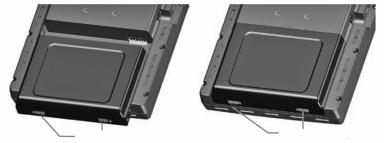
Установка/ извлечение батарейного блока
|
Фиксаторы батареи (установка) |
Фиксаторы батареи (съем) |
Установка батарейного блока
Зарядка батареи
Подключите устройство к 12или 24-вольтовому коннектору для зарядки. Вы можете пользоваться прибором во время зарядки. Зарядку навигатора следует производиться при температуре от 32° до 104°F (от -0° до 40°C).
Зарядка батарейного блока устройства
1)Совместите выемки на устройстве с разъемом автомобильного кабеля питания.
2)Вставьте разъем в коннектор внешнего питания до упора.
3)Подключите кабель питания в электрическую розетку самолета (разъем прикуривателя).
4)Проложите кабель питания таким образом, чтобы он не мешал управлению самолетом.
Прибор начнет зарядку после подачи внешнего питания. Когда устройство находится в режиме зарядки, снижается потребление заряда батареи самолета.
Использование режима зарядки
При подаче внешнего питания на прибор GPSMAP 695/696 устройство автоматически включается и переходит в рабочее состояние. Если в приборе установлена батарея, и она требует зарядки, то происходит зарядка батареи от внешнего источника питания, пока Вы пользуетесь навигатором.
Если Вы не собираетесь пользоваться прибором, но хотели бы зарядить батарею, Вы можете переключить устройство в режим зарядки. Подключите прибор к внешнему источнику питания. Нажмите на кнопку POWER (питание) и удерживайте ее в нажатом положении. Вместо полного отключения устройство перейдет в режим зарядки.
|
GPSMAP 695/696 Руководство пользователя |
13 |
ПРИМЕЧАНИЕ: В режиме зарядки устройство потребляет ток из батареи самолета. Чтобы аккумуляторная бортовая батарея не разрядилась, следует отсоединять внешний кабель питания от навигатора, если Вы не собираетесь его использовать в течение нескольких дней.
Включение/ выключение прибора
Для включения или выключения прибора нажмите на кнопку POWER (питание) и удерживайте ее в нажатом положении.
Первый раз при включении устройства приемник должен собрать спутниковые данные и рассчитать текущее местоположение. Для обеспечения надлежащей инициализации навигатор GPSMAP 695/696 поставляется с завода в режиме AutoLocate, который позволяет прибору «найти себя» в любой точке мира.
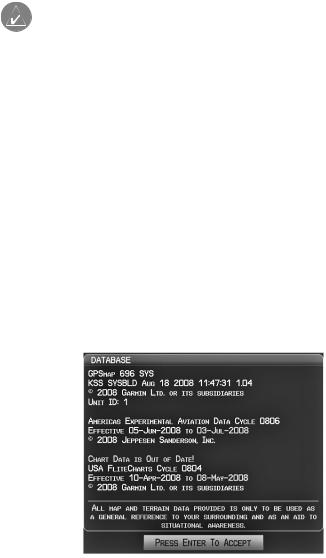
Во время инициализации на экране показана информация о текущей базе данных, включающая срок действия, номер цикла и тип базы данных. После просмотра этой информации (на предмет того, не истек ли срок действия базы данных) пользователю предлагают продолжить процедуру включения.
Нажмите кнопку ENT для подтверждения данной информации. Появится страница карты (MAP).
Инициализация базы данных.
|
14 |
GPSMAP 695/696 Руководство пользователя |

Состояние GPS-приемника
В поле состояния приемника на странице информации (INFO) могут быть показаны следующие состояния приемника:
•Autolocate – приемник занимается поиском спутников, для которых имеются данные альманаха. Это может занять до 5 минут.
•Search the Sky (поиск в небе) – приемник ищет спутники.
•Acquiring Satellites (нахождение спутников) — приемник ищет спутники и собирает данные со спутников, которые были видимыми в последнем известном местоположении или местоположении, заданном при инициализации. Координаты еще не рассчитаны.
•2D GPS Location (местоположение GPS с 2-мя координатами) – были получены данные как минимум от трех спутников, и прибор рассчитал 2-мерное местоположение. При приеме корректировок DGPS в режиме 2D появится надпись “2D Differential”.
•3D GPS Location (местоположение GPS с 3-мя координатами) – были получены данные как минимум от четырех спутников, и прибор рассчитал 3-мерное местоположение. При приеме корректировок DGPS в режиме 3D появится надпись “3D Differential”.
•Lost Satellite Reception (потерян прием спутниковых сигналов) – приемник больше не принимает сигналы от достаточного количества спутников для расчета местоположения 2D или 3D.
|
Схема рас- |
||
|
положения |
Состояние |
|
|
спутников |
||
|
приемника |
||
|
Полоски |
||
|
Номер PRN |
мощности |
|
|
спутнико- |
||
|
вого сигнала |
||
|
45 градусов |
Номер PRN |
|
|
над горизон- |
||
|
том |
||
|
Горизонт |
||
|
Состояние GPS (страница информации) |
|
GPSMAP 695/696 Руководство пользователя |
15 |
Прием спутниковых сигналов
Когда приемник находится в процессе получения достаточного количества спутниковых сигналов для навигации, приемник использует орбитальные спутниковые данные (непрерывно получаемые со спутников) и последнее известное местоположение для определения видимых спутников. На странице состояния GPS будет показана позиция “Acquiring Satellite” (нахождение спутников), пока устройство не найдет достаточное количество спутников для расчета координат.
Когда приемник находится в состоянии приема данных для расчета 3-мерных координат GPS с дифференциальной корректировкой, будет показана позиция “3D GPS Location” (местоположение GPS с 3-мя координатами) до тех пор, пока не будут приняты данные для расчета местоположения 3D с дифференциальной корректировкой.
Информация о спутниках
Спутники, видимые в данный момент, показаны на схеме расположения спутников. Внешняя окружность на этой схеме представляет собой линию горизонта, внутренняя окружность – линию на 45 градусов выше горизонта, а центральная точка – зенит. Каждый спутник обозначен квадратом с номером PRN (PseudoRandom Noise – псевдохаотический шум) (т.е., идентификационный номер спутника).
Страница информации (INFO) может помочь для определения причины слабого (или пропадающего) спутникового сигнала из-за плохой зоны спутникового покрытия или проблем, связанных с установкой. После того, как GPS-приемник найдет необходимые спутники, для каждого видимого спутника будет показана полоска мощности сигнала. Под каждой полоской будет указан номер PRN соответствующего спутника (01-32 или 33-64 для WAAS). Процесс поиска спутникового сигнала показан в три этапа, и для каждого этапа предусмотрен свой вид полоски мощности сигнала:
—Полоска отсутствует – приемник ищет данный спутник.
—Серая полоска – приемник собрал необходимые данные, и спутниковый сигнал может быть использован.
—Зеленая полоска – спутниковый сигнал используется для расчета координат GPS.
-7-
|
16 |
GPSMAP 695/696 Руководство пользователя |

1.2 Кнопки управления GPSMAP 695/696
Кнопки управления прибора GPSMAP 695/696 были разработаны для простого управления системой и минимального количества действий и времени, требуемых для доступа к функциям.
1 – Кнопка Power (питание)
Нажмите и удерживайте в нажатом положении для включения и выключения устройства.
Когда прибор находится во включенном состоянии, нажмите для регулировки подсветки и уровня громкости.
2 – Кнопка RNG
Нажмите для увеличения или уменьшения диапазона просмотра карты.
3 – Джойстик FMS
Нажмите джойстик FMS для переключения режима ввода пользователя между текущей страницей и страницей навигационной панели. Поворачивайте джойстик FMS по часовой стрелке для вызова раскрывающегося меню.
Поворачивайте джойстик FMS против часовой стрелки для изменения выбранного значения в выделенном поле.
Перемещайте джойстик FMS для выделения полей или перемещения курсора карты при выполнении операций на данной странице.
|
GPSMAP 695/696 Руководство пользователя |
17 |
4 – Кнопка ENT
Нажмите для подтверждения выбора меню или ввода данных. Нажмите для подтверждения сообщений.
Нажмите и удерживайте в нажатом положении для отметки путевой точки.
5 – Кнопка CLR
Нажмите для отмены ввода, возврата к предыдущему значению в поле ввода данных или отключении меню.
Нажмите и удерживайте в нажатом положении для возврата на страницу по умолчанию.
6 – Кнопка MENU
Нажмите один раз для вызова меню для данной страницы. Нажмите два раза для вызова главного меню.
Нажмите три раза для удаления главного меню.
7 – Кнопка FPL
Нажмите для вызова страницы плана полетов.
Нажмите второй раз для удаления страницы плана полетов.
8 – Кнопка Direct-To
Нажмите для активации функции Direct-To, введите пункт назначения и установите прямолинейный курс к выбранному пункту назначения.
9 – Кнопка NRST
Нажмите для вызова страницы ближайших объектов, на которой показаны ближайшие аэропорты, пересечения, маяки NDB и VOR, путевые точки, частоты и воздушные пространства.
10 – Функциональные кнопки
Нажмите для выбора функциональной кнопки, показанной над кнопками вдоль нижней стороны прибора.
Функции функциональных кнопок
Функциональные кнопки расположены вдоль нижней стороны дисплея. Показанные функциональные кнопки зависят от уровня функциональных кнопок или текущей страницы. Для выбора какой-либо функциональной кнопки нажмите на соответствующую кнопку, расположенную под ней. Когда функциональная кнопка выбрана, ее цвет мгновенно меняется на черный текст на синем фоне, затем автоматически переключается на черный текст на сером фоне. Кнопка сохраняет такой цветовой режим до тех пор, пока она не будет отключена, после чего внешний вид кнопки меняется на белый текст на черном фоне. Если функция функциональной кнопки не может быть активизирована, то изображение кнопки затемняется.
Функциональные кнопки возвращаются к предыдущему уровню после 45-секунд- ного периода неактивности.
|
18 |
GPSMAP 695/696 Руководство пользователя |

Softkey On = функциональная кнопка включена
|
Функ- |
Названия |
|
циональные |
функ- |
|
кнопки на |
циональных |
|
лицевой |
кнопок (ото- |
|
панели при- |
бражаются |
|
бора (для |
на дисплее) |
|
нажатия) |
|
|
Функциональные кнопки (страница путевой точки – WPT) |
Функциональные кнопки страницы карты
|
MAP (карта) |
активизирует функциональные кнопки страницы карты |
|
второго уровня. |
|
|
TERRAIN (рельеф) |
включение/отключение индикации предупреждений о |
|
рельефе. |
|
|
WEATHER (погода) |
включение/отключение информации о погоде. |
|
PANEL (панель) |
включение/отключение индикации панели. |
Нажмите функциональную кнопку BACK (назад) для возврата к функциональным кнопкам высшего уровня.
|
GPSMAP 695/696 Руководство пользователя |
19 |

Выбрана функциональная кнопка VFR MAP:
IFR MAP (карта IFR) – индикация информации карты и функциональных кнопок IFR (правила полета по приборам).
TOPO (топография) – включение/ отключение затенения рельефа на топографических картах.
SAT VIEW (спутниковый вид) – включение/отключение спутниковых изображений (при масштабе более 20 морских миль).
BACK (назад) – возврат к функциональным клавишам высшего уровня.
Выбрана функциональная кнопка IFR MAP:
VFR MAP (карта VFR) — индикация информации карты и функциональных кнопок VFR (правила визуального полета).
LOW AWY (низкие воздушные линии) – показаны воздушные линии малой высоты (Victor).
HIGH AWY (высокие воздушные линии) – показаны воздушные линии большой высоты (Jet Routes).
BACK (назад) – возврат к функциональным клавишам высшего уровня.
Функциональные кнопки страницы путевой точки
INFO (информация) – показана информация о путевых точках. CHART (карта) – показаны дополнительные карты полетов. AOPA – показана информация AOPA.
WEATHER (погода) – показаны текстовые сообщения METAR и TAF.
Функциональные кнопки страницы погоды (только GPSMAP 696)
PAN MAP (прокрутка карты) – активизирует курсор карты для прокрутки карты. ANIMATE (анимировать) – анимация погоды NEXRAD.
INFO (информация) – показана информация ХМ.
LEGEND (легенда) – показаны легенды погоды.
|
20 |
GPSMAP 695/696 Руководство пользователя |
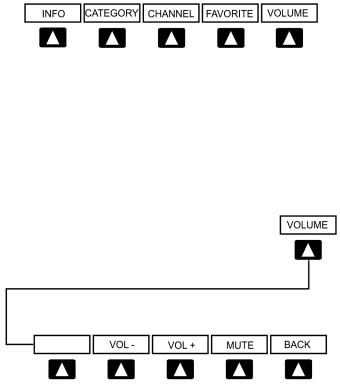
Функциональные кнопки страницы аудио ХМ (только GPSMAP 696)
INFO (информация) – показана информация ХМ.
CATEGORY (категория) – выделение поля категории.
CHANNEL (канал) – выделение поля канала.
FAVORITE (избранное) – показан список избранных каналов.
VOLUME (громкость) – активизация функциональных кнопок VOLUME (громкость) второго уровня.
Нажмите и удерживайте в нажатом положении для включения и выключения функции приглушения звука.
Нажмите функциональную кнопку BACK (назад) для возврата к функциональным кнопкам высшего уровня.
VOL – уменьшение уровня громкости аудио ХМ.
VOL + увеличение уровня громкости аудио ХМ.
MUTE (приглушение) – включение/выключение аудио ХМ.
BACK (назад) – возврат к функциональным клавишам высшего уровня.
|
GPSMAP 695/696 Руководство пользователя |
21 |
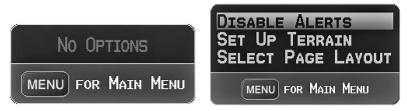
Меню
В приборе GPSMAP 695/696 имеется отдельная кнопка MENU (меню), которая при однократном нажатии вызывает зависящий от контекста список опций для данной страницы (меню страницы), а при двукратном нажатии — главное меню.
Меню страницы обеспечивает пользователям доступ к дополнительным функциям или к изменению настроек, связанных с текущим окном/страницей. При отсутствии опций, связанных с текущим окном/страницей, будет показано сообщение “No Options” (нет опций).
Навигация по меню страницы:
1)Однократно нажмите кнопку MENU для индикации меню страницы.
2)Поверните или переместите джойстик FMS для прокрутки списка имеющихся опций (если список опций длиннее окна, то справа от окна будет показана линейка прокрутки).
3)Нажмите кнопку ENT для выбора нужной опции.
4)Нажмите джойстик FMS, кнопку CLR или два раза кнопку MENU для отключения индикации меню и отмены операции.
|
Меню страницы (нет опций) |
Меню страницы рельефа (TER) |
Навигация по главному меню:
1)Дважды нажмите кнопку MENU для вызова главного меню.
2)Поверните или переместите джойстик FMS для прокрутки списка имеющихся опций (если список опций длиннее окна, то справа от окна будет показана линейка прокрутки).
3)Нажмите кнопку ENT для выбора нужной опции.
4)Нажмите джойстик FMS, кнопку CLR, программируемую кнопку EXIT или кнопку MENU для отключения индикации меню и отмены операции.
|
22 |
GPSMAP 695/696 Руководство пользователя |

Главное меню
Ввод данных
Вы можете использовать джойстик FMS для непосредственного ввода буквенноцифровых данных в навигатор GPSMAP 695/696. В некоторых случаях, например, при вводе идентификатора, прибор GPSMAP 695/696 попытается предсказать желаемый идентификатор на основе уже введенных символов. Если на экране появится желаемый идентификатор, нажмите кнопку ENT для подтверждения ввода. При этом не нужно вводить остаток данных вручную. Таким образом, пилот может быть освобожден от необходимости вводить все знаки идентификатора.
В дополнение к посимвольному вводу данных система позволяет использовать специальные сокращения для ввода идентификаторов путевых точек. Когда курсор находится в поле, в которое Вы собираетесь вводить идентификатор путевой точки, поверните джойстик FMS против часовой стрелки для получения доступа к меню с тремя различными списками идентификаторов для быстрого выбора: недавние путевые точки (RECENT WPTS), ближайшие аэропорты (NRST APTS) и путевые точки плана полетов (FPL WPTS). Прибор GPSMAP 695/696 автоматически заполнит поля идентификатора, сооружения и города, используя необходимую информацию для выбранной путевой точки.
|
GPSMAP 695/696 Руководство пользователя |
23 |
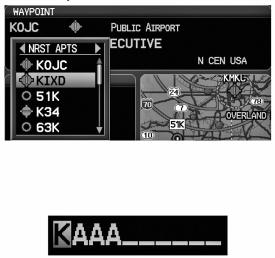
Использование джойстика FMS для ввода данных:
1)Нажмите джойстик FMS для активизации курсора.
2)Переместите джойстик FMS для выделения желаемого поля.
3)Начинайте ввод данных.
a)Для быстрого ввода идентификатора путевой точки поверните джойстик FMS против часовой стрелки для отображения списка недавних путевых точек (RECENT WPTS), ближайших аэропортов (NRST APTS) и путевых точек плана полетов (FPL WPTS).
b)Переместите джойстик FMS для выделения нужной путевой точки из списка и нажмите кнопку ENT.
Ввод путевой точки (страница путевой точки)
Или:
a) Поверните джойстик FMS для выбора знака для первого поля.
Ввод данных
Поворачивая джойстик FMS по часовой стрелке Вы будете покручивать алфавит (если это возможно) по направлению к букве Z, начиная с середины алфавита (буквы К – только для США), а также цифры от 0 до 9. При повороте джойстика FMS против часовой стрелки алфавит прокручивается в противоположном направлении.
b)С помощью джойстика FMS переместите курсор к следующей позиции в поле.
c)Продолжайте действовать подобным образом, поворачивая джойстик FMS для выбора знаков и перемещая с помощью джойстика FMS курсор, пока все поля не будут заполнены.
d)Нажмите кнопку ENT для подтверждения ввода.
4)Нажмите джойстик FMS или кнопку CLR для отмены ввода данных (в полях будет восстановлена предыдущая информация).
|
24 |
GPSMAP 695/696 Руководство пользователя |
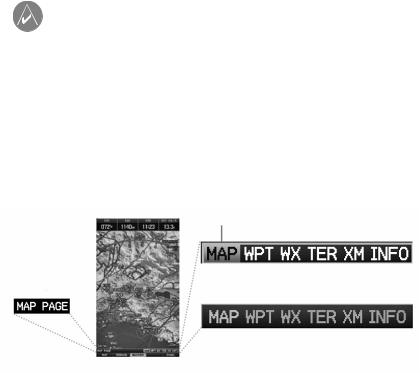
Страницы
ПРИМЕЧАНИЕ: Страница погоды (WX) и страница аудио (XM)
доступны только для модели GPSMAP 696.
Страницы связаны друг с другом в последовательность, которую Вы можете прокручивать с помощью джойстика FMS. Панель навигации по страницам расположена в нижней части каждой страницы, прямо над панелью функциональных кнопок. В правой части навигационной панели показан список сокращенных названий всех основных страниц, а в левой части – название активной страницы.
Нажмите джойстик FMS для переключения между использованием панели навигации по страницам или операций с текущей страницей (курсор страницы включен/выключен).
Выбранная
страница
|
Название |
Действия с панелью навигации |
|
|
активной |
||
|
(курсор страницы выключен) |
||
|
страницы |
||
|
Действия с текущей страницей |
||
|
(курсор страницы включен) |
В приборе может использоваться до шести основных страниц, по которым можно перемещаться с помощью джойстика FMS.
Выбор какой-либо основной страницы с помощью джойстика FMS:
1)При необходимости нажмите джойстик FMS для начала действия с панелью навигации.
2)Поворачивая джойстик FMS, выберите необходимую страницу (MAP, WPT, WX, TER, XM, INFO).
|
GPSMAP 695/696 Руководство пользователя |
25 |
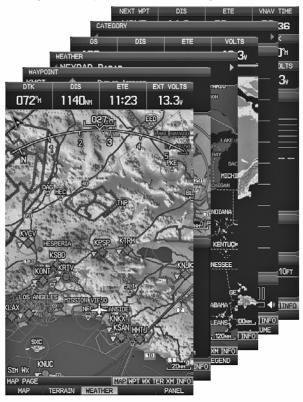
Основные страницы
Страница карты (MAP) Страница путевой точки (WPT) Страница погоды (WX) (опция)
Страница рельефа (TER) Страница аудио ХМ (ХМ) (опция) Страница информации (INFO)
|
26 |
GPSMAP 695/696 Руководство пользователя |
Страницы FPL (планы полетов) и NRST (ближайшие объекты)
Существует несколько страниц, которые можно выбрать с помощью кнопок FPL или NRST.
Выбор страниц FPL или NRST:
1)Нажмите кнопку FPL или NRST.
2)Поворачивая джойстик FMS, выберите желаемую страницу.
3)Нажмите функциональную кнопку EXIT для возврата на основные страницы.
Страницы ближайших объектов содержат следующую информацию:
•APT (аэропорт) — идентификатор, азимут, расстояние, протяженность самой длинной взлетно-посадочной полосы, общие рекомендации по воздушному движению (CTAF) или частота башни.
•VRP (точки визуального оповещения) (только приборы для Атлантики) — идентификатор, азимут и расстояние.
•WX (погода в аэропорте) – идентификатор, азимут, расстояние, текст METAR (только для модели GPSMAP 696) и частота ATIS, AWOS или ASOS.
•VOR (маяк VOR, всенаправленный радиомаяк VHF) – идентификатор, тип сооружения (символ), азимут, расстояние и частота.
•NDB (маяк NDB, ненаправленный маяк) — идентификатор, тип сооружения (символ), азимут, расстояние и частота.
•INT (пересечение) – идентификатор, азимут и расстояние.
•USR (путевые точки пользователя) – название, азимут и расстояние.
•CTY (большой город) – название, азимут и расстояние.
•ATC (центр управления воздушным движением на маршруте) – азимут, расстояние и частота.
•FSS (станции службы обеспечения полетов) – название, азимут, расстояние, частота и маяк VOR (при наличии).
•ASPC (воздушное пространство) – название, время входа (если применимо) и состояние.
|
GPSMAP 695/696 Руководство пользователя |
27 |

Страницы ближайших объектов (NRST)
|
Ближайшие аэропорты (APT) |
Ближайшие путевые точки |
|
пользователя (USR) |
|
|
Точки визуального оповещения (VRP) |
Ближайшие города (CTY) |
|
Погода в ближайших аэропортах (WX) |
Ближайшие ARTCC (ATC) |
|
Ближайшие маяки VOR (VOR) |
Ближайшие FSS (FSS) |
|
Ближайшие маяки NDB (NDB) |
Ближайшее воздушное пространство |
|
(ASPC) |
|
|
Ближайшие пересечения (INT) |
|
28 |
GPSMAP 695/696 Руководство пользователя |

Страницы планов полетов (FPL)
|
Активный план полета (ACTV) |
Вертикальная навигация (VNAV) |
|
Список планов полетов (LIST) |
|
GPSMAP 695/696 Руководство пользователя |
29 |
Страницы главного меню
Для доступа к страницам главного меню дважды нажмите кнопку MENU и используйте джойстик FMS для навигации по меню.
Выбор страниц главного меню:
1)Дважды нажмите кнопку MENU. Появится главное меню.
2)Поверните или переместите джойстик FMS для выделения желаемой опции меню и нажмите кнопку ENT.
Страницы настройки системы
Страницы настройки системы доступны из главного меню.
Выбор страниц настройки системы:
1)Дважды нажмите кнопку MENU. Появится главное меню.
2)Поверите или переместите джойстик FMS для выделения опции “System Setup…” (настройка системы). Нажмите кнопку ENT. Появится меню настройки системы.
3)Поверите или переместите джойстик FMS для выделения желаемой опции меню и нажмите кнопку ENT.
1.3 Системные настройки
Меню настроек системы в главном меню позволяет управлять следующими параметрами системы:
|
• Дисплей |
• Местоположение |
|
• Звук |
• Интерфейс |
|
• Единицы измерения |
• Сигнализация |
|
• Дата и время |
• Питание |
|
30 |
GPSMAP 695/696 Руководство пользователя |

Меню системных настроек
Восстановление системных настроек по умолчанию:
1)Дважды нажмите кнопку MENU для вызова главного меню.
2)Поверите или переместите джойстик FMS для выделения опции “System Setup…” (настройка системы). Нажмите кнопку ENT.
3)Поверите или переместите джойстик FMS для выделения желаемой опции меню (Display – дисплей, Sound – звук, Units – единицы измерения, Date & Time – дата и время, Position – местоположение, Interface – интерфейс, Alarms
– сигнализация или Power – питание) и нажмите кнопку ENT.
4)Нажмите кнопку MENU.
5)Выделите опцию “Restore Default” (восстановить настройки по умолчанию) и нажмите кнопку ENT.
Окно восстановления настроек по умолчанию.
|
GPSMAP 695/696 Руководство пользователя |
31 |

Настройки дисплея
Изменение настройки подсветки экрана:
1)Дважды нажмите кнопку MENU для вызова главного меню.
2)Поверите или переместите джойстик FMS для выделения опции “System Setup…” (настройка системы). Нажмите кнопку ENT.
3)Выделите опцию “Display” (дисплей) и нажмите кнопку ENT.
4)Выделив поле “Backlight Intensity” (интенсивность подсветки), отрегулируйте уровень подсветки путем поворота джойстика FMS.
5)Нажмите джойстик FMS, кнопку CLR, функциональную кнопку EXIT или кнопку MENU для выхода из меню.
Страница настройки дисплея
Или:
1)Нажмите кнопку POWER.
2)Выделив поле “Backlight” (подсветка), отрегулируйте интенсивность подсветки путем поворота джойстика FMS.
3)Выделите поле “Done” (завершить) и нажмите кнопку ENT.
4)Нажмите джойстик FMS или кнопку CLR для выхода из меню.
Время отключения подсветки
По истечении определенного периода неактивности подсветка автоматически отключится для экономии заряда батареи.
Регулировка времени отключения подсветки:
1)Дважды нажмите кнопку MENU для вызова главного меню.
2)Поверите или переместите джойстик FMS для выделения опции “System Setup…” (настройка системы). Нажмите кнопку ENT.
3)Выделите опцию “Display” (дисплей) и нажмите кнопку ENT.
|
32 |
GPSMAP 695/696 Руководство пользователя |

4)Выделив поле “Backlight Timeout” (время отключения подсветки), отрегулируйте время путем поворота джойстика FMS.
5)Нажмите джойстик FMS, кнопку CLR, функциональную кнопку EXIT или кнопку MENU для выхода из меню.
Настройка звука
Изменение настройки звука
1)Дважды нажмите кнопку MENU для вызова главного меню.
2)Поверите или переместите джойстик FMS для выделения опции “System Setup…” (настройка системы). Нажмите кнопку ENT.
3)Выделите опцию “Sound” (звук) и нажмите кнопку ENT.
4)Выделив необходимую опцию, отрегулируйте звук путем поворота джойстика
FMS.
5)Нажмите джойстик FMS, кнопку CLR, функциональную кнопку EXIT или кнопку MENU для выхода из меню.
Страница настройки звука.
Настройка единиц измерения
Изменение настройки единиц измерения:
1)Дважды нажмите кнопку MENU для вызова главного меню.
2)Поверите или переместите джойстик FMS для выделения опции “System Setup…” (настройка системы). Нажмите кнопку ENT.
3)Выделите опцию “Units” (единицы измерения) и нажмите кнопку ENT.
4)Выделив нужную единицу измерения, отрегулируйте настройку путем поворота джойстика FMS.
5)Нажмите джойстик FMS, кнопку CLR, функциональную кнопку EXIT или кнопку MENU для выхода из меню.
|
GPSMAP 695/696 Руководство пользователя |
33 |

Страница настройки единиц измерения
Настройка даты и времени
Изменение настроек даты и времени:
1)Дважды нажмите кнопку MENU для вызова главного меню.
2)Поверите или переместите джойстик FMS для выделения опции “System Setup…” (настройка системы). Нажмите кнопку ENT.
3)Выделите опцию “Date & Time” (дата и время) и нажмите кнопку ENT.
4)Переместите джойстик FMS для выделения желаемого поля и выберите нужную опцию путем поворота джойстика FMS.
5)Нажмите джойстик FMS, кнопку CLR, функциональную кнопку EXIT или кнопку MENU для выхода из меню.
Страница настройки даты и времени.
|
34 |
GPSMAP 695/696 Руководство пользователя |

Настройка местоположения
ПРИМЕЧАНИЕ: Дополнительную информацию о датумах карты и форматах местоположения см. в Приложении Н.
Изменение настроек местоположения:
1)Дважды нажмите кнопку MENU для вызова главного меню.
2)Поверите или переместите джойстик FMS для выделения опции “System Setup…” (настройка системы). Нажмите кнопку ENT.
3)Выделите опцию “Position” (местоположение) и нажмите кнопку ENT.
4)Переместите джойстик FMS для выделения желаемого поля и выберите нужную опцию путем поворота джойстика FMS.
5)Нажмите джойстик FMS, кнопку CLR, функциональную кнопку EXIT или кнопку MENU для выхода из меню.
Страница настройки местоположения
Настройка интерфейса
ПРИМЕЧАНИЕ: Дополнительную информацию об интерфейсе см. в Приложении D.
Изменение настроек местоположения:
1)Дважды нажмите кнопку MENU для вызова главного меню.
2)Поверите или переместите джойстик FMS для выделения опции “System Setup…” (настройка системы). Нажмите кнопку ENT.
3)Выделите опцию “Interface” (интерфейс) и нажмите кнопку ENT.
4)Переместите джойстик FMS для выделения желаемого поля “Serial Data Format” (формат последовательных данных).
5)Нажмите джойстик FMS, кнопку CLR, функциональную кнопку EXIT или кнопку MENU для выхода из меню.
|
GPSMAP 695/696 Руководство пользователя |
35 |

Настройка сигнализации
Страница сигнализации позволяет пилоту включить/отключить сигнализации воздушного пространства, настроить буфер высоты, сигнализацию прибытия, сигнализацию следующей путевой точки, сигнализацию вхождения в зону путевой точки и сигнализацию напоминания о заправке.
Изменение настроек сигнализации:
1)Дважды нажмите кнопку MENU для вызова главного меню.
2)Поверите или переместите джойстик FMS для выделения опции “System Setup…” (настройка системы). Нажмите кнопку ENT.
3)Поверните или переместите джойстик FMS для выделения опции “Alarms” (сигнализация) и нажмите кнопку ENT.
4)Переместите джойстик FMS для выделения желаемого поля и выберите нужную опцию путем поворота джойстика FMS.
5)Нажмите джойстик FMS, кнопку CLR, функциональную кнопку EXIT или кнопку MENU для выхода из меню.
Страница сигнализации
|
36 |
GPSMAP 695/696 Руководство пользователя |
Включение/выключение предупреждения о потере питания:
1)Дважды нажмите кнопку MENU для вызова главного меню.
2)Поверите или переместите джойстик FMS для выделения опции “System Setup…” (настройка системы). Нажмите кнопку ENT.
3)Поверните или переместите джойстик FMS для выделения опции “Power” (питание) и нажмите кнопку ENT.
4)Поверните джойстик FMS для выбора настройки “On” (вкл.) или “Off” (выкл.) и нажмите на кнопку ENT.
Настройка критерия аэропорта
Меню опций страницы ближайших аэропортов позволяет пилотам отфильтровывать аэропорты, которые не соответствуют заданным критериям. Можно указать определенное покрытие и длину взлетно-посадочной полосы, а также возможность включения в отбор частных аэропортов и/или аэропортов для вертолетов.
Runway Surface (поверхность взлетно-посадочной полосы) — позволяет задать тип поверхности взлетно-посадочной полосы):
•Any (любые) — показаны все взлетно-посадочные полосы независимо от типа покрытия, включая водные.
•Hard Only (только твердое покрытие) — будут показаны взлетно-посадочные полосы только с бетонным, асфальтовым или подобным покрытием.
•Hard or Soft (твердое или мягкое) — показаны все взлетно-посадочные полосы кроме водных.
•Water Only (только водные) — показаны только водные полосы.
Minimum Runway Length (минимальная длина взлетно-посадочной полосы) — позволяет пилоту ввести определенную длину для самой короткой допустимой взлетно-посадочной полосы.
Ввод критерия аэропорта:
1)Нажмите кнопку NRST.
2)Поверните джойстик FMS для выбора страницы ближайших аэропортов.
3)Нажмите кнопку MENU для вызова меню страницы.
4)Поверните или переместите джойстик FMS для выбора опции “Set Airport Criteria” (настроить критерий аэропорта) и нажмите кнопку ENT. Появится окно критерия аэропорта с текущими настройками.
|
GPSMAP 695/696 Руководство пользователя |
37 |

Меню страницы ближайших аэропортов
5)Переместите джойстик FMS для выделения желаемого поля. Затем поверните джойстик FMS для выбора желаемой опции в меню. При необходимости нажмите кнопку ENT для выделения следующего поля.
Окно критерия аэропорта.
6) Выделив поле “Done” (завершить), нажмите кнопку ENT.
Для возврата к настройкам критерия аэропорта по умолчанию:
1)Нажмите кнопку NRST.
2)Поверните джойстик FMS для выбора страницы ближайших аэропортов.
3)Нажмите кнопку MENU для вызова меню страницы.
4)Поверните или переместите джойстик FMS для выбора опции “Set Airport Criteria” (настроить критерий аэропорта) и нажмите кнопку ENT. Появится окно критерия аэропорта с текущими настройками.
5)Нажмите кнопку MENU.
6)Выделив опцию “Restore Defaults” (восстановить настройки по умолчанию), нажмите кнопку ENT.
Утилиты
См. информацию о журнале полетов, треке, Е6В, профиле самолета и функции «Вес и баланс» в Приложении F.
|
38 |
GPSMAP 695/696 Руководство пользователя |
РАЗДЕЛ 2. GPS НАВИГАЦИЯ
2.1 Введение
На навигационной карте показаны авиационные данные (например, аэропорты, маяки VOR, воздушные линии, воздушные пространства), географические данные (например, города, озера, шоссе, границы), топографические данные (затененная карта с обозначением высоты). Навигационная карта может быть ориентирована тремя различными образами: по северу (NORTH UP), по курсу (TRK UP) или по желаемому курсу (DTK UP).
На навигационной карте в точке, соответствующей рассчитанному текущему местоположению, показана пиктограмма самолета. Местоположение самолета и отрезки плана полета основаны на расчетах GPS. Базовая карта, на фоне которой изображены эти элементы, получена из источника с меньшим разрешением, поэтому местоположение самолета относительно карты не является точным. Отрезок активного плана полета, по которому совершается движение, отмечен на навигационной карте малиновой линией. Остальные отрезки показаны белым цветом.
Для вызова окна Direct-To, страниц плана полетов и страниц ближайших аэропортов нажимайте соответствующие функциональные кнопки.
Вид страниц карты, рельефа и информации может быть независимо настроен пользователем.
|
Вид страницы |
Страница карты |
Страница рельефа |
Страница информации |
|
|
Только карта |
+ |
+ |
||
|
Карта с панелью |
+ |
|||
|
4 |
поля данных |
+ |
+ |
+ |
|
8 |
полей данных |
+ |
+ |
+ |
|
12 полей данных |
+ |
+ |
+ |
|
|
6 |
полей данных и индикатор HSI |
+ |
+ |
|
Вид страниц
|
GPSMAP 695/696 Руководство пользователя |
39 |

Поля панели данных
Количество и содержимое полей панели данных на страницах карты, рельефа и информации независимо настраивается пользователем. Для каждой страницы, которая поддерживает поля панели данных, пользователь может выбрать следующее количество полей данных: 0, 4, 8, 12 или 6 + индикатор HSI (при наличии).
Поля панели данных.
По умолчанию в полях панели данных показана следующая информация: скорость относительно земли (GS), расстояние (DIS), оценочное время в пути (ETE) и требуемая вертикальная скорость (VSR). Вы можете настроить эти четыре поля данных на индикацию любой информации.
Изменение информации, показанной в полях панели данных:
1)Находясь на странице карты, странице рельефа или странице информации, нажмите кнопку MENU.
2)Повернув или переместив джойстик FMS, выделите опцию “Change Data Fields” (изменить поля данных) и нажмите кнопку ENT.
3)Переместите джойстик FMS для выделения желаемого поля данных.
4)Поверните джойстик FMS для получения доступа к списку опций. Затем поверните или переместите джойстик FMS для выделения нужной опции. Нажмите кнопку ENT.
Выбор поля панели данных.
|
40 |
GPSMAP 695/696 Руководство пользователя |
Опции полей панели данных
•Accuracy (точность)
•Altitude (высота)
•Bearing (BRG) (азимут)
•Course (курс)
•Course to Steer (CTS) (рулевой курс)
•Crosstrack Error (XTK) (ошибка отклонения от курса)
•Distance (DIS) (расстояние)
•Enroute Safe Altitude (ESA) (безопасная высота маршрута)
•Estimated Time Enroute (ETE) (оценочное время в пути)
•Estimated Time of Arrival (ETA) (оценочное время прибытия)
•Estimated Time to VNAV (VNAV Time) (оценочное время до вертикальной навигации)
•Flight Timer (FLT TIMER) (таймер полета)
•Fuel Timer (таймер топлива)
•Glide Ratio (G/R) (коэффициент скольжения)
•Ground Speed (GS) (скорость относительно земли)
•Ground Track (TRK) (курс относительно земли)
•Minimum Safe Altitude (MSA) (минимальная безопасная высота)
•Next Waypoint (WPT) (следующая путевая точка)
•Sunrise (восход Солнца)
•Sunset (заход Солнца)
•Time (UTC) (время – UTC)
•Time of Day (Local) (TIME) (время суток – местное)
•Vertical Speed (VS) (вертикальная скорость)
•Vertical Speed Required (VSR) (требуемая вертикальная скорость)
•Volts (вольты)
•Weather (Altimeter) (WX ALTIM) (погода – альтиметр)
•Weather (Dew Point) (WX DEW PT) (погода – точка росы)
•Weather (Pressure) (WX PRESS) (погода – давление)
•Weather (Relative Humidity) (WX HUMIDITY) (погода – относительная влажность)
•Weather (Temperature) (WX TEMP) (погода – температура)
•Weather (Wind) (WX WIND) (погода – ветер)
Изменение вида страницы:
1)Находясь на странице карты, странице рельефа или странице информации, нажмите кнопку MENU.
2)Повернув или переместив джойстик FMS, выделите опцию “Select Page Layout” (выбрать вид страницы) и нажмите кнопку ENT.
3)Переместите джойстик FMS для выделения желаемой опции вида страницы. Нажмите кнопку ENT.
|
GPSMAP 695/696 Руководство пользователя |
41 |

Окно вида страницы (страница карты)
Шкала компаса
В соответствии с настройкой по умолчанию на странице карты показана шкала компаса. Линия маршрута представляет собой курс. Малиновый малый индикатор (аналогично малому индикатору на HSI) может быть настроен на отображение следующих направлений: “Bearing” (азимут, настройка по умолчанию), “Course to Steer” (рулевой курс), определенное направление (“User Selected” – направление, выбранное пользователем) или “Off” (выкл.)
Magenta Bug Indicator = малиновый малый индикатор
Compass Arc = шкала компаса
Route Line = линия маршрута
Шкала компаса (страница карты)
|
42 |
GPSMAP 695/696 Руководство пользователя |

Удаление шкалы компаса со страницы карты:
1)Находясь на странице карты, нажмите кнопку MENU.
2)Повернув или переместив джойстик FMS, выделите опцию “Set Up Map” (настройка карты) и нажмите кнопку ENT.
3)Поверните джойстик FMS для выделения меню “General” (общие настройки).
4)Переместите джойстик FMS для выделения поля “Compass Arc” (шкала компаса).
5)Поверните джойстик FMS для вызова раскрывающегося списка “On/Off” (вкл./ выкл.)
6)Поверните или переместите джойстик FMS для выделения опции “Off” (выкл.). Нажмите кнопку ENT.
2.2 Приборная панель
На приборной панели представлены в графическом формате данные, рассчитанные на основе информации GPS. Всегда помните о различии между панелью GPS и механическими приборами, поскольку механические приборы используют информацию из других источников (не из GPS-приемника).
|
HSI |
— Следующая путевая точка |
|
|
-Расстояние |
||
|
Скорость |
Высота |
|
|
относи- |
||
|
тельно |
||
|
земли |
||
|
Индикатор |
Верти- |
|
|
скорости |
кальная |
|
|
поворота |
скорость |
|
|
Оценочное время в пути |
Шкала CDI |
|
|
Панель (страница карты) |
На приборной панели показан графический индикатор горизонтальной обстановки (HIS), окруженный дополнительными индикаторами.
|
GPSMAP 695/696 Руководство пользователя |
43 |
Графический индикатор горизонтальной обстановки HSI показывает курс к пункту назначения или следующей путевой точке плана полета, текущий курс относительно земли, ошибку отклонения от курса и данные “To/From” (из/в). Вращающийся компас показывает Ваш текущий курс относительно земли.
Стрелка курса и стрелка отклонения от курса показывают значения курса, а также позволяют определить, находитесь ли Вы в данный момент на желаемом курсе. Малый индикатор может быть настроен на отображение следующих направлений: “Bearing” (азимут, настройка по умолчанию), “Course to Steer” (рулевой курс), определенное направление (“User Selected” – направление, выбранное пользователем) или “Off” (выкл.)
Азимут представляет собой направление по компасу от текущего местоположения до пункта назначения. Рулевой курс является рекомендуемым направлением движения для того, чтобы уменьшить ошибку отклонения от курса и возврата на линию курса.
Индикатор отклонения от курса (CDI) показывает расстояние отклонения от курса (влево или вправо). Для определения величины отклонения используется шкала отклонения от курса.
Вы можете выбрать настройку шкалы отклонения от курса: Auto (авто), ±0,25, 1,25 или 5,0 (морских миль, сухопутных миль или километров). Шкала отклонения от курса показана в нижнем правом углу индикатора HSI. Настройка по умолчанию – Auto (авто) – использует три фактора для определения расстояния от центра индикатора CDI до левой или правой крайней точки:
•Шкала CDI = 1,25 – в пределах 30 морских миль от любого аэропорта активного маршрута.
•Шкала CDI = 0,25 на отрезке захода на посадку или в пределах 2 морских миль от FAF (контрольная точка конечного этапа захода на посадку) или MAP (точка начала ухода на второй круг).
•Шкала CDI = 5,0 – при отсутствии двух первых условий.
Индикация приборной панели на странице карты:
Находясь на странице карты, нажмите функциональную кнопку PANEL.
Или:
1)Находясь на странице карты, нажмите кнопку MENU для вызова меню страницы карты.
2)Повернув или переместив джойстик FMS, выделите опцию “Select Page Layout” (выбрать вид страницы) и нажмите кнопку ENT.
|
44 |
GPSMAP 695/696 Руководство пользователя |

3)Повернув или переместив джойстик FMS, выделите опцию “Map with Panel” (карта с панелью) и нажмите кнопку ENT.
Изменение шкалы CDI
Вы можете настроить шкалу CDI с помощью меню страницы карты.
Изменение шкалы CDI:
1)Находясь на странице карты с показанной приборной панелью, индикатором HIS или шкалой компаса, нажмите кнопку MENU для вызова меню страницы карты.
2)Повернув или переместив джойстик FMS, выделите опцию “Set CDI Scale” (настроить шкалу CDI) и нажмите кнопку ENT. Появится меню “Set CDI Scale” (настройка шкалы CDI).
3)Повернув или переместив джойстик FMS, выделите желаемую опцию меню. Нажмите кнопку ENT.
|
Меню страницы карты |
Меню настройки шкалы |
|
CDI |
Настройка малого индикатора
Малый индикатор может быть настроен с помощью меню страницы карты.
Настройка малого индикатора:
1)Находясь на странице карты с показанной приборной панелью, индикатором HIS или шкалой компаса, нажмите кнопку MENU для вызова меню страницы карты.
2)Повернув или переместив джойстик FMS, выделите опцию “Set Bug Indicator” (настроить малый индикатор) и нажмите кнопку ENT. Появится меню “Set Bug Indicator” (настройка малого индикатора).
3)Повернув или переместив джойстик FMS, выделите желаемую опцию меню. Нажмите кнопку ENT. Для опции “User Selected” (настройка пользователя) поверните джойстик FMS для выбора желаемого значения направления и нажмите кнопку ENT.
|
GPSMAP 695/696 Руководство пользователя |
45 |

|
Меню страницы карты |
Меню настройки малого индикатора |
Ручная настройка курса
Используйте опцию меню “Set OBS and Hold” для задания ручного курса к пункту назначения.
Ручная настройка курса к пункту назначения:
1)Находясь на странице карты с показанной приборной панелью, индикатором HIS или шкалой компаса, нажмите кнопку MENU для вызова меню страницы карты.
2)Повернув или переместив джойстик FMS, выделите опцию “Set OBS and Hold” (задать OBS и заблокировать) и нажмите кнопку ENT.
3)Поверните джойстик FMS для выбора желаемого курса к пункту назначения. Нажмите кнопку ENT.
|
Меню страницы карты |
Окно “Set OBS” |
Возврат к автоматической последовательности путевых точек маршрута:
1)Находясь на странице карты после ручного задания курса, нажмите кнопку MENU для вызова меню страницы карты.
2)Повернув или переместив джойстик FMS, выделите опцию “Release Hold” (отпустить блокировку) и нажмите кнопку ENT.
|
46 |
GPSMAP 695/696 Руководство пользователя |

2.3 Вертикальная навигация (VNAV)
Страница вертикальной навигации обеспечивает настройки для функции вертикальной навигации. Эти настройки позволяют создать трехмерный профиль от текущего местоположения и высоты до конечной (целевой) высоты в заданном местоположении.
Когда профиль VNAV определен, устройство информирует пилота о продвижении по профилю с помощью сообщений. Панель на индикаторе HSI (при наличии) показывает профиль VNAV.
Функция вертикальной навигации может быть использована только во время навигации “Direct To” или движения по плану полета при скорости относительно земли более 35 узлов.
Сообщение “Approaching VNAV Profile” (приближение к профилю VNAV) появляется за минуту до начальной точки снижения. Угол спуска блокируется для предотвращения изменений скорости, чтобы самолет не отклонился от профиля. Функция VNAV не учитывает изменения скорости относительно земли, которые могут происходить при переходе с уровня полета до более высокого или низкого уровня.
Когда самолет находится на 500 футов над целевой высотой, появляется сообщение “Approaching Target Altitude” (приближаемся к целевой высоте). Позиция “Estimated Time To VNAV” (оценочное время до VNAV) начинает мигать, и индикатор VNAV исчезает с индикатора HSI.
ПРЕДУПРЕЖДЕНИЕ: Прибор GPSMAP 695/696 является навигационным инструментом VFR, и это устройство не должно использоваться для выполнения захода на посадку по приборам.
ПРЕДУПРЕЖДЕНИЕ: Функция VNAV является только вспомогательным навигационным средством VFR, и она не предназначена для выполнения захода на посадку по приборам.
|
GPSMAP 695/696 Руководство пользователя |
47 |

|
профиль |
AV |
|
|
= |
||
|
Profile |
||
|
VNAV |
||
|
Расстояние |
||
|
до профиля |
к цели |
|
|
Коэффициент |
||
|
скольжения |
||
|
Целевая высота |
||
|
Расстояние до цели |
Aэропорт |
|
|
Визуальное представление VNAV |
Использование функции VNAV
Используйте функцию VNAV (вертикальная навигация) для гарантии того, что самолет находится на требуемой высоте. Индикатор VNAV появляется на индикаторе HSI (когда показан) в виде горизонтальной панели. При приближении к профилю VNAV на экране прибора появляется сообщение. Когда панель находится в вертикальном центре индикатора HSI, самолет достигает верной высоты для профиля VNAV.
Включение/ выключение индикатора VNAV:
1)Находясь на странице карты, нажмите кнопку MENU для вызова меню страницы карты.
2)Повернув или переместив джойстик FMS, выделите опцию “Enable VNAV Indicator” (включить индикатор VNAV) или “Disable VNAV Indicator” (отключить индикатор VNAV). Нажмите кнопку ENT.
Блокировка/ отмена профиля VNAV:
1)Введите действительный профиль VNAV и начинайте навигацию.
2)Находясь на странице карты, нажмите кнопку MENU для вызова меню страницы карты.
3)Повернув или переместив джойстик FMS, выделите опцию “Capture VNAV Profile” (блокировать профиль VNAV) или “Cancel Capture” (отключить блокировку). Нажмите кнопку ENT. При выборе опции “Capture VNAV Profile” (блокировать профиль VNAV) индикатор VNAV будет помещен в центр HIS (если он показан).
|
48 |
GPSMAP 695/696 Руководство пользователя |

Индикатор VNAV
Индикатор VNAV (приборная панель)
Настройка профиля VNAV:
1)Нажмите кнопку FPL.
2)Поверните джойстик FMS для выбора страницы вертикальной навигации.
3)Нажмите джойстик FMS для активизации курсора.
4)Введите желаемый профиль в поля и нажмите функциональную кнопку EXIT.
Страница вертикальной навигации
•Waypoint (путевая точка) – введите любую путевую точку, расположенную на текущем активном маршруте, в качестве опорной путевой точки. Опорная путевая точка определяет целевое местоположение.
•Profile (профиль) – введите скорость спуска.
•Altitude (высота) – введите желаемую высоту опорной путевой точки. Выберите “Above Waypoint” (выше путевой точки) для использования высоты поля для аэропортов из базы данных Jeppesen или “MSL” (средний уровень моря) для определения точного значения целевой высоты над средним уровнем моря.
|
GPSMAP 695/696 Руководство пользователя |
49 |
•By (на) – введите целевое местоположение с помощью настроек расстояния “Before” (до) или “After” (после) опорной путевой точки. Для задания целевого местоположения в опорной путевой точке введите нулевое расстояние.
•VNAV Messages (сообщения о вертикальной навигации) – выберите настройку “On” (вкл.) или “Off” (выкл.) для включения или выключения предупреждающих сообщений о вертикальной навигации.
2.4 Использование экранов карты
Экраны карты широко используются в приборе GPSMAP 695/696 для обеспечения информации об окружающей местности во время полета. Большинство карт навигатора GPSMAP 695/696 содержат следующую информацию:
•Аэропорты, навигационные знаки, воздушные пространства, авиационные трассы, наземные данные (шоссе, города, озера, реки, границы и т.д.) с названиями.
•Информация, относящаяся к курсору карты (азимут и расстояние до курсора, координаты курсора, название объекта рядом с курсором и прочая информация).
•Масштаб карты.
•Пиктограмма самолета (обозначает текущее местоположение).
•Отрезки плана полета.
•Путевые точки пользователя.
•Вектор трека.
•Топографические данные.
Информация в данном разделе относится к следующим картам (если не указано иное):
•Страница карты (MAP)
•Страница путевой точки (WPT) (выбрана функциональная кнопка INFO)
•Страница погоды (WX)
•Страница рельефа (TER)
•Страницы ближайших объектов (NRST)
•Страница активного плана полета (FPL)
•Окно Direct-To (только диапазон карты)
|
50 |
GPSMAP 695/696 Руководство пользователя |
 Loading…
Скачать
GPSMAP
®
695/696
Owner’s Manual
Portable Aviation Receiver
Инструкции на русском языке для навигаторов Garmin представлены в таблице. Выберите название вашего устройства и скачайте инструкцию.
-
Page 1: Garmin 695
GPSMAP ® 695/696 Owner’ s Manual P ortable A viation Receiver[…]
-
Page 2: Garmin 695
[…]
-
Page 3: Garmin 695
OVER VIEW GPS NA VIGA TION FLIGHT PLANNING HAZARD A VOIDANCE ADDITIONAL FEA TURES APPENDICES INDEX[…]
-
Page 4: Garmin 695
[…]
-
Page 5: Garmin 695
Copyright © 2008 Garmin Ltd. or its subsidiaries . All rights reserved. T his manual reflects the operation of System Software version 0002.00 or later . Some differences in operation may be observed when comparing the information in this manual to earlier or later software versions . Garmin International, Inc., 1200 East 151st Street, Olathe , K[…]
-
Page 6: Garmin 695
Garmin GPSMAP 695/696 Owner’ s Manual 190-00919-00 Rev . D W arnings, Cautions & Notes W ARNING: When installing the GPSMAP ® 695/696, place the unit so it does not obstruct the field of view or interfere with operating controls . W ARNING: The indicators represented on the P anel are based on GPS-derived data and may differ from the instru[…]
-
Page 7: Garmin 695
Garmin GPSMAP 695/696 Owner’ s Manual 190-00919-00 Rev . D W arnings, Cautions & Notes W ARNING: T raffic information is provided as an aid in visually acquiring traffic. Pilots must maneuver the aircraft based only upon A TC guidance or positive visual acquisition of conflicting traffic. W ARNING: XM Weather should not be used for hazard[…]
-
Page 8: Garmin 695
Garmin GPSMAP 695/696 Owner’ s Manual 190-00919-00 Rev . D W arnings, Cautions & Notes W ARNING : T he illustrations in this guide are only examples. Never use the GPSMAP 695/696 to attempt to penetrate a thunderstorm. Both the F AA Advisory Circular , Subject: T hunderstorms , and the Aeronautical Information Manual (AIM) recommend avoiding […]
-
Page 9: Garmin 695
Garmin GPSMAP 695/696 Owner’ s Manual 190-00919-00 Rev . D W arnings, Cautions & Notes NO TE : Use of polarized eyewear may cause the display to appear dim or blank. NO TE : T emporary Flight Restriction (TFR) data is provided by the F AA and may not be updated outside of normal business hours . Confirm data currency through alternate source[…]
-
Page 10: Garmin 695
Garmin GPSMAP 695/696 Owner’ s Manual 190-00919-00 Rev . D W arnings, Cautions & Notes Blank P age[…]
-
Page 11: Garmin 695
Garmin GPSMAP 695/696 Owner’ s Manual 190-00919-00 Rev . D i T able of Contents Section 1 Overview ……………………………………………………………………………. 1 1.1 Unit Overview ……………………………………………………………………………………………… 1 Battery Care and Charging …[…]
-
Page 12: Garmin 695
Garmin GPSMAP 695/696 Owner’ s Manual 190-00919-00 Rev . D ii T able of Contents 2.5 Waypoints …………………………………………………………………………………………………. 52 Nearest Information …………………………………………………………………………………………….. 56 Weathe[…]
-
Page 13: Garmin 695
Garmin GPSMAP 695/696 Owner’ s Manual 190-00919-00 Rev . D iii T able of Contents SECTION 5 Additional Featur es ……………………………………………………….. 119 5.1 SafeT axi …………………………………………………………………………………………………… 119 SafeT axi Cycle Number and Revis[…]
-
Page 14: Garmin 695
Garmin GPSMAP 695/696 Owner’ s Manual 190-00919-00 Rev . D iv T able of Contents EPE Circle ………………………………………………………………………………………………………… 170 Proximity Waypoints …………………………………………………………………………………………… 171 D[…]
-
Page 15: Garmin 695
Garmin GPSMAP 695/696 Owner’ s Manual 190-00919-00 Rev . D 1 Overview Overview GPS Navigation Flight Planning Hazard Avoidance Additional Features Appendices Index SECTION 1 O VERVIEW 1.1 UNIT O VERVIEW T he GPSMAP 695/696 presents GPS-derived analog flight instrumentation, position, navigation, and hazard avoidance information to the pilot usin[…]
-
Page 16: Garmin 695
Garmin GPSMAP 695/696 Owner’ s Manual 190-00919-00 Rev . D 2 Overview Overview GPS Navigation Flight Planning Hazard Avoidance Additional Features Appendices Index • Contact your local waste disposal department to properly recycle/dispose of the unit/battery . • Donotleavetheunitexposed[…]
-
Page 17: Garmin 695
Garmin GPSMAP 695/696 Owner’ s Manual 190-00919-00 Rev . D 3 Overview Overview GPS Navigation Flight Planning Hazard Avoidance Additional Features Appendices Index INSER TING/REMOVING THE B A TTER Y P ACK Inserting the Battery P ack Battery Locks (Out) Battery Locks (In) CHARGING THE B A TTER Y P A CK Plug the unit into a 12-Volt or 24-V olt conn[…]
-
Page 18: Garmin 695
Garmin GPSMAP 695/696 Owner’ s Manual 190-00919-00 Rev . D 4 Overview Overview GPS Navigation Flight Planning Hazard Avoidance Additional Features Appendices Index NO TE : While in Charge Mode, the unit draws a current from the aircraft. T o avoid discharging the aircraft’ s battery , disconnect the external power cable from the unit when not i[…]
-
Page 19: Garmin 695
Garmin GPSMAP 695/696 Owner’ s Manual 190-00919-00 Rev . D 5 Overview Overview GPS Navigation Flight Planning Hazard Avoidance Additional Features Appendices Index GPS RECEIVER ST A TUS T he receiver status field on the INFO P age displays one of the following conditions: • Autolocate—Receiver is looking for any satellite?[…]
-
Page 20: Garmin 695
Garmin GPSMAP 695/696 Owner’ s Manual 190-00919-00 Rev . D 6 Overview Overview GPS Navigation Flight Planning Hazard Avoidance Additional Features Appendices Index A CQUIRING SA TELLITES When the receiver is in the process of acquiring enough satellite signals for navigation, the receiver uses satellite […]
-
Page 21: Garmin 695
Garmin GPSMAP 695/696 Owner’ s Manual 190-00919-00 Rev . D 7 Overview Overview GPS Navigation Flight Planning Hazard Avoidance Additional Features Appendices Index 1.2 GPSMAP 695/696 CONTROLS T he GPSMAP 695/696 controls have been designed to simplify oper ation of the system andminimizeworkloadandthetimerequiredtoaccess?[…]
-
Page 22: Garmin 695
Garmin GPSMAP 695/696 Owner’ s Manual 190-00919-00 Rev . D 8 Overview Overview GPS Navigation Flight Planning Hazard Avoidance Additional Features Appendices Index 4 ENT K ey Press to confirm menu selection or data entry Press to acknowledge messages Press and hold to mark a waypoint 5 CLR K ey Press to cancel an entry , revert to the previous v[…]
-
Page 23: Garmin 695
Garmin GPSMAP 695/696 Owner’ s Manual 190-00919-00 Rev . D 9 Overview Overview GPS Navigation Flight Planning Hazard Avoidance Additional Features Appendices Index Softkeys (WPT P age) Softkey On Bezel Mounted Softkeys (Pr ess) Softkey Names (Displayed) MAP P A GE SOFTKEY S MAP TERRAIN WE AT HER PA NEL •MAP Enables second-level Map P age sof[…]
-
Page 24: Garmin 695
Garmin GPSMAP 695/696 Owner’ s Manual 190-00919-00 Rev . D 10 Overview Overview GPS Navigation Flight Planning Hazard Avoidance Additional Features Appendices Index VFR MAP Softk ey selected IFR MAP Displays IFR map information and softk eys T OPO Displays/removes topographical terr ain shading SA T VIEW Displays/removes satellite imagery (above […]
-
Page 25: Garmin 695
Garmin GPSMAP 695/696 Owner’ s Manual 190-00919-00 Rev . D 11 Overview Overview GPS Navigation Flight Planning Hazard Avoidance Additional Features Appendices Index XM A UDIO P A GE SOFTKEY S (GPSMAP 696 ONL Y) INFO CHANNEL VOLUME CA TEGORY FA VORITE INFO Displays XM Information CA TEGOR Y Highlights the Category field CHANNEL Highlights the Cha[…]
-
Page 26: Garmin 695
Garmin GPSMAP 695/696 Owner’ s Manual 190-00919-00 Rev . D 12 Overview Overview GPS Navigation Flight Planning Hazard Avoidance Additional Features Appendices Index MENUS T he GPSMAP 695/696 has a dedicated MENU K ey that when pressed once displays a context-sensitive list of options for the page (P age Menu), and when pressed twice displays the […]
-
Page 27: Garmin 695
Garmin GPSMAP 695/696 Owner’ s Manual 190-00919-00 Rev . D 13 Overview Overview GPS Navigation Flight Planning Hazard Avoidance Additional Features Appendices Index Main Menu D A T A ENTRY T he FMS Joystick can be used for directly entering alphanumeric data into the GPSMAP 695/696. In some instances , such as when entering an identifier , the G[…]
-
Page 28: Garmin 695
Garmin GPSMAP 695/696 Owner’ s Manual 190-00919-00 Rev . D 14 Overview Overview GPS Navigation Flight Planning Hazard Avoidance Additional Features Appendices Index Using the FMS Joystick to enter data: 1) Press the FMS Joystick to activate the cursor . 2) Move the FMS Joystick to highlight the desired field. 3) Begin entering data. a) T oqui[…]
-
Page 29: Garmin 695
Garmin GPSMAP 695/696 Owner’ s Manual 190-00919-00 Rev . D 15 Overview Overview GPS Navigation Flight Planning Hazard Avoidance Additional Features Appendices Index P A GES NOTE: T he Weather (WX) P age and (XM) Audio P age are only available with the GPSMAP 696. T he pages are link ed together in a series that you can cycle through using the FMS[…]
-
Page 30: Garmin 695
Garmin GPSMAP 695/696 Owner’ s Manual 190-00919-00 Rev . D 16 Overview Overview GPS Navigation Flight Planning Hazard Avoidance Additional Features Appendices Index • Main P ages Map P age (MAP) T errain P age (TER) W aypoint P age (WPT) XM Audio Page (XM) (optional) Weather P age (WX) (optional) Info P age (INFO)[…]
-
Page 31: Garmin 695
Garmin GPSMAP 695/696 Owner’ s Manual 190-00919-00 Rev . D 17 Overview Overview GPS Navigation Flight Planning Hazard Avoidance Additional Features Appendices Index FPL AND NRST P A GES T here are also several pages which are selected first by pressing the FPL Key or NRST K ey . Selecting the FPL or NRST P ages: 1) Press the FPL or NRST K ey . 2[…]
-
Page 32: Garmin 695
Garmin GPSMAP 695/696 Owner’ s Manual 190-00919-00 Rev . D 18 Overview Overview GPS Navigation Flight Planning Hazard Avoidance Additional Features Appendices Index • Nearest P ages (NRST) Nearest Airports (APT) Nearest User Waypoints (USR) Visual Reporting P oint (VRP) (Atlantic Unit) Nearest Cities (CTY) Nearest Airport Weather (WX) Neares[…]
-
Page 33: Garmin 695
Garmin GPSMAP 695/696 Owner’ s Manual 190-00919-00 Rev . D 19 Overview Overview GPS Navigation Flight Planning Hazard Avoidance Additional Features Appendices Index • Flight Planning P ages (FPL) Active Flight Plan (ACTV) V ertical Navigation (VNA V) Flight Plan List (LIST)[…]
-
Page 34: Garmin 695
Garmin GPSMAP 695/696 Owner’ s Manual 190-00919-00 Rev . D 20 Overview Overview GPS Navigation Flight Planning Hazard Avoidance Additional Features Appendices Index MAIN MENU P A GES T he Main Menu pages are accessed by pressing the Menu K ey twice and using the FMS Joystick to navigate the menu. Selecting the main menu pages: 1) Press the MENU K[…]
-
Page 35: Garmin 695
Garmin GPSMAP 695/696 Owner’ s Manual 190-00919-00 Rev . D 21 Overview Overview GPS Navigation Flight Planning Hazard Avoidance Additional Features Appendices Index System Setup Menu Restoring system setting defaults: 1) Press the MENU K ey twice to display the Main Menu. 2) T urn or move the FMS Joystick to highlight ‘System Setup …’ and p[…]
-
Page 36: Garmin 695
Garmin GPSMAP 695/696 Owner’ s Manual 190-00919-00 Rev . D 22 Overview Overview GPS Navigation Flight Planning Hazard Avoidance Additional Features Appendices Index DISPLA Y Adjusting display backlighting: 1) Press the MENU K ey twice to display the Main Menu. 2) T urn or move the FMS Joystick to highlight ‘System Setup …’ and press the ENT[…]
-
Page 37: Garmin 695
Garmin GPSMAP 695/696 Owner’ s Manual 190-00919-00 Rev . D 23 Overview Overview GPS Navigation Flight Planning Hazard Avoidance Additional Features Appendices Index 4) With the ‘Backlight T imeout’ field highlighted adjust the time by turning the FMS Joystick. 5) Press the FMS Joystick, the CLR K ey , the EXIT Softk ey or the MENU Key to rem[…]
-
Page 38: Garmin 695
Garmin GPSMAP 695/696 Owner’ s Manual 190-00919-00 Rev . D 24 Overview Overview GPS Navigation Flight Planning Hazard Avoidance Additional Features Appendices Index Units Setup P age D A TE & TIME Changing date & time settings: 1) Press the MENU K ey twice to display the Main Menu. 2) T urn or move the FMS Joystick to highlight ‘System […]
-
Page 39: Garmin 695
Garmin GPSMAP 695/696 Owner’ s Manual 190-00919-00 Rev . D 25 Overview Overview GPS Navigation Flight Planning Hazard Avoidance Additional Features Appendices Index POSITION NOTE: Refer to Appendix H for more information on Map Datums and Location F ormats . Changing position settings: 1) Press the MENU K ey twice to display the Main Menu. 2) T u[…]
-
Page 40: Garmin 695
Garmin GPSMAP 695/696 Owner’ s Manual 190-00919-00 Rev . D 26 Overview Overview GPS Navigation Flight Planning Hazard Avoidance Additional Features Appendices Index 5) Press the FMS Joystick, the CLR K ey , the EXIT Softk ey or the MENU Key to remove the menu. ALARMS T he Alarms P age allows the pilot to turn airspace alarms On/Off , set an Altit[…]
-
Page 41: Garmin 695
Garmin GPSMAP 695/696 Owner’ s Manual 190-00919-00 Rev . D 27 Overview Overview GPS Navigation Flight Planning Hazard Avoidance Additional Features Appendices Index POWER T urning the power loss warning on/off: 1) Press the MENU K ey twice to display the Main Menu. 2) T urn or move the FMS Joystick to highlight ‘System Setup …’, and press t[…]
-
Page 42: Garmin 695
Garmin GPSMAP 695/696 Owner’ s Manual 190-00919-00 Rev . D 28 Overview Overview GPS Navigation Flight Planning Hazard Avoidance Additional Features Appendices Index Nearest Airports P age Menu 5) Move the FMS Joystick to highlight the desired field and turn the FMS Joystick to select the desired option from the menu. Press the ENT K ey if necess[…]
-
Page 43: Garmin 695
Garmin GPSMAP 695/696 Owner’ s Manual 190-00919-00 Rev . D 29 GPS Navigation Overview GPS Navigation Flight Planning Hazard Avoidance Additional Features Appendices Index SECTION 2 GPS NA VIGA TION 2.1 INTRODUCTION T he Navigation Map displays aviation data (e.g., airports , VORs , airways , airspaces), geographic data (e .g., cities , lakes , hi[…]
-
Page 44: Garmin 695
Garmin GPSMAP 695/696 Owner’ s Manual 190-00919-00 Rev . D 30 GPS Navigation Overview GPS Navigation Flight Planning Hazard A voidance Additional Features Appendices Index D A T A BAR FIELDS T he number and content of the data bar fields on the Map , T errain and Info P ages are independently configured by the user . F or each page that support[…]
-
Page 45: Garmin 695
Garmin GPSMAP 695/696 Owner’ s Manual 190-00919-00 Rev . D 31 GPS Navigation Overview GPS Navigation Flight Planning Hazard Avoidance Additional Features Appendices Index D A T A B AR FIELD OPTIONS • Accur acy • Altitude • Bearing(BRG) • Course(DTK) • CoursetoSteer(CTS) • Crosstr ackError(XTK) ?[…]
-
Page 46: Garmin 695
Garmin GPSMAP 695/696 Owner’ s Manual 190-00919-00 Rev . D 32 GPS Navigation Overview GPS Navigation Flight Planning Hazard A voidance Additional Features Appendices Index P age Layout Window (Map P age) COMP ASS ARC A compass arc appears by default on the Map P age . T he route line represents the course and the magenta bug indicator (similar to[…]
-
Page 47: Garmin 695
Garmin GPSMAP 695/696 Owner’ s Manual 190-00919-00 Rev . D 33 GPS Navigation Overview GPS Navigation Flight Planning Hazard Avoidance Additional Features Appendices Index Removing the Compass Arc from the Map P age: 1) With the Map P age displayed, press the MENU Key . 2) T urn or move the FMS Joystick to highlight ‘Set Up Map’ and press the […]
-
Page 48: Garmin 695
Garmin GPSMAP 695/696 Owner’ s Manual 190-00919-00 Rev . D 34 GPS Navigation Overview GPS Navigation Flight Planning Hazard A voidance Additional Features Appendices Index T he gr aphic HSI depicts the course to the destination or the next waypoint in a flight plan, current ground track, off course error , and a T o/F rom indication. T he rotati[…]
-
Page 49: Garmin 695
Garmin GPSMAP 695/696 Owner’ s Manual 190-00919-00 Rev . D 35 GPS Navigation Overview GPS Navigation Flight Planning Hazard Avoidance Additional Features Appendices Index CHANGING THE CDI SCALE T he CDI scale can be set from the Map P age Menu. Changing the CDI scale: 1) F rom the Map P age with the Panel, HSI, or Compass Arc displayed, press MEN[…]
-
Page 50: Garmin 695
Garmin GPSMAP 695/696 Owner’ s Manual 190-00919-00 Rev . D 36 GPS Navigation Overview GPS Navigation Flight Planning Hazard A voidance Additional Features Appendices Index Map P age Menu Set Bug Indicator Menu MANU ALL Y SETTING A COURSE Use the ‘Set OBS and Hold’ option to manually set your course to the destination. Manually setting a cours[…]
-
Page 51: Garmin 695
Garmin GPSMAP 695/696 Owner’ s Manual 190-00919-00 Rev . D 37 GPS Navigation Overview GPS Navigation Flight Planning Hazard Avoidance Additional Features Appendices Index 2.3 VERTICAL NA VIGA TION (VNA V) T he V ertical Navigation P age provides settings for the vertical navigation feature . T hese settings create a three-dimensional profile fro[…]
-
Page 52: Garmin 695
Garmin GPSMAP 695/696 Owner’ s Manual 190-00919-00 Rev . D 38 GPS Navigation Overview GPS Navigation Flight Planning Hazard A voidance Additional Features Appendices Index VNAV Profile Glide Ratio to Target Distance to Target Distance to Profile Target Altitude Airport Visual Repr esentation of VNA V USING THE VNA V FEA TURE Use the VNA V (Vertic[…]
-
Page 53: Garmin 695
Garmin GPSMAP 695/696 Owner’ s Manual 190-00919-00 Rev . D 39 GPS Navigation Overview GPS Navigation Flight Planning Hazard Avoidance Additional Features Appendices Index VNA V Indicator (P anel) VNA V Indicator Configuring a VNA V profile: 1) Press the FPL K ey . 2) T urn the FMS Joystick to select the V ertical Navigation Page . 3) Press the […]
-
Page 54: Garmin 695
Garmin GPSMAP 695/696 Owner’ s Manual 190-00919-00 Rev . D 40 GPS Navigation Overview GPS Navigation Flight Planning Hazard A voidance Additional Features Appendices Index • By—Enterthetargetlocationwithsettingsofdistance ‘Before’or ‘ After’a reference waypoint. To set a target location at a refe[…]
-
Page 55: Garmin 695
Garmin GPSMAP 695/696 Owner’ s Manual 190-00919-00 Rev . D 41 GPS Navigation Overview GPS Navigation Flight Planning Hazard Avoidance Additional Features Appendices Index MAP ORIENT A TION Maps are shown in one of three different orientation options , allowing flexibility in determining aircraft position relative to other items on the map (North[…]
-
Page 56: Garmin 695
Garmin GPSMAP 695/696 Owner’ s Manual 190-00919-00 Rev . D 42 GPS Navigation Overview GPS Navigation Flight Planning Hazard A voidance Additional Features Appendices Index Map P age Menu General Menu (Map Setup P age) MAP RANGE NOTE: Refer to the Additional Features section for information on changing the FliteCharts™ range . T here are 23 diff[…]
-
Page 57: Garmin 695
Garmin GPSMAP 695/696 Owner’ s Manual 190-00919-00 Rev . D 43 GPS Navigation Overview GPS Navigation Flight Planning Hazard Avoidance Additional Features Appendices Index 5) T urn the FMS Joystick to access the ‘On/Off’ drop down list. 6) T urn or move the FMS Joystick to highlight the desired option, and press the ENT K ey . MAP P ANNING Map[…]
-
Page 58: Garmin 695
Garmin GPSMAP 695/696 Owner’ s Manual 190-00919-00 Rev . D 44 GPS Navigation Overview GPS Navigation Flight Planning Hazard A voidance Additional Features Appendices Index Map P anning (Map P age) Information Box Map Pointer Bearing and Dis- tance to the Pointer fr om the Aircraft’ s Pr esent Position Elevation amd ETE to the Pointer Gr een Arr[…]
-
Page 59: Garmin 695
Garmin GPSMAP 695/696 Owner’ s Manual 190-00919-00 Rev . D 45 GPS Navigation Overview GPS Navigation Flight Planning Hazard Avoidance Additional Features Appendices Index MEASURING BEARING AND DIST ANCE Distance and bearing from the aircraft’ s present position to any point on the view able navigation map may be calculated using the ‘Measure […]
-
Page 60: Garmin 695
Garmin GPSMAP 695/696 Owner’ s Manual 190-00919-00 Rev . D 46 GPS Navigation Overview GPS Navigation Flight Planning Hazard A voidance Additional Features Appendices Index T OPOGRAPHY T opographic data can be displayed or removed as described in the following procedures . Displaying/removing topographic data: 1) Press the MAP Softk ey on the Map […]
-
Page 61: Garmin 695
Garmin GPSMAP 695/696 Owner’ s Manual 190-00919-00 Rev . D 47 GPS Navigation Overview GPS Navigation Flight Planning Hazard Avoidance Additional Features Appendices Index SA TELLITE VIEW T he Satellite View displays satellite imagery above 20nm. Displaying/removing satellite imagery on the map page: 1) Press the MAP Softk ey on the Map P age. Pre[…]
-
Page 62: Garmin 695
Garmin GPSMAP 695/696 Owner’ s Manual 190-00919-00 Rev . D 48 GPS Navigation Overview GPS Navigation Flight Planning Hazard A voidance Additional Features Appendices Index MAP SYMBOLS See Appendix G for a list of map symbols. MAP DECLUTTER Y ou can remove items from the map (declutter the screen) to remove unwanted items , such as highways . T o […]
-
Page 63: Garmin 695
Garmin GPSMAP 695/696 Owner’ s Manual 190-00919-00 Rev . D 49 GPS Navigation Overview GPS Navigation Flight Planning Hazard Avoidance Additional Features Appendices Index 5) T urn the FMS Joystick to access a list of options for each feature (On/Off , Auto , range settings , or text size). 6) Using the FMS Joystick select the desired option and p[…]
-
Page 64: Garmin 695
Garmin GPSMAP 695/696 Owner’ s Manual 190-00919-00 Rev . D 50 GPS Navigation Overview GPS Navigation Flight Planning Hazard A voidance Additional Features Appendices Index Map Setup P age (City Category) Map Setup P age (Road Category) AIRW A Y S Low Altitude Airw ays (or Victor Airways) primarily serve smaller piston-engine, propeller -driven ai[…]
-
Page 65: Garmin 695
Garmin GPSMAP 695/696 Owner’ s Manual 190-00919-00 Rev . D 51 GPS Navigation Overview GPS Navigation Flight Planning Hazard Avoidance Additional Features Appendices Index IFR Map — Low Airways (Victor Airways) IFR Map — High Airways (Jet Routes) Airways may be displayed on the map at the pilot’ s discretion using the MAP Softkey on the Map P ag[…]
-
Page 66: Garmin 695
Garmin GPSMAP 695/696 Owner’ s Manual 190-00919-00 Rev . D 52 GPS Navigation Overview GPS Navigation Flight Planning Hazard A voidance Additional Features Appendices Index Map Setup P age (Airspace Category) Map Setup P age (SUA Category) 2.5 WA YPOINTS T he W aypoint (WPT) P age provides airport and waypoint information. W aypoints are predeterm[…]
-
Page 67: Garmin 695
Garmin GPSMAP 695/696 Owner’ s Manual 190-00919-00 Rev . D 53 GPS Navigation Overview GPS Navigation Flight Planning Hazard Avoidance Additional Features Appendices Index W aypoint P age (INFO Softkey Selected) INFO Softkey Selected -W aypoint Identifier/Symbol/T ype -Facility Name -City/Region Runway Information -Designation -Length/Width -Surf[…]
-
Page 68: Garmin 695
Garmin GPSMAP 695/696 Owner’ s Manual 190-00919-00 Rev . D 54 GPS Navigation Overview GPS Navigation Flight Planning Hazard A voidance Additional Features Appendices Index Selecting an airport for review by identifier , facility name, or loca- tion: 1) F rom the W aypoint (WPT) P age, press the INFO Softkey . 2) Press the FMS Joystick to activat[…]
-
Page 69: Garmin 695
Garmin GPSMAP 695/696 Owner’ s Manual 190-00919-00 Rev . D 55 GPS Navigation Overview GPS Navigation Flight Planning Hazard Avoidance Additional Features Appendices Index Runways Box (W aypoint P age) 6) T urn the FMS Joystick to display the desired runway (if more than one) for the selected airport. Viewing additional information for a fr equenc[…]
-
Page 70: Garmin 695
Garmin GPSMAP 695/696 Owner’ s Manual 190-00919-00 Rev . D 56 GPS Navigation Overview GPS Navigation Flight Planning Hazard A voidance Additional Features Appendices Index Additional Frequency Information (W aypoint P age) 4) Press the ENT K ey to view the Additional Information Window . 5) T o remove the window , press the FMS Joystick, ENT K ey[…]
-
Page 71: Garmin 695
Garmin GPSMAP 695/696 Owner’ s Manual 190-00919-00 Rev . D 57 GPS Navigation Overview GPS Navigation Flight Planning Hazard Avoidance Additional Features Appendices Index 5) T o return to the Nearest P age, press the FMS Joystick, the ENT K ey , or the CLR K ey . Nearest Airports P age Airport Information P age NEAREST AIRPOR T CRITERIA F rom the[…]
-
Page 72: Garmin 695
Garmin GPSMAP 695/696 Owner’ s Manual 190-00919-00 Rev . D 58 GPS Navigation Overview GPS Navigation Flight Planning Hazard A voidance Additional Features Appendices Index T he P age Menu also allows the pilot to choose between displaying the facility names , city names , bearing, or direction arrows. Setting nearest airport criteria: 1) With the[…]
-
Page 73: Garmin 695
Garmin GPSMAP 695/696 Owner’ s Manual 190-00919-00 Rev . D 59 GPS Navigation Overview GPS Navigation Flight Planning Hazard Avoidance Additional Features Appendices Index WEA THER INFORMA TION T extual weather information can be viewed from the Waypoint P age or the Nearest WX P age . Refer to the Hazard Avoidance section for information on XM We[…]
-
Page 74: Garmin 695
Garmin GPSMAP 695/696 Owner’ s Manual 190-00919-00 Rev . D 60 GPS Navigation Overview GPS Navigation Flight Planning Hazard A voidance Additional Features Appendices Index Nearest Airport W eather P age W eather Information P age INTERSECTIONS Intersections can be viewed from the W aypoint P age or the Nearest Intersections P age . In addition to[…]
-
Page 75: Garmin 695
Garmin GPSMAP 695/696 Owner’ s Manual 190-00919-00 Rev . D 61 GPS Navigation Overview GPS Navigation Flight Planning Hazard Avoidance Additional Features Appendices Index 1) Press the NRST K ey . 2) T urn the FMS Joystick to select the Nearest Intersections P age . 3) Press the FMS Joystick to activate the cursor . 4) T urn or move the FMS Joysti[…]
-
Page 76: Garmin 695
Garmin GPSMAP 695/696 Owner’ s Manual 190-00919-00 Rev . D 62 GPS Navigation Overview GPS Navigation Flight Planning Hazard A voidance Additional Features Appendices Index V ORS VORs can be viewed from the Waypoint Page or the Nearest NDBs P age . In addition to displaying a map of the currently selected VOR and surrounding area, the page display[…]
-
Page 77: Garmin 695
Garmin GPSMAP 695/696 Owner’ s Manual 190-00919-00 Rev . D 63 GPS Navigation Overview GPS Navigation Flight Planning Hazard Avoidance Additional Features Appendices Index USER WA YPOINTS T he GPSMAP 695/696 can create and store up to 3,000 user -defined waypoints . Once a waypoint has been created, it can be renamed, deleted, or moved. Creating […]
-
Page 78: Garmin 695
Garmin GPSMAP 695/696 Owner’ s Manual 190-00919-00 Rev . D 64 GPS Navigation Overview GPS Navigation Flight Planning Hazard A voidance Additional Features Appendices Index a) F rom a map page , press the FMS Joystick to activ ate the Map P ointer (on the WX Page , press the P AN MAP Softkey). b) Select a map feature using the Map P ointer and pre[…]
-
Page 79: Garmin 695
Garmin GPSMAP 695/696 Owner’ s Manual 190-00919-00 Rev . D 65 GPS Navigation Overview GPS Navigation Flight Planning Hazard Avoidance Additional Features Appendices Index New Waypoint Window (POSITION Softkey Selected) New Waypoint Window (REF WPTS Softkey Selected) 6) With ‘Done’ highlighted, press the ENT Key . Selecting and viewing nearest[…]
-
Page 80: Garmin 695
Garmin GPSMAP 695/696 Owner’ s Manual 190-00919-00 Rev . D 66 GPS Navigation Overview GPS Navigation Flight Planning Hazard A voidance Additional Features Appendices Index Deleting user waypoints: 1) Press the MENU K ey twice to access the Main Menu. 2) T urn or Move the FMS Joystick to highlight ‘User Waypoints’ and press the ENT K ey . If d[…]
-
Page 81: Garmin 695
Garmin GPSMAP 695/696 Owner’ s Manual 190-00919-00 Rev . D 67 GPS Navigation Overview GPS Navigation Flight Planning Hazard Avoidance Additional Features Appendices Index 2.6 AIRSP A CE T he GPSMAP 695/696 can display the following types of airspaces: Class B/ TMA, Class C/TCA, Class D, Restricted, MOA (Military), Other Airspace, Air Defense Iden[…]
-
Page 82: Garmin 695
Garmin GPSMAP 695/696 Owner’ s Manual 190-00919-00 Rev . D 68 GPS Navigation Overview GPS Navigation Flight Planning Hazard A voidance Additional Features Appendices Index Nearest Airspace P age Airspace Information P age AIRSP A CE ALERT MESSAGES When an airspace alert appears , press the NRST K ey to automatically show nearby airspace informati[…]
-
Page 83: Garmin 695
Garmin GPSMAP 695/696 Owner’ s Manual 190-00919-00 Rev . D 69 GPS Navigation Overview GPS Navigation Flight Planning Hazard Avoidance Additional Features Appendices Index Smart Airspace De-emphasized Airspace Bold Airspace 2.7 DIRECT -T O NA VIGA TION T heDirect-tomethod ofnavigation, initiatedbypressing theDirectto?[…]
-
Page 84: Garmin 695
Garmin GPSMAP 695/696 Owner’ s Manual 190-00919-00 Rev . D 70 GPS Navigation Overview GPS Navigation Flight Planning Hazard A voidance Additional Features Appendices Index Direct-to Window Selecting RECENT WPTS , NRST APTS , or FPL WPTS as a direct-to destination: 1) Press the Direct-to K ey . T he Direct-to Window is displayed (with the active ?[…]
-
Page 85: Garmin 695
Garmin GPSMAP 695/696 Owner’ s Manual 190-00919-00 Rev . D 71 GPS Navigation Overview GPS Navigation Flight Planning Hazard Avoidance Additional Features Appendices Index Flight Plan Waypoints (Dir ect-to Window) Selecting a nearby airport as a direct-to destination: 1) Press the NRST K ey . 2) Select the desired airport (the nearest one is alrea[…]
-
Page 86: Garmin 695
Garmin GPSMAP 695/696 Owner’ s Manual 190-00919-00 Rev . D 72 GPS Navigation Overview GPS Navigation Flight Planning Hazard A voidance Additional Features Appendices Index 5) Press the ENT K ey . 6) With ‘ Activate’ highlighted, press the ENT K ey . Cancelling a direct-to: 1) Press the Direct-to K ey to display the Direct-to Window . 2) Move […]
-
Page 87: Garmin 695
Garmin GPSMAP 695/696 Owner’ s Manual 190-00919-00 Rev . D 73 Flight Planning Overview GPS Navigation Flight Planning Hazard Avoidance Additional Features Appendices Index SECTION 3 FLIGHT PLANNING 3.1 INTRODUCTION Flight planning on the GPSMAP 695/696 consists of building a flight plan by entering waypoints one at a time , adding w aypoints alo[…]
-
Page 88: Garmin 695
Garmin GPSMAP 695/696 Owner’ s Manual 190-00919-00 Rev . D 74 Flight Planning Overview GPS Navigation Flight Planning Hazard Avoidance Additional Features Appendices Index 1) F rom the Active Flight Plan P age or the Saved Flight Plan P age, press the MENU K ey . 2) T urn or move the FMS Joystick to highlight ‘Change Data Fields’ and press th[…]
-
Page 89: Garmin 695
Garmin GPSMAP 695/696 Owner’ s Manual 190-00919-00 Rev . D 75 Flight Planning Overview GPS Navigation Flight Planning Hazard Avoidance Additional Features Appendices Index Active Leg Active Flight Plan P age Non- Active Leg Active Leg Active Leg Data Fields Creating an active flight plan: 1) Press the FPL K ey . 2) Press the FMS Joystick to acti[…]
-
Page 90: Garmin 695
Garmin GPSMAP 695/696 Owner’ s Manual 190-00919-00 Rev . D 76 Flight Planning Overview GPS Navigation Flight Planning Hazard Avoidance Additional Features Appendices Index Insert Waypoint Window 4) Enter the identifier , facility, or city name of the departure waypoint or select a waypoint from the submenu of w aypoints and press the ENT K ey . […]
-
Page 91: Garmin 695
Garmin GPSMAP 695/696 Owner’ s Manual 190-00919-00 Rev . D 77 Flight Planning Overview GPS Navigation Flight Planning Hazard Avoidance Additional Features Appendices Index ADDING WA YPOINTS TO AN EXISTING FLIGHT PLAN W aypoints can be added to the active flight plan or any stored flight plan. Choose the flight plan, select the desired point of[…]
-
Page 92: Garmin 695
Garmin GPSMAP 695/696 Owner’ s Manual 190-00919-00 Rev . D 78 Flight Planning Overview GPS Navigation Flight Planning Hazard Avoidance Additional Features Appendices Index Loading an approach procedur e into a stored flight plan: An Approach Procedure can be loaded at any airport that has an approach available . Only one approach can be loaded a[…]
-
Page 93: Garmin 695
Garmin GPSMAP 695/696 Owner’ s Manual 190-00919-00 Rev . D 79 Flight Planning Overview GPS Navigation Flight Planning Hazard Avoidance Additional Features Appendices Index Flight Plan List P age Saved Flight Plan P age Storing an active flight plan from the Active Flight Plan P age: 1) Press the FPL K ey . 2) T urn the FMS Joystick to select the[…]
-
Page 94: Garmin 695
Garmin GPSMAP 695/696 Owner’ s Manual 190-00919-00 Rev . D 80 Flight Planning Overview GPS Navigation Flight Planning Hazard Avoidance Additional Features Appendices Index 3.4 FLIGHT PLAN ACTIV A TION Activating a stored flight plan erases the active flight plan and replaces it with a copy of the flight plan being activated. Inverting a stored[…]
-
Page 95: Garmin 695
Garmin GPSMAP 695/696 Owner’ s Manual 190-00919-00 Rev . D 81 Flight Planning Overview GPS Navigation Flight Planning Hazard Avoidance Additional Features Appendices Index 3.5 FLIGHT PLAN EDITING EDITING SPEED AND FUEL FLOW Adjusting the Active Flight Plan fuel flow: 1) Press the MENU K ey twice to open the Main Menu. 2) T urn or move the FMS Jo[…]
-
Page 96: Garmin 695
Garmin GPSMAP 695/696 Owner’ s Manual 190-00919-00 Rev . D 82 Flight Planning Overview GPS Navigation Flight Planning Hazard Avoidance Additional Features Appendices Index Fuel Flow (Active Flight Plan P age) Fuel Flow Field Adjusting the Saved Flight Plan speed and fuel flow: 1) Press the FPL K ey and turn the FMS Joystick to display the Flight[…]
-
Page 97: Garmin 695
Garmin GPSMAP 695/696 Owner’ s Manual 190-00919-00 Rev . D 83 Flight Planning Overview GPS Navigation Flight Planning Hazard Avoidance Additional Features Appendices Index Plan Speed and Fuel Flow (Saved Flight Plan P age) Fuel Flow Field Plan Speed Field COPYING FLIGHT PLANS T he GPSMAP 695/696 allows copying a flight plan into a new flight pl[…]
-
Page 98: Garmin 695
Garmin GPSMAP 695/696 Owner’ s Manual 190-00919-00 Rev . D 84 Flight Planning Overview GPS Navigation Flight Planning Hazard Avoidance Additional Features Appendices Index DELETING FLIGHT PLANS Individual or all stored flight plans can be deleted from the GPSMAP 695/696 memory . Deleting a stored flight plan: 1) Press the FPL K ey and turn the […]
-
Page 99: Garmin 695
Garmin GPSMAP 695/696 Owner’ s Manual 190-00919-00 Rev . D 85 Flight Planning Overview GPS Navigation Flight Planning Hazard Avoidance Additional Features Appendices Index Active Flight Plan P age Menu Deleting an individual waypoint from the active flight plan: 1) Press the FPL K ey to display the Active Flight Plan P age . 2) Press the FMS Joy[…]
-
Page 100: Garmin 695
Garmin GPSMAP 695/696 Owner’ s Manual 190-00919-00 Rev . D 86 Flight Planning Overview GPS Navigation Flight Planning Hazard Avoidance Additional Features Appendices Index INVERTING A FLIGHT PLAN Any flight plan may be inverted (reversed) for navigation back to the original departure point. Inverting the active flight plan: 1) Press the FPL K e[…]
-
Page 101: Garmin 695
Garmin GPSMAP 695/696 Owner’ s Manual 190-00919-00 Rev . D 87 Flight Planning Overview GPS Navigation Flight Planning Hazard Avoidance Additional Features Appendices Index 3.5 APPROA CHES WARNING: T he GPSMAP 695/696 is not designed to be independently used for flight into instrument meteorological conditions (IMC) or other conditions in which a[…]
-
Page 102: Garmin 695
Garmin GPSMAP 695/696 Owner’ s Manual 190-00919-00 Rev . D 88 Flight Planning Overview GPS Navigation Flight Planning Hazard Avoidance Additional Features Appendices Index SELECTING AN APPROA CH When selecting an approach, it replaces the destination airport with the sequence of waypoints for the selected appr[…]
-
Page 103: Garmin 695
Garmin GPSMAP 695/696 Owner’ s Manual 190-00919-00 Rev . D 89 Flight Planning Overview GPS Navigation Flight Planning Hazard Avoidance Additional Features Appendices Index Activating an approach on the Active Flight Plan P age: 1) Press the FPL K ey . 2) T urn the FMS Joystick to display the Active Flight Plan P age (if necessary). 3) Press the S[…]
-
Page 104: Garmin 695
Garmin GPSMAP 695/696 Owner’ s Manual 190-00919-00 Rev . D 90 Flight Planning Overview GPS Navigation Flight Planning Hazard Avoidance Additional Features Appendices Index Loading/Activating an approach from the Dir ect-to Window or W aypoint P age: 1) Press the Direct-to K ey or select the Waypoint P age . 2) Press the MENU K ey . 3) T urn or mo[…]
-
Page 105: Garmin 695
Garmin GPSMAP 695/696 Owner’ s Manual 190-00919-00 Rev . D 91 Flight Planning Overview GPS Navigation Flight Planning Hazard Avoidance Additional Features Appendices Index V ectors-to-Final (Active Flight Plan P age) Final Course Extension V ectors-to-Final Symbol VECTORS Softkey T he GPSMAP 695/696 provides no guidance to the inbound course . T […]
-
Page 106: Garmin 695
Garmin GPSMAP 695/696 Owner’ s Manual 190-00919-00 Rev . D 92 Flight Planning Overview GPS Navigation Flight Planning Hazard Avoidance Additional Features Appendices Index Cancelling V ectors-to-Final: F rom the Active Flight Plan P age (with an approach activated), press the VECT ORS Softk ey . Or : 1) F rom the Active Flight Plan P age , press […]
-
Page 107: Garmin 695
Garmin GPSMAP 695/696 Owner’ s Manual 190-00919-00 Rev . D 93 Hazard Avoidance Overview GPS Navigation Flight Planning Hazard Avoidance Additional Features Appendices Index SECTION 4 HAZARD A V OIDANCE 4.1 XM WEA THER (GPSMAP 696) NOTE: XM Satellite Weather is only available with the GPSMAP 696. A CTIV A TING SERVICES Before XM Satellite Weather […]
-
Page 108: Garmin 695
Garmin GPSMAP 695/696 Owner’ s Manual 190-00919-00 Rev . D 94 Hazard Avoidance Overview GPS Navigation Flight Planning Hazard Avoidance Additional Features Appendices Index XM SA TELLITE WEA THER PRODUCTS NEXRAD NEXRAD (NEXt-generation RADar), is a network of 158 high-resolution Doppler radar systems that are operated by the National W eather Ser[…]
-
Page 109: Garmin 695
Garmin GPSMAP 695/696 Owner’ s Manual 190-00919-00 Rev . D 95 Hazard Avoidance Overview GPS Navigation Flight Planning Hazard Avoidance Additional Features Appendices Index neXrAd l i m i t A t i o n s Certain limitations exist regarding the NEXRAD radar displays . Some , but not all, are listed for the user’ s awareness: • NEXRAD base?[…]
-
Page 110: Garmin 695
Garmin GPSMAP 695/696 Owner’ s Manual 190-00919-00 Rev . D 96 Hazard Avoidance Overview GPS Navigation Flight Planning Hazard Avoidance Additional Features Appendices Index SA TELLITE MOSAIC Satellite Mosaic displays infrared composite images of cloud cover tak en by geostationary weather satellites . T he Satellite Mosaic provides up to seven le[…]
-
Page 111: Garmin 695
Garmin GPSMAP 695/696 Owner’ s Manual 190-00919-00 Rev . D 97 Hazard Avoidance Overview GPS Navigation Flight Planning Hazard Avoidance Additional Features Appendices Index WINDS ALOFT Winds Aloft data shows the forecasted wind speed and direction at the surface and at selected altitudes . Altitudes can be displayed in 3,000-foot increments up to[…]
-
Page 112: Garmin 695
Garmin GPSMAP 695/696 Owner’ s Manual 190-00919-00 Rev . D 98 Hazard Avoidance Overview GPS Navigation Flight Planning Hazard Avoidance Additional Features Appendices Index SURF A CE PRESSURE T his feature displays pressure isobars and pressure centers . T he isobars connect points of equal pressure. Pressure readings can?[…]
-
Page 113: Garmin 695
Garmin GPSMAP 695/696 Owner’ s Manual 190-00919-00 Rev . D 99 Hazard Avoidance Overview GPS Navigation Flight Planning Hazard Avoidance Additional Features Appendices Index ST ORM CELLS T he Storm Cells feature displays storms as well as the storm’ s projected path in the immediate future . T he direction of the storm is displays by an arrow (a[…]
-
Page 114: Garmin 695
Garmin GPSMAP 695/696 Owner’ s Manual 190-00919-00 Rev . D 100 Hazard Avoidance Overview GPS Navigation Flight Planning Hazard Avoidance Additional Features Appendices Index MET AR and T AF text are displayed on the Map P age and the Weather (WX) P age . An abbreviated version can be viewed by panning over the MET AR flag. Pressing the ENT K ey […]
-
Page 115: Garmin 695
Garmin GPSMAP 695/696 Owner’ s Manual 190-00919-00 Rev . D 101 Hazard Avoidance Overview GPS Navigation Flight Planning Hazard Avoidance Additional Features Appendices Index SIGMETS AND AIRMETS SIGMETs (SIGnificant MET eorological Information) and AIRMETs (AIRmen’ s MET eorological Information) are broadcast for potentially hazardous weather c[…]
-
Page 116: Garmin 695
Garmin GPSMAP 695/696 Owner’ s Manual 190-00919-00 Rev . D 102 Hazard Avoidance Overview GPS Navigation Flight Planning Hazard Avoidance Additional Features Appendices Index FREEZING LEVELS F reezing Level shows contours for the lowest forecast altitude where icing conditions are lik ely to occur . Freezing Level Data FORECAST F orecast informati[…]
-
Page 117: Garmin 695
Garmin GPSMAP 695/696 Owner’ s Manual 190-00919-00 Rev . D 103 Hazard Avoidance Overview GPS Navigation Flight Planning Hazard Avoidance Additional Features Appendices Index F orecast Legend Fronts Legend Sunny P artly Cloudy Cloudy Mostly Cloudy Thunderstorms Rain Snow Freezing Rain Windy Haze V ery Cold Foggy V ery Hot USING XM SA TELLITE WEA T[…]
-
Page 118: Garmin 695
Garmin GPSMAP 695/696 Owner’ s Manual 190-00919-00 Rev . D 104 Hazard Avoidance Overview GPS Navigation Flight Planning Hazard Avoidance Additional Features Appendices Index 3) Press FMS Joystick to activate the Map P ointer . 4) Use the FMS Joystick to highlight the desired weather product with the Map P ointer . 5) With the desired weather prod[…]
-
Page 119: Garmin 695
Garmin GPSMAP 695/696 Owner’ s Manual 190-00919-00 Rev . D 105 Hazard Avoidance Overview GPS Navigation Flight Planning Hazard Avoidance Additional Features Appendices Index Setting up and customizing weather data for the Map P age: 1) F rom the Map P age press the MENU Key . 2) T urn or move the FMS Joystick to highlight ‘Set Up Map’ and pre[…]
-
Page 120: Garmin 695
Garmin GPSMAP 695/696 Owner’ s Manual 190-00919-00 Rev . D 106 Hazard Avoidance Overview GPS Navigation Flight Planning Hazard Avoidance Additional Features Appendices Index Viewing legends for displayed weather pr oducts: 1) F rom the Map P age press the MENU Key to access the Map P age Menu. 2) T urn or move the FMS Joystick to select ‘Weathe[…]
-
Page 121: Garmin 695
Garmin GPSMAP 695/696 Owner’ s Manual 190-00919-00 Rev . D 107 Hazard Avoidance Overview GPS Navigation Flight Planning Hazard Avoidance Additional Features Appendices Index 4.2 TERRAIN WARNING: Do not use T errain information for primary terrain avoidance . T errain information is intended only to enhance situational awareness . NOTE: T errain d[…]
-
Page 122: Garmin 695
Garmin GPSMAP 695/696 Owner’ s Manual 190-00919-00 Rev . D 108 Hazard Avoidance Overview GPS Navigation Flight Planning Hazard Avoidance Additional Features Appendices Index Alert windows appear on all pages (except the T errain (TER) P age) to inform the pilot of proximity to the terr ain and obstacles , as well as an unsafe descent r ate . T he[…]
-
Page 123: Garmin 695
Garmin GPSMAP 695/696 Owner’ s Manual 190-00919-00 Rev . D 109 Hazard Avoidance Overview GPS Navigation Flight Planning Hazard Avoidance Additional Features Appendices Index Unlighted Obstacle Lighted Obstacle P otential Impact P oints Obstacle Location < 1000’ AG L > 1000’ AG L < 1000’ AG L > 1000’ AG L WARNING: Red obstacle […]
-
Page 124: Garmin 695
Garmin GPSMAP 695/696 Owner’ s Manual 190-00919-00 Rev . D 110 Hazard Avoidance Overview GPS Navigation Flight Planning Hazard Avoidance Additional Features Appendices Index TERRAIN ALERTS & SETUP Enabling/Disabling terrain alerts: 1) F rom the T errain P age , press the MENU K ey to access the Page Menu. 2) T urn or move the FMS Joystick to […]
-
Page 125: Garmin 695
Garmin GPSMAP 695/696 Owner’ s Manual 190-00919-00 Rev . D 111 Hazard Avoidance Overview GPS Navigation Flight Planning Hazard Avoidance Additional Features Appendices Index T errain P age T errain Pr ofile View Red T errain is within 100 ft above or below the air craft. Y ellow T errain is Between the User — defined Caution Elevation and 100 f[…]
-
Page 126: Garmin 695
Garmin GPSMAP 695/696 Owner’ s Manual 190-00919-00 Rev . D 112 Hazard Avoidance Overview GPS Navigation Flight Planning Hazard Avoidance Additional Features Appendices Index TERRAIN ALERTS T errain, Obstacle , and Descent Rate Alerts are issued when flight conditions meet parameters that are set within the softw are algorithms . T errain alerts […]
-
Page 127: Garmin 695
Garmin GPSMAP 695/696 Owner’ s Manual 190-00919-00 Rev . D 113 Hazard Avoidance Overview GPS Navigation Flight Planning Hazard Avoidance Additional Features Appendices Index Alert Severity T errain Obstacle Descent Rate Caution “caution, terrain” “caution, terrain ahead” “caution, obstacle” “caution, obstacle ahead” “caution, si[…]
-
Page 128: Garmin 695
Garmin GPSMAP 695/696 Owner’ s Manual 190-00919-00 Rev . D 114 Hazard Avoidance Overview GPS Navigation Flight Planning Hazard Avoidance Additional Features Appendices Index 4.3 TRAFFIC INFORMA TION SER VICE (TIS) NOTE: Refer to Appendix E for general information regarding TIS . Refer to Appendix D for configuration information. T he GPSMAP 695/[…]
-
Page 129: Garmin 695
Garmin GPSMAP 695/696 Owner’ s Manual 190-00919-00 Rev . D 115 Hazard Avoidance Overview GPS Navigation Flight Planning Hazard Avoidance Additional Features Appendices Index If the number of T raffic Advisories on the TIS display decreases and then increases , a new audio alert is sounded. T he TIS audio alert is also generated whenever TIS serv[…]
-
Page 130: Garmin 695
Garmin GPSMAP 695/696 Owner’ s Manual 190-00919-00 Rev . D 116 Hazard Avoidance Overview GPS Navigation Flight Planning Hazard Avoidance Additional Features Appendices Index DISPLA YING TRAFFIC DA T A TIS traffic can be displayed on the Map P age . Setting up and customizing TIS traffic on the map page: 1) F rom the Map P age press the MENU Key[…]
-
Page 131: Garmin 695
Garmin GPSMAP 695/696 Owner’ s Manual 190-00919-00 Rev . D 117 Hazard Avoidance Overview GPS Navigation Flight Planning Hazard Avoidance Additional Features Appendices Index TIS (Map P age) T raffic Gr ound T rack T raffic W arning Window T raffic Range and Altitude Separation using Map Pointer Range Rings[…]
-
Page 132: Garmin 695
Garmin GPSMAP 695/696 Owner’ s Manual 190-00919-00 Rev . D 118 Hazard Avoidance Overview GPS Navigation Flight Planning Hazard Avoidance Additional Features Appendices Index Blank P age[…]
-
Page 133: Garmin 695
Garmin GPSMAP 695/696 Owner’ s Manual 190-00919-00 Rev . D 119 Additional Featur es Overview GPS Navigation Flight Planning Hazard Avoidance Additional Features Appendices Index SECTION 5 ADDITIONAL FEA TURES NOTE: With the availability of SafeT axi and FliteCharts in electronic form, it is still advisable to carry another source of charts on boa[…]
-
Page 134: Garmin 695
Garmin GPSMAP 695/696 Owner’ s Manual 190-00919-00 Rev . D 120 Additional Featur es Overview GPS Navigation Flight Planning Hazard Avoidance Additional Features Appendices Index Designated Hot Spots are recognized at airports with many intersecting taxiways and runways , and/or complex ramp areas . Airport Hot Spots are outlined to caution pilots[…]
-
Page 135: Garmin 695
Garmin GPSMAP 695/696 Owner’ s Manual 190-00919-00 Rev . D 121 Additional Featur es Overview GPS Navigation Flight Planning Hazard Avoidance Additional Features Appendices Index SAFET AXI CYCLE NUMBER AND REVISION SafeT axi database is revised every 56 days. SafeT axi is always available for use after the expir ation date . When turning on the GP[…]
-
Page 136: Garmin 695
Garmin GPSMAP 695/696 Owner’ s Manual 190-00919-00 Rev . D 122 Additional Featur es Overview GPS Navigation Flight Planning Hazard Avoidance Additional Features Appendices Index 1) F rom the Active Flight Plan P age or the Select Approach Window , press the MENU K ey . 2) T urn or move the FMS Joystick to select ‘Show Chart’, and press the EN[…]
-
Page 137: Garmin 695
Garmin GPSMAP 695/696 Owner’ s Manual 190-00919-00 Rev . D 123 Additional Featur es Overview GPS Navigation Flight Planning Hazard Avoidance Additional Features Appendices Index FliteCharts (W aypoint (WPT) P age) FliteChart Softkey Chart Field A vailable Approaches Airport Identifier Field[…]
-
Page 138: Garmin 695
Garmin GPSMAP 695/696 Owner’ s Manual 190-00919-00 Rev . D 124 Additional Featur es Overview GPS Navigation Flight Planning Hazard Avoidance Additional Features Appendices Index CHART RANGE Changing the chart range: Use the down arrow on the RNG K ey to zoom in (decreasing), or the up arrow to zoom out (increasing). Move the FMS Joystick to scrol[…]
-
Page 139: Garmin 695
Garmin GPSMAP 695/696 Owner’ s Manual 190-00919-00 Rev . D 125 Additional Featur es Overview GPS Navigation Flight Planning Hazard Avoidance Additional Features Appendices Index FLITECHARTS CYCLE NUMBER AND EXPIRA TION DA TE FliteCharts data is revised every 28 days. Charts are still viewable during a period that extends from the cycle expiration[…]
-
Page 140: Garmin 695
Garmin GPSMAP 695/696 Owner’ s Manual 190-00919-00 Rev . D 126 Additional Featur es Overview GPS Navigation Flight Planning Hazard Avoidance Additional Features Appendices Index AOP A (W aypoint (WPT) P age) Scr oll Bar Airport Identifier Field Service Icon AOP A Softkey Icon Description Restaurant on Field Self Serve Fuel Courtesy Car A OP A Se[…]
-
Page 141: Garmin 695
Garmin GPSMAP 695/696 Owner’ s Manual 190-00919-00 Rev . D 127 Additional Featur es Overview GPS Navigation Flight Planning Hazard Avoidance Additional Features Appendices Index 5.4 XM ® RADIO ENTERT AINMENT (GPSMAP 696) NOTE: XM Satellite Radio is only available with the GPSMAP 696. NOTE: Refer to the Hazard Avoidance Section for information ab[…]
-
Page 142: Garmin 695
Garmin GPSMAP 695/696 Owner’ s Manual 190-00919-00 Rev . D 128 Additional Featur es Overview GPS Navigation Flight Planning Hazard Avoidance Additional Features Appendices Index 1) F rom the WX P age press the MENU K ey to display the WX Page Menu. 2) T urn or move the FMS Joystick to highlight ‘Weather Products’ and press the ENT K ey . XM I[…]
-
Page 143: Garmin 695
Garmin GPSMAP 695/696 Owner’ s Manual 190-00919-00 Rev . D 129 Additional Featur es Overview GPS Navigation Flight Planning Hazard Avoidance Additional Features Appendices Index XM Audio P age Channels Categories Active Channel: -Artist Name -Song Title -Category -Channel Signal Str ength V olume Active Channel Selected Channel CA TEGOR Y T he Ca[…]
-
Page 144: Garmin 695
Garmin GPSMAP 695/696 Owner’ s Manual 190-00919-00 Rev . D 130 Additional Featur es Overview GPS Navigation Flight Planning Hazard Avoidance Additional Features Appendices Index 1) Press the FMS Joystick to activate the cursor . Move the FMS Joystick to highlight the Category Field (if necessary). 2) T urn the FMS Joystick to highlight the desire[…]
-
Page 145: Garmin 695
Garmin GPSMAP 695/696 Owner’ s Manual 190-00919-00 Rev . D 131 Additional Featur es Overview GPS Navigation Flight Planning Hazard Avoidance Additional Features Appendices Index USING F A VORITES F avorites is a customized category of up to 30 of your XM Radio favorites . T o add a channel to F avorites: 1) With the favorites channel selected, pr[…]
-
Page 146: Garmin 695
Garmin GPSMAP 695/696 Owner’ s Manual 190-00919-00 Rev . D 132 Additional Featur es Overview GPS Navigation Flight Planning Hazard Avoidance Additional Features Appendices Index V OLUME Radio volume is shown in the Now Playing Box in the lower right corner of the display . Volume level is controlled by selecting the VOLUME Softk ey , which brings[…]
-
Page 147: Garmin 695
Garmin GPSMAP 695/696 Owner’ s Manual 190-00919-00 Rev . D Appendix A 133 Overview GPS Navigation Flight Planning Hazard Avoidance Additional Features Appendices Index SECTION 6 APPENDICES MESSA GES , ALERTS & DA T A FIELD OPTIONS SY STEM MESSAGES • Antenna Shorted to Ground—the external GPS antenna has an el[…]
-
Page 148: Garmin 695
Garmin GPSMAP 695/696 Owner’ s Manual 190-00919-00 Rev . D Appendix A 134 Overview GPS Navigation Flight Planning Hazard Avoidance Additional Features Appendices Index • Route AlreadyExists—aroutenamethatalreadyexistshasbeenentered. • RouteMemoryFull—noadditionalroutescanbesaved. ?[…]
-
Page 149: Garmin 695
Garmin GPSMAP 695/696 Owner’ s Manual 190-00919-00 Rev . D Appendix A 135 Overview GPS Navigation Flight Planning Hazard Avoidance Additional Features Appendices Index • Airspace Ahead, Within 10 Minutes—the projected course tak es you inside an airspace within the next 10 minutes or less . • Near A[…]
-
Page 150: Garmin 695
Garmin GPSMAP 695/696 Owner’ s Manual 190-00919-00 Rev . D Appendix A 136 Overview GPS Navigation Flight Planning Hazard Avoidance Additional Features Appendices Index D A T A FIELD OPTIONS • Accur acy—thecurrentaccuracyoftheGPSdeterminedlocation. • Altitude—the current GPS-derived altitude in geo[…]
-
Page 151: Garmin 695
Garmin GPSMAP 695/696 Owner’ s Manual 190-00919-00 Rev . D Appendix A 137 Overview GPS Navigation Flight Planning Hazard Avoidance Additional Features Appendices Index • Ground T r ack (TRK)—direction of aircraft movement relative to a ground position. • Minimum Safe Altitude (MSA)—uses Grid[…]
-
Page 152: Garmin 695
Garmin GPSMAP 695/696 Owner’ s Manual 190-00919-00 Rev . D Appendix A 138 Overview GPS Navigation Flight Planning Hazard Avoidance Additional Features Appendices Index Blank P age[…]
-
Page 153: Garmin 695
Garmin GPSMAP 695/696 Owner’ s Manual 190-00919-00 Rev . D Appendix B 139 Overview GPS Navigation Flight Planning Hazard Avoidance Additional Features Appendices Index ABNORMAL OPERA TION RESETTING THE UNIT T o reset the unit: Remove the power source and restart the unit. Or: Hold down the #1 Softk ey , #5 Softkey , and zoom out using the RNG Key[…]
-
Page 154: Garmin 695
Garmin GPSMAP 695/696 Owner’ s Manual 190-00919-00 Rev . D Appendix B 140 Overview GPS Navigation Flight Planning Hazard Avoidance Additional Features Appendices Index HAZARD DISPLA Y WITH LOSS OF GPS POSITION If the T errain P age doesn’t have at least a 3D fix (i.e . altitude unknown), a Red X will be displayed. T errain P age Red X[…]
-
Page 155: Garmin 695
Garmin GPSMAP 695/696 Owner’ s Manual 190-00919-00 Rev . D Appendix C 141 Overview GPS Navigation Flight Planning Hazard Avoidance Additional Features Appendices Index SD CARD USE AND DA T ABASES SD CARD USE T he GPSMAP 695/696 uses an optional SD Card for storing MapSource ® data and user -downloaded vehicles. MAPSOURCE DET AILED MAPS T he incl[…]
-
Page 156: Garmin 695
Garmin GPSMAP 695/696 Owner’ s Manual 190-00919-00 Rev . D Appendix C 142 Overview GPS Navigation Flight Planning Hazard Avoidance Additional Features Appendices Index Installing an SD Card: 1) Insert the card into the slot on the top , left side of the unit. Be sure the label is facing the front of the unit. 2) Firmly push the card into the unit[…]
-
Page 157: Garmin 695
Garmin GPSMAP 695/696 Owner’ s Manual 190-00919-00 Rev . D Appendix C 143 Overview GPS Navigation Flight Planning Hazard Avoidance Additional Features Appendices Index Database Americas Unit Atlantic Unit P acific Unit Worldwide Basemap + + + AOP A Airport Directory + Jeppesen ® Aviation Database +++ FliteCharts ® + SafeT axi ® + Obstacle + +[…]
-
Page 158: Garmin 695
Garmin GPSMAP 695/696 Owner’ s Manual 190-00919-00 Rev . D Appendix C 144 Overview GPS Navigation Flight Planning Hazard Avoidance Additional Features Appendices Index NOTE: T he data contained in the terrain and obstacle databases comes from government agencies . Garmin accurately processes and cross-validates the data, but cannot guarantee the […]
-
Page 159: Garmin 695
Garmin GPSMAP 695/696 Owner’ s Manual 190-00919-00 Rev . D Appendix C 145 Overview GPS Navigation Flight Planning Hazard Avoidance Additional Features Appendices Index • *NDBs—identier , facility name, city/state/country , location (latitude/longitude), andfrequency . • Intersections—identier , nea[…]
-
Page 160: Garmin 695
Garmin GPSMAP 695/696 Owner’ s Manual 190-00919-00 Rev . D Appendix C 146 Overview GPS Navigation Flight Planning Hazard Avoidance Additional Features Appendices Index Blank P age[…]
-
Page 161: Garmin 695
Garmin GPSMAP 695/696 Owner’ s Manual 190-00919-00 Rev . D Appendix D 147 Overview GPS Navigation Flight Planning Hazard Avoidance Additional Features Appendices Index INST ALLA TION & INTERF A CING INFORMA TION CONNECTING THE POWER/DA T A CABLE T he power/data cable connects the GPSMAP 695/696 to an 9-40 VDC system and provides interface cap[…]
-
Page 162: Garmin 695
Garmin GPSMAP 695/696 Owner’ s Manual 190-00919-00 Rev . D Appendix D 148 Overview GPS Navigation Flight Planning Hazard Avoidance Additional Features Appendices Index Power/Data Connector GPSMAP 695/696 and P ower/Data Connector CONNECTING TO A GARMIN VHF COMM RADIO T he GPSMAP 695/696 can also output frequency data to[…]
-
Page 163: Garmin 695
Garmin GPSMAP 695/696 Owner’ s Manual 190-00919-00 Rev . D Appendix D 149 Overview GPS Navigation Flight Planning Hazard Avoidance Additional Features Appendices Index 5) With the Serial Data F ormat field highlighted, turn the FMS Joystick to select ‘TIS In/NMEA & VHF Out’ or ‘ Aviation In/NMEA & VHF Out’. T hese commmodes[…]
-
Page 164: Garmin 695
Garmin GPSMAP 695/696 Owner’ s Manual 190-00919-00 Rev . D Appendix D 150 Overview GPS Navigation Flight Planning Hazard Avoidance Additional Features Appendices Index USING XIMA GE FOR CUSTOMIZED WA YPOINT SYMBOLS xImage allows you to exchange images between your PC and your GPSMAP 695/696. Y ou can download and save screen shots of any screen s[…]
-
Page 165: Garmin 695
Garmin GPSMAP 695/696 Owner’ s Manual 190-00919-00 Rev . D Appendix D 151 Overview GPS Navigation Flight Planning Hazard Avoidance Additional Features Appendices Index CONNECTING TO A GTX 330 MODE S TRANSPONDER T o receive Mode S TIS traffic data from a GTX 330 transponder on your GPSMAP 695/696, connect an available RS-232 OUT pin on the transp[…]
-
Page 166: Garmin 695
Garmin GPSMAP 695/696 Owner’ s Manual 190-00919-00 Rev . D Appendix D 152 Overview GPS Navigation Flight Planning Hazard Avoidance Additional Features Appendices Index Interface Setup (Main Menu) s e r i A l d A t A F o r m A t s GarminData T ransfer—theproprietaryformatusedtoexchangedatawithaPCor • a[…]
-
Page 167: Garmin 695
Garmin GPSMAP 695/696 Owner’ s Manual 190-00919-00 Rev . D Appendix D 153 Overview GPS Navigation Flight Planning Hazard Avoidance Additional Features Appendices Index Setting NMEA output mode: 1) Press the MENU K ey twice to select the Main Menu. 2) T urn or move the FMS Joystick to select ‘System Setup’, and press the ENT K ey . 3) T urn or[…]
-
Page 168: Garmin 695
Garmin GPSMAP 695/696 Owner’ s Manual 190-00919-00 Rev . D Appendix D 154 Overview GPS Navigation Flight Planning Hazard Avoidance Additional Features Appendices Index USING AN EXTERNAL GPS ANTENNA (OPTIONAL) T he optional GA25 MCX antenna can be used. Connect the antenna to the connector located on the left side of the unit. MCX Connector (for a[…]
-
Page 169: Garmin 695
Garmin GPSMAP 695/696 Owner’ s Manual 190-00919-00 Rev . D Appendix E 155 Overview GPS Navigation Flight Planning Hazard Avoidance Additional Features Appendices Index GENERAL TIS INFORMA TION NOTE: Aircraft without an operational transponder are invisible to TIS . NOTE: TIS is not intended to be used as a collision avoidance system and does not […]
-
Page 170: Garmin 695
Garmin GPSMAP 695/696 Owner’ s Manual 190-00919-00 Rev . D Appendix E 156 Overview GPS Navigation Flight Planning Hazard Avoidance Additional Features Appendices Index • TISoper ationmaybeintermittentduringturnsorothermaneuvering. • TIS is dependent on two-way , line-of-sight communications?[…]
-
Page 171: Garmin 695
Garmin GPSMAP 695/696 Owner’ s Manual 190-00919-00 Rev . D Appendix E 157 Overview GPS Navigation Flight Planning Hazard Avoidance Additional Features Appendices Index T hese are rare occurrences and are typically resolved within a few radar sweeps once the client/intruder aircraft course stabilizes . Pilots using TIS can provide valuable assista[…]
-
Page 172: Garmin 695
Garmin GPSMAP 695/696 Owner’ s Manual 190-00919-00 Rev . D Appendix E 158 Overview GPS Navigation Flight Planning Hazard Avoidance Additional Features Appendices Index Blank P age[…]
-
Page 173: Garmin 695
Garmin GPSMAP 695/696 Owner’ s Manual 190-00919-00 Rev . D Appendix F 159 Overview GPS Navigation Flight Planning Hazard Avoidance Additional Features Appendices Index UTILITIES FLIGHT LOG T he Flight Log shows a list of any recorded flights , including date, route of flight, and flight time . T he GPSMAP 695/696 saves up to 50 recorded fligh[…]
-
Page 174: Garmin 695
Garmin GPSMAP 695/696 Owner’ s Manual 190-00919-00 Rev . D Appendix F 160 Overview GPS Navigation Flight Planning Hazard Avoidance Additional Features Appendices Index Flight Log List Flight Log Review[…]
-
Page 175: Garmin 695
Garmin GPSMAP 695/696 Owner’ s Manual 190-00919-00 Rev . D Appendix F 161 Overview GPS Navigation Flight Planning Hazard Avoidance Additional Features Appendices Index DELETING FLIGHT RECORDS Y ou can delete the highlighted flight record or delete all flight records from the Flight Log. Deleting flight records: 1) Press the MENU K ey twice to […]
-
Page 176: Garmin 695
Garmin GPSMAP 695/696 Owner’ s Manual 190-00919-00 Rev . D Appendix F 162 Overview GPS Navigation Flight Planning Hazard Avoidance Additional Features Appendices Index T he Save feature allows storage of up to 15 tr ack logs . Displaying/removing the track log on the Map P age: 1) F rom the Map P age, press the MENU Key . T he Map Page Menu is di[…]
-
Page 177: Garmin 695
Garmin GPSMAP 695/696 Owner’ s Manual 190-00919-00 Rev . D Appendix F 163 Overview GPS Navigation Flight Planning Hazard Avoidance Additional Features Appendices Index T rack Log Window RecordMode—’Wrap’recordsovertheoldesttr ackswhenthetracklogreaches • 100%. ‘Fill’ records a track log until the[…]
-
Page 178: Garmin 695
Garmin GPSMAP 695/696 Owner’ s Manual 190-00919-00 Rev . D Appendix F 164 Overview GPS Navigation Flight Planning Hazard Avoidance Additional Features Appendices Index 5) Move the FMS Joystick to highlight ‘Save’ and press the ENT K ey . Editing a track log: 1) Press the MENU K ey twice . 2) T urn or move the FMS Joystick to select ‘T rack […]
-
Page 179: Garmin 695
Garmin GPSMAP 695/696 Owner’ s Manual 190-00919-00 Rev . D Appendix F 165 Overview GPS Navigation Flight Planning Hazard Avoidance Additional Features Appendices Index Changing the heading line settings on the Map P age: 1) F rom the Map P age, press the MENU Key . T he Map Page Menu is displayed. 2) T urn or move the FMS Joystick to select ‘Se[…]
-
Page 180: Garmin 695
Garmin GPSMAP 695/696 Owner’ s Manual 190-00919-00 Rev . D Appendix F 166 Overview GPS Navigation Flight Planning Hazard Avoidance Additional Features Appendices Index I • ndicated Altitude — requiredentryfordensityaltitude/trueairspeedcalculation. Enter the aircraft’ s altimeter reading. Baro Pressur e • ?[…]
-
Page 181: Garmin 695
Garmin GPSMAP 695/696 Owner’ s Manual 190-00919-00 Rev . D Appendix F 167 Overview GPS Navigation Flight Planning Hazard Avoidance Additional Features Appendices Index 2) Repeat for ‘Calibrated Airspeed’, ‘Baro Pressure’, and ‘T otal Air T emperature’ fields . (For Calibr ated Airspeed, use the speed shown on the airspeed indicator .[…]
-
Page 182: Garmin 695
Garmin GPSMAP 695/696 Owner’ s Manual 190-00919-00 Rev . D Appendix F 168 Overview GPS Navigation Flight Planning Hazard Avoidance Additional Features Appendices Index Aircraft Pr ofile P age Entering an aircraft pr ofile: 1) F rom the Aircraft Profile P age, press the NEW Softk ey . T he cursor is activated in the ‘Current Aircraft’ fiel[…]
-
Page 183: Garmin 695
Garmin GPSMAP 695/696 Owner’ s Manual 190-00919-00 Rev . D Appendix F 169 Overview GPS Navigation Flight Planning Hazard Avoidance Additional Features Appendices Index Deleting a saved aircraft pr ofile: 1) F rom the Aircraft Profile P age, highlight the ‘Current Aircraft’ field. 2) T urn the FMS Joystick to select the desired aircraft pro[…]
-
Page 184: Garmin 695
Garmin GPSMAP 695/696 Owner’ s Manual 190-00919-00 Rev . D Appendix F 170 Overview GPS Navigation Flight Planning Hazard Avoidance Additional Features Appendices Index W eight & Balance EPE CIRCLE Estimated P osition Error (EPE) indicates the accuracy of the position fix. EPE uses Dilution of Precision (DOP) and other factors to calculate a […]
-
Page 185: Garmin 695
Garmin GPSMAP 695/696 Owner’ s Manual 190-00919-00 Rev . D Appendix F 171 Overview GPS Navigation Flight Planning Hazard Avoidance Additional Features Appendices Index PRO XIMITY WA YPOINTS T he Proximity W aypoints P age allows the pilot to define an alarm circle around a waypoint location. Proximity W aypoint Alarm Pr oximity Cir cle Pr oximit[…]
-
Page 186: Garmin 695
Garmin GPSMAP 695/696 Owner’ s Manual 190-00919-00 Rev . D Appendix F 172 Overview GPS Navigation Flight Planning Hazard Avoidance Additional Features Appendices Index 1) F rom the Map P age press the MENU Key . 2) T urn or move the FMS Joystick to highlight ‘Set Up Map’ and press the ENT K ey . 3) T urn the FMS Joystick to select the ‘P oi[…]
-
Page 187: Garmin 695
Garmin GPSMAP 695/696 Owner’ s Manual 190-00919-00 Rev . D Appendix G 173 Overview GPS Navigation Flight Planning Hazard Avoidance Additional Features Appendices Index DISPLA Y SYMBOLS VFR SYMBOLS Item Symbol Unknown Non-towered, Non-serviced T owered, Non-serviced Non-towered, Serviced T owered, Serviced Soft Surface , Non-serviced Soft Surface […]
-
Page 188: Garmin 695
Garmin GPSMAP 695/696 Owner’ s Manual 190-00919-00 Rev . D Appendix G 174 Overview GPS Navigation Flight Planning Hazard Avoidance Additional Features Appendices Index Item Symbol Intersection Visual Reporting P oint LOM (compass locator at outer mark er) NDB (non-directional radio beacon) VOR VOR/DME ILS/DME or DME only V O RTA C T ACAN Navaids […]
-
Page 189: Garmin 695
Garmin GPSMAP 695/696 Owner’ s Manual 190-00919-00 Rev . D Appendix G 175 Overview GPS Navigation Flight Planning Hazard Avoidance Additional Features Appendices Index Item Symbol Unknown VFR Airport, Non-serviced IFR Airport, Non-serviced VFR Airport, Serviced IFR Airport, Serviced VFR, Soft Surface , Non- serviced VFR, Soft Surface , Serviced V[…]
-
Page 190: Garmin 695
Garmin GPSMAP 695/696 Owner’ s Manual 190-00919-00 Rev . D Appendix G 176 Overview GPS Navigation Flight Planning Hazard Avoidance Additional Features Appendices Index AIRSP A CE SYMBOLS Item Symbol Class B , Class E, C TA Class A, Class C, TMA Class D Mode C V eil TRSA MOA Danger , Alert, or T r aining Area Restricted, Prohibited, or W arning Ar[…]
-
Page 191: Garmin 695
Garmin GPSMAP 695/696 Owner’ s Manual 190-00919-00 Rev . D Appendix G 177 Overview GPS Navigation Flight Planning Hazard Avoidance Additional Features Appendices Index Item Symbol Danger or Alert Area Restricted, Prohibited, or W arning Area T r aining Area VFR Atlantic Database Exceptions Item Symbol T r aining Area IFR Atlantic Database Excepti[…]
-
Page 192: Garmin 695
Garmin GPSMAP 695/696 Owner’ s Manual 190-00919-00 Rev . D Appendix G 178 Overview GPS Navigation Flight Planning Hazard Avoidance Additional Features Appendices Index Blank P age[…]
-
Page 193: Garmin 695
Garmin GPSMAP 695/696 Owner’ s Manual 190-00919-00 Rev . D Appendix H 179 Overview GPS Navigation Flight Planning Hazard Avoidance Additional Features Appendices Index MAP D A TUM AND LOCA TION FORMA TS MAP D A TUMS A datum is a mathematical model of the Earth that approximates the shape of the Earth and enables calculations to be carried out in […]
-
Page 194: Garmin 695
Garmin GPSMAP 695/696 Owner’ s Manual 190-00919-00 Rev . D Appendix H 180 Overview GPS Navigation Flight Planning Hazard Avoidance Additional Features Appendices Index Blank P age[…]
-
Page 195: Garmin 695
Garmin GPSMAP 695/696 Owner’ s Manual 190-00919-00 Rev . D Appendix I 181 Overview GPS Navigation Flight Planning Hazard Avoidance Additional Features Appendices Index GLOSSAR Y ADIZ Air Defense Identification Zone AGL Above Ground Level AIM Airman’ s Information Manual AIRMET Airman’ s Meteorological Information APT airport ASPC airspace AR[…]
-
Page 196: Garmin 695
Garmin GPSMAP 695/696 Owner’ s Manual 190-00919-00 Rev . D Appendix I 182 Overview GPS Navigation Flight Planning Hazard Avoidance Additional Features Appendices Index dBZ decibels ‘Z’ (radar return) deg degree Desired T rack T he desired course between the active “from” and “to” waypoints . DIS distance Distance T he ‘great circle?[…]
-
Page 197: Garmin 695
Garmin GPSMAP 695/696 Owner’ s Manual 190-00919-00 Rev . D Appendix I 183 Overview GPS Navigation Flight Planning Hazard Avoidance Additional Features Appendices Index gal gallon(s) Glide Ratio , G/R T he estimated distance an aircraft will move forw ard for any given amount of lost altitude . GND ground gph gallons per hour GPS Global P ositioni[…]
-
Page 198: Garmin 695
Garmin GPSMAP 695/696 Owner’ s Manual 190-00919-00 Rev . D Appendix I 184 Overview GPS Navigation Flight Planning Hazard Avoidance Additional Features Appendices Index Indicated Information provided by properly calibrated and set instrumentation on the aircraft panel. in HG inches of mercury kg kilogram kHz kilohertz km kilometer kt knot L AT lat[…]
-
Page 199: Garmin 695
Garmin GPSMAP 695/696 Owner’ s Manual 190-00919-00 Rev . D Appendix I 185 Overview GPS Navigation Flight Planning Hazard Avoidance Additional Features Appendices Index O AT Outside Air T emperature OBS Omni Bearing Selector psi poundspersquareinch QTY quantity rpm revolutions per minute SBAS Satellite-Based Augmentation System SD Secure […]
-
Page 200: Garmin 695
Garmin GPSMAP 695/696 Owner’ s Manual 190-00919-00 Rev . D Appendix I 186 Overview GPS Navigation Flight Planning Hazard Avoidance Additional Features Appendices Index VFR Visual Flight Rules VHF V eryHighF requency VNA V vertical navigation VOL volume VOR VHF Omni-directional Range V O RTA C veryhighfrequencyomnidirectionalrang[…]
-
Page 201: Garmin 695
Garmin GPSMAP 695/696 Owner’ s Manual 190-00919-00 Rev . D Appendix J 187 Overview GPS Navigation Flight Planning Hazard Avoidance Additional Features Appendices Index LICENSE AGREEMENT AND W ARRANTY CONT A CT GARMIN Contact Garmin if you have any questions while using your GPSMAP 695/696. In the USA c[…]
-
Page 202: Garmin 695
Garmin GPSMAP 695/696 Owner’ s Manual 190-00919-00 Rev . D Appendix J 188 Overview GPS Navigation Flight Planning Hazard Avoidance Additional Features Appendices Index Garmin retains the exclusive right to repair or replace the unit or software or offer a full refund of the purchase price at its sole discretion. SUCH REMEDY SHALL BE Y OUR SOLE AN[…]
-
Page 203: Garmin 695
Garmin GPSMAP 695/696 Owner’ s Manual 190-00919-00 Rev . D Appendix J 189 Overview GPS Navigation Flight Planning Hazard Avoidance Additional Features Appendices Index USER SAFETY If you use XM Services it is your responsibility to exercise prudent discretion and observe all safety measures requiredbylawandyourowncommonsense […]
-
Page 204: Garmin 695
Garmin GPSMAP 695/696 Owner’ s Manual 190-00919-00 Rev . D Appendix J 190 Overview GPS Navigation Flight Planning Hazard Avoidance Additional Features Appendices Index XM SA TELLITE RADIO SERVICE A GREEMENT XM Satellite Radio Inc. Hardwareandrequiredmonthlysubscriptionsoldsepar ately. Subscriptionfeeisconsumeronly[…]
-
Page 205: Garmin 695
Garmin GPSMAP 695/696 Owner’ s Manual 190-00919-00 Rev . D Index Index-1 Overview GPS Navigation Flight Planning Hazard Avoidance Additional Features Appendices Index A Aircraft Profile 167 Airport Criteria 27 Airspaces 67 Airways 50 alarms VNA V 37 antenna 154 AOP A Data 125 Approach Loading 78 , 88 , 89 , 90 B Battery 1 Bearing/distance , meas[…]
-
Page 206: Garmin 695
Garmin GPSMAP 695/696 Owner’ s Manual 190-00919-00 Rev . D Index Index-2 Overview GPS Navigation Flight Planning Hazard Avoidance Additional Features Appendices Index L limited warr anty 187 Loss of GPS 139 M Map Orientation 41 P anning 44 Range 42 Symbols 48 Map P age declutter 48 Map Range 42 MapSource 141 Map Symbols 48 Measuring 45 Menus Main[…]
-
Page 207: Garmin 695
Garmin GPSMAP 695/696 Owner’ s Manual 190-00919-00 Rev . D Index Index-3 Overview GPS Navigation Flight Planning Hazard Avoidance Additional Features Appendices Index USB data cable 149 User Waypoints 62 Utilities 28 V vectors 90 VNA V 38 W W aypoints 62 Weight & Balance 169 winds aloft 167 X xImage 150 XM Radio 127 XM Weather 93 X symbol on […]
-
Page 208: Garmin 695
Garmin GPSMAP 695/696 Owner’ s Manual 190-00919-00 Rev . D Index Index-4 Overview GPS Navigation Flight Planning Hazard Avoidance Additional Features Appendices Index Blank P age[…]
-
Page 209: Garmin 695
[…]
-
Page 210: Garmin 695
Garmin International, Inc. 1200 East 151st Street Olathe , KS 66062, U .S .A. p: 913.397.8200 f: 913.397.8282 Garmin A T , Inc. 2345 T urner Road SE Salem, OR 97302, U .S .A. p: 503.391.3411 f: 503.364.2138 Garmin (Europe) Ltd Liberty House , Bulls Copse Road Hounsdown Business P ark Southampton, SO40 9RB , U .K. p: 44/0870.8501241 f: 44/0870.85012[…]
-
Garmin 695 — page 1
GPSMAP ® 695/696 Owner’ s Manual P ortable A viation Receiver …
-
Garmin 695 — page 2
…
-
Garmin 695 — page 3
OVER VIEW GPS NA VIGA TION FLIGHT PLANNING HAZARD A VOID ANCE ADDITIONAL FEA TURES APPENDICES INDEX …
-
Garmin 695 — page 4
…
-
Garmin 695 — page 5
Copyright © 2008, 2012 Garmin Ltd. or its subsidiaries. All rights reserved. T his manual reflects the operation of System Softw are version 6.00 or later . Some differences in operation may be observed when comparing the information in this manual to earlier or later software versions . Garmin International, Inc., 1200 East 151st Street, Olathe …
-
Garmin 695 — page 6
Garmin GPSMAP 695/696 Owner’ s Manual 190-00919-00 Rev . F W arnings, Cautions & Notes W ARNING: When installing the GPSMAP ® 695/696, place the unit so it does not obstruct the field of view or interfere with operating controls . W ARNING: T he indicators represented on the P anel are based on GPS-deri ved data and may differ from the inst …
-
Garmin 695 — page 7
Garmin GPSMAP 695/696 Owner’ s Manual 190-00919-00 Rev . F W arnings, Cautions & Notes W ARNING: Do not rely solely upon the display of traffic information for collision avoidance maneuvering. T he traffic display does not provide colli- sion avoidance resolution advisories and does not under any circumstances or conditions relieve the pilo …
-
Garmin 695 — page 8
Garmin GPSMAP 695/696 Owner’ s Manual 190-00919-00 Rev . F W arnings, Cautions & Notes W ARNING: T o reduce the risk of unsafe operation, carefully review and understand all aspects of the GPSMAP 695/696 User’ s Manual documentation and the Pilot’ s Operating Handbook for the aircraft. Thoroughly practice basic operation prior to actual u …
-
Garmin 695 — page 9
Garmin GPSMAP 695/696 Owner’ s Manual 190-00919-00 Rev . F W arnings, Cautions & Notes NO TE : T his device complies with part 15 of the FCC Rules. Operation is subject to the following two conditions: (1) this device may not cause harmful interference , and (2) this device must accept any interference received, including interference that ma …
-
Garmin 695 — page 10
Garmin GPSMAP 695/696 Owner’ s Manual 190-00919-00 Rev . F RR-10 Part Number Change Summary 190-00919-00 Initial release . Rev Date Description D November , 2008 Production Release . E March, 2012 System Software V ersion 2.00 — 2.20 changes: • Added separate leg and cumulative distance , ETE, and fuel fields to the flight plan pages . Sys …
-
Garmin 695 — page 11
Garmin GPSMAP 695/696 Owner’ s Manual 190-00919-00 Rev . F RR-11 Rev Date Description E March, 2012 System Software V ersion 4.40-4.50 changes: • Added AC-U-KWIK airport data support. System Software V ersion 4.70-4.80 changes: • Added display setup option to show/hide aircraft position on maps and charts . System Software V ersion 4.80 …
-
Garmin 695 — page 12
Garmin GPSMAP 695/696 Owner’ s Manual 190-00919-00 Rev . F RR-12 Rev Date Description F July , 2012 System Software V ersion 4.90-5.00 changes: • Correct Disclaimer page database expiration date information • Correct missing ‘Mark’ waypoint operation (695 units only) System Software V ersion 5.00-6.00 changes: • Added GDL 39 su …
-
Garmin 695 — page 13
Garmin GPSMAP 695/696 Owner’ s Manual 190-00919-00 Rev . F i T able of Contents SECTION 1 OVER VIEW …………………………………………………………………………. 1 1.1 Unit Overview ……………………………………………………………………………………………… 1 Battery Care and Charging ….. …
-
Garmin 695 — page 14
Garmin GPSMAP 695/696 Owner’ s Manual 190-00919-00 Rev . F ii T able of Contents Airports & NA V AIDs……………………………………………………………………………………………… 55 Cities & Roads …………………………………………………………………………………………………. …
-
Garmin 695 — page 15
Garmin GPSMAP 695/696 Owner’ s Manual 190-00919-00 Rev . F iii T able of Contents T errain Settings …………………………………………………………………………………………………. 144 T errain Alerts ……………………………………………………………………………………………………. …
-
Garmin 695 — page 16
Garmin GPSMAP 695/696 Owner’ s Manual 190-00919-00 Rev . F iv T able of Contents Connecting to a Computer ………………………………………………………………………………….. 207 Information about USB Drivers …………………………………………………………………………….. 208 Using xImage for C …
-
Garmin 695 — page 17
Garmin GPSMAP 695/696 Owner’ s Manual 190-00919-00 Rev . F 1 Overview Overview GPS Navigation Flight Planning Hazard A voidance Additional Features Appendices Index SECTION 1 O VERVIEW 1.1 UNIT O VERVIEW T he GPSMAP 695/696 presents GPS-derived analog flight instrumentation, position, navigation, and hazard avoidance information to the pilot usi …
-
Garmin 695 — page 18
Garmin GPSMAP 695/696 Owner’ s Manual 190-00919-00 Rev . F 2 Overview Overview GPS Navigation Flight Planning Hazard A voidance Additional Features Appendices Index B A TTERY CARE AND CHARGING B A TTER Y WARNINGS If these guidelines are not followed, the internal Nick el Metal Hydride battery may experience a shortened life span or may present a …
-
Garmin 695 — page 19
Garmin GPSMAP 695/696 Owner’ s Manual 190-00919-00 Rev . F 3 Overview Overview GPS Navigation Flight Planning Hazard A voidance Additional Features Appendices Index INSER TING/REMOVING THE B A TTER Y P ACK Inserting the Battery P ack Battery Locks (Out) Battery Locks (In) CHARGING THE B A TTER Y P A CK Plug the unit into a 12-V olt or 24-V olt co …
-
Garmin 695 — page 20
Garmin GPSMAP 695/696 Owner’ s Manual 190-00919-00 Rev . F 4 Overview Overview GPS Navigation Flight Planning Hazard A voidance Additional Features Appendices Index If you do not want to use the unit, but you would lik e to charge the battery , you can put the unit into Charge Mode . Connect the unit to an external power supply . Press and hold t …
-
Garmin 695 — page 21
Garmin GPSMAP 695/696 Owner’ s Manual 190-00919-00 Rev . F 5 Overview Overview GPS Navigation Flight Planning Hazard A voidance Additional Features Appendices Index During initialization, current database information is displayed. Database information includes valid oper ating dates , cycle number , and database type . When this information has b …
-
Garmin 695 — page 22
Garmin GPSMAP 695/696 Owner’ s Manual 190-00919-00 Rev . F 6 Overview Overview GPS Navigation Flight Planning Hazard A voidance Additional Features Appendices Index GPS RECEIVER ST A TUS T he receiver status field on the INFO P age displays one of the following conditions: • Autolocate—Receiver is looking for any satellite? …
-
Garmin 695 — page 23
Garmin GPSMAP 695/696 Owner’ s Manual 190-00919-00 Rev . F 7 Overview Overview GPS Navigation Flight Planning Hazard A voidance Additional Features Appendices Index A CQUIRING SA TELLITES When the receiver is in the process of acquiring enough satellite signals for navigation, the receiver uses satellite orbital data (collected continuously from …
-
Garmin 695 — page 24
Garmin GPSMAP 695/696 Owner’ s Manual 190-00919-00 Rev . F 8 Overview Overview GPS Navigation Flight Planning Hazard A voidance Additional Features Appendices Index 1.2 GPSMAP 695/696 CONTROLS T he GPSMAP 695/696 controls have been designed to simplify operation of the system and minimize workload and the time required to access sophisticated fun …
-
Garmin 695 — page 25
Garmin GPSMAP 695/696 Owner’ s Manual 190-00919-00 Rev . F 9 Overview Overview GPS Navigation Flight Planning Hazard A voidance Additional Features Appendices Index 4 ENT K ey Press to confirm menu selection or data entry Press to acknowledge messages Press and hold to mark a waypoint 5 CLR K ey Press to cancel an entry , revert to the previous …
-
Garmin 695 — page 26
Garmin GPSMAP 695/696 Owner’ s Manual 190-00919-00 Rev . F 10 Overview Overview GPS Navigation Flight Planning Hazard A voidance Additional Features Appendices Index 1.3 ACCESSING SY STEM FUNCTIONALITY MENUS T he GPSMAP 695/696 has a dedicated MENU K ey that when pressed once displays a context-sensitive list of options for the page (P age Menu), …
-
Garmin 695 — page 27
Garmin GPSMAP 695/696 Owner’ s Manual 190-00919-00 Rev . F 11 Overview Overview GPS Navigation Flight Planning Hazard A voidance Additional Features Appendices Index Main Menu D A T A ENTRY T he FMS Joystick can be used for directly entering alphanumeric data into the GPSMAP 695/696. In some instances , such as when entering an identifier , the …
-
Garmin 695 — page 28
Garmin GPSMAP 695/696 Owner’ s Manual 190-00919-00 Rev . F 12 Overview Overview GPS Navigation Flight Planning Hazard A voidance Additional Features Appendices Index Using the FMS Joystick to enter data: 1) Press the FMS Joystick to activate the cursor . 2) Move the FMS Joystick to highlight the desired field. 3) Begin entering data. a) T o quic …
-
Garmin 695 — page 29
Garmin GPSMAP 695/696 Owner’ s Manual 190-00919-00 Rev . F 13 Overview Overview GPS Navigation Flight Planning Hazard A voidance Additional Features Appendices Index P A GES NOTE: T he Weather (WX) P age and (XM) Audio P age are only available with the GPSMAP 696. T he pages are link ed together in a series that you can cycle through using the FM …
-
Garmin 695 — page 30
Garmin GPSMAP 695/696 Owner’ s Manual 190-00919-00 Rev . F 14 Overview Overview GPS Navigation Flight Planning Hazard A voidance Additional Features Appendices Index • Main P ages Map P age (MAP) T r affic P age (TRF) W aypoint P age (WPT) XM Audio Page (XM) (optional) Weather P age (WX) (optional) Info P age (INFO) T errain P age (TER) …
-
Garmin 695 — page 31
Garmin GPSMAP 695/696 Owner’ s Manual 190-00919-00 Rev . F 15 Overview Overview GPS Navigation Flight Planning Hazard A voidance Additional Features Appendices Index FPL AND NRST P A GES T here are also several pages which are selected first by pressing the FPL K ey or NRST Ke y. Selecting the FPL or NRST P ages: 1) Press the FPL or NRST Ke y. 2 …
-
Garmin 695 — page 32
Garmin GPSMAP 695/696 Owner’ s Manual 190-00919-00 Rev . F 16 Overview Overview GPS Navigation Flight Planning Hazard A voidance Additional Features Appendices Index • Nearest P ages (NRST) Nearest Airports (APT) Nearest User Waypoints (USR) Visual Reporting P oint (VRP) (Atlantic Unit) Nearest Cities (CTY) Nearest Airport Weather (WX) Neare …
-
Garmin 695 — page 33
Garmin GPSMAP 695/696 Owner’ s Manual 190-00919-00 Rev . F 17 Overview Overview GPS Navigation Flight Planning Hazard A voidance Additional Features Appendices Index • Flight Planning P ages (FPL) Active Flight Plan (ACTV) V ertical Navigation (VNA V) Flight Plan List (LIST) MAIN MENU P A GES T he Main Menu pages are accessed by pressing the …
-
Garmin 695 — page 34
Garmin GPSMAP 695/696 Owner’ s Manual 190-00919-00 Rev . F 18 Overview Overview GPS Navigation Flight Planning Hazard A voidance Additional Features Appendices Index SY STEM SETUP P A GES T he System Setup pages are accessed from the Main Menu. Selecting the system setup pages: 1) Press the MENU K ey twice . T he Main Menu is displayed. 2) T urn …
-
Garmin 695 — page 35
Garmin GPSMAP 695/696 Owner’ s Manual 190-00919-00 Rev . F 19 Overview Overview GPS Navigation Flight Planning Hazard A voidance Additional Features Appendices Index MAP P A GE SOFTKEY S MAP TERRAIN WEA THER TRAFFIC P ANEL MAP Enables second-level Map P age softk eys TERRAIN Displays/removes terrain aw areness information WEA THER Displays/remove …
-
Garmin 695 — page 36
Garmin GPSMAP 695/696 Owner’ s Manual 190-00919-00 Rev . F 20 Overview Overview GPS Navigation Flight Planning Hazard A voidance Additional Features Appendices Index W A YPOINT P A GE SOFTKEY S INFO CHART AOP A WEA THER (DIRECTOR Y) W aypoint (WPT) P age Softkeys INFO Displays waypoint information CHAR T Displays chart data (i.e ., FliteCharts ® …
-
Garmin 695 — page 37
Garmin GPSMAP 695/696 Owner’ s Manual 190-00919-00 Rev . F 21 Overview Overview GPS Navigation Flight Planning Hazard A voidance Additional Features Appendices Index TRAFFIC P A GE SOFTKEY S (OPTIONAL GDL 39) VOL + BACK VOL — MUTE VOLUME Press the BACK Softkey to return to the top-level softkeys. INFO CHANNEL VOLUME CA TEGOR Y PRESETS DISABLE FL …
-
Garmin 695 — page 38
Garmin GPSMAP 695/696 Owner’ s Manual 190-00919-00 Rev . F 22 Overview Overview GPS Navigation Flight Planning Hazard A voidance Additional Features Appendices Index S iriUs XM A UDIO P A GE SOFTKEY S (OPTIONAL) INFO CHANNEL VOLUME CA TEGORY F A VORITE INFO Displays SiriusXM Information CA TEGOR Y Highlights the Category field CHANNEL Highlights …
-
Garmin 695 — page 39
Garmin GPSMAP 695/696 Owner’ s Manual 190-00919-00 Rev . F 23 Overview Overview GPS Navigation Flight Planning Hazard A voidance Additional Features Appendices Index FLIGHT PLANNING SOFTKEY S A CTIVE FLIGHT PLAN P A GE SOFTKEY S USE MAP SEL APPR EXIT USE MAP Activ ates the Map P ointer SEL APPR Displays the Select Approach Window EXIT Exits the F …
-
Garmin 695 — page 40
Garmin GPSMAP 695/696 Owner’ s Manual 190-00919-00 Rev . F 24 Overview Overview GPS Navigation Flight Planning Hazard A voidance Additional Features Appendices Index NEAREST P A GE SOFTKEYS NEAREST AIRPOR T P A GE SOFTKEY S PRIV A TE EXIT HELIPOR T PRIV A TE Displays/removes the nearest private airports HELIPOR T Displays/removes the nearest heli …
-
Garmin 695 — page 41
Garmin GPSMAP 695/696 Owner’ s Manual 190-00919-00 Rev . F 25 Overview Overview GPS Navigation Flight Planning Hazard A voidance Additional Features Appendices Index 1.4 SY STEM SETTINGS T he System Setup Menu in the Main Menu allows management of the following system parameters: • Display • Sound • Units • Date& Tim …
-
Garmin 695 — page 42
Garmin GPSMAP 695/696 Owner’ s Manual 190-00919-00 Rev . F 26 Overview Overview GPS Navigation Flight Planning Hazard A voidance Additional Features Appendices Index 3) T urn or move the FMS Joystick to highlight the desired menu option (Display , Sound, Units, Date & T ime, Position, Interface , Alarms , or Power), and press the ENT Ke y. 4) …
-
Garmin 695 — page 43
Garmin GPSMAP 695/696 Owner’ s Manual 190-00919-00 Rev . F 27 Overview Overview GPS Navigation Flight Planning Hazard A voidance Additional Features Appendices Index 4) With the ‘Backlight Intensity’ field highlighted adjust the intensity by turning the FMS Joystick. 5) Press the FMS Joystick, the CLR K ey , the EXIT Softk ey or the MENU Key …
-
Garmin 695 — page 44
Garmin GPSMAP 695/696 Owner’ s Manual 190-00919-00 Rev . F 28 Overview Overview GPS Navigation Flight Planning Hazard A voidance Additional Features Appendices Index 4) With the ‘Backlight T imeout’ field highlighted adjust the time by turning the FMS Joystick. 5) Press the FMS Joystick, the CLR K ey , the EXIT Softk ey or the MENU Key to re …
-
Garmin 695 — page 45
Garmin GPSMAP 695/696 Owner’ s Manual 190-00919-00 Rev . F 29 Overview Overview GPS Navigation Flight Planning Hazard A voidance Additional Features Appendices Index 4) With the desired option highlighted, adjust the sound by turning the FMS Joystick. 5) Press the FMS Joystick, the CLR K ey , the EXIT Softk ey or the MENU Key to remove the menu. …
-
Garmin 695 — page 46
Garmin GPSMAP 695/696 Owner’ s Manual 190-00919-00 Rev . F 30 Overview Overview GPS Navigation Flight Planning Hazard A voidance Additional Features Appendices Index D A TE & TIME Changing date & time settings: 1) Press the MENU K ey twice to display the Main Menu. 2) T urn or move the FMS Joystick to highlight ‘System Setup …’ and …
-
Garmin 695 — page 47
Garmin GPSMAP 695/696 Owner’ s Manual 190-00919-00 Rev . F 31 Overview Overview GPS Navigation Flight Planning Hazard A voidance Additional Features Appendices Index P osition Setup P age INTERF ACE NOTE: Refer to Appendix D for more information on Interfacing. Changing interface settings: 1) Press the MENU K ey twice to display the Main Menu. 2) …
-
Garmin 695 — page 48
Garmin GPSMAP 695/696 Owner’ s Manual 190-00919-00 Rev . F 32 Overview Overview GPS Navigation Flight Planning Hazard A voidance Additional Features Appendices Index Alarms P age POWER T urning the power loss warning on/off: 1) Press the MENU K ey twice to display the Main Menu. 2) T urn or move the FMS Joystick to highlight ‘System Setup …? …
-
Garmin 695 — page 49
Garmin GPSMAP 695/696 Owner’ s Manual 190-00919-00 Rev . F 33 Overview Overview GPS Navigation Flight Planning Hazard A voidance Additional Features Appendices Index SETTING AIRPORT CRITERIA T he P age Menu on the Nearest Airports P age allows the pilot to filter out airports that do not meet a defined criteria. Specific surface types and runw …
-
Garmin 695 — page 50
Garmin GPSMAP 695/696 Owner’ s Manual 190-00919-00 Rev . F 34 Overview Overview GPS Navigation Flight Planning Hazard A voidance Additional Features Appendices Index Airport Criteria Window 6) With ‘Done’ highlighted press the ENT Ke y. T o restore airport criteria defaults: 1) Press the NRST Ke y. 2) T urn the FMS Joystick to select the Near …
-
Garmin 695 — page 51
Garmin GPSMAP 695/696 Owner’ s Manual 190-00919-00 Rev . F 35 GPS Navigation Overview GPS Navigation Flight Planning Hazard A voidance Additional Features Appendices Index SECTION 2 GPS NA VIGA TION 2.1 INTRODUCTION T he Navigation Map displays aviation data (e .g., airports, VORs , airways , airspaces), geographic data (e .g., cities , lak es , …
-
Garmin 695 — page 52
Garmin GPSMAP 695/696 Owner’ s Manual 190-00919-00 Rev . F 36 GPS Navigation Overview GPS Navigation Flight Planning Hazard A voidance Additional Features Appendices Index D A T A BAR FIELDS T he number and content of the data bar fields on the Map , T errain, and Info P ages are independently configured by the user . F or each page that suppor …
-
Garmin 695 — page 53
Garmin GPSMAP 695/696 Owner’ s Manual 190-00919-00 Rev . F 37 GPS Navigation Overview GPS Navigation Flight Planning Hazard A voidance Additional Features Appendices Index D A T A B AR FIELD OPTIONS • Accuracy • Altitude • Battery • Bearing(BRG) • Climb Gradient (Alt P er NM) (CLIMB/NM) • ClimbGr …
-
Garmin 695 — page 54
Garmin GPSMAP 695/696 Owner’ s Manual 190-00919-00 Rev . F 38 GPS Navigation Overview GPS Navigation Flight Planning Hazard A voidance Additional Features Appendices Index Changing page layout: 1) F rom the Map P age, T errain P age, or the Info P age press the MENU K e y. 2) T urn or move the FMS Joystick to highlight ‘Select P age Layout’ a …
-
Garmin 695 — page 55
Garmin GPSMAP 695/696 Owner’ s Manual 190-00919-00 Rev . F 39 GPS Navigation Overview GPS Navigation Flight Planning Hazard A voidance Additional Features Appendices Index Compass Arc (Map P age) Route Line Compass Ar c Magenta Bug Indicator Removing the Compass Arc from the Map P age: 1) With the Map P age displayed, press the MENU Ke y. 2) T ur …
-
Garmin 695 — page 56
Garmin GPSMAP 695/696 Owner’ s Manual 190-00919-00 Rev . F 40 GPS Navigation Overview GPS Navigation Flight Planning Hazard A voidance Additional Features Appendices Index 2.2 P ANEL T he panel shows GPS-derived data in a graphical format. K eep in mind the differences between the GPS-derived panel and mechanical instruments , as mechanical panel …
-
Garmin 695 — page 57
Garmin GPSMAP 695/696 Owner’ s Manual 190-00919-00 Rev . F 41 GPS Navigation Overview GPS Navigation Flight Planning Hazard A voidance Additional Features Appendices Index T he course deviation scale setting is adjustable for Auto , ±0.25, 1.25 or 5.0 (nautical mile , statute mile , or kilometer) full-scale deflection. The course deviation scal …
-
Garmin 695 — page 58
Garmin GPSMAP 695/696 Owner’ s Manual 190-00919-00 Rev . F 42 GPS Navigation Overview GPS Navigation Flight Planning Hazard A voidance Additional Features Appendices Index SETTING THE BUG INDICA TOR T he Bug Indicator can be set from the Map P age Menu. Setting the Bug Indicator: 1) F rom the Map P age with the Panel, HSI, or Compass Arc displaye …
-
Garmin 695 — page 59
Garmin GPSMAP 695/696 Owner’ s Manual 190-00919-00 Rev . F 43 GPS Navigation Overview GPS Navigation Flight Planning Hazard A voidance Additional Features Appendices Index Map P age Menu Set OBS Window Returning to automatic sequencing of route waypoints: 1) F rom the Map P age after manually setting a course, press the MENU Key to display the Ma …
-
Garmin 695 — page 60
Garmin GPSMAP 695/696 Owner’ s Manual 190-00919-00 Rev . F 44 GPS Navigation Overview GPS Navigation Flight Planning Hazard A voidance Additional Features Appendices Index CA UTION: T he GPSMAP 695/696 is a VFR navigation tool and should not be used to perform instrument approaches . CA UTION: VNA V is only a VFR navigation aid and is not intende …
-
Garmin 695 — page 61
Garmin GPSMAP 695/696 Owner’ s Manual 190-00919-00 Rev . F 45 GPS Navigation Overview GPS Navigation Flight Planning Hazard A voidance Additional Features Appendices Index V ertical Navigation P age • W aypoint—Enteranywaypointalongthecurrentlyactiverouteasthe reference waypoint. The reference w aypoint defin …
-
Garmin 695 — page 62
Garmin GPSMAP 695/696 Owner’ s Manual 190-00919-00 Rev . F 46 GPS Navigation Overview GPS Navigation Flight Planning Hazard A voidance Additional Features Appendices Index VNA V Indicator (P anel) VNA V Indicator Configuring a VNA V profile: 1) Press the FPL Ke y. 2) T urn the FMS Joystick to select the V ertical Navigation Page . 3) Press the …
-
Garmin 695 — page 63
Garmin GPSMAP 695/696 Owner’ s Manual 190-00919-00 Rev . F 47 GPS Navigation Overview GPS Navigation Flight Planning Hazard A voidance Additional Features Appendices Index • T opographydata T he information in this section applies to the following maps unless otherwise noted: • MapP age(MAP) • W aypointP age(WPT)( …
-
Garmin 695 — page 64
Garmin GPSMAP 695/696 Owner’ s Manual 190-00919-00 Rev . F 48 GPS Navigation Overview GPS Navigation Flight Planning Hazard A voidance Additional Features Appendices Index b) T urn the FMS Joystick to access a list of av ailable options. c) T urn or move the FMS Joystick to highlight ‘North Up’, ‘T rack Up’, or ‘DTK Up’, and press the …
-
Garmin 695 — page 65
Garmin GPSMAP 695/696 Owner’ s Manual 190-00919-00 Rev . F 49 GPS Navigation Overview GPS Navigation Flight Planning Hazard A voidance Additional Features Appendices Index Map Range/Overzoom Scale Bar Rep- r esenting a Map Scale of 1.2 nm Per Scale Width. A UT O ZOOM Auto Zoom allows the GPSMAP 695/696 to change the map display r ange to the smal …
-
Garmin 695 — page 66
Garmin GPSMAP 695/696 Owner’ s Manual 190-00919-00 Rev . F 50 GPS Navigation Overview GPS Navigation Flight Planning Hazard A voidance Additional Features Appendices Index When the panning function is selected by pressing the FMS Joystick ( P AN MAP Softk ey on the Weather P age) the Map Pointer flashes on the map display . A window also appears …
-
Garmin 695 — page 67
Garmin GPSMAP 695/696 Owner’ s Manual 190-00919-00 Rev . F 51 GPS Navigation Overview GPS Navigation Flight Planning Hazard A voidance Additional Features Appendices Index Reviewing information for a map or weather feature: 1) Place the Map P ointer on a map feature . If multiple map features are present at the Map P ointer position (green arrow …
-
Garmin 695 — page 68
Garmin GPSMAP 695/696 Owner’ s Manual 190-00919-00 Rev . F 52 GPS Navigation Overview GPS Navigation Flight Planning Hazard A voidance Additional Features Appendices Index T OPOGRAPHY T opographic data can be displayed or removed as described in the following procedures . Displaying/removing topographic data: 1) Press the MAP Softk ey on the Map …
-
Garmin 695 — page 69
Garmin GPSMAP 695/696 Owner’ s Manual 190-00919-00 Rev . F 53 GPS Navigation Overview GPS Navigation Flight Planning Hazard A voidance Additional Features Appendices Index SA TELLITE VIEW T he Satellite View displays satellite imagery above 20nm. Displaying/removing satellite imagery on the map page: 1) Press the MAP Softk ey on the Map P age. Pr …
-
Garmin 695 — page 70
Garmin GPSMAP 695/696 Owner’ s Manual 190-00919-00 Rev . F 54 GPS Navigation Overview GPS Navigation Flight Planning Hazard A voidance Additional Features Appendices Index MAP SYMBOLS Refer to Appendix G for a list of map symbols. MAP DECLUTTER T he pilot can remove (declutter) unwanted items , such as highways from the map . Decluttering the Map …
-
Garmin 695 — page 71
Garmin GPSMAP 695/696 Owner’ s Manual 190-00919-00 Rev . F 55 GPS Navigation Overview GPS Navigation Flight Planning Hazard A voidance Additional Features Appendices Index AIRPORTS & NA V AIDS Airport and NA V AID information can be customized to display a variety of information including: runway extension lines , runway numbers and visual re …
-
Garmin 695 — page 72
Garmin GPSMAP 695/696 Owner’ s Manual 190-00919-00 Rev . F 56 GPS Navigation Overview GPS Navigation Flight Planning Hazard A voidance Additional Features Appendices Index Map Setup P age (Airport Category) Map Setup P age (NA V AID Category) CITIES & RO ADS Setting up and customizing cities and roads for the map page: 1) F rom the Map P age …
-
Garmin 695 — page 73
Garmin GPSMAP 695/696 Owner’ s Manual 190-00919-00 Rev . F 57 GPS Navigation Overview GPS Navigation Flight Planning Hazard A voidance Additional Features Appendices Index AIRSP A CE Setting up and customizing airspace for the map page: 1) F rom the Map P age press the MENU K e y. 2) T urn or move the FMS Joystick to highlight ‘Set Up Map’ an …
-
Garmin 695 — page 74
Garmin GPSMAP 695/696 Owner’ s Manual 190-00919-00 Rev . F 58 GPS Navigation Overview GPS Navigation Flight Planning Hazard A voidance Additional Features Appendices Index are called “flight levels” and are described as FL450 for 45,000 feet MSL). Jet Routes are designated with a “J” before the route number . Low Altitude Airways are dra …
-
Garmin 695 — page 75
Garmin GPSMAP 695/696 Owner’ s Manual 190-00919-00 Rev . F 59 GPS Navigation Overview GPS Navigation Flight Planning Hazard A voidance Additional Features Appendices Index 4) Place the Map P ointer on an airway . T he MEA, name of airway , endpoints , distance , and calculated radials are displayed. Reviewing Airway Information (Map P age) Calcul …
-
Garmin 695 — page 76
Garmin GPSMAP 695/696 Owner’ s Manual 190-00919-00 Rev . F 60 GPS Navigation Overview GPS Navigation Flight Planning Hazard A voidance Additional Features Appendices Index 2.5 WA YPOINTS T he W aypoint (WPT) P age provides airport and waypoint information. W aypoints are predetermined geographical positions (internal database) or pilot- entered p …
-
Garmin 695 — page 77
Garmin GPSMAP 695/696 Owner’ s Manual 190-00919-00 Rev . F 61 GPS Navigation Overview GPS Navigation Flight Planning Hazard A voidance Additional Features Appendices Index W aypoint P age (INFO Softkey Selected) INFO Softkey Selected -W aypoint Identifier/Symbol/T ype -Facility Name -City/Region Runway Information -Designation -Length/Width -Sur …
-
Garmin 695 — page 78
Garmin GPSMAP 695/696 Owner’ s Manual 190-00919-00 Rev . F 62 GPS Navigation Overview GPS Navigation Flight Planning Hazard A voidance Additional Features Appendices Index If duplicate entries exist for the entered facility name or location, additional entries may be viewed by continuing to turn the FMS Joystick during the selection process . If …
-
Garmin 695 — page 79
Garmin GPSMAP 695/696 Owner’ s Manual 190-00919-00 Rev . F 63 GPS Navigation Overview GPS Navigation Flight Planning Hazard A voidance Additional Features Appendices Index FREQUENCIES T he F requencies Box uses the descriptions and abbreviations listed in the follow- ing table: Communication Frequencies Navigation Frequencies Approach * Arrival * …
-
Garmin 695 — page 80
Garmin GPSMAP 695/696 Owner’ s Manual 190-00919-00 Rev . F 64 GPS Navigation Overview GPS Navigation Flight Planning Hazard A voidance Additional Features Appendices Index 4) Press the ENT K ey to view the Additional Information Window . 5) T o remove the window , press the FMS Joystick, ENT Key, o r CLR Ke y. T o quickly view the departure or de …
-
Garmin 695 — page 81
Garmin GPSMAP 695/696 Owner’ s Manual 190-00919-00 Rev . F 65 GPS Navigation Overview GPS Navigation Flight Planning Hazard A voidance Additional Features Appendices Index Nearest Airports P age Airport Information P age NEAREST AIRPOR T CRITERIA F rom the Menu on the Nearest Airports P age the pilot can define the minimum runway length and surf …
-
Garmin 695 — page 82
Garmin GPSMAP 695/696 Owner’ s Manual 190-00919-00 Rev . F 66 GPS Navigation Overview GPS Navigation Flight Planning Hazard A voidance Additional Features Appendices Index 3) Press the ENT K ey . The Airport Criteria Window is displayed. 4) Move the FMS Joystick to select the desired criteria to be defined. 5) T urn the FMS Joystick to select th …
-
Garmin 695 — page 83
Garmin GPSMAP 695/696 Owner’ s Manual 190-00919-00 Rev . F 67 GPS Navigation Overview GPS Navigation Flight Planning Hazard A voidance Additional Features Appendices Index 1) Press the NRST Ke y. 2) T urn the FMS Joystick to select the Nearest Airport WX P age . If Nearest Airport Weather is not available , “None Within 200 NM” is displayed. …
-
Garmin 695 — page 84
Garmin GPSMAP 695/696 Owner’ s Manual 190-00919-00 Rev . F 68 GPS Navigation Overview GPS Navigation Flight Planning Hazard A voidance Additional Features Appendices Index INTERSECTIONS Intersections can be viewed from the W aypoint P age or the Nearest Intersections P age . In addition to displaying a map of the currently selected intersection a …
-
Garmin 695 — page 85
Garmin GPSMAP 695/696 Owner’ s Manual 190-00919-00 Rev . F 69 GPS Navigation Overview GPS Navigation Flight Planning Hazard A voidance Additional Features Appendices Index 3) T urn the FMS Joystick clockwise to begin entering the identifier (turning it counter -clockwise brings up the waypoint selection submenu — press the CLR K ey to remove it) …
-
Garmin 695 — page 86
Garmin GPSMAP 695/696 Owner’ s Manual 190-00919-00 Rev . F 70 GPS Navigation Overview GPS Navigation Flight Planning Hazard A voidance Additional Features Appendices Index Or : 1) Press the NRST Ke y. 2) T urn the FMS Joystick to select the Nearest VOR P age . 3) Press the FMS Joystick to activate the cursor . 4) T urn the FMS Joystick to highlig …
-
Garmin 695 — page 87
Garmin GPSMAP 695/696 Owner’ s Manual 190-00919-00 Rev . F 71 GPS Navigation Overview GPS Navigation Flight Planning Hazard A voidance Additional Features Appendices Index Or : a) F rom a map page , press the FMS Joystick to activ ate the Map P ointer (on the WX Page , press the P AN MAP Softkey or press Menu , then ‘Show Map P oint’). b) Fin …
-
Garmin 695 — page 88
Garmin GPSMAP 695/696 Owner’ s Manual 190-00919-00 Rev . F 72 GPS Navigation Overview GPS Navigation Flight Planning Hazard A voidance Additional Features Appendices Index 5) If desired, press the POSITION Softk ey and enter the latitude, longitude, name , or altitude for the waypoint or press the REF WPTS Softk ey to enter a bearing and distance …
-
Garmin 695 — page 89
Garmin GPSMAP 695/696 Owner’ s Manual 190-00919-00 Rev . F 73 GPS Navigation Overview GPS Navigation Flight Planning Hazard A voidance Additional Features Appendices Index Deleting user waypoints: 1) Press the MENU K ey twice to access the Main Menu. 2) T urn or Move the FMS Joystick to highlight ‘User Waypoints’ and press the ENT K ey . If d …
-
Garmin 695 — page 90
Garmin GPSMAP 695/696 Owner’ s Manual 190-00919-00 Rev . F 74 GPS Navigation Overview GPS Navigation Flight Planning Hazard A voidance Additional Features Appendices Index 2.6 AIRSP A CE T he GPSMAP 695/696 can display the following types of airspaces: Class B/TMA, Class C/TCA, Class D , Restricted, MOA (Military), Other Airspace, Air Defense Ide …
-
Garmin 695 — page 91
Garmin GPSMAP 695/696 Owner’ s Manual 190-00919-00 Rev . F 75 GPS Navigation Overview GPS Navigation Flight Planning Hazard A voidance Additional Features Appendices Index AIRSP A CE ALERT MESSA GES When an airspace alert appears , press the NRST K ey to automatically show nearby airspace information on the Nearest Airspace P age . T his informat …
-
Garmin 695 — page 92
Garmin GPSMAP 695/696 Owner’ s Manual 190-00919-00 Rev . F 76 GPS Navigation Overview GPS Navigation Flight Planning Hazard A voidance Additional Features Appendices Index 2.7 DIRECT -TO NA VIGA TION T he Direct-to method of navigation, initiated by pressing the Direct to K ey is quicker to use than a flight plan when the desire is to navigate t …
-
Garmin 695 — page 93
Garmin GPSMAP 695/696 Owner’ s Manual 190-00919-00 Rev . F 77 GPS Navigation Overview GPS Navigation Flight Planning Hazard A voidance Additional Features Appendices Index Selecting RECENT WPTS , NRST APTS , or FPL WPTS as a direct-to destination: 1) Press the Direct-to K ey . T he Direct-to Window is displayed (with the active flight plan desti …
-
Garmin 695 — page 94
Garmin GPSMAP 695/696 Owner’ s Manual 190-00919-00 Rev . F 78 GPS Navigation Overview GPS Navigation Flight Planning Hazard A voidance Additional Features Appendices Index Direct-to destinations may also be selected by using the pointer on the navigation map pages . If no airport, NA V AID , or user waypoint exists at the desired location, a temp …
-
Garmin 695 — page 95
Garmin GPSMAP 695/696 Owner’ s Manual 190-00919-00 Rev . F 79 Flight Planning Overview GPS Navigation Flight Planning Hazard A voidance Additional Features Appendices Index SECTION 3 FLIGHT PLANNING 3.1 INTRODUCTION Flight planning on the GPSMAP 695/696 consists of building a flight plan by entering waypoints one at a time and inserting approach …
-
Garmin 695 — page 96
Garmin GPSMAP 695/696 Owner’ s Manual 190-00919-00 Rev . F 80 Flight Planning Overview GPS Navigation Flight Planning Hazard A voidance Additional Features Appendices Index Or : 1) F rom the Active Flight Plan P age or the Saved Flight Plan P age, press the MENU Ke y. 2) T urn or move the FMS Joystick to highlight ‘Change Data Fields’ and pre …
-
Garmin 695 — page 97
Garmin GPSMAP 695/696 Owner’ s Manual 190-00919-00 Rev . F 81 Flight Planning Overview GPS Navigation Flight Planning Hazard A voidance Additional Features Appendices Index 3.2 FLIGHT PLAN CREA TION T he active flight plan is listed on the Active Flight Plan P age . It is the flight plan to which the GPSMAP 695/696 is currently providing guidan …
-
Garmin 695 — page 98
Garmin GPSMAP 695/696 Owner’ s Manual 190-00919-00 Rev . F 82 Flight Planning Overview GPS Navigation Flight Planning Hazard A voidance Additional Features Appendices Index Creating an active flight plan: 1) Press the FPL Ke y. 2) Press the FMS Joystick to activate the cursor . 3) T urn the FMS Joystick to display the Insert W aypoint Window . ( …
-
Garmin 695 — page 99
Garmin GPSMAP 695/696 Owner’ s Manual 190-00919-00 Rev . F 83 Flight Planning Overview GPS Navigation Flight Planning Hazard A voidance Additional Features Appendices Index 5) Enter the identifier , facility, or city name of the departure waypoint or select a waypoint from the submenu of w aypoints and press the ENT Ke y. 6) Repeat steps 4 and 5 …
-
Garmin 695 — page 100
Garmin GPSMAP 695/696 Owner’ s Manual 190-00919-00 Rev . F 84 Flight Planning Overview GPS Navigation Flight Planning Hazard A voidance Additional Features Appendices Index O r: a) T urn the FMS Joystick counter -clockwise to display a list of recent waypoints (RECENT WPTS), or nearest airports (NRST APTS). c) Select the desired waypoint from the …
-
Garmin 695 — page 101
Garmin GPSMAP 695/696 Owner’ s Manual 190-00919-00 Rev . F 85 Flight Planning Overview GPS Navigation Flight Planning Hazard A voidance Additional Features Appendices Index GRAPHICAL FLIGHT PLANNING Flight Plans can be created and edited on the GPSMAP 695/696 by using the Map Area and the FMS Joystick. Graphical Flight Plan Creation: 1) Press the …
-
Garmin 695 — page 102
Garmin GPSMAP 695/696 Owner’ s Manual 190-00919-00 Rev . F 86 Flight Planning Overview GPS Navigation Flight Planning Hazard A voidance Additional Features Appendices Index 5) With the APPEND Softk ey selected, repeat step numbers 3 and 4 to enter each additional flight plan waypoint. 6) Press the DONE Softk ey (from the Saved Flight Plan P age …
-
Garmin 695 — page 103
Garmin GPSMAP 695/696 Owner’ s Manual 190-00919-00 Rev . F 87 Flight Planning Overview GPS Navigation Flight Planning Hazard A voidance Additional Features Appendices Index Flight Plan P age (Flight Plan Leg Highlighted with Map Pointer) 4) With the desired flight plan leg highlighted (blue), press the ENT K ey (the flight plan leg turns magent …
-
Garmin 695 — page 104
Garmin GPSMAP 695/696 Owner’ s Manual 190-00919-00 Rev . F 88 Flight Planning Overview GPS Navigation Flight Planning Hazard A voidance Additional Features Appendices Index 3.3 FLIGHT PLAN ST ORAGE T he GPSMAP 695/696 can store up to 50 flight plans . T he active flight plan is erased when another flight plan is activated. Details about each s …
-
Garmin 695 — page 105
Garmin GPSMAP 695/696 Owner’ s Manual 190-00919-00 Rev . F 89 Flight Planning Overview GPS Navigation Flight Planning Hazard A voidance Additional Features Appendices Index Storing an active flight plan from the Active Flight Plan P age: 1) Press the FPL Ke y. 2) T urn the FMS Joystick to select the Active Flight Plan P age. 3) Press the MENU K …
-
Garmin 695 — page 106
Garmin GPSMAP 695/696 Owner’ s Manual 190-00919-00 Rev . F 90 Flight Planning Overview GPS Navigation Flight Planning Hazard A voidance Additional Features Appendices Index Activate Leg Window 5) With ‘Y es’ highlighted, press the ENT Key . T o cancel the request, press the CLR K ey , the FMS Joystick, or highlight ‘No’ and press the ENT …
-
Garmin 695 — page 107
Garmin GPSMAP 695/696 Owner’ s Manual 190-00919-00 Rev . F 91 Flight Planning Overview GPS Navigation Flight Planning Hazard A voidance Additional Features Appendices Index 1) Press the FPL K ey and turn the FMS Joystick to display the Active Flight Plan P age . 2) Press the FMS Joystick to activate the cursor , and move the FMS Joystick to highl …
-
Garmin 695 — page 108
Garmin GPSMAP 695/696 Owner’ s Manual 190-00919-00 Rev . F 92 Flight Planning Overview GPS Navigation Flight Planning Hazard A voidance Additional Features Appendices Index Plan Speed and Fuel Flow (Saved Flight Plan P age) Fuel Flow Field Plan Speed Field COPYING FLIGHT PLANS T he GPSMAP 695/696 allows copying a flight plan into a new flight p …
-
Garmin 695 — page 109
Garmin GPSMAP 695/696 Owner’ s Manual 190-00919-00 Rev . F 93 Flight Planning Overview GPS Navigation Flight Planning Hazard A voidance Additional Features Appendices Index Joystick to highlight the desired flight plan. 3) Press the CLR K ey; or press the MENU Key , highlight ‘Delete Flight Plan’, and press the ENT Ke y. 4) With ‘Y es’ h …
-
Garmin 695 — page 110
Garmin GPSMAP 695/696 Owner’ s Manual 190-00919-00 Rev . F 94 Flight Planning Overview GPS Navigation Flight Planning Hazard A voidance Additional Features Appendices Index Deleting an individual waypoint from the active flight plan: 1) Press the FPL K ey to display the Active Flight Plan P age . 2) Press the FMS Joystick to activate the cursor …
-
Garmin 695 — page 111
Garmin GPSMAP 695/696 Owner’ s Manual 190-00919-00 Rev . F 95 Flight Planning Overview GPS Navigation Flight Planning Hazard A voidance Additional Features Appendices Index 3) With ‘Y es’ highlighted, press the ENT Key to invert the active flight plan. T o cancel, press the CLR K ey , the FMS Joystick, or highlight ‘No’ and press the ENT …
-
Garmin 695 — page 112
Garmin GPSMAP 695/696 Owner’ s Manual 190-00919-00 Rev . F 96 Flight Planning Overview GPS Navigation Flight Planning Hazard A voidance Additional Features Appendices Index 3.5 APPROA CHES WARNING: T he GPSMAP 695/696 is not designed to be independently used for flight into instrument meteorological conditions (IMC) or other conditions in which …
-
Garmin 695 — page 113
Garmin GPSMAP 695/696 Owner’ s Manual 190-00919-00 Rev . F 97 Flight Planning Overview GPS Navigation Flight Planning Hazard A voidance Additional Features Appendices Index SELECTING AN APPRO ACH When an approach is selected and activ ated, it replaces the destination airport with the sequence of waypoints for the selected approach. When an appro …
-
Garmin 695 — page 114
Garmin GPSMAP 695/696 Owner’ s Manual 190-00919-00 Rev . F 98 Flight Planning Overview GPS Navigation Flight Planning Hazard A voidance Additional Features Appendices Index Activating an approach on the Active Flight Plan P age: 1) Press the FPL Ke y. 2) T urn the FMS Joystick to display the Active Flight Plan P age (if necessary). 3) Press the S …
-
Garmin 695 — page 115
Garmin GPSMAP 695/696 Owner’ s Manual 190-00919-00 Rev . F 99 Flight Planning Overview GPS Navigation Flight Planning Hazard A voidance Additional Features Appendices Index Loading/Activating an approach from the Dir ect-to Window or W aypoint P age: 1) Press the Direct-to K ey or select the Waypoint P age . 2) Press the MENU Ke y. 3) T urn or mo …
-
Garmin 695 — page 116
Garmin GPSMAP 695/696 Owner’ s Manual 190-00919-00 Rev . F 100 Flight Planning Overview GPS Navigation Flight Planning Hazard A voidance Additional Features Appendices Index A CTIV A TING VECTORS-T O-FINAL After an approach has been activated, the VECT ORS Softk ey is used when being vectored to the final approach course by Air T raffic Control …
-
Garmin 695 — page 117
Garmin GPSMAP 695/696 Owner’ s Manual 190-00919-00 Rev . F 101 Flight Planning Overview GPS Navigation Flight Planning Hazard A voidance Additional Features Appendices Index T he GPSMAP 695/696 provides no guidance to the inbound course . T he course deviation needle on the graphic HSI remains off-center until established on the final approach c …
-
Garmin 695 — page 118
Garmin GPSMAP 695/696 Owner’ s Manual 190-00919-00 Rev . F 102 Flight Planning Overview GPS Navigation Flight Planning Hazard A voidance Additional Features Appendices Index Blank P age …
-
Garmin 695 — page 119
Garmin GPSMAP 695/696 Owner’ s Manual 190-00919-00 Rev . F 103 Hazard A voidance Overview GPS Navigation Flight Planning Hazard A voidance Additional Features Appendices Index SECTION 4 HAZARD A V OIDANCE 4.1 WEA THER INFORMA TION WEA THER SOURCE With a SiriusXM subscription and FIS-B weather information (through GDL 39), there are three options …
-
Garmin 695 — page 120
Garmin GPSMAP 695/696 Owner’ s Manual 190-00919-00 Rev . F 104 Hazard A voidance Overview GPS Navigation Flight Planning Hazard A voidance Additional Features Appendices Index Or 1) F rom the Weather P age press SETUP Softkey . 2) T urn or move the FMS Joystick to select the desired weather source (A UT O , XM, or GDL FIS-B). T he default is ‘ …
-
Garmin 695 — page 121
Garmin GPSMAP 695/696 Owner’ s Manual 190-00919-00 Rev . F 105 Hazard A voidance Overview GPS Navigation Flight Planning Hazard A voidance Additional Features Appendices Index S iriUs XM WEA THER PRODUCTS neXrAd NEXRAD (NEXt-generation RADar), is a network of multiple high-resolution Doppler radar sites that are oper ated by the National Weather …
-
Garmin 695 — page 122
Garmin GPSMAP 695/696 Owner’ s Manual 190-00919-00 Rev . F 106 Hazard A voidance Overview GPS Navigation Flight Planning Hazard A voidance Additional Features Appendices Index neXrAd l imit A tions Certain limitations exist regarding the NEXRAD radar displays . Some , but not all, are listed for the user’ s awareness: • NEXRAD base r …
-
Garmin 695 — page 123
Garmin GPSMAP 695/696 Owner’ s Manual 190-00919-00 Rev . F 107 Hazard A voidance Overview GPS Navigation Flight Planning Hazard A voidance Additional Features Appendices Index s A tellite m osAic Satellite Mosaic displays infrared composite images of cloud cover tak en by geostationary weather satellites . T he Satellite Mosaic provides up to sev …
-
Garmin 695 — page 124
Garmin GPSMAP 695/696 Owner’ s Manual 190-00919-00 Rev . F 108 Hazard A voidance Overview GPS Navigation Flight Planning Hazard A voidance Additional Features Appendices Index W inds A loft Winds Aloft data shows the forecasted wind speed and direction at the surface and at selected altitudes . Altitudes can be displayed in 3,000-foot increments …
-
Garmin 695 — page 125
Garmin GPSMAP 695/696 Owner’ s Manual 190-00919-00 Rev . F 109 Hazard A voidance Overview GPS Navigation Flight Planning Hazard A voidance Additional Features Appendices Index s Urf Ace p ressUre T his feature displays pressure isobars and pressure centers . T he isobars connect points of equal pressure . Pressure readings can help determine weat …
-
Garmin 695 — page 126
Garmin GPSMAP 695/696 Owner’ s Manual 190-00919-00 Rev . F 110 Hazard A voidance Overview GPS Navigation Flight Planning Hazard A voidance Additional Features Appendices Index s t orm c ells T he Storm Cells feature displays storms as well as the storm’ s projected path in the immediate future . T he direction of the storm is displays by an arr …
-
Garmin 695 — page 127
Garmin GPSMAP 695/696 Owner’ s Manual 190-00919-00 Rev . F 111 Hazard A voidance Overview GPS Navigation Flight Planning Hazard A voidance Additional Features Appendices Index MET AR and T AF text are displayed on the Map P age and the Weather (WX) P age . An abbreviated version can be viewed by panning over the MET AR flag. Pressing the ENT K e …
-
Garmin 695 — page 128
Garmin GPSMAP 695/696 Owner’ s Manual 190-00919-00 Rev . F 112 Hazard A voidance Overview GPS Navigation Flight Planning Hazard A voidance Additional Features Appendices Index AIRMETS An AIRMET (AIRmen’ s MET eorological Information) can be especially helpful for pilots of light aircraft that have limited flight capability or instrumentation. …
-
Garmin 695 — page 129
Garmin GPSMAP 695/696 Owner’ s Manual 190-00919-00 Rev . F 113 Hazard A voidance Overview GPS Navigation Flight Planning Hazard A voidance Additional Features Appendices Index t emporAr y f light r estrictions (tfr) NO TE: Do not rely solely upon data link services to provide T emporary Flight Restriction TFR information. Always confirm TFR info …
-
Garmin 695 — page 130
Garmin GPSMAP 695/696 Owner’ s Manual 190-00919-00 Rev . F 114 Hazard A voidance Overview GPS Navigation Flight Planning Hazard A voidance Additional Features Appendices Index PIREP Data on Weather P age Decoded PIREP Data FREEZING LEVELS F reezing Level shows contours for the lowest forecast altitude where icing conditions are lik ely to occur . …
-
Garmin 695 — page 131
Garmin GPSMAP 695/696 Owner’ s Manual 190-00919-00 Rev . F 115 Hazard A voidance Overview GPS Navigation Flight Planning Hazard A voidance Additional Features Appendices Index TURBULENCE FORECAST T urbulence data identifies the potential for err atic movement of high-altitude air mass associated winds . T urbulence is classified as light, moder …
-
Garmin 695 — page 132
Garmin GPSMAP 695/696 Owner’ s Manual 190-00919-00 Rev . F 116 Hazard A voidance Overview GPS Navigation Flight Planning Hazard A voidance Additional Features Appendices Index Supercooled Large Droplet (SLD) icing conditions are char acterized by the presence of relatively large , supercooled water droplets indicative of freezing drizzle and free …
-
Garmin 695 — page 133
Garmin GPSMAP 695/696 Owner’ s Manual 190-00919-00 Rev . F 117 Hazard A voidance Overview GPS Navigation Flight Planning Hazard A voidance Additional Features Appendices Index f orecAst F orecast information is available for current and forecast weather conditions . F orecasts are available for interv als of 12, 24, 36, and 48 hours . For ecast D …
-
Garmin 695 — page 134
Garmin GPSMAP 695/696 Owner’ s Manual 190-00919-00 Rev . F 118 Hazard A voidance Overview GPS Navigation Flight Planning Hazard A voidance Additional Features Appendices Index SEA SURF A CE TEMPERA TURE NOTE: Sea Surface T emperature data requires Master Mariner SiriusXM subscription. T he surface temperatures of coastal and large inland bodies o …
-
Garmin 695 — page 135
Garmin GPSMAP 695/696 Owner’ s Manual 190-00919-00 Rev . F 119 Hazard A voidance Overview GPS Navigation Flight Planning Hazard A voidance Additional Features Appendices Index USING S iriUs XM WEA THER PRODUCTS W ARNING: Do not use data link weather information for maneuvering in, near , or around areas of hazardous weather . Information containe …
-
Garmin 695 — page 136
Garmin GPSMAP 695/696 Owner’ s Manual 190-00919-00 Rev . F 120 Hazard A voidance Overview GPS Navigation Flight Planning Hazard A voidance Additional Features Appendices Index Additional information is also available for the following weather products on the Weather Map (not displayed on the Navigation Map): • F orecast • PIREPs Viewing …
-
Garmin 695 — page 137
Garmin GPSMAP 695/696 Owner’ s Manual 190-00919-00 Rev . F 121 Hazard A voidance Overview GPS Navigation Flight Planning Hazard A voidance Additional Features Appendices Index Detailed Weather Pr oduct Information Abbreviated W eather Product Information Setting up and customizing weather data for the Map P age: 1) F rom the Map P age press the M …
-
Garmin 695 — page 138
Garmin GPSMAP 695/696 Owner’ s Manual 190-00919-00 Rev . F 122 Hazard A voidance Overview GPS Navigation Flight Planning Hazard A voidance Additional Features Appendices Index Map Setup P age (Weather Category) Map Setup P age (WX Report Category) Restoring default weather data for the Map P age: 1) F rom the Map P age press the MENU K e y. 2) T …
-
Garmin 695 — page 139
Garmin GPSMAP 695/696 Owner’ s Manual 190-00919-00 Rev . F 123 Hazard A voidance Overview GPS Navigation Flight Planning Hazard A voidance Additional Features Appendices Index Animating SiriusXM W eather: 1) F rom the Map P age press the MENU Key to access the Map P age Menu. 2) T urn or move the FMS Joystick to select ‘ Animate Weather’ and …
-
Garmin 695 — page 140
Garmin GPSMAP 695/696 Owner’ s Manual 190-00919-00 Rev . F 124 Hazard A voidance Overview GPS Navigation Flight Planning Hazard A voidance Additional Features Appendices Index D A T A LINK WEA THER (FIS-B) T he GPSMAP 695/696 is compatible with the GDL 39 data link radio . T he GDL 39 is a receive-only data link radio with on-board GPS , 978 MHz …
-
Garmin 695 — page 141
Garmin GPSMAP 695/696 Owner’ s Manual 190-00919-00 Rev . F 125 Hazard A voidance Overview GPS Navigation Flight Planning Hazard A voidance Additional Features Appendices Index Or 1) F rom the Weather P age press SETUP Softkey . 2) T urn or move the FMS Joystick to select the desired weather source (A UT O , XM, or GDL FIS-B). T he default is ‘ …
-
Garmin 695 — page 142
Garmin GPSMAP 695/696 Owner’ s Manual 190-00919-00 Rev . F 126 Hazard A voidance Overview GPS Navigation Flight Planning Hazard A voidance Additional Features Appendices Index When a FIS-B weather product is active on a map , the age of the data is displayed on the screen in the lower left corner of the display . T he age of the product is based …
-
Garmin 695 — page 143
Garmin GPSMAP 695/696 Owner’ s Manual 190-00919-00 Rev . F 127 Hazard A voidance Overview GPS Navigation Flight Planning Hazard A voidance Additional Features Appendices Index FIS-B Products Expiration Time Update Interval (Minutes) Broadcast Interval (Minutes) Winds and T emperatures Aloft 12 hours 12 hours 10 NO T AM (D)/FDC (Including TFRs) 12 …
-
Garmin 695 — page 144
Garmin GPSMAP 695/696 Owner’ s Manual 190-00919-00 Rev . F 128 Hazard A voidance Overview GPS Navigation Flight Planning Hazard A voidance Additional Features Appendices Index NEXRAD Abnormalities T here are possible abnormalities regarding displayed NEXRAD images . Some, but not all, of those include: • Groundclutter • Strobesand …
-
Garmin 695 — page 145
Garmin GPSMAP 695/696 Owner’ s Manual 190-00919-00 Rev . F 129 Hazard A voidance Overview GPS Navigation Flight Planning Hazard A voidance Additional Features Appendices Index NEXRAD Data RAD AR Legend fis-b r Ad Ar p rodUcts FIS-B weather provides two different Radar products , CONUS and Regional. T he system can display each individually or a c …
-
Garmin 695 — page 146
Garmin GPSMAP 695/696 Owner’ s Manual 190-00919-00 Rev . F 130 Hazard A voidance Overview GPS Navigation Flight Planning Hazard A voidance Additional Features Appendices Index FIS-B Radar (Regional) FIS-B Radar (CONUS) FIS-B Radar (Combined) …
-
Garmin 695 — page 147
Garmin GPSMAP 695/696 Owner’ s Manual 190-00919-00 Rev . F 131 Hazard A voidance Overview GPS Navigation Flight Planning Hazard A voidance Additional Features Appendices Index WINDS ALOFT Winds Aloft data shows the forecasted wind speed and direction in 3,000-foot increments up to 39,000 feet MSL. Winds Aloft are displayed using wind barbs or a w …
-
Garmin 695 — page 148
Garmin GPSMAP 695/696 Owner’ s Manual 190-00919-00 Rev . F 132 Hazard A voidance Overview GPS Navigation Flight Planning Hazard A voidance Additional Features Appendices Index TEMPERA TURES ALOFT T emperature Aloft data shows the forecasted temperatures aloft in 3,000-foot increments up to 39,000 feet MSL. F or altitudes 18,000 feet and above the …
-
Garmin 695 — page 149
Garmin GPSMAP 695/696 Owner’ s Manual 190-00919-00 Rev . F 133 Hazard A voidance Overview GPS Navigation Flight Planning Hazard A voidance Additional Features Appendices Index MET ARS AND T AFS NOTE: MET AR information is only displayed within the installed navigation database service area. MET AR (MET eorological Aerodrome Report) is an internat …
-
Garmin 695 — page 150
Garmin GPSMAP 695/696 Owner’ s Manual 190-00919-00 Rev . F 134 Hazard A voidance Overview GPS Navigation Flight Planning Hazard A voidance Additional Features Appendices Index MET AR Selected With Map P ointer MET AR Legend AIRMETS An AIRMET (AIRmen’ s MET eorological Information) can be especially helpful for pilots of light aircraft that have …
-
Garmin 695 — page 151
Garmin GPSMAP 695/696 Owner’ s Manual 190-00919-00 Rev . F 135 Hazard A voidance Overview GPS Navigation Flight Planning Hazard A voidance Additional Features Appendices Index TEMPORAR Y FLIGHT RESTRICTIONS (TFR) CAUTION: The Graphical Depiction of TFR data is approximated. NO TE: Do not rely solely upon data link services to provide T emporary F …
-
Garmin 695 — page 152
Garmin GPSMAP 695/696 Owner’ s Manual 190-00919-00 Rev . F 136 Hazard A voidance Overview GPS Navigation Flight Planning Hazard A voidance Additional Features Appendices Index PIREPS Pilot Weather Reports (PIREPs) provide timely weather information. When significant weather conditions are reported or forecast, Air T r affic Control (A TC) facil …
-
Garmin 695 — page 153
Garmin GPSMAP 695/696 Owner’ s Manual 190-00919-00 Rev . F 137 Hazard A voidance Overview GPS Navigation Flight Planning Hazard A voidance Additional Features Appendices Index USING FIS-B WEA THER PRODUCTS W ARNING: Do not use data link weather information for maneuvering in, near , or around areas of hazardous weather . Information contained wit …
-
Garmin 695 — page 154
Garmin GPSMAP 695/696 Owner’ s Manual 190-00919-00 Rev . F 138 Hazard A voidance Overview GPS Navigation Flight Planning Hazard A voidance Additional Features Appendices Index T he setup menu for the Map P age controls the map range settings above which weather products are decluttered from the display . If a map r ange larger than the weather pr …
-
Garmin 695 — page 155
Garmin GPSMAP 695/696 Owner’ s Manual 190-00919-00 Rev . F 139 Hazard A voidance Overview GPS Navigation Flight Planning Hazard A voidance Additional Features Appendices Index 4) Press the P AN MAP Softk ey to get abbreviated information about the selected weather product or map feature (if available). 5) With the desired weather product selected …
-
Garmin 695 — page 156
Garmin GPSMAP 695/696 Owner’ s Manual 190-00919-00 Rev . F 140 Hazard A voidance Overview GPS Navigation Flight Planning Hazard A voidance Additional Features Appendices Index Restoring default weather data for the Map P age: 1) F rom the Map P age press the MENU K e y. 2) T urn or move the FMS Joystick to highlight ‘Set Up Map’ and press the …
-
Garmin 695 — page 157
Garmin GPSMAP 695/696 Owner’ s Manual 190-00919-00 Rev . F 141 Hazard A voidance Overview GPS Navigation Flight Planning Hazard A voidance Additional Features Appendices Index 1) Select the Weather (WX) P age . 2) Using the FMS Joystick select either the ‘NEXRAD Radar’ or ‘Satellite Mosaic’ weather product. 3) Select the ANIMA TE Softkey …
-
Garmin 695 — page 158
Garmin GPSMAP 695/696 Owner’ s Manual 190-00919-00 Rev . F 142 Hazard A voidance Overview GPS Navigation Flight Planning Hazard A voidance Additional Features Appendices Index 4.2 TERRAIN WARNING: Do not use T errain information for primary terrain avoidance . T errain information is intended only to enhance situational awareness . NO TE: T errai …
-
Garmin 695 — page 159
Garmin GPSMAP 695/696 Owner’ s Manual 190-00919-00 Rev . F 143 Hazard A voidance Overview GPS Navigation Flight Planning Hazard A voidance Additional Features Appendices Index TERRAIN INFORMA TION T wo views are displayed on the T errain (TER) P age: the Map View , and the Profile View . T he areas of the terrain shaded red are predicted to be w …
-
Garmin 695 — page 160
Garmin GPSMAP 695/696 Owner’ s Manual 190-00919-00 Rev . F 144 Hazard A voidance Overview GPS Navigation Flight Planning Hazard A voidance Additional Features Appendices Index TERRAIN AND OBST ACLE COLOR CODE Red—terrainorobstacleiswithin100feetaboveorbelowtheaircr aft. Y ellow—terr ain orobstacleis? …
-
Garmin 695 — page 161
Garmin GPSMAP 695/696 Owner’ s Manual 190-00919-00 Rev . F 145 Hazard A voidance Overview GPS Navigation Flight Planning Hazard A voidance Additional Features Appendices Index Accessing the terrain settings: 1) On the T errain P age, press the SETTINGS Softkey . 2) Move the FMS Joystick to highlight the desired field. 3) T urn the FMS Joystick t …
-
Garmin 695 — page 162
Garmin GPSMAP 695/696 Owner’ s Manual 190-00919-00 Rev . F 146 Hazard A voidance Overview GPS Navigation Flight Planning Hazard A voidance Additional Features Appendices Index T errain P age T errain Pr ofile View Red T errain is within 100 ft above or below the air craft. Y ellow T errain is Between the User — defined Caution Elevation and 100 …
-
Garmin 695 — page 163
Garmin GPSMAP 695/696 Owner’ s Manual 190-00919-00 Rev . F 147 Hazard A voidance Overview GPS Navigation Flight Planning Hazard A voidance Additional Features Appendices Index TERRAIN ALERTS T errain, Obstacle, and Descent Rate Alerts are issued when flight conditions meet parameters that are set within the softw are algorithms . T errain alerts …
-
Garmin 695 — page 164
Garmin GPSMAP 695/696 Owner’ s Manual 190-00919-00 Rev . F 148 Hazard A voidance Overview GPS Navigation Flight Planning Hazard A voidance Additional Features Appendices Index P op-Up Alert (Map P age) Range Rings Alert Severity T errain Obstacle Descent Rate Caution “caution, terrain” “caution, terrain ahead” “caution, obstacle” “c …
-
Garmin 695 — page 165
Garmin GPSMAP 695/696 Owner’ s Manual 190-00919-00 Rev . F 149 Hazard A voidance Overview GPS Navigation Flight Planning Hazard A voidance Additional Features Appendices Index 4.3 TRAFFIC INFORMA TION TRAFFIC SOURCE T he GPSMAP 696 is compatible with two different traffic sources; TIS-A traffic via a Garmin Mode S T ransponder (GTX 330 or GTX 2 …
-
Garmin 695 — page 166
Garmin GPSMAP 695/696 Owner’ s Manual 190-00919-00 Rev . F 150 Hazard A voidance Overview GPS Navigation Flight Planning Hazard A voidance Additional Features Appendices Index TRAFFIC INFORMA TION SERVICE (TIS-A) NOTE: Refer to Appendix E for general information regarding TIS-A. Refer to Appendix D for configuration information. T he GPSMAP 695/ …
-
Garmin 695 — page 167
Garmin GPSMAP 695/696 Owner’ s Manual 190-00919-00 Rev . F 151 Hazard A voidance Overview GPS Navigation Flight Planning Hazard A voidance Additional Features Appendices Index TIS-A Symbol Description T r affic Advisory (T A) Other T r affic TIS-A T raffic Symbols TIS-A ALER TS A TIS-A audio alert is generated whenever the number of T r affic …
-
Garmin 695 — page 168
Garmin GPSMAP 695/696 Owner’ s Manual 190-00919-00 Rev . F 152 Hazard A voidance Overview GPS Navigation Flight Planning Hazard A voidance Additional Features Appendices Index TRAFFIC W ARNING WINDOW T he system displays the T raffic W arning Window when the system issues a traffic advisory (T A). T he T r affic W arning Window shows a small p …
-
Garmin 695 — page 169
Garmin GPSMAP 695/696 Owner’ s Manual 190-00919-00 Rev . F 153 Hazard A voidance Overview GPS Navigation Flight Planning Hazard A voidance Additional Features Appendices Index Displaying TIS-A information using the Map P ointer: 1) With traffic displayed on the Map P age, press the FMS Joystick. T he Map P ointer is activated. 2) Move the FMS Jo …
-
Garmin 695 — page 170
Garmin GPSMAP 695/696 Owner’ s Manual 190-00919-00 Rev . F 154 Hazard A voidance Overview GPS Navigation Flight Planning Hazard A voidance Additional Features Appendices Index D A T A LINK TRAFFIC (GDL 39) T he GDL 39 is a receive-only data link r adio with on-board GPS , 978 MHz ( Universal Access T ransceiver frequency band), and 1090 MHz Exten …
-
Garmin 695 — page 171
Garmin GPSMAP 695/696 Owner’ s Manual 190-00919-00 Rev . F 155 Hazard A voidance Overview GPS Navigation Flight Planning Hazard A voidance Additional Features Appendices Index Out refers to the capability to transmit ADS-B information. ADS-B participating refers to the capability to both send and receive ADS-B information. Aircraft lacking either …
-
Garmin 695 — page 172
Garmin GPSMAP 695/696 Owner’ s Manual 190-00919-00 Rev . F 156 Hazard A voidance Overview GPS Navigation Flight Planning Hazard A voidance Additional Features Appendices Index traffic position updates typically occur every three to thirteen seconds . Therefore , TIS-B traffic may be displayed with degraded positional accur acy . Aircraft withou …
-
Garmin 695 — page 173
Garmin GPSMAP 695/696 Owner’ s Manual 190-00919-00 Rev . F 157 Hazard A voidance Overview GPS Navigation Flight Planning Hazard A voidance Additional Features Appendices Index SY STEM ST A TUS T he traffic system status is annunciated in the upper right corner of the Map P age . System Status T raffic Icon Operating TIS-A/T AS No T r affic Dat …
-
Garmin 695 — page 174
Garmin GPSMAP 695/696 Owner’ s Manual 190-00919-00 Rev . F 158 Hazard A voidance Overview GPS Navigation Flight Planning Hazard A voidance Additional Features Appendices Index T he GDL 39 also has a pressure altitude sensor to aid in displaying the relative altitude of received traffic information. If the GDL 39 is used onboard a pressurized air …
-
Garmin 695 — page 175
Garmin GPSMAP 695/696 Owner’ s Manual 190-00919-00 Rev . F 159 Hazard A voidance Overview GPS Navigation Flight Planning Hazard A voidance Additional Features Appendices Index Directional airborne T raffic Advisory (T A) with track vector . P oints in the direction of the aircraft tr ack. Directional off-scale airborne T raffic Advisory (T A). …
-
Garmin 695 — page 176
Garmin GPSMAP 695/696 Owner’ s Manual 190-00919-00 Rev . F 160 Hazard A voidance Overview GPS Navigation Flight Planning Hazard A voidance Additional Features Appendices Index TRAFFIC ALER TS (ADS-B TIS-B) A traffic audio alert is gener ated whenever the number of T raffic Advisories on the GPSMAP 695/696 display increases . Limiting T r affic …
-
Garmin 695 — page 177
Garmin GPSMAP 695/696 Owner’ s Manual 190-00919-00 Rev . F 161 Hazard A voidance Overview GPS Navigation Flight Planning Hazard A voidance Additional Features Appendices Index TRAFFIC W ARNING WINDOW T he system displays the T raffic W arning Window when the GDL 39 issues a traffic advisory (T A). T he T r affic W arning Window is a small pop- …
-
Garmin 695 — page 178
Garmin GPSMAP 695/696 Owner’ s Manual 190-00919-00 Rev . F 162 Hazard A voidance Overview GPS Navigation Flight Planning Hazard A voidance Additional Features Appendices Index T raffic (Map P age) T raffic Information using Map Pointer T raffic Ground T rack T raffic Range and Altitude Separation using Map Pointer DEDICA TED TRAFFIC P A GE (T …
-
Garmin 695 — page 179
Garmin GPSMAP 695/696 Owner’ s Manual 190-00919-00 Rev . F 163 Hazard A voidance Overview GPS Navigation Flight Planning Hazard A voidance Additional Features Appendices Index FLIGHT ID DISPLA Y AND GROUND TRA CK T he Flight IDs of other aircraft (when av ailable) can be enabled for display on the T r affic P age . When a flight ID is received, …
-
Garmin 695 — page 180
Garmin GPSMAP 695/696 Owner’ s Manual 190-00919-00 Rev . F 164 Hazard A voidance Overview GPS Navigation Flight Planning Hazard A voidance Additional Features Appendices Index T raffic P age Full-Screen MFD (GDL 39) T raffic Sour ce T raffic Advisory T raffic Display Range Rings Altitude/ Operating Mode Pr oximity Advisory (P A), 800’ above …
-
Garmin 695 — page 181
Garmin GPSMAP 695/696 Owner’ s Manual 190-00919-00 Rev . F 165 Additional Featur es Overview GPS Navigation Flight Planning Hazard A voidance Additional Features Appendices Index SECTION 5 ADDITIONAL FEA TURES NOTE: With the availability of electronic documents/charts (i.e ., SafeT axi, Checklists , FliteCharts ® , or ChartView (optional)), it i …
-
Garmin 695 — page 182
Garmin GPSMAP 695/696 Owner’ s Manual 190-00919-00 Rev . F 166 Additional Featur es Overview GPS Navigation Flight Planning Hazard A voidance Additional Features Appendices Index Designated Hot Spots are recognized at airports with many intersecting taxiways and runways , and/or complex ramp areas . Airport Hot Spots are outlined to caution pilot …
-
Garmin 695 — page 183
Garmin GPSMAP 695/696 Owner’ s Manual 190-00919-00 Rev . F 167 Additional Featur es Overview GPS Navigation Flight Planning Hazard A voidance Additional Features Appendices Index SAFET AXI CYCLE NUMBER AND REVISION SafeT axi database is revised every 56 days . SafeT axi is always available for use after the expiration date . When turning on the G …
-
Garmin 695 — page 184
Garmin GPSMAP 695/696 Owner’ s Manual 190-00919-00 Rev . F 168 Additional Featur es Overview GPS Navigation Flight Planning Hazard A voidance Additional Features Appendices Index T he ChartV iew database subscription is available from Jeppesen, Inc. Available data includes: • Arrivals(ST AR) • DepartureProcedures(DP) • …
-
Garmin 695 — page 185
Garmin GPSMAP 695/696 Owner’ s Manual 190-00919-00 Rev . F 169 Additional Featur es Overview GPS Navigation Flight Planning Hazard A voidance Additional Features Appendices Index When a terminal procedure chart is not available for the requested airport or there is an error rendering the data, the banner “CHAR T NO T A V AILABLE” appears on t …
-
Garmin 695 — page 186
Garmin GPSMAP 695/696 Owner’ s Manual 190-00919-00 Rev . F 170 Additional Featur es Overview GPS Navigation Flight Planning Hazard A voidance Additional Features Appendices Index Aircraft Hidden Icon (W aypoint P age) Air craft Hidden Icon CHART RANGE Changing the chart range: Use the down arrow on the RNG K ey to zoom in (decreasing), or the up …
-
Garmin 695 — page 187
Garmin GPSMAP 695/696 Owner’ s Manual 190-00919-00 Rev . F 171 Additional Featur es Overview GPS Navigation Flight Planning Hazard A voidance Additional Features Appendices Index 5.3 FLITECHARTS ® WARNING: Do not use the approach information provided by the VFR navigation database residing within the GPSMAP 695/696 as a means of navigating any i …
-
Garmin 695 — page 188
Garmin GPSMAP 695/696 Owner’ s Manual 190-00919-00 Rev . F 172 Additional Featur es Overview GPS Navigation Flight Planning Hazard A voidance Additional Features Appendices Index Or : 1) F rom the Map P age or Active Flight Plan P age, use the Map P ointer to highlight the desired airport and press the ENT Key . T he Airport Information Window is …
-
Garmin 695 — page 189
Garmin GPSMAP 695/696 Owner’ s Manual 190-00919-00 Rev . F 173 Additional Featur es Overview GPS Navigation Flight Planning Hazard A voidance Additional Features Appendices Index FliteCharts ® (W aypoint (WPT) P age) FliteChart Softkey Chart Field A vailable Approaches Airport Identifier Field …
-
Garmin 695 — page 190
Garmin GPSMAP 695/696 Owner’ s Manual 190-00919-00 Rev . F 174 Additional Featur es Overview GPS Navigation Flight Planning Hazard A voidance Additional Features Appendices Index AIRCRAFT SYMBOL T he aircraft symbol is shown in magenta on the chart only if the chart is to scale and the aircraft position is within the boundaries of the chart. The …
-
Garmin 695 — page 191
Garmin GPSMAP 695/696 Owner’ s Manual 190-00919-00 Rev . F 175 Additional Featur es Overview GPS Navigation Flight Planning Hazard A voidance Additional Features Appendices Index FliteCharts ® (Zoomed Out) Scr oll Arr ow FliteCharts ® (Zoomed In) Scr oll Bar FLITECHARTS CYCLE NUMBER AND EXPIRA TION DA TE FliteCharts ® data is revised every 28 …
-
Garmin 695 — page 192
Garmin GPSMAP 695/696 Owner’ s Manual 190-00919-00 Rev . F 176 Additional Featur es Overview GPS Navigation Flight Planning Hazard A voidance Additional Features Appendices Index 5.4 AIRPORT DIRECTOR Y DA T A T he Airport Directory contains airport statistics such as pattern altitudes , noise abatement information, FBO phone numbers , hours of op …
-
Garmin 695 — page 193
Garmin GPSMAP 695/696 Owner’ s Manual 190-00919-00 Rev . F 177 Additional Featur es Overview GPS Navigation Flight Planning Hazard A voidance Additional Features Appendices Index Airport Directory Information (W aypoint (WPT) P age) Scr oll Bar Airport Identifier Field Service Icon Airport Dir ectory Softkey …
-
Garmin 695 — page 194
Garmin GPSMAP 695/696 Owner’ s Manual 190-00919-00 Rev . F 178 Additional Featur es Overview GPS Navigation Flight Planning Hazard A voidance Additional Features Appendices Index 5.5 S irius XM RADIO ENTERT AINMENT (GPSMAP 696) NOTE: SiriusXM Satellite Radio is only available with the GPSMAP 696. NOTE: Refer to the Hazard Avoidance Section for in …
-
Garmin 695 — page 195
Garmin GPSMAP 695/696 Owner’ s Manual 190-00919-00 Rev . F 179 Additional Featur es Overview GPS Navigation Flight Planning Hazard A voidance Additional Features Appendices Index F rom the XM Audio P age select Channel ‘0’ in the ‘ All Channels’ Category . Or: 1) F rom the WX P age press the MENU K ey to display the WX P age Menu. 2) T ur …
-
Garmin 695 — page 196
Garmin GPSMAP 695/696 Owner’ s Manual 190-00919-00 Rev . F 180 Additional Featur es Overview GPS Navigation Flight Planning Hazard A voidance Additional Features Appendices Index XM Audio P age Channels Categories Active Channel: -Artist Name -Song Title -Category -Channel Signal Str ength V olume Active Channel Selected Channel CA TEGOR Y T he C …
-
Garmin 695 — page 197
Garmin GPSMAP 695/696 Owner’ s Manual 190-00919-00 Rev . F 181 Additional Featur es Overview GPS Navigation Flight Planning Hazard A voidance Additional Features Appendices Index 1) Press the FMS Joystick to activate the cursor . Move the FMS Joystick to highlight the Category Field (if necessary). 2) T urn the FMS Joystick to highlight the desir …
-
Garmin 695 — page 198
Garmin GPSMAP 695/696 Owner’ s Manual 190-00919-00 Rev . F 182 Additional Featur es Overview GPS Navigation Flight Planning Hazard A voidance Additional Features Appendices Index 1) F rom the XM Audio P age , press the MENU Ke y. 2) T urn or move the FMS Joystick to highlight ‘Enter Channel’ and press the ENT Ke y. 3) T urn the FMS Joystick t …
-
Garmin 695 — page 199
Garmin GPSMAP 695/696 Owner’ s Manual 190-00919-00 Rev . F 183 Additional Featur es Overview GPS Navigation Flight Planning Hazard A voidance Additional Features Appendices Index T o delete a channel from F avorites: 1) With the F avorites channel selected, press the MENU K e y. 2) With ‘Delete F avorite’ selected, press the ENT Ke y. Or : Hi …
-
Garmin 695 — page 200
Garmin GPSMAP 695/696 Owner’ s Manual 190-00919-00 Rev . F 184 Additional Featur es Overview GPS Navigation Flight Planning Hazard A voidance Additional Features Appendices Index SHO W/HIDE THE XM A UDIO P AGE T he XM Audio and WX P ages can be hidden from view . Showing/Hiding the XM Audio P age: 1) Press the MENU K ey twice to access the Main M …
-
Garmin 695 — page 201
Garmin GPSMAP 695/696 Owner’ s Manual 190-00919-00 Rev . F 185 Additional Featur es Overview GPS Navigation Flight Planning Hazard A voidance Additional Features Appendices Index 5.7 FLIGHT D A T A LOGGING T he flight data logging feature automatically stores flight data to an SD card. Data is recorded to the SD card every second. A data file …
-
Garmin 695 — page 202
Garmin GPSMAP 695/696 Owner’ s Manual 190-00919-00 Rev . F 186 Additional Featur es Overview GPS Navigation Flight Planning Hazard A voidance Additional Features Appendices Index Blank P age …
-
Garmin 695 — page 203
Garmin GPSMAP 695/696 Owner’ s Manual 190-00919-00 Rev . F Appendix A 187 Overview GPS Navigation Flight Planning Hazard A voidance Additional Features Appendices Index SECTION 6 APPENDICES MESSA GES , ALERTS & DA T A FIELD OPTIONS SY STEM MESSAGES Message Comments Antenna Shorted to Ground T he external GPS antenna has an electrical connecti …
-
Garmin 695 — page 204
Garmin GPSMAP 695/696 Owner’ s Manual 190-00919-00 Rev . F Appendix A 188 Overview GPS Navigation Flight Planning Hazard A voidance Additional Features Appendices Index Message Comments Next DTK XXX T he aircraft is nearing a turn in a route . No XM Signal T he GXM 40 antenna is not receiving a SiriusXM signal. Proximity Memory Full No additional …
-
Garmin 695 — page 205
Garmin GPSMAP 695/696 Owner’ s Manual 190-00919-00 Rev . F Appendix A 189 Overview GPS Navigation Flight Planning Hazard A voidance Additional Features Appendices Index Message Comments W aypoint Memory Full T he unit has stored the maximum number of waypoints . XM Antenna Not Responding T he unit is unable to communicate with the GXM 40. AIRSP A …
-
Garmin 695 — page 206
Garmin GPSMAP 695/696 Owner’ s Manual 190-00919-00 Rev . F Appendix A 190 Overview GPS Navigation Flight Planning Hazard A voidance Additional Features Appendices Index Alert Severity T errain Obstacle Descent Rate Caution “caution, terrain” “caution, terrain ahead” “caution, obstacle” “caution, obstacle ahead” “caution, sink ra …
-
Garmin 695 — page 207
Garmin GPSMAP 695/696 Owner’ s Manual 190-00919-00 Rev . F Appendix A 191 Overview GPS Navigation Flight Planning Hazard A voidance Additional Features Appendices Index Data Field Option Definition En Route Safe Altitude (ESA) T he recommended minimum altitude within ten miles left or right of the desired course on a active flight plan or direc …
-
Garmin 695 — page 208
Garmin GPSMAP 695/696 Owner’ s Manual 190-00919-00 Rev . F Appendix A 192 Overview GPS Navigation Flight Planning Hazard A voidance Additional Features Appendices Index Data Field Option Definition Next W aypoint (NEXT WPT) T he next waypoint in the flight plan or direct-to route . Sunrise T he time at which the sun rises on this day (current l …
-
Garmin 695 — page 209
Garmin GPSMAP 695/696 Owner’ s Manual 190-00919-00 Rev . F Appendix B 193 Overview GPS Navigation Flight Planning Hazard A voidance Additional Features Appendices Index ABNORMAL OPERA TION RESETTING THE UNIT T o reset the unit: Remove the power source and restart the unit. Or: Hold down the #1 Softk ey , #5 Softkey , and zoom out using the RNG K …
-
Garmin 695 — page 210
Garmin GPSMAP 695/696 Owner’ s Manual 190-00919-00 Rev . F Appendix B 194 Overview GPS Navigation Flight Planning Hazard A voidance Additional Features Appendices Index HAZARD DISPLA Y WITH LOSS OF GPS POSITION If the T errain P age doesn’t have at least a 3D fix (i.e . altitude unknown), a Red X will be displayed. T errain P age Red X …
-
Garmin 695 — page 211
Garmin GPSMAP 695/696 Owner’ s Manual 190-00919-00 Rev . F Appendix C 195 Overview GPS Navigation Flight Planning Hazard A voidance Additional Features Appendices Index SD CARD USE AND DA T AB ASES SD CARD USE T he GPSMAP 695/696 uses an optional SD Card for storing MapSource ® data and user -downloaded vehicles. MAPSOURCE DET AILED MAPS T he in …
-
Garmin 695 — page 212
Garmin GPSMAP 695/696 Owner’ s Manual 190-00919-00 Rev . F Appendix C 196 Overview GPS Navigation Flight Planning Hazard A voidance Additional Features Appendices Index Installing an SD Card: 1) Insert the card into the slot on the top , left side of the unit. Be sure the label is facing the front of the unit. 2) Firmly push the card into the uni …
-
Garmin 695 — page 213
Garmin GPSMAP 695/696 Owner’ s Manual 190-00919-00 Rev . F Appendix C 197 Overview GPS Navigation Flight Planning Hazard A voidance Additional Features Appendices Index Database Americas Unit Atlantic Unit P acific Unit Worldwide Basemap + + + AOP A Airport Directory + Jeppesen ® Navigation Database +++ FliteCharts ® + SafeT axi ® + Obstacle …
-
Garmin 695 — page 214
Garmin GPSMAP 695/696 Owner’ s Manual 190-00919-00 Rev . F Appendix C 198 Overview GPS Navigation Flight Planning Hazard A voidance Additional Features Appendices Index n A vigA tion d A t AbAse T he GPSMAP 695/696 includes an internal navigation database that provides location and facility information for thousands of airports , VORs , NDBs , an …
-
Garmin 695 — page 215
Garmin GPSMAP 695/696 Owner’ s Manual 190-00919-00 Rev . F Appendix C 199 Overview GPS Navigation Flight Planning Hazard A voidance Additional Features Appendices Index • FSS—FlightServiceStations . * Symbology used for NDBs , VORs , and airports is consistent with those used on a sectional chart. NOTE: After performing a navigation …
-
Garmin 695 — page 216
Garmin GPSMAP 695/696 Owner’ s Manual 190-00919-00 Rev . F Appendix C 200 Overview GPS Navigation Flight Planning Hazard A voidance Additional Features Appendices Index TERRAIN NOTE: T he data contained in the terrain and obstacle databases comes from government agencies . Garmin accurately processes and cross-validates the data, but cannot guara …
-
Garmin 695 — page 217
Garmin GPSMAP 695/696 Owner’ s Manual 190-00919-00 Rev . F Appendix C 201 Overview GPS Navigation Flight Planning Hazard A voidance Additional Features Appendices Index Database Information P age Unit ID Updating GPSMAP 695/696 Databases: Equipment required to perform the update: • Windows-compatiblePCcomputer(Windows2000or …
-
Garmin 695 — page 218
Garmin GPSMAP 695/696 Owner’ s Manual 190-00919-00 Rev . F Appendix C 202 Overview GPS Navigation Flight Planning Hazard A voidance Additional Features Appendices Index Update Databases P age 3) With ‘Update All’ highlighted, press the ENT K ey . T he database status is updated. Update Databases P age Or : Move the FMS Joystick to highlight a …
-
Garmin 695 — page 219
Garmin GPSMAP 695/696 Owner’ s Manual 190-00919-00 Rev . F Appendix C 203 Overview GPS Navigation Flight Planning Hazard A voidance Additional Features Appendices Index Update Databases P age EXPORTING TRA CK LOGS AND USER WA YPOINTS Exporting a track log: 1) Press the MENU K ey twice . 2) T urn or move the FMS Joystick to select ‘T rack Log’ …
-
Garmin 695 — page 220
Garmin GPSMAP 695/696 Owner’ s Manual 190-00919-00 Rev . F Appendix C 204 Overview GPS Navigation Flight Planning Hazard A voidance Additional Features Appendices Index Exporting flight plans: 1) Press the FPL K ey and turn the FMS Joystick to display the Flight Plan List Pa g e. 2) Press the FMS Joystick to activate the cursor , and turn or mov …
-
Garmin 695 — page 221
Garmin GPSMAP 695/696 Owner’ s Manual 190-00919-00 Rev . F Appendix D 205 Overview GPS Navigation Flight Planning Hazard A voidance Additional Features Appendices Index INST ALLA TION & INTERF A CING INFORMA TION CONNECTING THE POWER/DA T A CABLE T he power/data cable connects the GPSMAP 695/696 to an 9-40 VDC system and provides interface ca …
-
Garmin 695 — page 222
Garmin GPSMAP 695/696 Owner’ s Manual 190-00919-00 Rev . F Appendix D 206 Overview GPS Navigation Flight Planning Hazard A voidance Additional Features Appendices Index Power/Data Connector GPSMAP 695/696 and P ower/Data Connector Gr ound (Black) Data In (Y ellow) Bare Wire P ower/Data Cable for the GPSMAP 695/696 Unit Data Out (Blue) Power (Red) …
-
Garmin 695 — page 223
Garmin GPSMAP 695/696 Owner’ s Manual 190-00919-00 Rev . F Appendix D 207 Overview GPS Navigation Flight Planning Hazard A voidance Additional Features Appendices Index Output frequency data to an SL40/SL30 nav/comm radio: 1) Connect the Data Out pin on the GPSMAP 695/696 to the RxD pin on the comm radio . (Y ou do not need to connect the comm ra …
-
Garmin 695 — page 224
Garmin GPSMAP 695/696 Owner’ s Manual 190-00919-00 Rev . F Appendix D 208 Overview GPS Navigation Flight Planning Hazard A voidance Additional Features Appendices Index INFORMA TION ABOUT USB DRIVERS When connecting the GPSMAP 695/696 to a USB port, the computer prompts you to locate the destination of the drivers for the device (a USB drivers CD …
-
Garmin 695 — page 225
Garmin GPSMAP 695/696 Owner’ s Manual 190-00919-00 Rev . F Appendix D 209 Overview GPS Navigation Flight Planning Hazard A voidance Additional Features Appendices Index GXM 40 Antenna CONNECTING T O A GTX 330 MODE S TRANSPONDER T o receive Mode S TIS-A traffic data from a GTX 330 transponder on your GPSMAP 695/696, connect an available RS-232 OU …
-
Garmin 695 — page 226
Garmin GPSMAP 695/696 Owner’ s Manual 190-00919-00 Rev . F Appendix D 210 Overview GPS Navigation Flight Planning Hazard A voidance Additional Features Appendices Index EMI FIL TER GDL 39 Bare Wire Cable PIN # Direction Description Wire Color 1 IN V oltage Supply Input Red 6 GND Black 10 IN RS-232 RXDA (GDL39 IN) White/Green 11 OUT RS-232 TXDA (G …
-
Garmin 695 — page 227
Garmin GPSMAP 695/696 Owner’ s Manual 190-00919-00 Rev . F Appendix D 211 Overview GPS Navigation Flight Planning Hazard A voidance Additional Features Appendices Index Configuring GPSMAP 695/696 for GDL 39: 1) Connect the GPSMAP 695/696 to the GDL 39 through the P ower/Data Cable or bare wire . 2) Press the MENU K ey twice to access the Main Me …
-
Garmin 695 — page 228
Garmin GPSMAP 695/696 Owner’ s Manual 190-00919-00 Rev . F Appendix D 212 Overview GPS Navigation Flight Planning Hazard A voidance Additional Features Appendices Index CAUTION: Never remove power from the GPSMAP 695/696 or GDL 39 during a software update . Anytime the GPSMAP 695/696 software is updated it may also contain firmware updates for p …
-
Garmin 695 — page 229
Garmin GPSMAP 695/696 Owner’ s Manual 190-00919-00 Rev . F Appendix D 213 Overview GPS Navigation Flight Planning Hazard A voidance Additional Features Appendices Index T he following are the Approved Sentences for NMEA 0183, version 3.01 output: GPRMC , GPGGA, GPGSA, GPGSV , GPGLL, GPBOD , GPR TE, and GPWPL. T he following are the Proprietary Se …
-
Garmin 695 — page 230
Garmin GPSMAP 695/696 Owner’ s Manual 190-00919-00 Rev . F Appendix D 214 Overview GPS Navigation Flight Planning Hazard A voidance Additional Features Appendices Index • AviationIn—theproprietaryformatusedforconnectiontoaGarminpanel- mounted GPS receiver . This eliminates the need to enter the destination on …
-
Garmin 695 — page 231
Garmin GPSMAP 695/696 Owner’ s Manual 190-00919-00 Rev . F Appendix D 215 Overview GPS Navigation Flight Planning Hazard A voidance Additional Features Appendices Index and PGRMH. • F ast Mode: GPRMB, GPRMC , PGRMZ, and PGRMH. tis-A i nterf Ace s etUp Configuring TIS-A input: 1) Press the MENU K ey twice to select the Main Menu. 2) T urn or …
-
Garmin 695 — page 232
Garmin GPSMAP 695/696 Owner’ s Manual 190-00919-00 Rev . F Appendix D 216 Overview GPS Navigation Flight Planning Hazard A voidance Additional Features Appendices Index Blank P age …
-
Garmin 695 — page 233
Garmin GPSMAP 695/696 Owner’ s Manual 190-00919-00 Rev . F Appendix E 217 Overview GPS Navigation Flight Planning Hazard A voidance Additional Features Appendices Index GENERAL TIS-A INFORMA TION NOTE: Aircraft without an operational transponder are invisible to TIS-A. WARNING: Do not rely solely upon the display of traffic information for colli …
-
Garmin 695 — page 234
Garmin GPSMAP 695/696 Owner’ s Manual 190-00919-00 Rev . F Appendix E 218 Overview GPS Navigation Flight Planning Hazard A voidance Additional Features Appendices Index TIS-A LIMIT A TIONS TIS-A relies on surveillance of the Mode-S radar system, which is a “secondary surveillance” radar system similar to that used by A TCRBS. Many limitations …
-
Garmin 695 — page 235
Garmin GPSMAP 695/696 Owner’ s Manual 190-00919-00 Rev . F Appendix E 219 Overview GPS Navigation Flight Planning Hazard A voidance Additional Features Appendices Index the target track vector and may delay display of the intruder information. However , intruder distance and altitude typically remain relatively accur ate and may be used to assist …
-
Garmin 695 — page 236
Garmin GPSMAP 695/696 Owner’ s Manual 190-00919-00 Rev . F Appendix E 220 Overview GPS Navigation Flight Planning Hazard A voidance Additional Features Appendices Index Blank P age …
-
Garmin 695 — page 237
Garmin GPSMAP 695/696 Owner’ s Manual 190-00919-00 Rev . F Appendix F 221 Overview GPS Navigation Flight Planning Hazard A voidance Additional Features Appendices Index UTILITIES FLIGHT LOG T he Flight Log shows a list of any recorded flights , including date, route of flight, and flight time . T he GPSMAP 695/696 saves up to 50 recorded flig …
-
Garmin 695 — page 238
Garmin GPSMAP 695/696 Owner’ s Manual 190-00919-00 Rev . F Appendix F 222 Overview GPS Navigation Flight Planning Hazard A voidance Additional Features Appendices Index Flight Log List Flight Log Review …
-
Garmin 695 — page 239
Garmin GPSMAP 695/696 Owner’ s Manual 190-00919-00 Rev . F Appendix F 223 Overview GPS Navigation Flight Planning Hazard A voidance Additional Features Appendices Index DELETING FLIGHT RECORDS Y ou can delete the highlighted flight record or delete all flight records from the Flight Log. Deleting flight records: 1) Press the MENU K ey twice to …
-
Garmin 695 — page 240
Garmin GPSMAP 695/696 Owner’ s Manual 190-00919-00 Rev . F Appendix F 224 Overview GPS Navigation Flight Planning Hazard A voidance Additional Features Appendices Index T he Save feature allows storage of up to 15 tr ack logs . Displaying/removing the track log on the Map P age: 1) F rom the Map P age, press the MENU Key . T he Map Page Menu is d …
-
Garmin 695 — page 241
Garmin GPSMAP 695/696 Owner’ s Manual 190-00919-00 Rev . F Appendix F 225 Overview GPS Navigation Flight Planning Hazard A voidance Additional Features Appendices Index T rack Log W indow • RecordMode—’Wrap’recordsovertheoldesttr ackswhenthetracklogreaches 100%. ‘Fill’ records a track log until t …
-
Garmin 695 — page 242
Garmin GPSMAP 695/696 Owner’ s Manual 190-00919-00 Rev . F Appendix F 226 Overview GPS Navigation Flight Planning Hazard A voidance Additional Features Appendices Index 4) T urn the FMS Joystick to select ‘Entire Active T rack’, ‘P ast 24 Hours’, ‘Past 7 Days’, or ‘Specify Dates’. 5) Move the FMS Joystick to highlight ‘Save’ a …
-
Garmin 695 — page 243
Garmin GPSMAP 695/696 Owner’ s Manual 190-00919-00 Rev . F Appendix F 227 Overview GPS Navigation Flight Planning Hazard A voidance Additional Features Appendices Index Heading Line (Map Setup P age Menu) Heading Line Changing the heading line settings on the Map P age: 1) F rom the Map P age, press the MENU Key . T he Map Page Menu is displayed. …
-
Garmin 695 — page 244
Garmin GPSMAP 695/696 Owner’ s Manual 190-00919-00 Rev . F Appendix F 228 Overview GPS Navigation Flight Planning Hazard A voidance Additional Features Appendices Index E6B CALCULA T OR T he E6B Calculator in the Main Menu calculates Density Altitude , T rue Airspeed, and Winds Aloft (Head Wind, T ail Wind, Wind F rom, and Wind Speed), based on i …
-
Garmin 695 — page 245
Garmin GPSMAP 695/696 Owner’ s Manual 190-00919-00 Rev . F Appendix F 229 Overview GPS Navigation Flight Planning Hazard A voidance Additional Features Appendices Index by speed. T he temperature reading on a standard outside air temperature gauge found on most piston aircraft is T A T . • Heading — required entry for winds aloft calcul …
-
Garmin 695 — page 246
Garmin GPSMAP 695/696 Owner’ s Manual 190-00919-00 Rev . F Appendix F 230 Overview GPS Navigation Flight Planning Hazard A voidance Additional Features Appendices Index NOTE: If T rue North is selected as the heading reference , a heading referenced to T rue North must be used to calculate winds accurately . Restoring E6B calculator defaults: 1) …
-
Garmin 695 — page 247
Garmin GPSMAP 695/696 Owner’ s Manual 190-00919-00 Rev . F Appendix F 231 Overview GPS Navigation Flight Planning Hazard A voidance Additional Features Appendices Index Entering an aircraft pr ofile: 1) F rom the Aircraft Profile P age, press the NEW Softk ey. T he cursor is activated in the ‘Current Aircraft’ field. 2) Enter the desired a …
-
Garmin 695 — page 248
Garmin GPSMAP 695/696 Owner’ s Manual 190-00919-00 Rev . F Appendix F 232 Overview GPS Navigation Flight Planning Hazard A voidance Additional Features Appendices Index WEIGHT & B ALANCE Weight & Balance may be used during pre-flight prepar ations to verify the weight and balance conditions of the aircraft. By entering the weight and arm …
-
Garmin 695 — page 249
Garmin GPSMAP 695/696 Owner’ s Manual 190-00919-00 Rev . F Appendix F 233 Overview GPS Navigation Flight Planning Hazard A voidance Additional Features Appendices Index W eight & Balance EPE CIRCLE Estimated P osition Error (EPE) indicates the accuracy of the position fix. EPE uses Dilution of Precision (DOP) and other factors to calculate a …
-
Garmin 695 — page 250
Garmin GPSMAP 695/696 Owner’ s Manual 190-00919-00 Rev . F Appendix F 234 Overview GPS Navigation Flight Planning Hazard A voidance Additional Features Appendices Index PRO XIMITY WA YPOINTS T he Proximity W aypoints P age allows the pilot to define an alarm circle around a waypoint location. Proximity W aypoint Alarm Pr oximity Cir cle Pr oximi …
-
Garmin 695 — page 251
Garmin GPSMAP 695/696 Owner’ s Manual 190-00919-00 Rev . F Appendix F 235 Overview GPS Navigation Flight Planning Hazard A voidance Additional Features Appendices Index 1) F rom the Map P age press the MENU K e y. 2) T urn or move the FMS Joystick to highlight ‘Set Up Map’ and press the ENT Ke y. 3) T urn the FMS Joystick to select the ‘P o …
-
Garmin 695 — page 252
Garmin GPSMAP 695/696 Owner’ s Manual 190-00919-00 Rev . F Appendix F 236 Overview GPS Navigation Flight Planning Hazard A voidance Additional Features Appendices Index Blank P age …
-
Garmin 695 — page 253
Garmin GPSMAP 695/696 Owner’ s Manual 190-00919-00 Rev . F Appendix G 237 Overview GPS Navigation Flight Planning Hazard A voidance Additional Features Appendices Index DISPLA Y SYMBOLS VFR SYMBOLS Item Symbol Unknown Non-towered, Non-serviced T owered, Non-serviced Non-towered, Serviced T owered, Serviced Soft Surface , Non-serviced Soft Surface …
-
Garmin 695 — page 254
Garmin GPSMAP 695/696 Owner’ s Manual 190-00919-00 Rev . F Appendix G 238 Overview GPS Navigation Flight Planning Hazard A voidance Additional Features Appendices Index Item Symbol Intersection Visual Reporting P oint LOM (compass locator at outer mark er) NDB (non-directional radio beacon) VOR VOR/DME ILS/DME or DME only V O RTA C T ACAN Navaids …
-
Garmin 695 — page 255
Garmin GPSMAP 695/696 Owner’ s Manual 190-00919-00 Rev . F Appendix G 239 Overview GPS Navigation Flight Planning Hazard A voidance Additional Features Appendices Index Item Symbol Unknown VFR Airport, Non-serviced IFR Airport, Non-serviced VFR Airport, Serviced IFR Airport, Serviced VFR, Soft Surface , Non- serviced VFR, Soft Surface , Serviced …
-
Garmin 695 — page 256
Garmin GPSMAP 695/696 Owner’ s Manual 190-00919-00 Rev . F Appendix G 240 Overview GPS Navigation Flight Planning Hazard A voidance Additional Features Appendices Index AIRSP A CE SYMBOLS Item Symbol Class B , Class E, C TA Class A, Class C, TMA Class D Mode C Veil TRSA MOA Danger , Alert, or T r aining Area Restricted, Prohibited, or W arning Ar …
-
Garmin 695 — page 257
Garmin GPSMAP 695/696 Owner’ s Manual 190-00919-00 Rev . F Appendix G 241 Overview GPS Navigation Flight Planning Hazard A voidance Additional Features Appendices Index Item Symbol Danger or Alert Area Restricted, Prohibited, or W arning Area T r aining Area VFR Atlantic Database Exceptions Item Symbol T r aining Area IFR Atlantic Database Except …
-
Garmin 695 — page 258
Garmin GPSMAP 695/696 Owner’ s Manual 190-00919-00 Rev . F Appendix G 242 Overview GPS Navigation Flight Planning Hazard A voidance Additional Features Appendices Index Blank P age …
-
Garmin 695 — page 259
Garmin GPSMAP 695/696 Owner’ s Manual 190-00919-00 Rev . F Appendix H 243 Overview GPS Navigation Flight Planning Hazard A voidance Additional Features Appendices Index MAP D A TUM AND LOCA TION FORMA TS MAP D A TUMS A datum is a mathematical model of the Earth that approximates the shape of the Earth and enables calculations to be carried out in …
-
Garmin 695 — page 260
Garmin GPSMAP 695/696 Owner’ s Manual 190-00919-00 Rev . F Appendix H 244 Overview GPS Navigation Flight Planning Hazard A voidance Additional Features Appendices Index Blank P age …
-
Garmin 695 — page 261
Garmin GPSMAP 695/696 Owner’ s Manual 190-00919-00 Rev . F Appendix I 245 Overview GPS Navigation Flight Planning Hazard A voidance Additional Features Appendices Index GLOSSAR Y ADIZ Air Defense Identification Zone ADS-B Automatic Dependant Surveillance -Broadcast ADS-B In Ability to receive ADS-B information from other aircraft and Ground Base …
-
Garmin 695 — page 262
Garmin GPSMAP 695/696 Owner’ s Manual 190-00919-00 Rev . F Appendix I 246 Overview GPS Navigation Flight Planning Hazard A voidance Additional Features Appendices Index Course to Steer T he recommended direction to steer in order to reduce course error or stay on course . Provides the most efficient heading to get back to the desired course and …
-
Garmin 695 — page 263
Garmin GPSMAP 695/696 Owner’ s Manual 190-00919-00 Rev . F Appendix I 247 Overview GPS Navigation Flight Planning Hazard A voidance Additional Features Appendices Index FA A F ederal Aviation Administr ation FA F Final Approach Fix FCC F ederal Communication Commission FPL flight plan fpm feet per minute FSS Flight Service Station ft foot/feet g …
-
Garmin 695 — page 264
Garmin GPSMAP 695/696 Owner’ s Manual 190-00919-00 Rev . F Appendix I 248 Overview GPS Navigation Flight Planning Hazard A voidance Additional Features Appendices Index hr hour HSI Horizontal Situation Indicator Hz Hertz IAF Initial Approach Fix I AT Indicated Air T emperature ICAO International Civil Aviation Organization IFR Instrument Flight R …
-
Garmin 695 — page 265
Garmin GPSMAP 695/696 Owner’ s Manual 190-00919-00 Rev . F Appendix I 249 Overview GPS Navigation Flight Planning Hazard A voidance Additional Features Appendices Index MHz megahertz Minimum Safe Altitude Uses Grid MORAs to determine a safe altitude within ten miles of the aircraft present position. MOA Military Operations Area MSA Minimum Safe A …
-
Garmin 695 — page 266
Garmin GPSMAP 695/696 Owner’ s Manual 190-00919-00 Rev . F Appendix I 250 Overview GPS Navigation Flight Planning Hazard A voidance Additional Features Appendices Index TA S T rue Airspeed TCAS T r affic Collision Avoidance System TER terrain TFR T emporary Flight Restriction TIS-A T raffic Information Service TIS-B T r affic Information Servi …
-
Garmin 695 — page 267
Garmin GPSMAP 695/696 Owner’ s Manual 190-00919-00 Rev . F Appendix J 251 Overview GPS Navigation Flight Planning Hazard A voidance Additional Features Appendices Index LICENSE A GREEMENT AND WARRANTY CONT A CT GARMIN Contact Garmin if you have any questions while using your GPSMAP 695/696. In the USA contact Garmin Product Support by phone: (913 …
-
Garmin 695 — page 268
Garmin GPSMAP 695/696 Owner’ s Manual 190-00919-00 Rev . F Appendix J 252 Overview GPS Navigation Flight Planning Hazard A voidance Additional Features Appendices Index Garmin retains the exclusive right to repair or replace the unit or software or offer a full refund of the purchase price at its sole discretion. SUCH REMEDY SHALL BE Y OUR SOLE A …
-
Garmin 695 — page 269
Garmin GPSMAP 695/696 Owner’ s Manual 190-00919-00 Rev . F Appendix J 253 Overview GPS Navigation Flight Planning Hazard A voidance Additional Features Appendices Index WEA THER DA T A WARRANTY THE WEA THER DA TA SOFTW ARE PRODUCT IS PROVIDED “ AS IS. ” ALL OTHER WARRANTIES , EXPRESSED OR IMPLIED , INCLUDING ANY WARRANTY OF MERCHANT ABILITY O …
-
Garmin 695 — page 270
Garmin GPSMAP 695/696 Owner’ s Manual 190-00919-00 Rev . F Appendix J 254 Overview GPS Navigation Flight Planning Hazard A voidance Additional Features Appendices Index S irius XM SA TELLITE RADIO SERVICE A GREEMENT SiriusXM Satellite Radio Inc. Hardware and required monthly subscription sold separ ately. Subscription fee is consumer only. Other …
-
Garmin 695 — page 271
Garmin GPSMAP 695/696 Owner’ s Manual 190-00919-00 Rev . F Index Index-1 Overview GPS Navigation Flight Planning Hazard A voidance Additional Features Appendices Index Symbols 978 MHz 154 1090 MHz 154 A AC-U-KWIK 176, 196, 197 ADS-B 154, 163 ADS-B In 154 ADS-B Out 154 ADS-B participating 154 ADS-R 155 Aircraft Profile 230 AIRMET 112, 134 Airport …
-
Garmin 695 — page 272
Garmin GPSMAP 695/696 Owner’ s Manual 190-00919-00 Rev . F Index Index-2 Overview GPS Navigation Flight Planning Hazard A voidance Additional Features Appendices Index Flight Information Service-Broadcast 155 flight log 221 FliteCharts 171, 175 Expiration 175 Range 170 Fuel Flow 90 G GBT 155 GDL 39 124, 126, 149, 154, 164 GPS Receiver Status 6 G …
-
Garmin 695 — page 273
Garmin GPSMAP 695/696 Owner’ s Manual 190-00919-00 Rev . F Index Index-3 Overview GPS Navigation Flight Planning Hazard A voidance Additional Features Appendices Index P P ages FPL P ages 15 Main P ages 15 NRST P ages 15 P anning 50 PIREP 136 power 205 Proximity W aypoints 234 R Reset 193 S SafeT axi 165, 167 SafeT axi database 167 Satellite View …
-
Garmin 695 — page 274
Garmin GPSMAP 695/696 Owner’ s Manual 190-00919-00 Rev . F Index Index-4 Overview GPS Navigation Flight Planning Hazard A voidance Additional Features Appendices Index Blank P age …
-
Garmin 695 — page 275
…
-
Garmin 695 — page 276
Garmin International, Inc. 1200 East 151st Street Olathe , KS 66062, U .S .A. p: 913.397.8200 f: 913.397.8282 Garmin A T , Inc. 2345 T urner Road SE Salem, OR 97302, U .S .A. p: 503.391.3411 f: 503.364.2138 Garmin (Europe) Ltd Liberty House , Bulls Copse Road Hounsdown Business P ark Southampton, SO40 9RB , U .K. p: 44/0870.8501241 f: 44/0870.85012 …