
Винтовые маслосмазываемые компрессоры
GA 90+ — 160,
GA 160+ — 315,
GA 110 — 315 VSD,
GA 355 — 500
Запрос на аналогичный компрессор
Запрос на запасные части
Запрос на сервисное обслуживание
Устанавливая новый промышленный стандарт
Компрессоры серии GA демонстрируют высокие показатели производительности и гарантируют бесперебойную работу оборудования. Минимальная совокупная стоимость владения является одним из преимуществ данной серии. Сконструированные для эксплуатации даже в самых тяжелых условиях окружающей среды, эти компрессоры поддержат высокую эффективность вашего производства.
Бесперебойная работа вашего производства
Сердце этих компрессоров — инновационные компрессорные элементы, изготовленные с применением новейших роторов с асимметричным профилем и приводимые в движение высокопроизводительными электродвигателями.
Снижение производственных затрат
Компрессоры GA потребляют меньше энергии, что значительно влияет на объем затрат на эксплуатацию компрессора. Оборудование поставляется готовым к работе и не требует дополнительной настройки. Процесс запуска и ввода в эксплуатацию не занимает много времени.
Защита технологических процессов
Концепция Full Feature (со встроенным осушителем) включает оборудование для подготовки сжатого воздуха, встроенное в кожух компрессора. Это снижает затраты на установку и сокращает занимаемую площадь. Встроенный влагоотделитель удаляет 100% конденсата, обеспечивая более высокое качество воздуха.
Максимальная экономия
Наша компания разработала ряд решений и опций, которые позволят вам наиболее эффективно использовать ваш компрессор: начиная от версии для работы при высоких температурах и до установки дополнительных устройств обеспечения безопасности.
Непревзойденная производительность, максимальные преимущества
Технические характеристики
GA 90+ — 160, GA 110 — 160 VSD
Мощность Масса, кг Стандарт Full-Feature (3) л/с м 3 /мин дБ(А) кВт Стандарт Full-Feature GA 90 + 5,5 5,3 336 20,2 74 90 3000 3393 7,5 7,3 293 17,6 74 90 3000 3393 8,5 8,3 280 16,8 74 90 3000 3393 10 9,8 253 15,2 74 90 3000 3393 GA 110 5,5 5,3 402 24,1 74 110 3100 3493 7,5 7,3 364 21,8 74 110 3100 3493 8,5 8,3 340 20,4 74 110 3100 3493 10 9,8 312 18,7 74 110 3100 3493 14 13,8 239 14,3 74 110 3100 3493 GA 132 5,5 5,3 474 28,4 74 132 3375 3768 7,5 7,3 430 25,8 74 132 3375 3768 8,5 8,3 401 24,1 74 132 3375 3768 10 9,8 373 22,4 74 132 3375 3768 14 13,8 300 18,0 74 132 3375 3768 GA 160 7,5 7,3 508 30,5 74 160 3440 3833 8,5 8,3 485 29,1 74 160 3440 3833 10 9,8 452 27,1 74 160 3440 3833 14 13,8 361 21,7 74 160 3440 3833
Мощность Масса, кг Стандарт Full-Feature (3) л/с м 3 /мин дБ(А) кВт Стандарт Full-Feature GA 110 VSD — 8,5 бар 5 5 128-437 7,7-26,2 78 110 3375 4015 7 7 128-392 7,7-23,5 8,5 8,3 154-359 9,2-21,5 GA 110 VSD — 10 бар 6 6 182-411 10,9-24,7 78 110 3375 3975 9,5 9,5 177-334 10,6-20,0 10 9,8 176-325 10,6-19,5 GA 110 VSD — 14 бар 9 9 178-344 10,7-20,6 78 110 3375 3950 13,5 12,5 166-266 10,0-16,0 14 12,8 165-258 9,9-15,5 GA 132 VSD — 8,5 бар 5 5 128-513 7,7-30,8 78 132 3415 4050 7 7 128-463 7,7-27,8 8,5 8,3 154-426 9,2-25,6 GA 132 VSD — 10 бар 6 6 182-484 10,9-29,0 78 132 3415 4050 9,5 9,5 177-399 10,6-23,9 10 9,8 176-389 10,6-23,3 GA 132 VSD — 14 бар 9 9 178-409 10,7-24,5 78 132 3415 4050 13,5 12,5 166-324 10,0-19,4 14 12,8 165-316 9,9-19,0 GA 160 VSD — 8,5 бар 5 5 128-569 7,7-34,1 78 160 3515 4155 7 7 128-548 7,7-32,9 8,5 8,3 154-507 9,2-30,4 GA 160 VSD — 10 бар 6 6 182-565 10,9-33,9 78 160 3515 4155 9,5 9,5 177-477 10,6-28,6 10 9,8 176-466 10,6-28,0 GA 160 VSD — 14 бар 9 9 178-489 10,7-29,3 78 160 3515 4155 13,5 12,5 166-395 10,00-23,7 14 12,8 165-385 9,9-23,1
(1) Производительность установки, измеренная в соответствии со стандартом ISO 1217, приложения C и E, редакция 4 (2009).
- Абсолютное давление на впуске: 1 бар.
- Температура воздуха на впуске: 20°C.
(2) Уровень А-взвешенного звукового давления на рабочем месте, Lp WSA (исх. 20 мкПа) дБ (с погрешностью 3 дБ). Значения установлены в соответствии со стандартом по испытаниям на уровень шума ISO 2151 и стандарту по измерению уровня шума ISO 9614. Точка росы под давлением после встроенного рефрижераторного осушителя при стандартных условиях: от 2 до 3 °C.
(3) Встроенный осушитель: точка росы сжатого воздуха под давлением при стандартных условиях работы осушителя 3 °C.
Производительность FAD(1) измерена для следующих модификаций:
- версия 8,5 бар — при рабочем давлении 7 бар (Стандарт и FF)
- версия 10 бар — при рабочем давлении 9,5 бар (Стандарт и FF)
- версия 14 бар — при рабочем давлении 13,5 бар (Стандарт) / 12,5 бар (FF)
Габаритные размеры
GA 90+ — 160, GA 110 — 160 VSD
Стандарт Full-Feature Длина, мм Ширина, мм Высота, мм Длина, мм Ширина, мм Высота, мм GA 90 + /GA 110-160 с воздушным и водяным охлаждением 2800 2000 2000 3700 2000 2000 GA 110-160 VSD с воздушным охлаждением 3200 2000 2347 3800 2002 2347 GA 110-160 VSD с водяным охлаждением 3200 1630 2347 3200 3200 2347
Высочайшая надежность, самые низкие эксплуатационные расходы
Технические характеристики
GA 160+ — 315, GA 200 — 315 VSD
Мощность Масса, кг Стандарт Full-Feature (3) л/с м 3 /мин дБ(А) кВт Стандарт Full-Feature GA 160 + 5,5 5,3 621 37,2 77 160 3624 4081 7,5 7,3 538 32,2 3624 4081 8,5 8,3 498 29,8 3197 3654 10 9,8 448 26,9 3197 3654 GA 200 5,5 5,3 748 44,8 78 200 3624 4217 7,5 7,3 674 40,4 4927 5384 8,5 8,3 632 37,9 4927 5384 10 9,8 572 34,3 4500 4957 14 13,8 440 26,4 4500 4957 GA 250 7,5 7,3 833 49,9 78 250 5144 5737 8,5 8,3 773 46,3 5144 5601 10 9,8 709 42,5 4717 5174 14 13,8 575 34,5 4717 5174 GA 315 7,5 7,3 1000 59,9 78 315 5559 6152 8,5 8,3 955 57,2 5559 6152 10 9,8 891 53,4 5132 5725 14 13,8 745 44,7 5132 5589
Мощность Масса, кг Стандарт Full-Feature (3) л/с м 3 /мин дБ(А) кВт Стандарт Full-Feature (3) GA 200 VSD — 8,5 бар 5 5 211-806 12,7-48,4 77 200 5682 6221 7 7 206-716 12,4-43,0 8,5 8,3 202-656 12,1-39,4 GA 200 VSD — 10 бар 6 6 100-611 6,0-36,7 80 200 4352 4891 9,5 9,5 97-600 5,8-36,0 10 9,8 96-584 5,8-35,0 GA 200 VSD — 14 бар 9 9 98-608 5,9-36,5 80 200 4352 4891 13,5 12,5 86-504 5,2-30,2 14 12,8 84-495 5,0-29,7 GA 250 VSD — 8,5 бар 5 5 211-900 12,7-54,0 80 250 5682 6301 7 7 206-876 12,4-52,6 8,5 8,3 202-808 12,1-48,5 GA 250 VSD — 10 бар 6 6 208-899 12,5-53,9 77 250 5255 5874 9,5 9,5 200-767 12,0-46,0 10 9,8 198-748 11,9-44,9 GA 315 VSD — 8,5 бар 5 5 211-1051 12,7-63,1 79 315 5792 6411 7 7 206-1049 12,4-62,9 8,5 8,3 202-992 12,1-59,5 GA 315 VSD — 10 бар 6 6 208-1050 12,5-63,0 80 315 5365 5984 9,5 9,5 200-947 12,0-56,8 10 9,8 198-925 11,9-55,5
(1) Производительность установки, измеренная в соответствии со стандартом ISO 1217, приложения C и E, редакция 4 (2009).
- Абсолютное давление на всасывании: 1 бар (14,5 фунта/кв. дюйм)
- Температура воздуха на впуске: 20 °C.
(2) Уровень А-взвешенного звукового давления на рабочем месте, Lp WSA (исх. 20 мкПа) дБ (с погрешностью 3 дБ). Значения установлены в соответствии со стандартом по испытаниям на уровень шума ISO 2151 и стандарту по измерению уровня шума ISO 9614. Точка росы под давлением после встроенного рефрижераторного осушителя при стандартных условиях: от 2 до 3 °C.
(3) Встроенный осушитель: точка росы сжатого воздуха под давлением при стандартных условиях работы осушителя 3 °C.
Габаритные размеры
GA 160+ — 315, GA 200 — 315 VSD
Длина, мм Ширина, мм Высота, мм GA 160+-315 A/W 3400 2000 2300 GA 160+-315 A — FF 4300 2000 2300 GA 160+-315 W — FF 3400 2000 2300 GA 160+-315 A/W (MV) 3700 2000 2300 GA 160+-315 A — FF (MV) 4600 2000 2300 GA 160+-315 W — FF (MV) 3700 2000 2300 GA 200-315 VSD A 3700 2000 2300 GA 200-315 VSD A — FF 4600 2000 2300 GA 200-315 VSD W 3700 2000 2300 GA 200-315 VSD W — FF 3700 2000 2300
A = с воздушным охлаждением.
MV = двигатель среднего напряжения
Выдающаяся производительность
Технические характеристики
GA 355 — 500
Мощность Масса (3) бар л/с м 3 /мин дБ(А) кВт кг GA 355 7,5 1050 63,1 73 355 8402 8,5 969 58,2 73 355 8402 10 890 53,5 73 355 8402 13 731 43,9 73 355 8402 GA 400 7,5 1175 70,6 74 400 8602 8,5 1109 66,6 74 400 8602 10 1011 60,8 74 400 8602 13 844 50,7 74 400 8602 GA 450 7,5 1298 78,0 75 450 8702 8,5 1240 74,5 75 450 8702 10 1144 68,8 75 450 8702 13 960 57,7 75 450 8702 GA 500 7,5 1410 84,7 76 500 8202 8,5 1347 80,9 76 500 8202 10 1257 75,5 76 500 8202 13 1068 64,2 76 500 8202
Значения для GA 500 приведены с учетом двигателя IP 23 среднего напряжения.
- Абсолютное давление на входе 1 бар
- Температура воздуха на всасе 20°C
- Температура охлаждающей среды 20°C
(1) Производительность установки, измеренная в соответствии со стандартом ISO 1217, приложение C, редакция 4 (2009). Производительность FAD измерена для рабочих давлений:
- варианты 7,5 бар — при 7 бар
- варианты 8,5 бар — при 8 бар
- варианты 10 бар — при 9,5 бар
- варианты 13 бар — при 12,5 бар
Уровень А-взвешенного звукового давления на рабочем месте, Lp WSA (исх. 20 мкПа) дБ (с погрешностью 3 дБ). Значения установлены в соответствии со стандартом по испытаниям на уровень шума ISO 2151 и стандарту по измерению уровня шума ISO 9614.
Источник
➤ Adblock
detector
«)
- Отправить запрос
- Заказать звонок
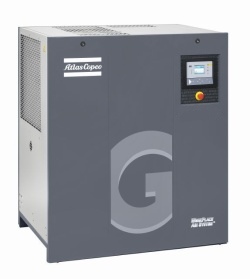
GA 90 VSD – это винтовой компрессор с охлаждением и переменной частотой вращения привода на основе технологии VSD. Автоматическое регулирование частоты вращения привода гарантирует высокие показатели энергосбережения (до 35 %). В комплектацию входят: компрессорный элемент с приводом, электродвигатель, системы слива конденсата, смазки, охлаждения, контроля. В качестве опций возможен монтаж осушителя и фильтров.
Тип оборудования: Винтовые компрессоры Атлас Копко
Калькулятор стоимости доставки по Москве и области
Калькулятор стоимости доставки в регионы
В пределах МКАД
За пределы МКАД
Стоимость доставки — 400 руб.
Расстояние от мкад: 1 км.
Стоимость доставки: 30 руб.
Инструкция GA 90 VSD
-

ga-7_90-vsd.pdf (2616 Кб)
- Характеристики
- Комплектация
- Опции
- Гарантия и сервис
| Технические характеристики | |
|---|---|
| Габариты, д/ш/в | 2249 / 1070 / 1955 |
| Вес, кг | 1654 |
| Мощность двигателя, кВт | 90 |
| Производительность, м3/мин | 17.50 |
| Максимальное давление, Бар | 13 |
• Привод
• Система охлаждения компрессора
• Система смазки
• Воздушная система
• Шкаф управления
• Система регулировки производительности
• Модуль управления Elektronikon
• Встроенный осушитель
• Блок усиленной очистки конденсата
• Блок рекуперации энергии
• Антиобледенительная система
•Воздушный (впускной) фильтр грубой очистки
• Клапан отсечки охл. воды
• Расширительный модуль для контроллера Mk5
• Комплект DD/PD фильтров
• Фильтр DD
• Байпасный канал осушителя
Гарантия и сервисное обслуживание предоставляется официальными дилерами.
Видео
Другое оборудование раздела
| Модель | Габариты, д/ш/в | Вес, кг | Мощность двигателя, кВт | Производительность, м3/мин | Максимальное давление, Бар |
|---|---|---|---|---|---|
| GA 30 VSD | 1255 / 865 / 1475 | 600 | 30 | 5.60 | 13 |
| GA 26 VSD | 1255 / 865 / 1475 | 590 | 26 | 4.90 | 13 |
| GA 75 VSD | 2249 / 1070 / 1955 | 1654 | 75 | 15.00 | 13 |
| GA 55 VSD | 2249 / 1070 / 1955 | 1480 | 55 | 10.50 | 13 |
В Вашем браузере отключен JavaScript. Пожалуйста, включите его в настройках браузера для корректной работы нашего сайта.

Atlas Copco
GA 55+
API603130
Instruction book
Atlas Copco
GA 55+
API603130
Instruction book
Original instructions
Manufacturing Date: 24/10/2006
Copyright notice
Any unauthorized use or copying of the contents or any part thereof is prohibited.
This applies in particular to trademarks, model denominations, part numbers and
drawings.
This instruction book is valid for CE as well as non-CE labelled machines. It meets the
requirements for instructions specified by the applicable European directives as
identified in the Declaration of Conformity.
2016 - 02
www.atlascopco.com
Instruction book
Table of contents
1
Safety precautions..........................................................................................................6
1.1
SAFETY ICONS................................................................................................................................... 6
1.2
GENERAL SAFETY PRECAUTIONS............................................................................................................6
1.3
SAFETY PRECAUTIONS DURING INSTALLATION........................................................................................... 7
1.4
SAFETY PRECAUTIONS DURING OPERATION.............................................................................................. 8
1.5
SAFETY PRECAUTIONS DURING MAINTENANCE OR REPAIR........................................................................... 9
2
General description...................................................................................................... 11
2.1
INTRODUCTION.................................................................................................................................11
2.2
AIR FLOW....................................................................................................................................... 13
2.3
OIL SYSTEM.................................................................................................................................... 14
2.4
COOLING SYSTEM.............................................................................................................................15
2.5
CONDENSATE SYSTEM.......................................................................................................................16
2.6
REGULATING SYSTEM........................................................................................................................ 17
2.7
ELECTRICAL SYSTEM.........................................................................................................................18
2.8
ELECTRICAL DIAGRAMS......................................................................................................................19
2.9
AIR DRYER......................................................................................................................................22
3
Elektronikon II regulator.............................................................................................. 24
3.1
ELEKTRONIKON® II REGULATOR.......................................................................................................... 24
3.2
CONTROL PANEL.............................................................................................................................. 26
3.3
FUNCTION KEYS............................................................................................................................... 27
3.4
SCROLL KEYS.................................................................................................................................. 28
3.5
EMERGENCY STOP BUTTON................................................................................................................ 28
3.6
CONTROL PROGRAMS........................................................................................................................28
3.7
MAIN SCREEN MENU......................................................................................................................... 30
3.8
CALLING UP MENUS.......................................................................................................................... 31
3.9
QUICK LOOK AT THE ACTUAL COMPRESSOR STATUS................................................................................ 32
2
API603130
Instruction book
3.10
STATUS DATA MENU..........................................................................................................................33
3.11
MEASURED DATA MENU..................................................................................................................... 36
3.12
COUNTERS MENU............................................................................................................................. 36
3.13
TEST MENU..................................................................................................................................... 37
3.14
MODIFY PARAMETERS MENU............................................................................................................... 38
3.15
MODIFYING PARAMETERS................................................................................................................... 38
3.16
MODIFYING PROTECTION SETTINGS...................................................................................................... 39
3.17
MODIFYING SERVICE PLANS................................................................................................................ 40
3.18
PROGRAMMING CLOCK FUNCTION.........................................................................................................42
3.19
MODIFYING CONFIGURATION SETTINGS..................................................................................................47
3.20
PROGRAMMING COMPRESSOR CONTROL MODES..................................................................................... 47
3.21
SERVICE MENU................................................................................................................................ 48
3.22
SAVED DATA MENU........................................................................................................................... 50
3.23
PROGRAMMABLE SETTINGS.................................................................................................................51
4
Installation.....................................................................................................................53
4.1
DIMENSION DRAWINGS.......................................................................................................................53
4.2
INSTALLATION PROPOSAL................................................................................................................... 55
4.3
ELECTRICAL CONNECTIONS.................................................................................................................57
4.4
PICTOGRAPHS................................................................................................................................. 60
5
Operating instructions................................................................................................. 62
5.1
INITIAL START-UP..............................................................................................................................62
5.2
BEFORE STARTING............................................................................................................................64
5.3
STARTING ...................................................................................................................................... 65
5.4
DURING OPERATION.......................................................................................................................... 66
5.5
CHECKING THE DISPLAY.....................................................................................................................69
5.6
STOPPING ......................................................................................................................................70
5.7
TAKING OUT OF OPERATION................................................................................................................71
API603130
3
Instruction book
6
Maintenance.................................................................................................................. 72
6.1
PREVENTIVE MAINTENANCE SCHEDULE..................................................................................................72
6.2
OIL SPECIFICATIONS..........................................................................................................................74
6.3
STORAGE AFTER INSTALLATION........................................................................................................... 75
6.4
SERVICE KITS.................................................................................................................................. 75
6.5
DISPOSAL OF USED MATERIAL............................................................................................................. 75
7
Adjustments and servicing procedures..................................................................... 76
7.1
DRIVE MOTOR .................................................................................................................................76
7.2
AIR FILTER......................................................................................................................................76
7.3
OIL AND OIL FILTER CHANGE...............................................................................................................77
7.4
COOLERS....................................................................................................................................... 79
7.5
SAFETY VALVES............................................................................................................................... 80
7.6
DRYER MAINTENANCE INSTRUCTIONS....................................................................................................80
8
Problem solving............................................................................................................82
9
Technical data...............................................................................................................85
9.1
READINGS ON DISPLAY...................................................................................................................... 85
9.2
ELECTRIC CABLE SIZE AND MAIN FUSES................................................................................................ 86
9.3
SETTINGS OF FAN MOTOR CIRCUIT BREAKER.......................................................................................... 87
9.4
MOTOR OVERLOAD RELAY SETTINGS.................................................................................................... 87
9.5
DRYER SWITCHES.............................................................................................................................88
9.6
REFERENCE CONDITIONS AND LIMITATIONS............................................................................................ 88
9.7
COMPRESSOR DATA..........................................................................................................................88
4
API603130
Instruction book
10
Instructions for use...................................................................................................... 90
11
Guidelines for inspection.............................................................................................91
12
Pressure equipment directives................................................................................... 92
13
Declaration of conformity............................................................................................ 93
API603130
5
Instruction book
1
Safety precautions
1.1
Safety icons
Explanation
Danger to life
Warning
Important note
1.2
General safety precautions
1. The operator must employ safe working practices and observe all related work safety requirements
and regulations.
2. If any of the following statements does not comply with the applicable legislation, the stricter of the
two shall apply.
3. Installation, operation, maintenance and repair work must only be performed by authorized, trained,
specialized personnel. The personnel should apply safe working practices by use of personal
protection equipment, appropriate tools and defined procedures.
4. The compressor is not considered capable of producing air of breathing quality. For air of breathing
quality, the compressed air must be adequately purified according to the applicable legislation and
standards.
5. Before any maintenance, repair work, adjustment or any other non-routine checks:
• Stop the machine
• Press the emergency stop button
• Switch off the voltage
• Depressurize the machine
• Lock Out - Tag Out (LOTO):
• Open the power isolating switch and lock it with a personal lock
• Tag the power isolating switch with the name of the service technician.
• On units powered by a frequency converter, wait 10 minutes before starting any electrical repair.
• Never rely on indicator lamps or electrical door locks before maintenance work, always
disconnect and check with measuring device.
If the machine is equipped with an automatic restart after voltage failure function and if
this function is active, be aware that the machine will restart automatically when the
power is restored if it was running when the power was interrupted!
6. Never play with compressed air. Do not apply the air to your skin or direct an air stream at people.
Never use the air to clean dirt from your clothes. When using the air to clean equipment, do so with
extreme caution and wear eye protection.
7. The owner is responsible for maintaining the unit in safe operating condition. Parts and accessories
shall be replaced if unsuitable for safe operation.
8. It is prohibited to walk or stand on the unit or on its components.
6
API603130
Instruction book
9. If compressed air is used in the food industry and more specifically for direct food contact, Atlas
Copco recommends, for optimal safety, the use of certified Class 0 compressors in combination with
appropriate filtration depending on the application. Please contact your Atlas Copco Customer Center
for advice on specific filtration.
1.3
Safety precautions during installation
All responsibility for any damage or injury resulting from neglecting these precautions, or
non observance of the normal caution and care required for installation, operation,
maintenance and repair, even if not expressly stated, will be disclaimed by the
manufacturer.
Precautions during installation
1. The machine must only be lifted using suitable equipment in accordance with the applicable safety
regulations. Loose or pivoting parts must be securely fastened before lifting. It is strictly forbidden to
dwell or stay in the risk zone under a lifted load. Lifting acceleration and deceleration must be kept
within safe limits. Wear a safety helmet when working in the area of overhead or lifting equipment.
2. The unit is designed for indoor use. If the unit is installed outdoors, special precautions must be taken;
consult your supplier.
3. In case the device is a compressor, place the machine where the ambient air is as cool and clean as
possible. If necessary, install a suction duct. Never obstruct the air inlet. Care must be taken to
minimize the entry of moisture at the inlet air.
4. Any blanking flanges, plugs, caps and desiccant bags must be removed before connecting the pipes.
5. Air hoses must be of correct size and suitable for the working pressure. Never use frayed, damaged or
worn hoses. Distribution pipes and connections must be of the correct size and suitable for the
working pressure.
6. In case the device is a compressor, the aspirated air must be free of flammable fumes, vapors and
particles, e.g. paint solvents, that can lead to internal fire or explosion.
7. In case the device is a compressor, arrange the air intake so that loose clothing worn by people cannot
be drawn in.
8. Ensure that the discharge pipe from the compressor to the aftercooler or air net is free to expand under
heat and that it is not in contact with or close to flammable materials.
9. No external force may be exerted on the air outlet valve; the connected pipe must be free of strain.
10. If remote control is installed, the machine must bear a clear sign stating: DANGER: This machine is
remotely controlled and may start without warning.
The operator has to make sure that the machine is stopped and depressurized and that the electrical
isolating switch is open, locked and labelled with a temporary warning before any maintenance or
repair. As a further safeguard, persons switching on or off remotely controlled machines shall take
adequate precautions to ensure that there is no one checking or working on the machine. To this end,
a suitable notice shall be affixed to the start equipment.
11. Air-cooled machines must be installed in such a way that an adequate flow of cooling air is available
and that the exhausted air does not recirculate to the compressor air inlet or cooling air inlet.
12. The electrical connections must correspond to the applicable codes. The machines must be earthed
and protected against short circuits by fuses in all phases. A lockable power isolating switch must be
installed near the compressor.
13. On machines with automatic start/stop system or if the automatic restart function after voltage failure
is activated, a sign stating "This machine may start without warning" must be affixed near the
instrument panel.
API603130
7
Instruction book
14. In multiple compressor systems, manual valves must be installed to isolate each compressor. Nonreturn valves (check valves) must not be relied upon for isolating pressure systems.
15. Never remove or tamper with the safety devices, guards or insulation fitted on the machine. Every
pressure vessel or auxiliary installed outside the machine to contain air above atmospheric pressure
must be protected by a pressure relieving device or devices as required.
16. Piping or other parts with a temperature in excess of 70˚C (158˚F) and which may be accidentally
touched by personnel in normal operation must be guarded or insulated. Other high temperature
piping must be clearly marked.
17. For water-cooled machines, the cooling water system installed outside the machine has to be
protected by a safety device with set pressure according to the maximum cooling water inlet pressure.
18. If the ground is not level or can be subject to variable inclination, consult the manufacturer.
19. If the device is a dryer and no free extinguishing system is present in the air net close to the dryer,
safety valves must be installed in the vessels of the dryer.
Also consult following safety precautions: Safety precautions during operation and
Safety precautions during maintenance.
These precautions apply to machinery processing or consuming air or inert gas.
Processing of any other gas requires additional safety precautions typical to the
application which are not included herein.
Some precautions are general and cover several machine types and equipment; hence
some statements may not apply to your machine.
1.4
Safety precautions during operation
All responsibility for any damage or injury resulting from neglecting these precautions, or
non observance of the normal caution and care required for installation, operation,
maintenance and repair, even if not expressly stated, will be disclaimed by the
manufacturer.
Precautions during operation
1. Never touch any piping or components of the machine during operation.
2. Use only the correct type and size of hose end fittings and connections. When blowing through a hose
or air line, ensure that the open end is held securely. A free end will whip and may cause injury. Make
sure that a hose is fully depressurized before disconnecting it.
3. Persons switching on remotely controlled machines shall take adequate precautions to ensure that
there is no one checking or working on the machine. To this end, a suitable notice shall be affixed to
the remote start equipment.
4. Never operate the machine when there is a possibility of taking in flammable or toxic fumes, vapors
or particles.
5. Never operate the machine below or in excess of its limit ratings.
6. Keep all bodywork doors shut during operation. The doors may be opened for short periods only, e.g.
to carry out routine checks. Wear ear protectors when opening a door.
On machines without bodywork, wear ear protection in the vicinity of the machine.
7. People staying in environments or rooms where the sound pressure level reaches or exceeds 80 dB(A)
shall wear ear protectors.
8. Periodically check that:
• All guards are in place and securely fastened
• All hoses and/or pipes inside the machine are in good condition, secure and not rubbing
• No leaks occur
8
API603130
Instruction book
•
•
•
•
9.
10.
11.
12.
13.
All fasteners are tight
All electrical leads are secure and in good order
Safety valves and other pressure relief devices are not obstructed by dirt or paint
Air outlet valve and air net, i.e. pipes, couplings, manifolds, valves, hoses, etc. are in good
repair, free of wear or abuse
• Air cooling filters of the electrical cabinet are not clogged
If warm cooling air from compressors is used in air heating systems, e.g. to warm up a workroom,
take precautions against air pollution and possible contamination of the breathing air.
On water-cooled compressors using open circuit cooling towers, protective measures must be taken to
avoid the growth of harmful bacteria such as Legionella pneumophila bacteria.
Do not remove any of, or tamper with, the sound-damping material.
Never remove or tamper with the safety devices, guards or insulations fitted on the machine. Every
pressure vessel or auxiliary installed outside the machine to contain air above atmospheric pressure
shall be protected by a pressure relieving device or devices as required.
Yearly inspect the air receiver. Minimum wall thickness as specified in the instruction book must be
respected. Local regulations remain applicable if they are more strict.
Also consult following safety precautions: Safety precautions during installation and
Safety precautions during maintenance.
These precautions apply to machinery processing or consuming air or inert gas.
Processing of any other gas requires additional safety precautions typical to the
application which are not included herein.
Some precautions are general and cover several machine types and equipment; hence
some statements may not apply to your machine.
1.5
Safety precautions during maintenance or repair
All responsibility for any damage or injury resulting from neglecting these precautions, or
non observance of the normal caution and care required for installation, operation,
maintenance and repair, even if not expressly stated, will be disclaimed by the
manufacturer.
Precautions during maintenance or repair
1. Always use the correct safety equipment (such as safety glasses, gloves, safety shoes, etc.).
2. Use only the correct tools for maintenance and repair work.
3. Use only genuine spare parts for maintenance or repair. The manufacturer will disclaim all damage or
injuries caused by the use of non-genuine spare parts.
4. All maintenance work shall only be undertaken when the machine has cooled down.
5. A warning sign bearing a legend such as "Work in progress; do not start" shall be attached to the
starting equipment.
6. Persons switching on remotely controlled machines shall take adequate precautions to ensure that
there is no one checking or working on the machine. To this end, a suitable notice shall be affixed to
the remote start equipment.
7. Close the compressor air outlet valve and depressurize the compressor before connecting or
disconnecting a pipe.
8. Before removing any pressurized component, effectively isolate the machine from all sources of
pressure and relieve the entire system of pressure.
9. Never use flammable solvents or carbon tetrachloride for cleaning parts. Take safety precautions
against toxic vapors of cleaning liquids.
API603130
9
Instruction book
10. Scrupulously observe cleanliness during maintenance and repair. Keep dirt away by covering the
parts and exposed openings with a clean cloth, paper or tape.
11. Never weld or perform any operation involving heat near the oil system. Oil tanks must be completely
purged, e.g. by steam cleaning, before carrying out such operations. Never weld on, or in any way
modify, pressure vessels.
12. Whenever there is an indication or any suspicion that an internal part of a machine is overheated, the
machine shall be stopped but no inspection covers shall be opened before sufficient cooling time has
elapsed; this to avoid the risk of spontaneous ignition of the oil vapor when air is admitted.
13. Never use a light source with open flame for inspecting the interior of a machine, pressure vessel, etc.
14. Make sure that no tools, loose parts or rags are left in or on the machine.
15. All regulating and safety devices shall be maintained with due care to ensure that they function
properly. They may not be put out of action.
16. Before clearing the machine for use after maintenance or overhaul, check that operating pressures,
temperatures and time settings are correct. Check that all control and shut-down devices are fitted and
that they function correctly. If removed, check that the coupling guard of the compressor drive shaft
has been reinstalled.
17. Every time the separator element is renewed, examine the discharge pipe and the inside of the oil
separator vessel for carbon deposits; if excessive, the deposits should be removed.
18. Protect the motor, air filter, electrical and regulating components, etc. to prevent moisture from
entering them, e.g. when steam cleaning.
19. Make sure that all sound-damping material and vibration dampers, e.g. damping material on the
bodywork and in the air inlet and outlet systems of the compressor, is in good condition. If damaged,
replace it by genuine material from the manufacturer to prevent the sound pressure level from
increasing.
20. Never use caustic solvents which can damage materials of the air net, e.g. polycarbonate bowls.
21. Only if applicable, the following safety precautions are stressed when handling refrigerant:
• Never inhale refrigerant vapors. Check that the working area is adequately ventilated; if
required, use breathing protection.
• Always wear special gloves. In case of refrigerant contact with the skin, rinse the skin with
water. If liquid refrigerant contacts the skin through clothing, never tear off or remove the latter;
flush abundantly with fresh water over the clothing until all refrigerant is flushed away; then
seek medical first aid.
Also consult following safety precautions: Safety precautions during installation and
Safety precautions during operation.
These precautions apply to machinery processing or consuming air or inert gas.
Processing of any other gas requires additional safety precautions typical to the
application which are not included herein.
Some precautions are general and cover several machine types and equipment; hence
some statements may not apply to your machine.
10
API603130
Instruction book
2
General description
2.1
Introduction
GA 55+ up to GA 90 are single-stage, oil-injected screw compressors driven by an electric motor. The
compressors are available in air-cooled and water-cooled version.
The compressors are controlled by an Elektronikon® regulator.
GA Workplace Full-Feature
GA Workplace Full-Feature compressors are enclosed in a sound-insulated bodywork. The Elektronikon
control module is fitted to the door on the right side. An electric cabinet comprising the motor starter is
located behind this panel. The compressors are provided with an air dryer.
The dryer is integrated in the sound-insulated bodywork. The dryer removes water from the compressed air
by cooling the air to near freezing point. The condensate is automatically drained.
Front view, GA 55+ up to GA 90 Workplace Full-Feature
Reference
Name
1
Electric cubicle
AF
Air filter
AR
Air receiver (oil separator vessel)
AV
Air outlet valve
Ca
Air cooler
API603130
11
Instruction book
Reference
Name
Co
Oil cooler
Da
Automatic condensate outlet
Da1
Automatic condensate outlet, dryer
DR
Dryer
ER
Elektronikon® II regulator
FN
Fan
M1
Compressor drive motor
VP
Vent plug (oil cooler)
S3
Emergency stop button
OF
Oil filter housing
Rear view, GA 55+ up to GA 90 Workplace Full-Feature
12
Reference
Name
E
Compressor element
CV/Vs
Check valve/oil stop valve
FN
Cooling fan
M1
Compressor drive motor
MT
Condensate trap
API603130
Instruction book
2.2
Reference
Name
AV
Compressed air outlet valve
DR
Dryer
AF
Air filter
Co
Oil cooler
Ca
Air cooler
UA
Unloader
Air flow
Flow diagrams
Flow diagram, GA Workplace Full-Feature
Reference
Description
A
Intake air
B
Air/oil mixture
C
Oil
D
Wet compressed air
E
Condensate
F
Dried compressed air
API603130
13
Instruction book
Description
Air drawn through filter (AF) and open inlet valve (IV) into compressor element (E) is compressed. A mix
of compressed air and oil flows into the air receiver/oil separator (AR) via check valve (CV). The air is
discharged through outlet valve (AV) via minimum pressure valve (Vp) and air cooler (Ca).
The air cooler is provided with a moisture trap (MT).
On Full-Feature compressors, the air flows through air dryer (DR) before it is discharged through outlet
valve (AV). Also see section Air dryer.
During loaded operation, minimum pressure valve (Vp) keeps the pressure in the separator tank (AR)
above a minimum value, required for lubrication. An integrated check valve prevents the compressed air
downstream the valve from being vented to atmosphere during unloaded operation. When the compressor
is stopped, check valve (CV) and inlet valve (IV) close, preventing compressed air (and oil) to be vented
into the air filter.
2.3
Oil system
Flow diagram
Oil system
14
References
Description
1
Compressed air flow to the air dryer (compressors with integrated dryer)
A
Intake air
B
Air/oil mixture
C
Oil
D
Wet compressed air
E
Condensate
API603130
Instruction book
Description
In air receiver/oil separator (AR), most of the oil is removed from the air/oil mixture by centrifugal action.
The remaining oil is removed by oil separator (OS). The oil collects in the lower part of air receiver/oil
separator (AR), which serves as an oil tank.
The oil system is provided with a thermostatic bypass valve (BV). When the oil temperature is below its set
point, bypass valve (BV) shuts off the supply to oil cooler (Co) and the oil cooler is bypassed.
Air pressure forces the oil from air receiver/oil separator (AR) through oil filter (OF) and oil stop valve
(Vs) to compressor element (E).
Bypass valve (BV) starts opening the supply from cooler (Co) when the oil temperature has increased to
the set point. At approx. 15 ˚C (27 ˚F) above the set point, all the oil flows through the oil cooler.
Oil stop valve (Vs) prevents the compressor element from flooding with oil when the compressor is
stopped. The valve is opened by element outlet pressure when the compressor is started.
2.4
Cooling system
Flow diagram
Cooling system, air-cooled compressors
References
Description
A
Intake air
B
Air/oil mixture
C
Oil
D
Wet compressed air
E
Condensate
API603130
15
Instruction book
Description
The cooling system comprises air cooler (Ca) and oil cooler (Co).
On air-cooled compressors, the cooling air flow is generated by fan (FN).
2.5
Condensate system
Water drains
Condensate drains, typical example
Reference
Designation
Da
Automatic drain connection
Da1
Automatic drain connection of the dryer (only on Full-Feature units)
Next to each automatic drain outlet is a manual condensate drain connection for manually draining of the
condensate.
Electronic condensate drains, typical example
The compressors have an electronic water drain (EWD). The condensate from the air cooler accumulates in
a collector. When the condensate reaches a certain level, it is discharged through the automatic drain outlet
(Da).
On Full-Feature compressors, an additional electronic water drain (EWD1) is provided. The condensate
trap of the heat exchanger is drained by EWD1 and discharged through automatic drain outlet (Da1).
Also see section Air flow.
Testing the electronic water drain can be done by briefly pressing the test button (1) on top of the drain.
16
API603130
Instruction book
2.6
Regulating system
Flow diagram
Regulating system (loaded condition)
Loading
When the net pressure is below the loading pressure, solenoid valve (Y1) is energised. Results:
• The space above unloading valve/blow-off valve (UV) is connected with the oil separator tank
pressure (1) via the solenoid valve.
• Unloading valve/blow-off valve (UV) moves downwards, closing off the connection to channels (2)
and (3).
• Underpressure from the compressor element causes loading plunger (LP) to move downwards and
inlet valve (IV) to open fully.
Air delivery is 100%, the compressor runs loaded.
Unloading
If the air consumption is less than the air output of the compressor, the net pressure increases. When the net
pressure reaches the unloading pressure, solenoid valve (Y1) is de-energised. Results:
• The pressure above unloading valve/blow-off valve (UV) is released to atmosphere and the space
above valve (UV) is no longer in connection with the oil separator tank pressure (1).
• Unloading valve/blow-off valve (UV) moves upwards, connecting the oil separator tank pressure (1)
with channels (2) and (3).
• The pressure in channel (2) causes the loading plunger (LP) to move upwards, causing inlet valve
(IV) to close, while the pressure is gradually released to atmosphere.
• The pressure in the separator tank stabilises at low value. A small amount of air is kept drawn in to
guarantee a minimal pressure, required for lubrication during unloaded operation.
Air output is stopped, the compressor runs unloaded.
API603130
17
Instruction book
2.7
Electrical system
General
Also consult sections Electrical diagrams and Electrical connections.
Electrical components
The electrical system comprises following components:
Electric cubicle, typical example
18
Reference
Designation
F1/2/3
Fuses
(F3 is only provided in case a phase sequence relay is provided)
F4/5/6
Fuses
F7/F8/F9
Fuses (only on Full-Feature)
F10/11/12
Fuses
F21
Overload relay, compressor motor
Q15
Circuit breaker, fan motor (on air-cooled compressors)
K5
Auxiliary relay
K11
Auxiliary contactor for dryer (only on Full-Feature)
K21
Line contactor
K22
Star contactor
K23
Delta contactor
API603130
Instruction book
2.8
Reference
Designation
T1
Transformer
1X0
Terminal strip (voltage supply)
X103/X108
Connectors
PE
Earth terminal
Electrical diagrams
The complete electrical diagram can be found in the electric cubicle.
Service diagram for GA 55+ up to GA 90 with Elektronikon II and star-delta starter
Text on drawing
Reference
Designation
(1)
Emergency stop
(2)
Remote start/stop
(3)
Remote load/unload
(4)
Remote pressure sensing
(5)
Overload, compressor motor
API603130
19
Instruction book
Reference
Designation
(6)
Overload, fan motor
(7)
Fault, EWD
(8)
Dp, DD filter
(9)
Dp, PD filter
(10)
Remote pressure set selection
(11)
ES 100 (if installed)
(12)
Remote emergency stop
(13)
Auxiliary contacts
(14)
Manual/automatic operation
(15)
General warning
(16)
General shut-down
References used (typical) in the electric diagram of the compressor:
Below list is a general list. Some references are only used for specific versions.
20
Reference
Sensors / solenoid valves / electronic water drain
A1
Dryer (units with integrated refrigeration dryer)
B1
Electronic water drain (EWD)
PDT01
Pressure sensor, pressure difference across oil separator
PT20
Pressure sensor, air outlet
TT01
Temperature sensor, ambient air
TT11
Temperature sensor, element outlet
TT53/54
Temperature sensor, energy recovery water inlet/outlet (compressors equipped with the
option Energy Recovery)
TT90
Temperature sensor, LAT dryer (compressors with integrated refrigeration dryer)
Y1
Loading solenoid valve
Reference
Motors
M1
Compressor motor
M2
Fan motor (on air-cooled compressors)
Reference
Electric cabinet
F1/9
Fuses
F21
Overload relay, drive motor
K21
Line contactor
K22
Star contactor
K23
Delta contactor
Q15
Circuit breaker, fan motor
T1
Transformers
1X0 -1X7
Terminal strips
X101-117
Connectors
API603130
Instruction book
Reference
Compressor control module
I
Start button
O
Stop button
S3
Emergency stop button
K01
Blocking relay
K02
Auxiliary relay, star contactor
K03
Auxiliary relay, delta contactor
K04
Auxiliary relay, loading/unloading
K05
Auxiliary relay, air pressure high/low
K06
Auxiliary relay, dryer
K07
Auxiliary relay, manual/automatic operation
K08
Auxiliary relay, warning
K09
Auxiliary relay, shut-down
Optional equipment
Reference
Designation
AIE1/2
Expansion modules, analogue input
B2
Electronic water drain (EWD) (Full-Feature)
DPT11/12
Dual pressure transmitters
K04’
Auxiliary relay, load/unload for ES100
K21
Auxiliary contact, compressor running for ES100
PDS11
Delta p switch for integrated DD filter
PDS12
Delta p switch for integrated PD filter
R1, K34
Drive motor thermistor protection, shut-down
R2, K35
Drive motor thermistor protection, warning
S10
Main power isolating switch
Y2
Solenoid valve
API603130
21
Instruction book
2.9
Air dryer
Flow diagram
Air dryer
Reference
Name
AI
Air inlet
AO
Air outlet
1
Air/air heat exchanger
2
Air/refrigerant heat exchanger/evaporator
3
Condensate separator
4
Automatic drain / condensate outlet
5
Refrigerant compressor
6
Refrigerant condenser
7
Liquid refrigerant dryer/filter
8
Thermostatic expansion valve
9
Bypass valve
10
Condenser cooling fan
11
Pressure switch, fan control
Compressed air circuit
Compressed air enters heat exchanger (1) and is cooled by the outgoing, cold, dried air. Water in the
incoming air starts to condense. The air then flows through heat exchanger/evaporator (2), where the
refrigerant evaporates, causing the air to be cooled further to close to the evaporating temperature of the
refrigerant. More water in the air condenses. The cold air then flows through separator (3) where all the
condensate is separated from the air. The condensate is automatically drained through outlet (4).
The cold, dried air flows through heat exchanger (1) where it is warmed up by the incoming air.
22
API603130
Instruction book
Refrigerant circuit
Compressor (5) delivers hot, high-pressure refrigerant gas which flows through condenser (6) where most
of the refrigerant condenses.
The liquid refrigerant flows through liquid refrigerant dryer/filter (7) to thermostatic expansion valve (8).
The refrigerant leaves the thermostatic expansion valve at evaporating pressure.
The refrigerant enters evaporator (2) where it withdraws heat from the compressed air by further
evaporation at constant pressure. The heated refrigerant leaves the evaporator and is sucked in by the
compressor (5).
By-pass valve (9) regulates the refrigerant flow. Fan (10) is switched on or off by switch (11) depending on
the loading degree of the refrigerant circuit.
The refrigerant compressor motor has a built-in thermic protection. If the motor stops after
tripping of the thermic protection, it may take up to 2 hours for the motor windings to cool down
and before the motor can restart.
API603130
23
Instruction book
3
Elektronikon II regulator
3.1
Elektronikon® II regulator
Control panel
General
In general, the Elektronikon regulator has following functions:
•
•
•
•
Controlling the compressor
Protecting the compressor
Monitoring components subject to service
Automatic restart after voltage failure (made inactive)
Automatic control of compressor operation
The regulator maintains the net pressure between programmable limits by automatically loading and
unloading the compressor. A number of programmable settings, e.g. the unloading and loading pressures,
the minimum stop time and the maximum number of motor starts are taken into account.
The regulator stops the compressor whenever possible to reduce the power consumption and restarts it
automatically when the net pressure decreases. If the expected unloading period is too short, the
compressor is kept running to prevent too-short standstill periods.
A number of time-based automatic start/stop commands may be programmed. Take into
account that a start command will be executed (if programmed and activated), even
after manually stopping the compressor.
Protecting the compressor
Shut-down
If the compressor element outlet temperature exceeds the programmed shut-down level, the compressor
will be stopped. This will be indicated on display (1) and general alarm LED (2) will flash.
The compressor will also be stopped in the event of overload of:
• the drive motor
• the cooler fan motor of air-cooled units
Remedy the trouble and reset the message. See also the Status data menu.
24
API603130
Instruction book
Before remedying, consult the Safety precautions.
Shut-down warning
A shut-down warning level is a programmable level below the shut-down level.
If the compressor element outlet temperature exceeds the programmed shut-down warning level, a message
will appear on display (1) and general alarm LED (2) will light up, to warn the operator that the shut-down
warning level is exceeded.
The message disappears as soon as the warning condition disappears.
Service warning
A number of service operations are grouped (called Service plans A, B, C, ...). Each Service plan has a
programmed time interval. If a time interval is exceeded, a message will appear on display (1) to warn the
operator to carry out the service actions belonging to that plan.
Warning
A warning message also appears if:
• On Full-Feature compressors, the dewpoint temperature is too high in relation to the ambient
temperature.
Automatic restart after voltage failure
The regulator has a built-in function to automatically restart the compressor when the voltage is restored
after voltage failure. This function is deactivated in compressors leaving the factory. If desired, the function
can be activated. Consult the Atlas Copco Customer Centre.
If activated, and provided the regulator was in the automatic operation mode, the
compressor will automatically restart if the supply voltage to the module is restored
within a programmed time period.
The power recovery time (the period within which the voltage must be restored to have
an automatic restart) can be set between 10 and 3600 seconds or to ‘Infinite’. If the
power recovery time is set to ‘Infinite’, the compressor will always restart after a voltage
failure, no matter how long it takes to restore the voltage. A restart delay can also be
programmed, allowing e.g. two compressors to be restarted one after the other.
API603130
25
Instruction book
3.2
Control panel
Elektronikon regulator
Parts and functions
26
Reference
Designation
Function
1
Start button
Button to start the compressor. LED (8) lights up
indicating that the Elektronikon regulator is
operative.
2
Display
Shows messages about the compressor operating
condition, a service need or a fault.
3
Scroll keys
Keys to scroll upwards or downwards through the
display.
4
Tabulator key
Key to select the parameter indicated by the
horizontal arrow. Only the parameters followed by an
arrow pointing to the right can be modified.
5
Function keys
Keys to control and program the compressor.
6
Voltage on LED
Indicates that the voltage is switched on.
7
General alarm LED
Is lit if a warning, service warning or shut-down
warning condition exists.
7
General alarm LED
Flashes if a shut-down condition exists, if an
important sensor is out of order or after an
emergency stop.
8
Automatic operation LED
Indicates that the regulator is automatically
controlling the compressor.
9
Stop button
Button to stop the compressor. LED (8) goes out.
The compressor will stop after running in unloaded
condition for about 30 seconds.
S3
Emergency stop button
Push button to stop the compressor immediately in
the event of an emergency. After remedying the
trouble, unlock the button by pulling it out.
Warning: use S3 only in case of emergency! Use
the Stop button (9) for normal stopping.
API603130
Instruction book
3.3
Function keys
Control panel
Function keys
The keys (1) are used:
•
•
•
•
To manually load/unload the compressor
To call up or to program settings
To reset a motor overload, shut-down or service message, or an emergency stop
To access all data collected by the regulator
The functions of the keys vary depending on the displayed menu. The actual function is indicated just
above the relevant key. The most common functions are listed below:
Designation
Function
‘Add’
To add compressor start/stop commands (day/hour)
‘Back’
To return to a previously shown option or menu
‘Canc’
To cancel a programmed setting when programming parameters
‘Del.’
To delete compressor start/stop commands
‘Help’
To find the Atlas Copco Internet address
‘Lim.’
To show limits for a programmable setting
‘Load’
To load the compressor manually
‘Main’
To return from a menu to the main screen
‘Menu’
Starting from the main screen, to have access to the submenus
‘Menu’
Starting from a submenu, to return to a previous menu
‘Mod.’
To modify programmable settings
‘Prog’
To program modified settings
‘Rset’
To reset a timer or message
‘Rtrn’
To return to a previously shown option or menu
‘Unld’
To unload the compressor manually
‘Xtra’
To find the module configuration of the regulator
API603130
27
Instruction book
3.4
Scroll keys
Control panel
The keys (1) allow the operator to scroll through the display.
As long as a downwards pointing arrow is shown at the far right position of the display, the scroll key with
the same symbol can be used to see the next item.
As long as an upwards pointing arrow is shown at the far right position of the display, the scroll key with
the same symbol can be used to see the previous item.
3.5
Emergency stop button
Control panel
In the event of an emergency, press button (S3) to stop the compressor immediately.
Before restarting, unlock the emergency stop button by pulling it out and push the reset button on the
Elektronikon.
Warning: use S3 only in case of emergency. Use the stop button for normal stopping.
Before starting any maintenance or repairs, wait until the compressor has stopped. Close
the air outlet valve, depressurize the compressor and switch off the voltage to the
compressor if necessary. See section Problem solving for full details. Always apply all
relevant Safety precautions.
3.6
Control programs
Description
In order to facilitate programming and controlling, menu-driven control programs have been implemented
in the regulator.
28
API603130
Instruction book
Menu flow (simplified)
Main menu
Program
Function
Main screen
Shows in short the operation status of the compressor. Is the gateway to all
functions.
‘Status data’
Calls up the status of the compressor protection functions (shut-down, shut-down
warning, service warning and warning). Resets a shut-down, motor overload and
service condition.
API603130
29
Instruction book
3.7
Program
Function
‘Measured data’
Calls up the data currently measured and the status of a number of inputs.
‘Counters’
Calls up the running hours, loaded hours, regulator (module) hours and number
of motor starts.
‘Test’
Display test.
‘Modify Params’
Modifies the settings for:
• Parameters (e.g. loading and unloading pressures)
• Protections (e.g. temperature shut-down level)
• Service plans (timers for service plans)
• Clock functions (automatic compressor start/stop/pressure band commands)
• Configuration (time, date, display language,...)
‘Service’
Calls up service plans and resets the timers after carrying out the service actions
belonging to a plan.
‘Saved data’
Calls up the saved data: last shut-down, last emergency stop data.
Main screen menu
Function
Control panel
The Main screen menu shows the status of the compressor operation and is the gateway to all functions
implemented in the regulator.
Procedure
The Main screen is shown automatically when the voltage is switched on.
If the function or arrow keys (1, 2 and 3) are not used for some minutes, the regulator will automatically
return to the Main screen.
Whenever displayed on a submenu screen, press the ‘Main’ key (F1) to return to the Main screen.
30
API603130
Instruction book
Example of Main screen
‘Compr. Outlet’
bar
7.0
‘Auto Loaded’
‘Menu’
F1
‘Unld’
F2
F3
The display indicates:
• The name of the sensor and its actual reading
• Messages regarding the compressor operating condition
• Just above the function keys (3), the actual functions of these keys
3.8
Calling up menus
Description
Control panel
When the voltage is switched on, the Main screen is shown automatically.
‘Compr. Outlet’
bar
7.0
‘Auto Loaded’
‘Menu’
F1
‘Unld’
F2
F3
The arrow down key (1) can be used for a quick look at the actual compressor status.
After pressing the ‘Menu’ (F1) key, the option ‘Status data’ will be followed by a horizontal arrow:
• Either press the tabulator key (2) to select this menu,
• Or use the arrow down key (1) until the desired submenu is followed by a horizontal arrow and then
press the tabulator key (2) to select this menu.
API603130
31
Instruction book
3.9
Quick look at the actual compressor status
Procedure
Control panel
Starting from the Main screen (see section Main screen menu), press the arrow down key (3): A screen
similar to the one below appears:
Example of the compressor status screen
‘Auto Operation’
‘Local Control’
‘Timer Active’
‘Main’
‘Help’
‘Xtra’
F1
F2
F3
Line 1 indicates the automatic or manual operation status of the regulator: ‘Auto Operation’ means that the
regulator automatically adapts the operation of the compressor, i.e. loading, unloading, stopping and
automatic restarting according to the programmed parameters.
Line 2 indicates whether the regulator is operating in local control or remote control mode: ‘Local Control’
means that the start/stop buttons on the keyboard are activated. ‘Remote Control’ means that these
functions are controlled remotely.
Line 3 indicates whether the timer which generates time-based start and stop commands is activated or not.
Press the arrow down key (3) to get other data (actual condition of the compressor). See section Control
programs.
32
API603130
Instruction book
3.10 Status data menu
Warning
Before starting any maintenance or repairs, press the stop button (4) and wait until the
compressor has stopped. Close the air outlet valve and press the test button on top of
the electronic water drain(s) until the air system between the air receiver and outlet
valve is fully depressurised. Press the red emergency stop button and open the isolating
switch (customer's installation) to switch off the voltage to the compressor.
Before remedying, consult sections Safety precautions and Problem solving.
Function
Control panel
The Status data submenu gives information regarding the status of the compressor protection functions
(shut-down, shut-down warning, service warning and warning) and allows resetting of a shut-down, motor
overload and service condition.
Procedure
Starting from the Main screen (see Main screen menu):
• Press the key ‘Menu’ (F1): the option ‘Status data’ will be followed by a horizontal arrow.
• Press the tabulator key (2).
No message exists
• General alarm LED (1) is out and the message on the display will indicate that all conditions are
normal:
‘All Conditions are OK’
.
.
‘Menu’
F1
F2
F3
A shut-down message exists
• If the compressor is shut down, LED (1) will flash.
• In the event of a shut-down due to too high a temperature at the outlet of the compressor element:
API603130
33
Instruction book
‘Element Outlet’
˚C
‘Shd’
122
‘Max.’
‘Menu**’
F1
120
‘**Rset’
F2
F3
• The indicators (**) are flashing. The screen shows the actual reading (122˚C), that the compressor is
shut down (‘Shd’), and the shut-down setting (120˚C).
• It remains possible to scroll through other menus, e.g. to check the values of other parameters.
When returning to the ‘Status data’ menu, the option ‘Shutdowns’ will flash. This option can be
selected by pressing the tabulator key (2) to return to the above shut-down screen.
Shut-down reset
• Switch off the voltage and remedy the trouble. After remedying and when the shut-down condition
has disappeared, switch on the voltage and press the key ‘Rset’ (F3).
• Press the keys ‘Menu’ and ‘Main’ to return to the Main screen and restart the compressor by means of
start button (3).
Motor overload reset
• Switch off the voltage and remedy the trouble. The overload relay (F21) and fan circuit breaker (Q15)
must be reset manually. Switch on the voltage and press the key ‘Rset’ (F3).
• Press the keys ‘Menu’ and ‘Main’ to return to the Main screen and restart the compressor by means of
start button (3).
A shut-down warning message exists
A shut-down warning level is a programmable level below the shut-down level.
• If a shut-down warning exists, LED (1) is lit. The Main screen will change into a screen similar to the
one below:
‘Compr. Outlet’
bar
‘*Shutd’
7.0
‘Warn*’
‘Menu**’
F1
‘**Unld’
F2
F3
• The indicators (**) are flashing. The message ‘*Shutd’ ‘Warn*’ appears alternately with the
messages indicating whether the compressor runs unloaded or loaded.
• Press the key ‘Menu’ (F1) and the tabulator key (2) to select the ‘Status data’ menu; the option
‘Protection’ is flashing.
• Scroll to this option and select it by pressing the tabulator key (2). A screen similar to the one below
appears:
34
API603130
Instruction book
Element outlet
˚C
‘Shdw’
‘Max.’
‘Menu**’
F1
116
110
F2
F3
• The screen indicates that the temperature at the outlet of the compressor element exceeds the
programmed shut-down warning level.
• If necessary, stop the compressor by means of stop button (4) and wait until it has stopped.
• Switch off the voltage, inspect and remedy.
• The warning message will disappear automatically as soon as the warning condition disappears.
A service warning exists
• LED (1) is lit. The Main screen will change into a screen similar to the one below:
‘Compr. Outlet’
bar
‘*Serv.Requir.*’
‘Menu**’
F1
‘**Unld’
F2
F3
• The indicators (**) are flashing and the service warning message appears alternately with the
messages indicating whether the compressor runs unloaded or loaded.
• Press the key ‘Menu’ (F1) and the tabulator key (2) to select the ‘Status data’ menu: the option
‘Service’ is flashing.
• Scroll to this option and select it by pressing the tabulator key (2); following option(s) may flash:
• ‘Inputs’: if the programmed service level of a component is exceeded (e.g. the maximum
pressure drop over the oil separator element).
• ‘Plans’: if a service plan interval is exceeded.
• Stop the compressor and switch off the voltage.
• If the service message was referring to ‘Inputs’ (oil separator): replace the separator element, switch
on the voltage, scroll in the ‘Status data’ menu to ‘Inputs’ and press the ‘Reset’ key to reset the
service message.
• If the service message was referring to ‘Plans’: carry out the service actions related to the indicated
plans. Reset the timers of the related plans. Contact your Atlas Copco Customer Centre. See section
Service menu.
A warning message exists
• LED (1) is lit and a warning message will appear on the screen.
• The indicators (**) are flashing and the warning message appears alternately with the messages
indicating whether the compressor runs unloaded or loaded. This warning indicates that:
• On Full-Feature compressors with integrated dryer the dewpoint temperature is too high in
relation to the ambient temperature.
• Stop the compressor and switch off the voltage. Inspect the compressor and remedy.
API603130
35
Instruction book
3.11 Measured data menu
Control panel
Function
To call up information regarding the actually measured data and the status of some inputs such as the motor
overload protection. Consult the menu flow in section Control programs.
Procedure
Starting from the Main screen (see Main screen menu):
•
•
•
•
•
Press the key ‘Menu’ (F1).
Press the arrow down key (1) until ‘Measured data’ is followed by a horizontal arrow.
Activate the menu by pressing the tabulator key (2).
By pressing the scroll keys (1), a number of actually measured data can be found.
If one of the sensors is linked to a shut-down, service or warning function, both the actually measured
value as well as the corresponding shut-down, warning or service level can be called up by pressing
key (2).
3.12 Counters menu
Control panel
Function
To call up:
•
•
•
•
36
The running hours
The loaded hours
The number of motor starts
The number of hours the regulator (module) has been under tension
API603130
Instruction book
• The number of load cycles
Procedure
Starting from the Main screen (see Main screen menu):
•
•
•
•
Press the key ‘Menu’ (F1).
Press the arrow down key (1) until ‘Counters’ is followed by a horizontal arrow.
Press the tabulator key (2) to activate the menu.
By pressing the arrow key (1), the above-mentioned data can be found.
Example of a Counters screen
‘Running Hours’
‘hrs’
‘2107 hrs’
‘Menu’
F1
F2
F3
3.13 Test menu
Control panel
Function
To carry out a display test, i.e. to check whether the display and LEDs are still intact.
Procedure
Starting from the Main screen (see Main screen menu):
•
•
•
•
•
API603130
Press the key ‘Menu’ (F1).
Press arrow down key (1) until ‘Test’ is followed by a horizontal arrow.
Activate the menu by pressing the key (2).
The option ‘Display test’ will be followed by a horizontal arrow.
To test the display, press the key (2). During testing, the regulator will generate a series of patterns on
the display which enable the operator to check that each pixel still functions normally; at the same
time the LEDs are lit.
37
Instruction book
3.14 Modify parameters menu
Function
To modify a number of programmable settings:
•
•
•
•
•
Parameters (see section Modifying parameters).
Protections (see section Modifying protections).
Service plan settings (see section Modifying service plan settings).
Clock function settings (see section Modifying clock function settings).
Configuration settings (see section Modifying configuration settings).
3.15 Modifying parameters
Control panel
Function
To modify a number of parameters. Consult the menu flow in section Control programs.
Procedure
Starting from the Main screen (see Main screen menu):
•
•
•
•
•
•
Press the key ‘Menu’ (F1).
Press the arrow down key (1) until ‘Modify Params’ is followed by a horizontal arrow.
Activate the menu by pressing the tabulator key (2).
The first item ‘Parameters’ will be followed by a horizontal arrow.
Press the tabulator key (2): the first item ‘Loading Press.’ and its setting will appear.
Press the arrow down key (1) until the parameter to be modified is followed by a horizontal arrow.
Modifying the loading and unloading pressures
If desired, the operator can program two pressure bands (band 1 and band 2) with different loading and
unloading pressures. The settings for band 1 are indicated as ‘Loading Press.’ and ‘Unloading Press.’, the
settings for band 2 are indicated as ‘Loading Press.2’ and ‘Unloading Press.2’).
Example:
For pressure band 1:
• Loading pressure: 6.4 bar
• Unloading pressure: 7.0 bar
For pressure band 2
38
API603130
Instruction book
• Loading pressure: 4.0 bar
• Unloading pressure: 6.0 bar
Procedure
• Consult the section Procedure above to select ‘Loading Press’.
‘Loading Press.’
bar
6.0
.
‘Menu’
‘Mod.’
F1
F2
F3
• The screen shows that the current setting is 6.0 bar(e). To modify this setting, press the key ‘Mod.’
(F2); the setting will flash.
• The key ‘Lim.’ (F2) can be used to find out the limitations for the parameter.
• Use the scroll keys (1) to change the setting.
• Press the key ‘Prog’ (F1) to program the new value or the key ‘Canc’ (F3) to cancel the modification
operation.
• The procedure to modify the unloading pressure is similar.
• If required, repeat the procedure for pressure band 2.
• The procedure to modify other parameters is similar.
The regulator will not accept new values beyond the limits. Press the key ‘Lim.’ to check the
limitations for the parameter. Consult section Programmable settings for the most important
settings.
3.16 Modifying protection settings
Control panel
Function
To modify protection settings:
• Shut-down (‘Shd’), e.g. for the compressor element outlet temperature
• Shut-down warning (‘Shdw’), e.g. for the compressor element outlet temperature
• Service warning (‘Serv’), e.g. for the maximum pressure drop over the oil separator
To check various compressor conditions, e.g. the status of the motor overload contacts. Some parameters
cannot be modified.
API603130
39
Instruction book
Procedure
Starting from the Main screen (see Main screen menu):
•
•
•
•
•
•
Press the ‘Menu’ key (F1).
Press the arrow down key (1) until the option ‘Modify Params’ is followed by a horizontal arrow.
Activate the menu by pressing the tabulator key (2).
Press the arrow down key (1) until the option ‘Protections’ is followed by a horizontal arrow.
Press the tabulator key (2): the first item and its value will appear.
Press the arrow down key (1) until the item to be modified is followed by a horizontal arrow and
press the tabulator key (2).
Modifying settings for the compressor element temperature
• Consult the section Procedure to select the parameter ‘Element outlet’. Example:
‘Element Outlet’
˚C
94
‘Shd’ ‘Max.’
120
‘Menu’
‘Mod.’
F1
F2
F3
• The screen shows the current temperature (94 ˚C) and the shut-down setting (120 ˚C). To modify the
setting, press the ‘Mod.’ key (F2); the setting will flash.
• The ‘Lim.’ key (F2) can be used to find out the limits for the parameter.
• Use the scroll keys (1) to change the setting.
• Press ‘Prog’ key (F1) to program the new value or ‘Canc’ (F3) to cancel the modification operation.
• The screen also shows a horizontal arrow indicating that the shut-down warning value can be
modified (the procedure is similar to the description above).
• The procedure to modify other items is similar. For some settings, a delay can be programmed.
The regulator will not accept new values beyond the limits. Press the key ‘Lim.’ to check the
limits for the parameter. Consult Programmable settings for the most important settings.
3.17 Modifying service plans
Control panel
40
API603130
Instruction book
Function
To modify the hour intervals for the service levels.
Service plans
The service actions to be carried out are grouped in plans called Service level A, B, C or D. When reaching
an interval, a message will appear on the screen indicating which Service plans are to be carried out.
Always consult your Atlas Copco Customer Centre if any timer should be changed. The
intervals must not exceed the intervals below and must coincide logically.
Programmed service plan intervals
Service plans
Intervals
Service plan A
Each 4000 running hours
Service plan B
Each 4000 running hours
Service plan C
Each 8000 running hours
Service plan D
Each 40000 running hours
The regulator will not accept new values beyond the limits. Press the key ‘Lim.’ to check the
limits for the parameter. Consult Programmable settings for the most important settings.
Resulting service actions to be carried out
Service actions according
to
At
Service plan A and B
4000 running hours
Service plan A, B and C
8000 running hours
Service plan A and B
12000 running hours
Service plan A, B and C
16000 running hours
...
...
Procedure
Starting from the Main screen (see Main screen menu):
•
•
•
•
•
API603130
Press the ‘Menu’ key (F1).
Press the arrow down key (1) until ‘Modify Params’ is followed by a horizontal arrow.
Activate the menu by pressing the tabulator key (2).
Press the arrow down key (1) until ‘Service Plan’ is followed by a horizontal arrow.
Press the tabulator key (2): a screen similar to the one below will appear:
41
Instruction book
‘Service Timer’
‘Running Hours’
‘hrs’
2130
‘Menu’
F1
F2
F3
• The screen shows the actual running hours.
• Press the tabulator key (2): a screen similar to the one below will appear:
‘Service Timer’
‘Level A’
‘hrs’
4000
‘Menu’
‘Mod.’
F1
F2
F3
• The screen indicates that the level for Service plan A is set at 4000 running hours.
• Press the ‘Mod.’ key (F2). The key ‘Lim.’ (F2) can be used to find out the limitations for the
parameter. Use the arrow up and arrow down keys to modify the interval.
• Press the ‘Prog’ key (F1) to program the new setting or the ‘Canc’ key (F3) to cancel the modification
operation.
• The procedure to modify the Service plans B, C and D is similar.
3.18 Programming clock function
Control panel
Function
To program:
• Time-based start/stop commands for the compressor
• Time-based change-over commands for the net pressure band
Programming start, stop and pressure band commands
In this example, the compressor will be programmed as follows:
• On Monday at 06:15 starting in pressure band 1
• On Friday at 18:00 changing over to pressure band 2
• On Saturday at 18:00 stopping
42
API603130
Instruction book
Starting from the Main screen (see Main screen menu):
•
•
•
•
Press the key ‘Menu’ (F1).
Press the arrow down key (1) until ‘Modify Params’ is followed by a horizontal arrow.
Activate the menu by pressing tabulator key (2).
Use the arrow down key (1) to scroll until the option ‘Clock Function’ is followed by a horizontal
arrow.
• Activate the menu by pressing tabulator key (2); the following screen appears:
‘Clock Function’
‘Not Activated’
.
‘Menu’
‘Mod.’
‘Del.’
F1
F2
F3
• Press the tabulator key (2), the following screen appears:
‘Monday’
‘Tuesday’
‘Wednesday’
‘Menu’
‘Mod.’
‘Del.’
F1
F2
F3
• Use the scroll keys (1) until the day on which a command must be programmed is followed by a
horizontal arrow. Press the tabulator key (2); the following screen appears:
--:--
----------------------
--:--
----------------------
--:--
----------------------
‘Menu’
‘Mod.’
‘Del.’
F1
F2
F3
• Press the key ‘Mod.’ (F2). The first two dashes will flash. Use the scroll keys (1) to enter 06. Press
the tabulator key (2) to jump to the following two dashes. Use the scroll keys to enter 15. Press the
tabulator key to jump to the row of dashes. Use the scroll keys to enter the command ‘Start’.
• Press the key ‘Prog’ to program the command: ‘06:15 Start Compressor’.
• Press the arrow down key (1): the horizontal arrow indicates that the second line is accessible. Press
the key ‘Mod.’ and modify this line in a similar way to the following command: ‘06:15 Pressure Band
1’.
• Press the key ‘Menu’ (F1) and scroll to ‘Friday’:
‘Thursday’
‘Friday’
‘Saturday’
‘Menu’
F1
API603130
‘Del.’
F2
F3
43
Instruction book
• Programming the command to change over at 18 o’clock to Pressure Band 2 is carried out in a similar
way as described above.
• Press the key ‘Menu’ (F1) and scroll to ‘Saturday’. Programming the command ‘18:00 Compressor
Stop’ is carried out in a similar way as described above.
Activating/deactivating the timer
•
•
•
•
•
The timer can only be activated if at least one start/stop command is programmed.
Starting from the Main screen, press the key ‘Menu’ (F1).
Use arrow down key (1) until the option ‘Modify Params’ is followed by a horizontal arrow.
Press the tabulator key (2) to activate the menu.
Use the arrow down key until the option ‘Clock Function’ is followed by a horizontal arrow, press the
tabulator key (2), the following screen appears:
‘Clock Function’
‘Not Activated’
.
‘Menu’
‘Mod.’
‘Del.’
F1
F2
F3
• Press the key ‘Mod’, ‘Not Activated’ starts flashing.
• Press the arrow down key (1) ‘Not Activated’ changes to ‘Activated’.
• Press the key ‘Prog’.
It is necessary to program the start/stop commands in successive order time-wise. Program
the commands from ‘Monday’ till ‘Sunday’, e.g.:
• 07.30 Start Compressor
• 07.30 Pressure Band 1
• 08.30 Pressure Band 2
• 18.00 Stop Compressor
Make sure that the timer function is activated (‘Activated’). If not, the programmed start/stop
commands will not be executed.
The timer can be deactivated again. In this case, the programmed start/stop commands will
not be executed (but remain in the memory of the regulator).
Modifying a command
Suppose the command to stop the compressor on Saturday 18:00 is to be modified, i.e. stopping at 17
o'clock instead of 18 o'clock.
• Starting from the Main screen, press the key ‘Menu’ (F1), press the arrow down key (1) until the
option ‘Modify Params’ is followed by a horizontal arrow.
• Activate the menu by pressing the tabulator key (2).
• Use the arrow down key (1) to scroll until the option ‘Clock Function’ is followed by a horizontal
arrow. Press the tabulator key, the following screen appears:
44
API603130
Instruction book
‘Clock Function’
‘Not Activated’
.
‘Menu’
‘Mod.’
‘Del.’
F1
F2
F3
• Press the tabulator key (2), the following screen appears:
‘Monday’
‘Tuesday’
‘Wednesday’
‘Menu’
F1
‘Del.’
F2
F3
• Scroll through the display until ‘Saturday’ is followed by a horizontal arrow. Press the tabulator key
(2). If necessary, scroll through the commands until the command to be modified is followed by a
horizontal arrow. Press the key ‘Mod.’, the first two digits of the command start flashing. Modify as
required using the scroll keys, i.e. in the example above change 18 to 17 using the arrow up key (1).
• If necessary, press the tabulator key (2) to go to the next field to be modified, the minutes indication
and the start/stop/pressure band indication.
• Press the key ‘Prog’ to program the new command or the key ‘Canc’ to quit without reprogramming.
Adding a command at the end of an existing list
• Starting from the Main screen, press the key ‘Menu’ (F1), press the arrow down key until the option
‘Modify Params’ is followed by a horizontal arrow.
• Activate the menu by pressing the tabulator key (2).
• Use the arrow down key (1) to scroll until the option ‘Clock Function’ is followed by a horizontal
arrow. Press the tabulator key, the following screen appears:
‘Clock Function’
‘Not Activated’
.
‘Menu’
‘Mod.’
‘Del.’
F1
F2
F3
Suppose the command to stop the compressor at 18:00 must be added to the list of Monday.
• Press the tabulator key (2), the following screen appears:
‘Monday’
‘Tuesday’
‘Wednesday’
‘Menu’
F1
API603130
‘Del.’
F2
F3
45
Instruction book
• Scroll through the display until ‘Monday’ is followed by a horizontal arrow. Press the tabulator key
(2). Scroll through the compressor start/stop/pressure band commands until the first empty command
line is indicated by the horizontal arrow.
• Press the key ‘Mod.’; the first two digits start flashing. Enter ‘18:00 Compressor Stop’ using the
scroll keys (1) to modify a field and the tabulator key (2) to jump from one field to another.
• Press the key ‘Prog’ to program the new command or the key ‘Canc’ to quit without reprogramming.
Adding a command between two existing commands
Suppose the command ‘17:00 Pressure Band 2’ must be added to the following list:
• ‘06:00 Start Compressor’
• ‘06:00 Pressure Band 1’
• ‘18:00 Stop Compressor’
The regulator does not allow the entering of a new command which time-wise is situated before the last
command in the list.
Scroll through the display until the command before which the new command must be entered is followed
by a horizontal arrow (in the example above: ‘18:00 Stop Compressor’) and press the key ‘Mod.’.
Change this command to the new command (in the example above ‘17:00 Pressure Band 2’).
Press the arrow down key and add the last command of the list (in the example above ‘18:00 Stop
Compressor’ and press the key ‘Prog’.
Deleting a command
• Starting from the Main screen, press the key Menu (F1), press the arrow down key until the option
‘Modify Params’ is followed by a horizontal arrow.
• Activate the menu by pressing the tabulator key (2).
• Use the scroll keys (1) to scroll until the option ‘Clock Function’ is followed by a horizontal arrow.
Press the tabulator key, the following screen appears:
‘Clock Function’
‘Not Activated’
.
‘Menu’
‘Mod’
‘Del’
F1
F2
F3
Deleting all commands
• Press the key ‘Del.’ in the screen above. A question to confirm the deleting operation will appear.
Deleting all commands of a specific day
• Scroll through the display until the desired day is followed by a horizontal arrow. Press the key
‘Del.’, a question to confirm the deleting operation will appear.
Deleting a specific command
• Scroll through the display until the command to be deleted is followed by a horizontal arrow. Press
the key ‘Del.’, a question to confirm the deleting operation will appear.
46
API603130
Instruction book
3.19 Modifying configuration settings
Control panel
Function
To modify a number of parameters. Consult the menu flow in section Control programs.
Procedure
Starting from the Main screen (see Main screen menu):
•
•
•
•
•
•
•
•
•
Press the key ‘Menu’ (F1).
Press the arrow down key (1) until ‘Modify Params’ is followed by an arrow pointing to the right.
Activate the menu by pressing tabulator key (2).
Press the arrow down key (1) to scroll until ‘Configuration’ is followed by a horizontal arrow.
Activate the menu by pressing tabulator key (2): the first item ‘Time’ will appear. If another option is
desired, scroll through the display until the option is followed by a horizontal arrow. Select the option
by pressing the tabulator key (2).
For the option ‘Time’, the second line on the screen indicates the actual setting, e.g. ‘14:30’. To
modify this setting, press the key ‘Mod.’ (F2); the first field ‘14’ will flash.
Use the scroll keys (1) to change the setting, then press the tabulator key (2) to go to the next field
‘30’. The setting of this field can now be modified using the scroll keys (1).
Press the key ‘Prog’ (F1) to program the new value or the key ‘Canc’ (F3) to cancel the modification
operation (the original value will be retained).
The procedure to modify other parameters is similar.
3.20 Programming compressor control modes
Control panel
API603130
47
Instruction book
Compressor control modes
The compressor can be controlled locally, remotely or via a local area network (LAN).
Procedure
Starting from the Main screen (see Main screen menu):
•
•
•
•
•
Press the key ‘Menu’ (F1).
Press the arrow down key (1) until ‘Modify Params’ is followed by an arrow pointing to the right.
Activate the menu by pressing tabulator key (2).
Press the arrow down key (1) to scroll until ‘Configuration’ is followed by a horizontal arrow.
Activate the menu by pressing tabulator key (2): the first item ‘Time’ will appear. Scroll through the
display using the scroll keys (1) until the option ‘C.C.M.’ is followed by a horizontal arrow and select
it using the tabulator key (2). The following screen is shown:
‘C.C.M.’
‘Local Control’
.
‘Menu’
‘Mod.’
F1
F2
F3
• Press the key ‘Mod.’ and use the scroll keys (1) to select the desired control mode. Press the key
‘Prog’ to program or the key ‘Canc’ to cancel the modification.
3.21 Service menu
Control panel
Function
• To reset the service plans which are carried out.
• To check when the next service plans are to be carried out.
• To find out which service plans were carried out previously.
Service plans
A number of service operations are grouped (called Level A, Level B, etc...). Each level stands for a
number of service actions to be carried out at the time intervals programmed in the Elektronikon regulator.
When a service plan interval is reached, a message will appear on the screen; see section Status data. After
carrying out the service actions related to the indicated levels, the timers must be reset.
48
API603130
Instruction book
Example
Service plans
Intervals
Service plan A
Every 4000 running hours
Service plan B
Every 4000 running hours
Service plan C
Every 8000 running hours
Service plan D
Every 40000 running hours
Resulting service actions according to
At
Service plan A and B
4000 running hours
Service plan A, B and C
8000 running hours
Service plan A and B
12000 running hours
Service plan A, B and C
16000 running hours
...
...
Procedure
Starting from the Main screen (see Main screen menu):
•
•
•
•
Press the key ‘Menu’ (F1).
Press the arrow down key (1) until ‘Service’ is followed by a horizontal arrow.
Activate the menu by pressing tabulator key (2).
A screen similar to the one below appears:
‘Service Timer’
‘Running Hours’
‘hrs’
7971
‘Menu’
F1
F2
F3
• The screen shows that the total compressor running time is 7971 hours.
• Press the tabulator key (2), the following screen appears:
‘Next Timer’
‘Level’
ABC
‘hrs’
8000
‘Back’
‘Rset’
F1
F2
F3
• The screen shows that the next service plans to be carried out are plans A, B and C and that these
plans are to be carried out every 8000 running hours.
• Press the arrow down key (1) to find out which service plans were carried out previously; the
following screen appears:
API603130
49
Instruction book
‘Previous Timer’
‘Level’
AB
‘hrs’
4008
.
F1
F2
F3
• The screen shows that service plans A and B were carried out at 4008 running hours.
• Stop the compressor, switch off the voltage and carry out the service operations related to plans A, B
and C; see section Preventive maintenance schedule.
• Switch on the voltage and scroll to the ‘Next Timer’ service screen.
• Press the ‘Rset’ button (F3). Confirm the question for resetting.
The ‘Rset’ button only appears when the ‘Next Timer’ level is almost reached.
After pressing the arrow down key in the ‘Service Timer’ screen, the ‘Life Time’ hours are
shown, i.e. the number of hours elapsed since initial programming ex-factory. This timer is
not taken into account.
3.22 Saved data menu
Control panel
Function
To call up some compressor data saved by the regulator. These data are:
• Last shut-down data
• Last emergency stop data
Procedure
Starting from the Main screen:
•
•
•
•
•
•
50
Press the key ‘Menu’ (F1).
Press the arrow down key (1) until the option ‘Saved Data’ is followed by a horizontal arrow.
Press the tabulator key (2) to activate the menu.
The list of last shut-down and emergency stop cases is shown.
Scroll through the items to select the desired shut-down or emergency stop item.
Press tabulator key (2) to find the date, time and other data reflecting the status of the compressor
when the last shut-down occurred.
API603130
Instruction book
3.23 Programmable settings
Parameters: unloading/loading pressures for compressors without dryer
Minimum
setting
Factory
setting
Maximum
setting
Minimum
setting
Factory
setting
Maximum
setting
Minimum
setting
Factory
setting
Maximum
setting
Unloading pressures
Loading pressures
Parameters: unloading/loading pressures for GA Workplace Full-Feature
Unloading pressures
Loading pressures
Parameters
Motor running time in star
sec
5
10
10
Load delay time (star-delta)
sec
0
0
10
Number of motor starts
starts/day
0
240
240
Minimum stop time
sec
0
20
30
Programmed stop time
sec
0
3
20
Power recovery time (ARAVF)
sec
10
10
3600
Restart delay
sec
0
0
1200
Communication time-out
sec
10
30
60
Minimum
setting
Factory
setting
Maximum
setting
Protections
Compressor element outlet temperature
(shut-down warning level)
˚C
50
110
119
Compressor element outlet temperature
(shut-down level)
˚C
111
120
120
Minimum
setting
Factory
setting
Maximum
setting
Oil separator (pressure difference)
bar
0
1
2
Oil separator (delay at signal)
sec
0
10
20
API603130
51
Instruction book
For compressors with integrated dryer:
Minimum
setting
Factory
setting
Maximum
setting
Delay at signal
sec
0
3
10
Delay at starting
sec
0
255
255
Service plan
Also see section Preventive maintenance schedule.
Consult Atlas Copco if a timer setting has to be changed. The intervals must not exceed the nominal
intervals and must coincide logically. See section Modifying service plans.
Minimum
setting
Factory
setting
Service plan A (operating hours)
hr
4000
Service plan B (operating hours)
hr
4000
Service plan C (operating hours)
hr
8000
Maximum
setting
Terminology
Term
Explanation
ARAVF
Automatic restart after voltage failure. See section Elektronikon regulator II.
Compressor
element outlet
The regulator does not accept illogical settings, e.g. if the warning level is programmed
at 95 ˚C/203 ˚F, the minimum limit for the shut-down level changes to 96 ˚C/204 ˚F. The
recommended difference between the warning level and shut-down level is 10 ˚C/18 ˚F.
Delay at shutdown signal
Is the time for which the signal must exist before the compressor is shut down. If it is
required to program this setting to another value, consult Atlas Copco.
Oil separator
Use Atlas Copco oil separators. The recommended maximum pressure difference is 1
bar/15 psi.
Power recovery
time
Is the period within which the voltage must be restored to have an automatic restart. Is
accessible if the automatic restart is activated. See Elektronikon II regulator. To activate
the automatic restart function, consult Atlas Copco.
Minimum stop
time
Once the compressor has automatically stopped, it will remain stopped for the minimum
stop time, whatever happens with the net air pressure. Consult Atlas Copco if a setting
lower than 20 seconds is required
Unloading/
The regulator does not accept illogical settings, e.g. if the unloading pressure is
Loading pressure programmed at 7.0 bar(e)/101 psig, the maximum limit for the loading pressure changes
to 6.9 bar(e)/100 psig. The recommended minimum pressure difference between
loading and unloading is 0.6 bar/9 psig.
52
API603130
Instruction book
4
Installation
4.1
Dimension drawings
Dimensions GA 55+ up to GA 90
API603130
53
Instruction book
Centre of gravity
Type
GA
55+
up to GA 90
mm
with dryer
with dryer
with dryer
L
B
H
1150
515
745
Dimensions +/- 50 mm (1.97 in)
Weight
Type
GA
55+
Unit
Weight, unit with dryer
kg
1580
Weights (oil included) +/- 50 kg (110 lb)
54
Reference
Designation
1
Electric cable passage
2
Cooling water outlet
3
Cooling water inlet
4
Compressor cooling air outlet
5
Dryer cooling air outlet
6
Compressed air outlet
7
Cooling air inlet
8
Energy recovery water, outlet (optional)
9
Energy recovery water, inlet (optional)
10
Compressed air, dryer bypass outlet (optional)
11
Automatic drain, dryer (On Workplace Full-Feature units)
12
Automatic drain, aftercooler
13
Drain, OSD unit (optional)
API603130
Instruction book
4.2
Installation proposal
Compressor room example
Compressor room example
API603130
55
Instruction book
(1)
Minimum free area to be reserved for the compressor installation
(2)
Ventilation proposals (on air-cooled compressors)
(3)
Cooling systems (on water-cooled compressors)
Description
56
1
Install the compressor unit on a solid, level floor suitable for taking the weight.
2
Position of the compressed air outlet valve.
3
The pressure drop over the air delivery pipe can be calculated as follows:
Δp = (L x 450 x Qc1.85) / (d5 x P), with
d = Inner diameter of the pipe in mm
Δp = Pressure drop (recommended maximum: 0.1 bar (1.5 psi)
L = Length of the pipe in m
P = Absolute pressure at the compressor outlet in bar(a)
Qc = Free air delivery of the compressor in l/s
It is recommended that the connection of the compressor air outlet pipe is made on top of the
main air net pipe in order to minimise carry-over of possible condensate residue.
4
Ventilation: the inlet grids and ventilation fan should be installed in such a way that any
recirculation of cooling air to the compressor or dryer is avoided. The maximum air velocity
through the grids is 5 m/s (16.5 ft/s).
The maximum air temperature at the compressor intake is 46 ˚C (115 ˚F) (minimum 0 ˚C / 32 ˚F).
For air-cooled compressors ventilation alternatives 1 and 3, the ventilation capacity
required to limit the compressor room temperature can be calculated as follows:
• Qv = (1.06 N + 8)/ΔT for GA Workplace Full-Feature compressors
The cooling air of the dryer can be ducted outside
Qv = Required ventilation capacity in m3/s
N = Shaft input of compressor in kW
ΔT = Temperature increase in compressor room in °C
For ventilation alternatives 2 and 4: the fan capacity should match the compressor fan capacity
at a pressure head equal to the pressure drop over the air ducts.
The maximum allowed pressure drop in ducting before or after the compressor is 30 Pa
5
The drain pipes to the drain collector must not dip into the water of the drain collector. Atlas
Copco has oil/water separators (type OSD or OSCi) to separate the major part of the oil from the
condensate to ensure that the condensate meets the requirements of the environmental codes.
6
Control module with monitoring panel.
7
Power supply cable to be sized and installed by a qualified electrician.
To preserve the protection degree of the electric cubicle and to protect its components from dust
from the environment, it is mandatory to use a proper cable gland when connecting the supply
cable to the compressor.
8
Provision for energy recovery system.
9
Filter, type DD for general purposes. The filter traps solid particles down to 1 micron with a max.
oil carry-over of 0.5 mg/m3. A high-efficiency filter, type PD, may be installed downstream of a DD
filter. This filter traps solid particles down to 0.01 micron with a max. oil carry-over of 0.01 mg/m3.
If oil vapours and odours are undesirable, a QD type filter should be installed downstream of the
PD filter.
It is recommended to install by-pass pipes over each filter together with ball valves, in order to
isolate the filters during service operations without disturbing the compressed air delivery.
10
Safety valve
11
By-pass system to by-pass the dryer during service operations (available as an option, consult
Atlas Copco).
API603130
Instruction book
13
Cooling air grating, dryer
Safety
The operator must apply all relevant safety precautions, including those mentioned in this
book.
Outdoor/altitude operation
Fix speed compressors can be sold with option "rain protection". With this option, this compressor can be
installed outside under a shelter, in frost free conditions. If frost might occur, the appropriate measures
should be taken to avoid damage to the machine and its ancillary equipment. In this case, and also if
operating above 1000 m (3300 ft), consult Atlas Copco.
Moving/lifting
The compressor can be moved by a lift truck using the slots in the frame. Take care not to damage the
bodywork during lifting or transport. Before lifting, reinstall the transport securing bolts. Make sure that
the forks protrude from the other side of the frame. The compressor can also be lifted after inserting beams
in the slots. Make sure that the beams cannot slide and that they protrude from the frame equally. The
chains must be held parallel to the bodywork by chain spreaders in order not to damage the compressor.
The lifting equipment must be placed in such a way that the compressor is lifted perpendicularly. Lift
gently and avoid twisting.
In case of units equipped with the Lifting Device Option, it is not allowed to lift the
compressor if the canopy parts or lifting supports are not completely installed. When the
compressor is being lifted, it is also forbidden to come under the load or to perform
maintenance activities to it.
4.3
Electrical connections
Important remark
To preserve the protection degree of the electric cubicle and to protect its components from
dust from the environment, it is mandatory to use a proper cable gland when connecting the
supply cable to the compressor.
API603130
57
Instruction book
Electrical connections
58
Reference
Designation
(1)
Customer’s installation
(2)
220/230 V: K21, K23 size 10 with 6 fuses type 1
(3)
> 230 V: K21, K23 smaller than size 10 with 3 fuses type 1
(4)
Option dryer
(5)
All voltages except: 440-460 V 60 Hz
(6)
Star connection: all other voltages
API603130
Instruction book
Reference
Designation
(7)
Delta connection: 200/220/230 V - 50/60 Hz
Instructions
1.
2.
3.
4.
Provide an isolating switch.
Check that the motor cables and wires inside the electric cabinet are clamped tight to their terminals.
Check the fuses and the setting of the overload relay. See section Settings of overload relay and fuses.
If terminals 1, 3 and 5 of motor contactors K21 and K23 are not bridged, connect power supply cables
to terminals 1, 3 and 5 of contactor K21 and to terminals 1, 3 and 5 of contactor K23.
If terminals 1, 3 and 5 of motor contactors K21 and K23 are bridged, connect power supply cables to
terminals L1, L2 and L3 of terminal strip 1X0.
The power cables must be connected stress-free to the terminals to avoid mechanical forces to the
terminals. For this reason, the use of flexible cables is strongly advised.
Also see section Electric cable size.
5. Connect earth conductor bolt (PE).
Compressor control modes on compressors equipped with an Elektronikon II regulator
Consult section Programming compressor control modes if it is desired to switch to another control mode.
The following control modes can be selected:
• Local control: The compressor will react to commands entered by means of the buttons on the
control panel. Compressor start/stop commands via Clock function are active, if programmed.
• Remote control: The compressor will react to commands from external switches. Emergency stop
remains active. Compressor start/stop commands via Clock function are still possible.
For remote starting and stopping:
• Connect a start/programmed stop button (S1') between terminals 1 and 2 (wires 30 and 33) of
connector (X108).
• Bridge terminals 1 and 3 of connector (X108). In this mode, the outlet pressure is still sensed by
pressure transducer (PT20), resulting in loading and unloading of the compressor at the
pressures programmed in the regulator. If terminals 1 and 3 of connector (X108) are not bridged,
the compressor is switched out of automatic load/unload operation and remains running
unloaded. Additional witch (S4') allows to manually unload the compressor when running in
remote control.
See section Electrical system to locate the connector.
For remote loading/unloading via external pressure switch:
Bridge terminals 5 and 6 of connector (X108) and connect a pressure switch between terminals 1 and
3 of connector (X108). This results in loading and unloading of the compressor at the closing and
opening pressures of the external pressure switch respectively.
• LAN control: The compressor is controlled via a local network. Consult Atlas Copco.
Have the modifications checked by Atlas Copco.
Stop the compressor and switch off the voltage before connecting external equipment.
Only potential-free contacts are allowed.
Compressor status indication on compressors equipped with an Elektronikon II regulator
The Elektronikon II regulator is provided with potential free auxiliary contacts (K05, K07, K08 and K09)
for remote indication of:
API603130
59
Instruction book
•
•
•
•
Low or high air pressure (K05) (5-6 closed means high air pressure)
Manual load/unload or automatic operation (K07)
Warning condition (K08)
Shut-down condition (K09)
Maximum contact load: 10 A / 250 V AC.
Stop the compressor and switch off the voltage before connecting external equipment. Consult Atlas
Copco.
4.4
Pictographs
Description
Pictographs
60
1
2
3
4
5
6
7
8
API603130
Instruction book
9
10
11
12
15
16
17
Reference
Designation
1
Warning: Always read the manual, switch off the voltage, depressurise compressor and
lock out/ tag out before repairing.
2
Keep the doors closed during operation
3
Switch off the voltage before removing protecting cover inside electric cubicle
4
Warning, voltage
5
Automatic condensate drain
6
Stop the compressor before cleaning the coolers
7
Lightly oil the gasket of the oil filter, screw it on and tighten by hand (approx. half a turn)
8
Before connecting the compressor electrically, consult the Instruction book for the motor
rotation direction
9
Compressor remains pressurized for 180 seconds after switching off the voltage
10
Torques for steel (Fe) or brass (CuZn) bolts
11
Switch off the voltage and wait at least 6 minutes before removing the screen
12
Oil outlet (option DD/PD filters)
17
Automatic Restart After Voltage Failure (ARAVF)
API603130
61
Instruction book
5
Operating instructions
5.1
Initial start-up
Safety
The operator must apply all relevant Safety precautions.
Procedure
For the location of the air outlet valve and the drain connections, see sections Introduction
and Condensate system.
Air receiver transport fixtures
62
API603130
Instruction book
Motor and gear casing transport fixtures
Electric cubicle, typical example
-
Consult the sections Electric cable size,Installation proposal and Dimension drawings
-
The following transport fixtures, painted red, must be removed:
• Bolts (1)
• Bushes (2)
• Supports (3)
-
Check that the electrical connections correspond to the applicable codes and that all wires are
clamped tight to their terminals.
The installation must be earthed and protected against short circuits by fuses of the inert type in all
phases. An isolating switch must be installed near the compressor.
API603130
63
Instruction book
5.2
-
Check transformer (T1) for correct connection.
Check the settings of drive motor overload relay (F21).
Check that the motor overload relay is set for manual resetting.
-
On air-cooled compressors, check the setting of circuit breaker (Q15). Also check that the switch on
the circuit breaker is in position I.
-
Fit air outlet valve (AV); see section Introduction for the location of the valve.
Close the valve.
Connect the air net to the valve.
On compressors equipped with a dryer bypass, fit the air outlet valve to the dryer bypass pipe.
-
Connect the condensate drain outlet(s) to a drain collector.
See section Condensate system.
-
For compressors with a DD or a DD and PD filter connect the automatic drain of the filters to a
suitable drain collector.
-
Check the oil level. See section Oil and oil filter change.
-
Provide labels, warning the operator that:
• The compressor may automatically restart after voltage failure (if activated, consult Atlas
Copco).
• The compressor is automatically controlled and may be restarted automatically.
-
Switch on the voltage. Start the compressor and stop it immediately. Check the rotation direction of
drive motor (M1) while the motor is coasting to a stop. The correct rotation direction of the drive
motor is indicated by an arrow shown on the motor fan cowl.
If the rotation direction of the drive motor is incorrect, open the isolating switch and reverse two
incoming electric lines.
On air-cooled compressors, check also the rotation direction of the fan motor. Rotation arrows,
visible through the grating in the roof, are provided on the plate below the fan to indicate the correct
rotation direction of the fan motor.
If the rotation direction of the fan motor is incorrect, open the isolating switch and reverse two
incoming electric connections at the terminals of circuit breaker (Q15).
Incorrect rotation direction of the drive motor may cause damage to the compressor.
-
On compressors equipped with an Elektronikon II regulator; check the programmed settings. Consult
section Programmable settings.
-
Start and run the compressor for a few minutes. Check that the compressor operates normally.
Before starting
Remarks
• If the compressor has not run for the past 6 months, it is strongly recommended to
improve the lubrication of the compressor element at starting. Disconnect the inlet
hose, remove the unloader (UA) and pour 0.75 l (0.20 US gal, 0.17 Imp gal) of oil
into the compressor element. Reinstall the unloader and reconnect the inlet hose.
Make sure that all connections are tight.
• On Full-Feature compressors, switch on the voltage 4 hours before starting to
energise the crankcase heater of the refrigerant compressor of the dryer.
64
API603130
Instruction book
Procedure
Location of unloader
5.3
-
See section Initial start-up for location of the oil system components.
Check oil level (Gl), top up if necessary. The pointer should be in the upper field of the green range
or in the orange range. If the pointer registers in the LOW range, depressurize the oil system (see
section Problem solving). Wait until the compressor has depressurized. Unscrew oil filler plug (FC)
only one turn to permit any pressure in the system to escape. Remove the filler cap and add oil until
the level reaches the filler neck. Tighten the plug.
-
If necessary, empty the dust trap of the filter, see section Air filter.
-
If the red part of the air filter service indicator shows full out, replace the air filter element. Reset the
service indicator (VI) by pushing the knob in the extremity of the body and reset the service warning.
On compressors equipped with an Elektronikon II regulator, see section Service menu.
Starting
Procedure
For the position of the air outlet valve and the drain connections, see sections Introduction
and Condensate system
API603130
65
Instruction book
Control panel of Elektronikon II
5.4
Step
Action
-
Open the air outlet valve.
-
Switch on the voltage. Check that voltage on LED (6) lights up.
During operation
Warnings
The operator must apply all relevant Safety precautions. Also consult section Problem
solving.
Keep the doors closed during operation; they may be opened for short periods only to carry
out checks.
When the motors are stopped and LED (8) (automatic operation) is alight, the motors may
start automatically.
Checking the oil level
When the automatic operation LED (8) is lit, the regulator is automatically controlling the
compressor, i.e. loading, unloading, stopping of the motors and restarting!
66
API603130
Instruction book
Control panel, Elektronikon II
Regularly check the oil level during loaded operation. The pointer of level gauge (Gl) must register in the
green range.
If the oil level is too low, press stop button (9). Wait until the compressor has stopped and depressurised
and push the emergency stop button (10) to avoid the compressor to start unexpectedly. Next, close the air
outlet valve and press the test button on top of the electronic water drain(s) (two water drains are provided
on Full-Feature compressors) until the air system between oil separator/air receiver vessel and outlet valve
is fully depressurised. See section Condensate system for location of the outlet valve and water drain.
API603130
67
Instruction book
Position of the oil level gauge
Unscrew oil filler plug (FC) one turn to permit any pressure left in the system to escape. Wait a few
minutes. Remove the plug and add oil until the level reaches the filler opening. Fit and tighten the plug
(FC).
Unlock the emergency stop button (10) and press the 'Rset' key (5) before restarting.
68
API603130
Instruction book
Air filter
Position of the service indicator
Regularly check the service indicator. If the coloured part of service indicator (VI) shows full out, replace
the air filter element. Reset the service indicator by pushing the knob in the extremity of the indicator body.
Drains
Regularly check that condensate is discharged during operation. See section Condensate system. The
amount of condensate depends on environmental and working conditions.
5.5
Checking the display
Procedure
Control panel, Elektronikon II
On compressors equipped with an Elektronikon II regulator, check the display (2) regularly for readings
and messages. Normally, the display shows the compressor outlet pressure, the status of the compressor
API603130
69
Instruction book
and the abbreviations of the functions of the keys below the display. Remedy the trouble if alarm LED (7)
is lit or flashes, see section Status data menu.
The display (2) will show a service message if a service plan interval has been exceeded or if a service
level for a monitored component has been exceeded. Carry out the service actions of the indicated plans or
replace the component and reset the relevant timer, see section Status data menu.
5.6
Stopping
Elektronikon regulator
Control panel of Elektronikon II
Procedure
70
Step
Action
-
Press stop button (9). Automatic operation LED (8) goes out and the compressor stops
after a programmed number of seconds of unloaded operation (programmed stop time).
-
To stop the compressor in the event of an emergency, press emergency stop button
(10). Alarm LED flashes (7).
On compressors with Elektronikon II: after remedying the problem cause, unlock the
button by pulling it out and press ‘Rset’ key (5) before restarting.
Do not use emergency stop button (10) for normal stopping!
-
Close air outlet valve (AV), see section Introduction.
-
Press the test button on top of the electronic water drain(s) until the air system between
air receiver and outlet valve is fully depressurized. See section Condensate system.
Switch off the voltage.
-
Press the test button on top of the electronic water drain(s) until the air system between
air receiver and outlet valve is fully depressurized.
API603130
Instruction book
5.7
Taking out of operation
Warning
The operator must apply all relevant Safety precautions.
Procedure
Step
Action
-
Stop the compressor and close the air outlet valve.
-
Press the test button on top of the electronic water drain(s) until the air system between air
receiver and outlet valve is fully depressurized. Consult section Condensate system to locate
the drain valve.
-
Switch off the voltage and disconnect the compressor from the mains.
-
Unscrew the oil filler plug only one turn to permit any pressure in the system to escape.
Consult section Oil and oil filter change to locate the filler plug.
-
Shut off and depressurise the part of the air net which is connected to the outlet valve.
Disconnect the compressor air outlet pipe from the air net.
-
Drain the oil.
-
Drain the condensate circuit and disconnect the condensate piping from the condensate net.
API603130
71
Instruction book
6
Maintenance
6.1
Preventive maintenance schedule
Control panel
Control panel, Elektronikon II
Warning
Before carrying out any maintenance, repair work or adjustments, proceed as
follows:
• Stop the compressor.
• Close the air outlet valve and press the test button on top of the electronic water
drain(s) until the air system between air receiver and outlet valve is fully
depressurized.
• Press the emergency stop button (10).
• Switch off the voltage.
• Depressurize the compressor.
For detailed instructions, see section Problem solving.
The operator must apply all relevant Safety precautions.
Warranty - Product Liability
Use only authorised parts. Any damage or malfunction caused by the use of unauthorised parts is not
covered by Warranty or Product Liability.
Service kits
For overhauling or carrying out preventive maintenance, service kits are available (see section Service
kits).
Service contracts
Atlas Copco offers several types of service contracts, relieving you of all preventive maintenance work.
Consult your Atlas Copco Customer Centre.
72
API603130
Instruction book
General
When servicing, replace all removed gaskets, O-rings and washers.
Intervals
The local Atlas Copco Customer Centre may overrule the maintenance schedule, especially the service
intervals, depending on the environmental and working conditions of the compressor.
The longer interval checks must also include the shorter interval checks.
Service plans for compressors with Elektronikon II
Besides the daily and 3-monthly checks, the service operations are grouped in plans,
called service plans A, B, ... as specified in the schedule below.
Each plan has a programmed time interval at which all service actions belonging to that
plan are to be carried out. When reaching the interval, a message will appear on the
screen indicating which service plans are to be carried out; see section Status data
menu. After servicing, the intervals must be reset; see section Service menu.
Preventive maintenance schedule
Daily and 3-monthly check list
Period
Operation
Daily
Check oil level.
Check readings on display.
Check air filter service indicator.
3-monthly (1)
Check coolers, clean if necessary.
Remove the air filter element and inspect. If necessary, clean using an air jet. Replace
damaged or heavily contaminated elements.
Check the filter element of the electric cabinet (if fitted). Replace if necessary
On Full-Feature units: Check condenser of dryer and clean if necessary.
3-monthly
Check that condensate is discharged when pressing the test button on top of the
electronic water drain(s).
(1): More frequently when operating in a dusty atmosphere.
API603130
73
Instruction book
Preventive Maintenance schedule programmed in the Elektronikon
Running hours
Service plan
Operation
4000 (1)
A
If Atlas Copco Roto-Inject Fluid is used,
change oil and oil filter.
4000 (1)
B
Replace the air filter element.
Replace the filter element of the electric
cabinet (where applicable).
Clean coolers.
Check pressure and temperature readings.
Carry out a LED/display test.
Check for leakages.
Open the manual drain valve (Dm) to clean
the filter of the automatic drain. See
sectionCondensate system
Test temperature shut-down function.
yearly
8000 (2)
Test safety valve.
A
B
Have the oil separator element replaced.
The oil separator element must also be
replaced when the pressure drop over it
exceeds 1 bar (14.5 psi). Check the
pressure drop while the compressor is
running loaded and preferably with a stable
working pressure.
(1): or yearly, whichever comes first
(2): or every 2 years, whichever comes first
The indicated oil exchange intervals are valid for standard operating conditions (see section Reference
conditions and limitations) and nominal operating pressure (see section Compressor data). Exposure of the
compressor to external pollutants, operation at high humidity combined with low duty cycles or operation
at higher temperatures may require a shorter oil exchange interval. Contact Atlas Copco if in doubt.
Important
• Always consult Atlas Copco if a timer setting has to be changed.
• For the change interval of oil and oil filter in extreme conditions of temperature,
humidity or cooling air, consult your Atlas Copco Customer Centre.
• Any leakage should be attended to immediately. Damaged hoses or flexible joints
must be replaced.
• Extending the use of the oil, exceeding the exchange intervals stated above may
create a risk for fire hazard.
6.2
Oil specifications
It is strongly recommended to use genuine Atlas Copco Lubricants. They are the result of years of field
experience and research. See section Preventive maintenance schedule for the advised replacement
intervals and consult the Spare Parts list for part number information.
74
API603130
Instruction book
Avoid mixing lubricants of different brands or types as they may not be compatible and
the oil mix may have inferior properties. A label, indicating the type of oil filled ex factory,
is stuck on the air receiver/oil tank.
Roto-Inject Fluid
Atlas Copco's Roto-Inject Fluid is a specially developed lubricant for use in single stage oil-injected screw
compressors. Its specific composition keeps the compressor in excellent condition. Roto-Inject Fluid can be
used for compressors operating at ambient temperatures between 0 ˚C (32 ˚F) and 40 ˚C (104 ˚F). If the
compressor is regularly operating in ambient temperatures above 35 °C (95 °F), oil lifetime is reduced
significantly. In such case it is recommended to use Roto-Xtend Duty Fluid.
6.3
Storage after installation
Procedure
Run the compressor regularly, e.g. twice a week, until warm. Load and unload the compressor a few times.
If the compressor is going to be stored without running from time to time, protective
measures must be taken. Consult your supplier.
6.4
Service kits
Service kits
For overhauling and for preventive maintenance, a wide range of service kits is available. Service kits
comprise all parts required for servicing the component and offer the benefits of genuine Atlas Copco parts
while keeping the maintenance budget low.
Also a full range of extensively tested lubricants, suitable for your specific needs is available to keep the
compressor in excellent condition.
Consult the Spare Parts List for part numbers.
6.5
Disposal of used material
Used filters or any other used material (e.g. desiccant, lubricants, cleaning rags, machine parts, etc.) must
be disposed of in an environmentally friendly and safe manner, and in line with the local recommendations
and environmental legislation.
Electronic components are subject to the EU Directive 2012/19/EC for Waste Electrical and Electronic
Equipment (WEEE). As such, these parts must not be disposed of at a municipal waste collection point.
Refer to local regulations for directions on how to dispose of this product in an environmental friendly
manner.
API603130
75
Instruction book
7
Adjustments and servicing procedures
7.1
Drive motor
General
Keep the outside of the electric motor clean for efficient cooling. If necessary, remove dust with a brush
and/or compressed air jet.
Bearing maintenance
The bearing at the non-drive end side is greased for life.
The bearing at the drive end side is lubricated by the oil system.
7.2
Air filter
Location of air filter
Air filter
76
API603130
Instruction book
Service indicator
Recommendations
1. Never remove the filtration element while the compressor is running.
2. For minimum downtime, replace the dirty element by a new one.
3. Discard the element when damaged.
Procedure
1. Stop the compressor. Switch off the voltage.
2. Release the snap clips of air filter (AF) and remove the dust trap and the air filter element. Clean the
trap. Discard the filter element.
3. Fit the new element and the cover.
4. Reset service indicator (1) by pushing the knob in the extremity of the body.
5. Reset the air filter service warning.
Consult section Status data menu to reset the service warning on Elektronikon II regulators.
1. Stop the compressor. Switch off the voltage.
2. Remove the side panel.
3. Remove the cover of air filter (AF) by turning it anti-clockwise. Remove the filter element. If
necessary, clean the cover.
4. Fit the new element and the cover.
5. Reset the air filter service warning.
7.3
Oil and oil filter change
Warning
The operator must apply all relevant Safety precautions.
API603130
77
Instruction book
Procedure
Oil system components
Oil drain plugs
78
API603130
Instruction book
-
Run the compressor until warm. Stop the compressor after 3 minutes of unloaded operation.
Close the air outlet valve and switch off the voltage. Wait a few minutes and depressurise by
unscrewing oil filler plug (FC) just one turn to permit any pressure in the system to escape.
-
Loosen the vent plug of the oil cooler and wait for 5 minutes. See section Introduction for the
position of the vent plug (VP).
-
Remove drain plug (DP1) and open drain valve (Dm).
Also drain the oil by removing the drain plug:
• on the check valve (DP2)
• on the gear casing (DP3)
-
Collect the oil in a collector and deliver it to the local collection service. Refit and tighten the drain
and vent plugs after draining.
Close the drain valve (Dm).
-
Unscrew the bolts of lid (2) and remove it. Take the filter element out of the oil filter housing (OF).
Fit a new oil filter. Oil the new gasket. Install the lid and screw the bolts of lid (2) on the oil filter
housing.
-
Remove filler plug (FC).
Fill the air receiver (AR) with oil until the level reaches the filler neck.
Take care that no dirt drops into the system. Refit and tighten filler plug (FC).
-
Run the compressor loaded for a few minutes. Stop the compressor and wait a few minutes to
allow the oil to settle.
-
Depressurise the system by unscrewing filler plug (FC) just one turn to permit any pressure in the
system to escape. Remove the plug.
Fill the air receiver with oil until the level reaches the filler neck.
Tighten the filler plug.
-
Reset the service warning after carrying out all service actions in the relevant Service Plan:
For compressors with Elektronikon® II regulator, see section Service menu.
7.4
Coolers
General
Keep the coolers clean to maintain their efficiency.
Instructions for air-cooled compressors
•
•
•
•
•
•
•
•
API603130
Stop the compressor, close the air outlet valve and switch off the voltage.
Cover all parts under the coolers.
Remove the side baffle that encloses the fan compartment.
Remove any dirt from the coolers with a fibre brush. Brush in the direction of the cooling fins.
Also remove any dirt from the fan with a fibre brush.
Next, clean with an air jet in the reverse direction to normal flow. Use low pressure air. If necessary,
the pressure may be increased up to 6 bar(e) (87 psig).
If it is necessary to wash the coolers with a cleaning agent, consult Atlas Copco.
Remove the cover used during cleaning.
Mount the side baffle that encloses the fan compartment.
79
Instruction book
7.5
Safety valves
Location of safety valve
Operating
Operate the safety valve from time to time by unscrewing the cap one or two turns. Retighten it afterwards.
Testing
Before removing the valve, depressurize the compressor. See also section Problem solving.
The safety valve (SV) can be tested on a separate air line. If the valve does not open at the set pressure
stamped on the valve, it needs to be replaced.
Warning
No adjustments are allowed. Never run the compressor without safety valve.
7.6
Dryer maintenance instructions
Safety precautions
Refrigeration dryers of ID type contain refrigerant HFC.
80
API603130
Instruction book
When handling refrigerant, all applicable safety precautions must be observed. Please be specifically
aware of the following points:
• Contact of refrigerant with the skin will cause freezing. Special gloves must be worn. If contacted
with the skin, the skin should be rinsed with water. On no account may clothing be removed.
• Fluid refrigerant will also cause freezing of the eyes; always wear safety glasses.
• Refrigerant is harmful. Do not inhale refrigerant vapours. Check that the working area is adequately
ventilated.
Be aware that certain components such as the refrigerant compressor and the discharge pipe can become
quite hot (up to 110 °C - 230 °F). Therefore, wait until the dryer has cooled down before removing the
panels.
Before starting any maintenance or repair work, switch off the voltage and close the air inlet and outlet
valves.
Local legislation
Local legislation may stipulate that:
• Work on the refrigerant circuit of the cooling dryer or on any equipment which influences its function
must be undertaken by an authorised control body.
• The installation should be checked once a year by an authorised control body.
General
For all references see section Introduction.
The following remarks should be kept in mind:
• Keep the dryer clean.
• Brush or blow off the finned surface of condenser monthly.
• Inspect and clean the electronic condensate drain monthly.
API603130
81
Instruction book
8
Problem solving
Warning
Before carrying out any maintenance, repair work or adjustment, press the stop button,
wait until the compressor has stopped (approx. 30 seconds) and close the air outlet
valve.
Press the test button on top of the electronic water drain unit the air system between the
air receiver and outlet valve is fully depressurized.
Press the emergency stop button and switch off the voltage.
Depressurise the compressor by opening the oil filler plug one turn.
For location of components, see sections:
• Introduction
• Condensate system
• Initial start-up
Open and lock the isolating switch.
The air outlet valve can be locked during maintenance or repair as follows:
• Close the valve.
• Remove the screw fixing the handle with the wrench delivered with the
compressor.
• Lift the handle and turn it until the slot of the handle fits over the blocking edge on
the valve body.
• Fit the screw.
Always apply all relevant Safety precautions.
Faults and remedies, compressor
On compressors equipped with an Elektronikon II regulator, if the alarm LED is lit or flashes, consult
sections Status data menu and Service menu.
Condition
Fault
Remedy
Compressor starts running, but
does not load after a delay time
Solenoid valve out of order
Replace valve
Inlet valve stuck in closed position
Have valve checked
Leak in control air tubes
Replace leaking tubes
Minimum pressure valve leaking
(when net is depressurized)
Have valve checked
Solenoid valve out of order
Replace valve
Inlet valve does not close
Have valve checked
Compressor does not unload,
safety valve blows
82
Condensate is not discharged
Discharge tube clogged
from condensate separator during
loading
Check and correct as necessary
Compressor air output or pressure Air consumption exceeds air
below normal
delivery of compressor
Check equipment connected
Choked air filter element
Replace filter element
Solenoid valve malfunctioning
Replace valve
Leak in control air tubes
Replace leaking tubes
Inlet valve does not fully open
Have valve checked
Oil separator clogged
Have element replaced
API603130
Instruction book
Condition
Fault
Remedy
Air leakage
Have leaks repaired
Safety valve leaking
Have valve replaced
Compressor element out of order
Consult Atlas Copco
Excessive oil flow through air inlet Check valve leaking or oil stop valve Replace defective parts. Replace
filter after stopping
jammed
air filter element
Excessive oil consumption; oil
carry-over through discharge line
Safety valve blows after loading
Compressor element outlet
temperature or delivery air
temperature above normal
Incorrect oil causing foam
Change to correct oil
Oil level too high
Check for overfilling. Release
pressure and drain oil to correct
level.
Oil separator defective
Replace oil separator element
Malfunctioning of the scavenge line
Replace non-return valve in the
scavenge line
Inlet valve malfunctioning
Have valve checked
Minimum pressure valve
malfunctioning
Have valve checked
Safety valve out of order
Have valve replaced
Compressor element out of order
Consult Atlas Copco
Oil separator element clogged
Have oil separator element
replaced
Oil level too low
Check and correct
On air-cooled compressors,
insufficient cooling air or cooling air
temperature too high
Check for cooling air restriction or
improve ventilation of the
compressor room. Avoid
recirculation of cooling air. If
installed, check capacity of
compressor room fan
Oil cooler clogged
Clean cooler
Bypass valve malfunctioning
Have valve tested
Air cooler clogged
Clean cooler
Compressor element out of order
Consult Atlas Copco Customer
Centre
Faults and remedies, dryer
For all references hereafter, consult section Air dryer.
Condition
Fault
Remedy
Pressure dew point too high
Air inlet temperature too high
Check and correct; if necessary, clean the
aftercooler of the compressor
Ambient temperature too high Check and correct; if necessary, draw
cooling air via a duct from a cooler place or
relocate the compressor
Shortage of refrigerant
API603130
Have circuit checked for leaks and
recharged
83
Instruction book
Condition
Condenser pressure too high
or too low
Fault
Remedy
Refrigerant compressor does
not run
See below
Evaporator pressure too high
See below
Condenser pressure too high
See below
Fan control switch out of
order
Replace
Fan blades or fan motor out of Check fan/fan motor
order
Ambient temperature too high Check and correct; if necessary, draw
cooling air via a duct from a cooler place or
relocate the compressor
Condenser externally clogged Clean condenser
Compressor stops or does not Electric power supply to
start
compressor is interrupted
Electronic condensate drain
remains inoperative
84
Check and correct as necessary
Thermal protection of
refrigerant compressor motor
has tripped
Motor will restart when motor windings have
cooled down
Electronic drain system
clogged
Have system inspected
Clean the filter of the automatic drain by
opening the manual drain valve. Check
functioning of the drain by pushing the test
button.
Condensate trap continuously Automatic drain out of order
discharges air and water
Have system checked. If necessary,
replace the automatic drain.
Evaporator pressure is too
high or too low at unload
Hot gas bypass valve
incorrectly set or out of order
Have hot gas bypass valve adjusted
Condenser pressure too high
or too low
See above
Shortage of refrigerant
Have circuit checked for leaks and
recharged if necessary
API603130
Instruction book
9
Technical data
9.1
Readings on display
Elektronikon II regulator
Important
The readings mentioned below are valid under the reference conditions (see section
Reference conditions and limitations).
Reference
Reading
Air outlet pressure
Fluctuates between programmed unloading and loading pressures.
Compressor element
outlet temperature
For air-cooled units: approx. 60 ˚C (108 ˚F) above cooling air inlet temperature
Dew point temperature
See section Compressor data.
Pressure difference
over oil separator
Below 1 bar (14.5 psi).
API603130
85
Instruction book
9.2
Electric cable size and main fuses
Important
• The voltage on the compressor terminals must not deviate more than 10% of the
nominal voltage.
It is however highly recommended to keep the voltage drop over the supply cables at
nominal current below 5% of the nominal voltage (IEC 60204-1). If cables are grouped
together with other power cables, it may be necessary to use cables of a larger size
than those calculated for the standard operating conditions.
• Use the original cable entry. See section Dimension drawings.
To preserve the protection degree of the electric cubicle and to protect its
components from dust from the environment, it is mandatory to use a proper
cable gland when connecting the supply cable to the compressor.
• Local regulations remain applicable if they are stricter than the values proposed
below.
IEC versions
For IEC designed control panels, the below suggested cable sections are calculated according to
60364-5-52 (Electrical installations of buildings - selection and erection equipment - current-carrying
capacities in wiring systems).
Standard conditions refer to multi core copper cables with 70˚C PVC or 90 °C XLPE/EPR insulation in
cable conduits or cable trunking systems (installation method B2) at 30˚C ambient temperature and
operating at nominal voltage. The cables may not be grouped with other power circuits or cables.
Worst case conditions refer to:
• Ambient temperature > 30˚C (86 ˚F)
• Cables in closed raceway, conduit or trunking system (installation method B2) at 46 ˚C ambient
temperature
• Cables not grouped with other cables
Fuse calculations for IEC are done according to 60364-4-43 electrical installations of buildings, part 4:
protection for safety- section 43: protection against overcurrent. Fuse sizes are calculated in order to protect
the cable against short circuit. Fuse type aM is recommended but gG/gL is also allowed.
86
API603130
Instruction book
Recommended cable size
Type
V
Hz
Approval
ItotP
(1)
ItotFF
(1)
Recommended
wire section (2)
Recommended
wire section (3)
Main
fuses
(A) (4)
GA 55+
400
50
IEC
116
129
4 x 70 mm2
4 x 70 mm2
160
Remarks :
(1): current in the supply lines at maximum load
(2): recommended wire section under standard conditions (Pack)
(3): recommended wire section under worst case conditions (Full-Feature)
(4): maximum fuse value - value between ( ) valid in case of 6 fuses for parallel supply cables
Fuse specifications IEC: gL/gG
9.3
Settings of fan motor circuit breaker
Circuit breaker
GA 55+ and GA 75+
9.4
Frequency (Hz)
Voltage (V)
IEC
Star-delta
50
400
Fan motor circuit breaker Q15 (A)
5.0
Motor overload relay settings
Overload relay and fuses
GA 55+
Frequency (Hz) Voltage (V)
IEC
Star-delta
50
400
Overload relay F21 (A)
71
Maximum allowed fuse ratings
Cable size (mm2)
Maximum fuse (A)
16
63
25
80
35
100
50
125
70
160
95
175
API603130
87
Instruction book
Cable size (mm2)
Maximum fuse (A)
120
200
9.5
Dryer switches
General
The regulating and safety devices are factory-adjusted to give optimum performance of the dryer.
Do not alter the setting of any of the devices.
9.6
Reference conditions and limitations
Reference conditions
Air inlet pressure (absolute)
bar
1
Air inlet temperature
˚C
20
Relative humidity
%
0
Working pressure
See section Compressor data
Maximum working pressure
See section compressor data
Limits
9.7
Minimum working pressure
bar
4
Maximum air inlet temperature
˚C
46
Minimum ambient temperature
˚C
0
Compressor data
Reference conditions
All data specified below apply under reference conditions, see section Reference
conditions and limitations.
GA 55+
8 bar
88
Frequency
Hz
50
Maximum (unloading) pressure, Full-Feature units
bar(e)
7.75
Reference working pressure, Full Feature units
bar(e)
7.75
Pressure drop over dryer, Full-Feature units
bar(e)
0.23
API603130
Instruction book
8 bar
Set point, thermostatic valve
˚C
40
Temperature of air leaving outlet valve (approx.), Full-Feature units
˚C
25
Pressure dew point, Full-Feature units
˚C
3
Drive motor, SIEMENS
1LG6
228-2
Motor shaft speed
r/min
2975
Nominal motor power
kW
55
Dryer power at full load, Full-Feature units
kW
3.2
Dryer power at unloaded operation, Full-Feature units
kW
2.4
Refrigerant type, Full-Feature units
R404a
Refrigerant quantity, Full-Feature units
kg
1.4
Oil capacity, air-cooled units
l
26
Oil capacity, water-cooled units
l
25
Sound pressure level (according to ISO 2151 (2004))
dB(A)
66
API603130
89
Instruction book
10
Instructions for use
Oil separator vessel
This vessel can contain pressurized air. This can be potentially dangerous if the equipment is misused.
This vessel must only be used as a compressed air/oil separator tank and must be operated within the
limits specified on the data plate.
No alterations must be made to this vessel by welding, drilling or other mechanical methods without the
written permission of the manufacturer.
The pressure and temperature of this vessel must be clearly indicated.
The safety valve must correspond with pressure surges of 1.1 times the maximum allowable operating
pressure. It should guarantee that the pressure will not permanently exceed the maximum allowable
operating pressure of the vessel.
Use only oil as specified by the manufacturer.
Original bolts have to be used after opening for inspection. The maximum torque has to be taken into
consideration: for M12 bolts 73 Nm (53.8 lbf.ft)), for M16 bolts 185 Nm (136.4 lbf.ft).
90
API603130
Instruction book
11
Guidelines for inspection
Guidelines
On the Declaration of Conformity / Declaration by the Manufacturer, the harmonised and/or other
standards that have been used for the design are shown and/or referred to.
The Declaration of Conformity / Declaration by the Manufacturer is part of the documentation that is
supplied with this compressor.
Local legal requirements and/or use outside the limits and/or conditions as specified by the manufacturer
may require other inspection periods as mentioned below.
API603130
91
Instruction book
12
Pressure equipment directives
Components subject to 97/23/EC Pressure Equipment Directive
The following table contains the necessary information for the inspection of all pressure equipment of
category II and higher according to the Pressure Equipment Directive 97/23/EC and all pressure equipment
according to the Simple Pressure Vessel Directive 87/404/EEC.
Compressor
type
Component
Description
Volume
Design
pressure
Minimum and
maximum
design
temperature
PED
Class
GA 55+ up to GA
90
1622 3658 99
Vessel
63 l
15 bar(e)
-10 ˚C/ 120 ˚C
II
1202 5401 00
Safety valve
-
-
-
IV
1202 5749 00
Safety valve
-
-
-
IV
1202 5452 00
Safety valve
-
-
-
IV
1613 7810 00
Safety valve
-
-
-
IV
Compressor
type
Component
Description
Number
of cycles
(1)
Minimum
wall
thickness
Visual
Hydrostatic
inspection
inspection
frequency (2) frequency (2)
GA 55+ up to
GA 90
1622 3658 99
Vessel
2 x 10⁶
8 mm
10 years
10 years
1202 5401 00
Safety valve
-
-
-
-
1202 5749 00
Safety valve
-
-
-
-
1202 5452 00
Safety valve
-
-
-
-
1613 7810 00
Safety valve
-
-
-
-
The compressors conform to PED smaller than category II.
(1) The number of cycles refers to the number of cycles from 0 bar(e) to maximum pressure.
(2) Other inspection techniques such as ultrasonic or X-ray are equivalent to hydrostatic testing for this
equipment.
92
API603130
Instruction book
13
Declaration of conformity
Typical example of a Declaration of Conformity document
(1): Contact address:
Atlas Copco Airpower n.v.
P.O. Box 100
B-2610 Wilrijk (Antwerp)
Belgium
(2): Applicable directives
(3): Standards used
API603130
93
Instruction book
On the Declaration of Conformity / Declaration by the Manufacturer, the harmonized and/or other
standards that have been used for the design are shown and/or referred to.
The Declaration of Conformity / Declaration by the Manufacturer is part of the documentation that is
supplied with this device.
94
API603130
In order to be First in Mind—First in Choice® for all your quality
compressed air needs, Atlas Copco delivers the products and
services that help to increase your business’ efficiency and
profitability.
Atlas Copco's pursuit of innovation never ceases, driven by our
need for reliability and efficiency. Always working with you, we
are committed to providing you the customized quality air
solution that is the driving force behind your business.
www.atlascopco.com
-
Contents
-
Table of Contents
-
Bookmarks
Industrial Air Division
Fig. 3a. Front view of GA50 VSD
6
CO
1
FN
OF
CV
E
Fig. 3b. Front view of GA90 VSD
Ca
E1
Instruction book
AR.
Air receiver/oil separator
AV.
Air outlet valve
Ca.
Air cooler
Co.
Oil cooler
CV.
Check valve
E.
Compressor element
E1.
Elektronikon control
module
FC.
Oil filler plug
FN.
Fan, compressor coolers
Gl.
Oil level gauge
M1.
Compressor motor
M2.
Fan motor
OF.
Oil filter
S0.
Isolator switch
SV.
Safety valve
VP.
Venting plug, oil cooler
1.
Cooler plate
2.
Flexible, oil drain
3.
Arrow, rotation direction
of fan motor
Figs. 3. Front views
AV
SO
M1
F002
2920 1190 05