
Требуется руководство для вашей Casio G-Shock GA-2000-1A2ER Наручные часы? Ниже вы можете просмотреть и загрузить бесплатно руководство в формате PDF. Кроме того, приведены часто задаваемые вопросы, рейтинг изделия и отзывы пользователей, что позволит оптимально использовать ваше изделие. Если это не то руководство, которое вы искали, – свяжитесь с нами.
Ваше устройство неисправно, и в руководстве отсутствует решение? Перейдите в Repair Café для получения бесплатных ремонтных услуг.
Руководство

Рейтинг
Сообщите нам, что вы думаете о Casio G-Shock GA-2000-1A2ER Наручные часы, оставив оценку продукта. Хотите поделиться вашими впечатлениями от данного изделия или задать вопрос? Вы можете оставить комментарий в нижней части страницы.
Довольны ли вы данным изделием Casio?
Да Нет
8 голоса
Часто задаваемые вопросы
Наша служба поддержки выполняет поиск полезной информации по изделиям и отвечает на часто задаваемые вопросы. Если вы заметили неточность в наших часто задаваемых вопросах, сообщите нам об этом с помощью нашей контактной формы.
Мои механические часы быстро бегают, что мне делать? Проверенный
Это может быть вызвано воздействием магнитного поля. Ее можно решить с помощью процесса размагничивания, выполняемого профессиональным часовщиком.
Это было полезно (656)
Аккумулятор в моем устройстве окислился, могу ли я его безопасно использовать? Проверенный
Ja, устройство все еще можно безопасно использовать. Во-первых снимаем оксидизд АКБ. Никогда не используйте для этого голые руки. Затем протрите батарейный отсек ватным тампоном, смоченным уксусом или лимонным соком. Дайте ему высохнуть и вставьте новые батарейки.
Это было полезно (644)
Что означают AM и PM? Проверенный
AM означает Ante Meridiem и указывает на то, что время еще до полудня. PM расшифровывается как Post Meridiem и указывает на то, что время прошло после полудня.
Это было полезно (568)
Что такое хронограф? Проверенный
Хронограф дословно означает «писатель времени». Этим термином называют наручные и другие виды часов, которые не только показывают который час, но и могут измерить определенный промежуток времени, как секундомер.
Это было полезно (515)
Что такое кварцевый механизм? Проверенный
Наручные и другие виды часов с кварцевым механизмом работают на батарейке. Батарейка посылает электрический ток через кристаллы кварца, заставляя их вибрировать. Эти вибрации приводят часовой механизм в действие. Поскольку кварц вибрирует с фиксированной частотой, часы с кварцевым механизмом чрезвычайно точны.
Это было полезно (348)
Что такое GMT? Проверенный
GMT означает среднее время по Гринвичу (иногда его называют UTC, что означает всемирное координированное время). Это время для долготы 0, которая проходит через Гринвич недалеко от Лондона.
Это было полезно (345)
Под стеклом моих часов Casio появилась влага. Что мне делать? Проверенный
Casio утверждают, что если влага появляется после экстремального изменения температуры и впоследствии относительно быстро исчезает, то в этом нет ничего плохого. Если влага не исчезает, необходимо как можно скорее отремонтировать часы.
Это было полезно (48)

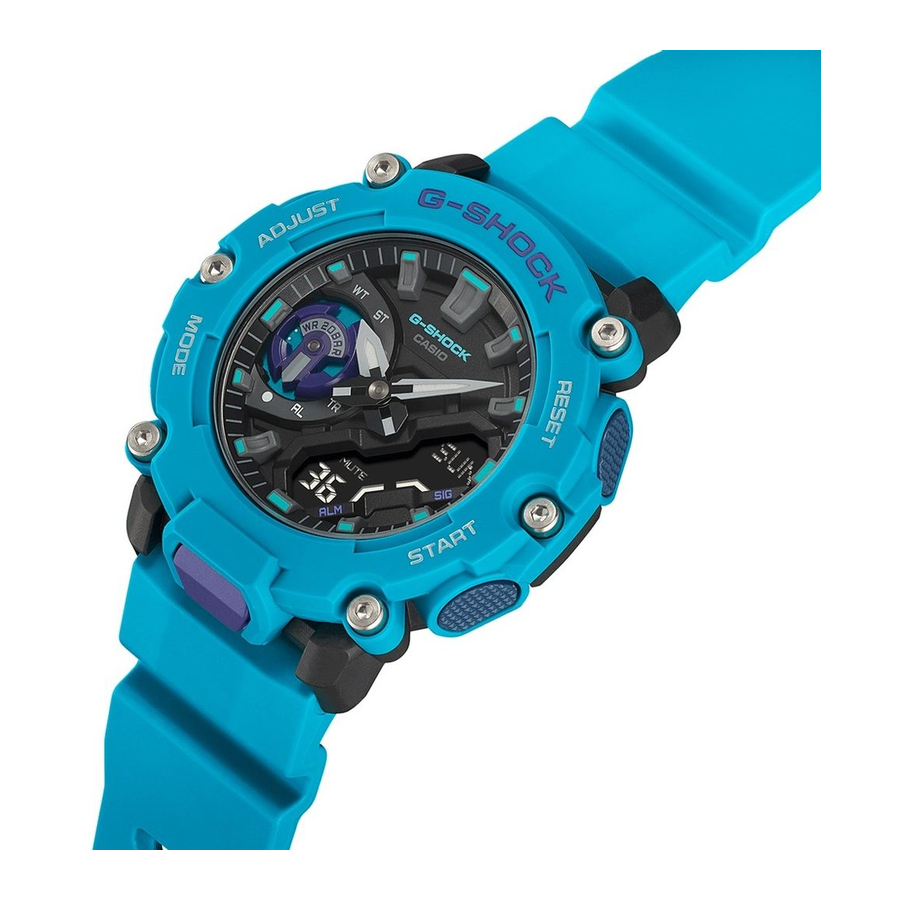
Casio G-Shock GA 2000 является одним из самых популярных и продаваемых моделей часов серии G-Shock. Эти часы имеют множество функций, начиная от противоударного корпуса и заканчивая легким весом. Но несмотря на множество функций, настройка Casio G-Shock GA 2000 очень простая и не занимает много времени. В этой статье мы расскажем, как настроить Casio G-Shock GA 2000.
Во-первых, необходимо установить время. Для этого нужно нажать кнопку «Mode» до тех пор, пока не появится цифра 1 на дисплее. Затем нажмите кнопку «Adjust», чтобы войти в режим настройки. Нажимайте кнопки «Mode» и «Adjust», чтобы изменять значения.
Кроме того, Casio G-Shock GA 2000 имеет другие функции, такие как таймер и будильник. Настройка этих функций также не составляет проблем: нажмите кнопку «Mode» до тех пор, пока не появится нужный режим, затем нажмите кнопку «Adjust» и изменяйте значения кнопками «Mode» и «Adjust».
Наконец, не забудьте проверить, правильно ли установлены часовой пояс, формат 12/24 часа и настройки подсветки дисплея. Эти параметры можно легко настроить в меню настроек.
Содержание
- Как настроить Casio G-Shock GA 2000
- Шаг 1: Установка даты и времени
- Шаг 2: Настройка будильника
- Шаг 3: Настройка таймера
- Шаг 4: Изменение яркости и звука
- Шаг 1. Распакуйте часы
- Шаг 1.1. Извлеките упаковку
- Шаг 1.2. Удалите защитный элемент
- Шаг 1.3. Убедитесь в наличии всех компонентов
- Шаг 1.4. Вставьте батарею
- Шаг 2. Настройте дату и время
- 1. Выберите режим настройки времени
- 2. Настройте часы
- 3. Настройте минуты
- 4. Настройте дату и день недели
- 5. Сохраните настройки
- Шаг 3. Настройте будильники
- 1. Включите режим настройки будильника
- 2. Выберите нужный вам будильник
- 3. Настройте время срабатывания
- 4. Настройте дни повтора будильника
- 5. Выберите мелодию будильника
- Шаг 4. Настройте таймеры и секундомер
- Таймер
- Секундомер
- Шаг 5. Изучите другие функции часов
- Таймер обратного отсчета
- Мировое время и будильник
- Хронограф
- Вопрос-ответ
- Как настроить время на Casio G-Shock GA 2000?
- Как установить будильник на Casio G-Shock GA 2000?
- Как включить и выключить функцию Signal на Casio G-Shock GA 2000?
- Как настроить пробуждение на Casio G-Shock GA 2000?
- Как настроить таймер обратного отсчета на Casio G-Shock GA 2000?
- Как настроить 24-часовой формат времени на Casio G-Shock GA 2000?
- Как настроить громкость звука на Casio G-Shock GA 2000?
Как настроить Casio G-Shock GA 2000
Шаг 1: Установка даты и времени
Для установки даты и времени на вашем Casio G-Shock GA 2000:
- Нажмите и удерживайте кнопку «Adjust» в течение нескольких секунд, пока на дисплее не появится «SET».
- Используя кнопку «Mode», выберите настройку «Time».
- Нажмите «Adjust» и задайте текущее время.
- Нажмите «Mode», чтобы перейти к настройке даты.
- Нажмите «Adjust» и задайте нужную дату.
- Нажмите «Adjust» снова, чтобы закончить установку даты и времени.
Шаг 2: Настройка будильника
Чтобы настроить будильник на вашем Casio G-Shock GA 2000:
- Нажмите кнопку «Mode» до появления настройки «Alarm».
- Нажмите «Adjust», чтобы выбрать час.
- Используйте кнопку «Mode», чтобы перейти к минутам.
- Нажмите «Adjust» и настройте нужное время срабатывания будильника.
- Нажмите «Mode» снова, чтобы завершить настройку.
Шаг 3: Настройка таймера
Чтобы настроить таймер на вашем Casio G-Shock GA 2000:
- Нажмите кнопку «Mode» до появления настройки «Timer».
- Нажмите «Adjust», чтобы выбрать количество минут для таймера.
- Нажмите «Mode», чтобы перейти к настройке секунд.
- Нажмите «Adjust» и настройте нужное время таймера.
- Нажмите «Mode» снова, чтобы закончить настройку.
Шаг 4: Изменение яркости и звука
Для изменения яркости и звука на вашем Casio G-Shock GA 2000:
- Нажмите «Adjust» и удерживайте его, пока не появится «LIGNT».
- Нажмите «Mode», чтобы изменить яркость.
- Нажмите «Adjust», чтобы сохранить яркость.
- Нажмите «Mode» еще раз, чтобы отключить звуковой сигнал.
- Нажмите «Adjust», чтобы сохранить настройку.
- Нажмите любую другую кнопку, чтобы выйти из режима настройки.
Шаг 1. Распакуйте часы
Шаг 1.1. Извлеките упаковку
Перед тем, как начать настраивать Casio G-Shock GA 2000, вам необходимо извлечь часы из упаковки. Начните с того, чтобы аккуратно распаковать коробку и извлечь всю ее содержимое.
Шаг 1.2. Удалите защитный элемент
Для защиты часов во время транспортировки на экране могут быть установлены специальные защитные элементы. Удалите их, чтобы экран стал доступен к настройке.
Шаг 1.3. Убедитесь в наличии всех компонентов
Перед началом настройки убедитесь, что вы получили все необходимые компоненты в комплекте. Он должен содержать часы, инструкцию по эксплуатации и подключению, а также дополнительные элементы, такие как провод для зарядки и другие дополнительные аксессуары. Если какие-то компоненты отсутствуют, свяжитесь с продавцом.
Шаг 1.4. Вставьте батарею
Вставьте батарею в часы, следуя инструкции по эксплуатации. Убедитесь, что батарея была вставлена правильно и достаточно плотно, чтобы избежать сбоев в работе и потерю времени. Если вы не уверены, как правильно вставить батарею, обратитесь к руководству пользователя или обратитесь за помощью к квалифицированному специалисту.
Шаг 2. Настройте дату и время
1. Выберите режим настройки времени
Для настройки времени нажмите и удерживайте кнопку «Adjust» на около 2 секунды, пока на дисплее не появится индикация настроек. Затем нажмите на кнопку «Mode» до тех пор, пока не появится режим настройки времени.
2. Настройте часы
Используйте кнопки «+» и «-» для настройки часов в формате 12H или 24H. Нажмите кнопку «Adjust», чтобы подтвердить выбор.
3. Настройте минуты
Для настройки минуты используйте кнопки «+» и «-» и выберите нужную минуту. Нажмите кнопку «Adjust», чтобы подтвердить выбор.
4. Настройте дату и день недели
Для настройки даты и дня недели используйте кнопки «+» и «-» и выберите нужное значение. Нажмите кнопку «Adjust», чтобы подтвердить выбор.
5. Сохраните настройки
Когда вы закончили настройку времени и даты, нажмите кнопку «Adjust», чтобы сохранить настройки и выйти из режима настройки времени. Теперь вы можете наслаждаться использованием своего Casio G-Shock GA 2000 с правильным временем и датой.
Обратите внимание, что дата может быть отображена в двух форматах: месяц/день или день/месяц. Выберите нужный формат в настройках даты.
Шаг 3. Настройте будильники
1. Включите режим настройки будильника
Чтобы настроить будильник на Casio G-Shock GA 2000, необходимо находиться в режиме настройки. Для этого удерживайте кнопку Adjust в течение нескольких секунд. Время на часах начнет мигать, и вы перейдете в режим настройки.
2. Выберите нужный вам будильник
Нажимайте кнопку Mode, чтобы выбрать нужный вам будильник. Всего в Casio G-Shock GA 2000 есть 5 будильников.
3. Настройте время срабатывания
Чтобы настроить время срабатывания будильника, нажмите кнопку Adjust. Часы на дисплее начнут мигать. Нажимайте кнопки Mode и Adjust, чтобы настроить нужное время срабатывания будильника.
4. Настройте дни повтора будильника
Если вы хотите, чтобы будильник звучал каждый день, нажимайте кнопку Adjust, пока на дисплее не появится символ «ALM». Если вы хотите выбрать только конкретные дни, нажмите кнопки Mode и Adjust, чтобы выбрать нужную комбинацию.
5. Выберите мелодию будильника
Нажимайте кнопку Adjust, пока на дисплее не появится символ «SNZ». Затем, нажимайте кнопки Mode и Adjust, чтобы выбрать нужную мелодию будильника.
После того, как вы настроили будильник на Casio G-Shock GA 2000, нажмите кнопку Adjust, чтобы завершить настройку и вернуться к основному экрану. Теперь ваш будильник готов к использованию!
Шаг 4. Настройте таймеры и секундомер
Таймер
Настройка таймера на Casio G-Shock GA 2000 довольно проста. Для этого нужно:
- Нажать кнопку Mode, чтобы перейти в режим Таймера.
- Нажать кнопку Start/Stop, чтобы начать или остановить таймер.
- Нажать кнопку Adjust, чтобы изменить время таймера.
- Чтобы вернуться в режим Часов, нажмите кнопку Mode.
Примечание: Максимальное время таймера — 60 минут. Если установленное время таймера закончилось, на экране появится звуковой сигнал.
Секундомер
Casio G-Shock GA 2000 имеет два типа секундомера — меры времени с интервалами и простой секундомер.
- Мера времени с интервалами:
- Нажмите кнопку Mode, чтобы перейти в режим Секундомера с интервалами.
- Нажмите кнопку Start/Stop, чтобы начать или остановить измерение времени.
- Нажмите кнопку Lap/Split, чтобы сохранить текущий отрезок времени.
- Для завершения измерения времени нажмите кнопку Start/Stop.
- Чтобы вернуться в режим Часов, нажмите кнопку Mode.
- Простой секундомер:
- Нажмите кнопку Mode, чтобы перейти в режим Простого секундомера.
- Нажмите кнопку Start/Stop, чтобы начать или остановить измерение времени.
- Для завершения измерения времени нажмите кнопку Start/Stop.
- Чтобы вернуться в режим Часов, нажмите кнопку Mode.
Шаг 5. Изучите другие функции часов
Кроме основных функций, у Casio G-Shock GA 2000 есть еще множество дополнительных возможностей. Изучите их, чтобы максимально использовать потенциал часов.
Таймер обратного отсчета
В Casio G-Shock GA 2000 есть таймер обратного отсчета, который может быть установлен до 24 часов. Он может быть использован как напоминание о важных событиях или задачах.
Мировое время и будильник
В Casio G-Shock GA 2000 можно установить часы на мировое время, что позволяет легко следить за временем в других частях света. Также часы имеют несколько будильников, которые можно настраивать на разные часы и дни недели.
Хронограф
Хронограф — это функция, которая позволяет измерять промежуток времени, например, время круга во время тренировки. Casio G-Shock GA 2000 имеет точный хронометраж до 1/100 секунды.
- Таблица международных размеров часов
| Мужские | Женские |
|---|---|
| 47-55 мм | 36-42 мм |
| толщина от 8 мм | толщина от 6 мм |
Изучив возможности Casio G-Shock GA 2000 более детально, вы сможете максимально использовать все ее преимущества и настроить ее для своих индивидуальных потребностей.
Вопрос-ответ
Как настроить время на Casio G-Shock GA 2000?
1. Нажмите и удерживайте кнопку Adjust до тех пор, пока цифры мигают.
Как установить будильник на Casio G-Shock GA 2000?
1. Нажмите кнопку Mode, чтобы перейти к настройке будильника.
Как включить и выключить функцию Signal на Casio G-Shock GA 2000?
1. Нажмите кнопку Mode, чтобы перейти к настройке Signal.
Как настроить пробуждение на Casio G-Shock GA 2000?
1. Нажмите кнопку Mode, чтобы перейти к настройке Alarm.
Как настроить таймер обратного отсчета на Casio G-Shock GA 2000?
1. Нажмите кнопку Timer, чтобы перейти к настройке таймера.
Как настроить 24-часовой формат времени на Casio G-Shock GA 2000?
1. Нажмите и удерживайте кнопку Mode, пока цифры мигают.
Как настроить громкость звука на Casio G-Shock GA 2000?
1. Нажмите и удерживайте кнопку Adjust, пока цифры мигают.
CASIO G-SHOCK GA-2200 — Analog-Digatal Watch Manual
Precautions
Operating Precautions
- Water Resistance
- The information below applies to watches with WATER RESIST or WATER RESISTANT marked on the back cover.
Water Resistance Under Daily Use
| Marking on watch front or on back cover | No BAR mark |
Example of Daily Use
| Hand washing, rain | Yes |
| Water-related work, swimming | No |
| Windsurfing | No |
| Skin diving | No |
Enhanced Water Resistance Under Daily Use
5 Atmospheres
| Marking on watch front or on back cover | 5BAR |
Example of Daily Use
| Hand washing, rain | Yes |
| Water-related work, swimming | Yes |
| Windsurfing | No |
| Skin diving | No |
10 Atmospheres
| Marking on watch front or on back cover | 10BAR |
Example of Daily Use
| Hand washing, rain | Yes |
| Water-related work, swimming | Yes |
| Windsurfing | Yes |
| Skin diving | Yes |
20 Atmospheres
| Marking on watch front or on back cover | 20BAR |
Example of Daily Use
| Hand washing, rain | Yes |
| Water-related work, swimming | Yes |
| Windsurfing | Yes |
| Skin diving | Yes |
- Do not use your watch for scuba diving or other types of diving that requires air tanks.
- Watches that do not have WATER RESIST or WATER RESISTANT marked on the back cover are not protected against the effects of sweat. Avoid using such a watch under conditions where it will be exposed to large amounts of sweat or moisture, or to direct splashing with water.
- Even if a watch is water resistant, note the usage precautions described below. Such types of use reduce water resistance performance and can cause fogging of the glass.
- Do not operate the crown or buttons while your watch is submersed in water or wet. ー Avoid wearing your watch while in the bath.
- Do not wear your watch while in a heated swimming pool, sauna, or any other high temperature/high humidity environment.
- Do not wear your watch while washing your hands or face, while doing housework, or while performing any other task that involves soaps or detergents.
- After submersion in seawater, use plain water to rinse all salt and dirt from your watch.
- To maintain water resistance, have the gaskets of your watch replaced periodically (about once every two or three years).
- A trained technician will inspect your watch for proper water resistance whenever you have its battery replaced. Battery replacement requires the use of special tools. Always request battery replacement from your original retailer or from an authorized CASIO service center.
- Some water-resistant watches come with fashionable leather bands. Avoid swimming, washing, or any other activity that causes direct exposure of a leather band to water.
- The inside surface of the watch glass may fog when the watch is exposed to a sudden drop in temperature. No problem is indicated if the fogging clears up relatively quickly. Sudden and extreme temperature changes (such as coming into an air conditioned room in the summer and standing close to an air conditioner outlet, or leaving a heated room in the winter and allowing your watch to come into contact with snow) can cause it to take longer for glass fogging to clear up. If glass fogging does not clear up or if you notice moisture inside of the glass, immediately stop using your watch and take it to your original retailer or to an authorized CASIO service center.
- Your water-resistant watch has been tested in accordance with International Organization for Standardization regulations.
- Band
- Tightening the band too tightly can cause you to sweat and make it difficult for air to pass under the band, which can lead to skin irritation. Do not fasten the band too tightly. There should be enough room between the band and your wrist so you can insert your finger.
- Deterioration, rust, and other conditions can cause the band to break or come off of your watch, which in turn can cause band pins to fly out of position or to fall out. This creates the risk of your watch falling from your wrist and becoming lost, and also creates the risk of personal injury. Always take good care of your band and keep it clean.
- Immediately stop using a band if you even notice any of the following: loss of band flexibility, band cracks, band discoloration, band looseness, band connecting pin flying or falling out, or any other abnormality. Take your watch to your original retailer or to a CASIO service center for inspection and repair (for which you will be charged) or to have the band replaced (for which you will be charged).
- Temperature
- Never leave your watch on the dashboard of a car, near a heater, or in any other location that is subject to very high temperatures. Do not leave your watch where it will be exposed to very low temperatures. Temperature extremes can cause your watch to lose or gain time, to stop, or otherwise malfunction.
- Leaving your watch in an area hotter than +60°C (140°F) for long periods can lead to problems with its LCD. The LCD may become difficult to read at temperatures lower than 0°C (32°F) and greater than +40°C (104°F).
- Impact
- Your watch is designed to withstand impact incurred during normal daily use and during light activity such as playing catch, tennis, etc. Dropping your watch or otherwise subjecting it to strong impact, however, can lead to malfunction. Note that watches with shock-resistant designs (G-SHOCK, BABY-G, G-MS) can be worn while operating a chain saw or engaging in other activities that generate strong vibration, or while engaging in strenuous sports activities (motocross, etc.)
- Magnetism
- The hands of analog and combination (analog-digital) watches are moved by a motor that uses magnetic force. When such a watch is close to a device (audio speakers, magnetic necklace, cell phone, etc.) that emits strong magnetism, the magnetism can cause timekeeping to slow down, speed up, or stop, resulting in the incorrect time being displayed.
- Very strong magnetism (from medical equipment, etc.) should be avoided because it can cause malfunction of your watch and damage to electronic components.
- Electrostatic Charge
- Exposure to very strong electrostatic charge can cause your watch to display the wrong time. Very strong electrostatic charge even can damage electronic components.
- Electrostatic charge can cause the display to go blank momentarily or cause a rainbow effect on the display.
- Chemicals
- Do not allow your watch to come into contact with thinner, gasoline, solvents, oils, or fats, or with any cleaners, adhesives, paints, medicines, or cosmetics that contain such ingredients. Doing so can cause discoloration of or damage to the resin case, resin band, leather, and other parts.
- Storage
- If you do not plan to use your watch for a long time, thoroughly wipe it free of all dirt, sweat, and moisture, and store it in a cool, dry place.
- Resin Components
- Allowing your watch to remain in contact with other items or storing it together with other items for long periods while it is wet can cause color on resin components to transfer to the other items, or the color of the other items to transfer to the resin components of your watch. Be sure to dry off your watch thoroughly before storing it and make sure it is not in contact with other items.
- Leaving your watch where it is exposed to direct sunlight (ultraviolet rays) for long periods or failure to clean dirt from your watch for long periods can cause it to become discolored.
- Friction caused by certain conditions (strong external force, sustained rubbing, impact, etc.) can cause discoloration of painted components.
- If there are printed figures on the band, strong rubbing of the printed area can cause discoloration.
- Leaving your watch wet for long periods can cause fluorescent color to fade. Wipe the watch dry as soon as possible after it becomes wet.
- Semi-transparent resin parts can become discolored due to sweat and dirt, and if exposed to high temperatures and humidity for long periods.
- Daily use and long-term storage of your watch can lead to deterioration, breaking, or bending of resin components. The extent of such damage depends on usage conditions and storage conditions.
- Leather Band
- Allowing your watch to remain in contact with other items or storing it together with other items for long periods while it is wet can cause the color of the leather band to transfer to the other items or the color of the other items to transfer to the leather band. Be sure to dry off your watch thoroughly with a soft cloth before storing it and make sure it is not in contact with other items.
- Leaving a leather band where it is exposed to direct sunlight (ultraviolet rays) for long periods or failure to clean dirt from a leather band for long periods can cause it to become discolored.
Exposing a leather band to rubbing or dirt can cause color transfer and discoloration. - Metal Components
- Failure to clean dirt from metal components can lead to formation of rust, even if components are stainless steel or plated. If metal components exposed to sweat or water, wipe thoroughly with a soft, absorbent cloth and then place the watch in a well-ventilated location to dry.
- Use a soft toothbrush or similar tool to scrub the metal with a weak solution of water and a mild neutral detergent, or with soapy water. Next, rinse with water to remove all remaining detergent and then wipe dry with a soft absorbent cloth. When washing metal components, wrap the watch case with kitchen plastic wrap so it does not come into contact with the detergent or soap.
- Bacteria and Odor Resistant Band
- The bacteria and odor resistant band protects against odor generated by the formation of bacteria from sweat, which ensures comfort and hygiene. In order to ensure maximum bacteria and odor resistance, keep the band clean. Use an absorbent soft cloth to thoroughly wipe the band clean of dirt, sweat, and moisture. A bacteria and odor resistant band suppresses the formation of organisms and bacteria. It does not protect against rash due to allergic reaction, etc.
- Liquid Crystal Display
- Display figures may be difficult to read when viewed from an angle.
Note that CASIO Computer Co., Ltd. assumes no responsibility for any damage or loss suffered by you or any third party arising through the use of your watch or its malfunction.
User Maintenance
- Caring for Your Watch
Remember that you wear your watch next to your skin, just like a piece of clothing. To ensure your watch performs at the level for which it is designed, keep it clean by frequently wiping with a soft cloth to keep your watch and band free of dirt, sweat, water and other foreign matter.
- Whenever your watch is exposed to sea water or mud, rinse it off with clean fresh water.
- For a metal band or a resin band with metal parts, use a soft toothbrush or similar tool to scrub the band with a weak solution of water and a mild neutral detergent, or with soapy water. Next, rinse with water to remove all remaining detergent and then wipe dry with a soft absorbent cloth. When washing the band, wrap the watch case with kitchen plastic wrap so it does not come into contact with the detergent or soap.
- For a resin band, wash with water and then wipe dry with a soft cloth. Note that sometimes a smudge like pattern may appear on the surface of a resin band. This will not have any effect on your skin or clothing. Wipe with a cloth to remove the smudge pattern.
- Clean water and sweat from a leather band by wiping with a soft cloth.
- Not operating a watch crown, buttons, or rotary bezel could lead to later problems with their operation. Periodically rotate the crown and rotary bezel, and press buttons to maintain proper operation.
- Dangers of Poor Watch Care
Rust
- Though the metal steel used for your watch is highly rust-resistant, rust can form if your watch is not cleaned after it becomes dirty.
— Dirt on your watch can make it impossible for oxygen to come into contact with the metal, which can lead to breakdown of the oxidization layer on the metal surface and the formation of rust.
- Rust can cause sharp areas on metal components and can cause band pins to fly out of position or to fall out. If you ever notice any abnormality immediately stop using your watch and take it to your original retailer or to an authorized CASIO service center.
- Even if the surface of the metal appears clean, sweat and rust in crevasses can soil the sleeves of clothing, cause skin irritation, and even interfere with watch performance.
Premature Wear
- Leaving sweat or water on a resin band or bezel, or storing your watch an area subject to high moisture can lead to premature wear, cuts, and breaks.
Skin Irritation
- Individuals with sensitive skin or in poor physical condition may experience skin irritation when wearing a watch. Such individuals should keep their leather band or resin band particularly clean. Should you ever experience a rash or other skin irritation, immediately remove your watch and contact a skin care professional.
Battery Replacement
- Leave battery replacement up to your original retailer or authorized CASIO service center.
- Have the batteries replaced only with the type specified in the «Specifications». Use of a different battery type can cause malfunction.
- When replacing the batteries, also request a check for proper water resistance.
- Ornamental resin components may become worn, cracked, or bent over time when subjected to normal daily use. Note that if cracking or any other abnormality indicating possible damage is noticed in a watch submitted for battery replacement, your watch will be returned with an explanation of the abnormality, without the requested servicing being performed.
- Initial Batteries
- The batteries that come loaded in your watch when you purchase it are used for function and performance testing at the factory.
- Test batteries may go dead quicker than the normally rated battery life noted in the «Specifications». Note that you will be charged for replacement of these batteries, even if replacement is required within your watch’s warranty period.
- Low Battery Power
- Low battery power is indicated by large timekeeping error, by dim display contents, or by a blank display.
- Operation while battery power is low can result in malfunction. Replace the batteries as soon as possible.
Before Getting Started…
This section provides an overview of the watch and introduces convenient ways it can be used.
Watch Features
- World Time
You can display the current time in any one of 48 cities around the globe, as well as for UTC (Coordinated Universal Time).
- Alarm
An alarm sounds whenever a time specified by you is reached.
- Stopwatch
The stopwatch measures elapsed time in units of 1/100 second for the first hour, and in one-second units thereafter, for up to 24 hours.
- Timer
Countdown from a start time specified by you. An alarm sounds when the countdown reaches zero.
Note
- The illustrations included in this operation guide have been created to facilitate explanation. An illustration may differ somewhat from the item it represents.
General Guide
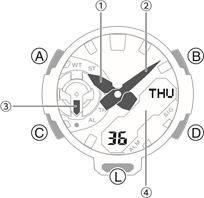
- Hour hand
- Minute hand
- Mode hand indicates the current mode.
- LCD
A button
Holding down this button for at least two seconds in the Timekeeping Mode displays the setting screen.
Pressing this button while any setting screen is displayed exits the setting screen.
B button
Pressing this button while any setting screen is displayed will change the setting.
C button
Each press cycles between watch modes.
In any mode, hold down this button for at least three seconds to return to the Timekeeping Mode.
D button
Pressing this button in the Timekeeping Mode cycles between displays.
Pressing this button while any setting screen is displayed will change the setting.
L button
Press to turn on illumination.
Pressing this button twice in succession shifts the hands for easy reading of the digital display area.
Watch Face and Display Indicators
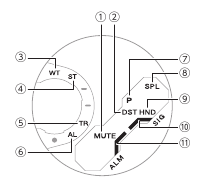
- Displayed while the button operation tone is disabled.
- Displayed while the watch is indicating summer time.
- In the World Time Mode, the mode hand points to [WT].
- In the Stopwatch Mode, the mode hand points to [ST].
- In the Timer Mode, the mode hand points to [TR].
- In the Alarm Mode, the mode hand points to [AL].
- Displayed during p.m. times while 12-hour timekeeping is being used.
- Displayed while a Stopwatch Mode split time measurement operation is in progress.
- Flashes while the watch’s hands are shifted for easier reading.
- Displayed while the hourly time signal is enabled.
- Displayed while an alarm is turned on.
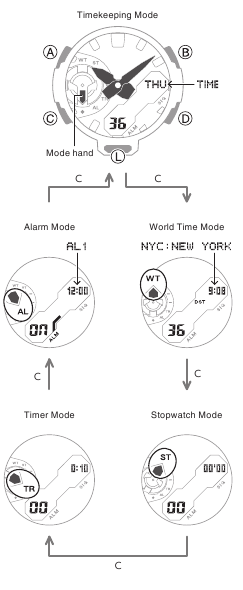
Navigating Between Modes
Each press of (C) cycles between watch modes.
- In any mode, hold down (C) for at least three seconds to return to the Timekeeping Mode.
Cycling Between Timekeeping Mode Digital Display Contents
Each press of (D) in the Timekeeping Mode cycles the display information as shown below.
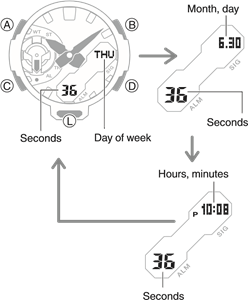
- Pressing (B) displays the World Time city code and then the current time in that city.
Shifting Hands to Read the Digital Display
Hand shift moves the hands out of the way for easy viewing of display information.
- Press (L) twice in succession.
- This will shift the analog hands to allow easy viewing of display information.
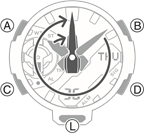
- To return the hands to their normal timekeeping positions, press (L) twice in succession again, or press (C) to change to another mode.
Note
- If you leave the watch with its hands shifted and do not perform any operation for about one hour, the hands will resume normal timekeeping automatically.
Viewing the Face in the Dark
The watch has an LED light that you can turn on for reading in the dark.
- Turning On Illumination
Press (L) to turn on illumination.
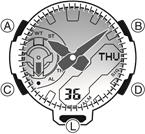
- Illumination will turn off automatically if an alarm starts to sound.
- Illumination is disabled while the hands are moving at high speed.
- The light may flicker when it turns on or off.
- Specifying the Illumination Duration
You can select either 1.5 seconds or three seconds as the illumination duration.
- Enter the Timekeeping Mode.
- Hold down (A) for at least two seconds until the name of the currently selected Home City is displayed.
- This is the setting mode. The hands automatically shift out of the way for easy viewing of the display and other indicators.
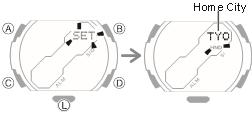
- Press (C) 10 times to display [LIGHT].
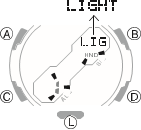
- Use (B) and (D) to select an illumination duration.
[1]: 1.5-second illumination
[3]: 3-second illumination
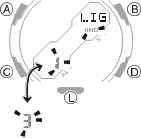
- Press (A) to exit the setting screen.
Time Adjustment
Use the procedures in this section to adjust the date and time settings.
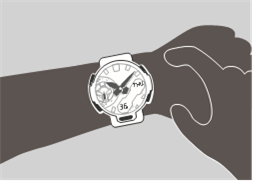
Adjusting the Current Time Setting
Use the procedures below to adjust the current date and time settings, and to select a Home City.
- Setting a Home City
Use the procedure in this section to select a city to use as your Home City. If you are in an area that observes summer time, you can also configure a summer time setting.
- Enter the Timekeeping Mode.
- Hold down (A) for at least two seconds. Release the button when the name of the currently selected Home City appears on the display.
- This is the setting mode. The hands automatically shift out of the way for easy viewing of the display and other indicators.
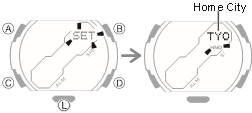
- Use (B) and (D) to change the Home City setting.
- Holding down (B) or (D) scrolls through settings at high speed.
- For details refer to the information below.
- Press (C).
- Press (B) or (D) to change the summer time setting.
- [OFF]
The watch always indicates standard time. - [ON]
The watch always indicates summer time.
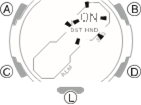
- Press (A) to complete the setting operation.
Note
- While the setting is being configured, the watch will exit the setting operation automatically after about two or three minutes of non-operation.
- Setting the Time/Date
- Enter the Timekeeping Mode.
- Hold down (A) for at least two seconds. Release the button when the name of the currently selected Home City appears on the display.
- This is the setting mode. The hands automatically shift out of the way for easy viewing of the display and other indicators.
- Keep pressing (C) until the setting you want to change is flashing.
- Each press of (C) moves the flashing to the next setting in the sequence shown below.
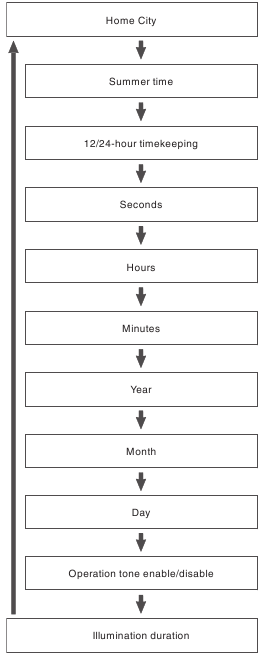
- Configure the date and time settings.
- To reset the seconds to 00: Press (D). 1 is added to the minutes when the current count is between 30 and 59 seconds.
- For all the other settings, use (B) and (D) to change the flashing setting. Holding down (B) or (D) scrolls through settings at high speed.
- Repeat steps 3 and 4 to select time and date settings.
- Press (A) to complete the setting operation.
Note
- While the setting is being configured, the watch will exit the setting operation automatically after about two or three minutes of non-operation.
- Switching between 12-hour and 24hour Timekeeping
You can specify either 12-hour format or 24hour format for the time display.
- Enter the Timekeeping Mode.
- Hold down (A) for at least two seconds. Release the button when the name of the currently selected Home City appears on the display.
- This is the setting mode. The hands automatically shift out of the way for easy viewing of the display and other indicators.
- Press (C) twice.
This causes [12H] or [24H] to flash on the display.
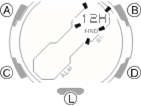
- Press (B) or (D) to select [12H] (12-hour timekeeping) or [24H] (24-hour timekeeping).
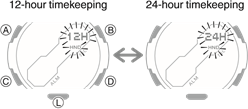
- Press (A) to complete the setting operation.
Note
- While the setting is being configured, the watch will exit the setting operation automatically after about two or three minutes of non-operation.
World Time
World Time lets you look up the current time in any one of 48 cities around the globe, and UTC (Coordinated Universal Time).
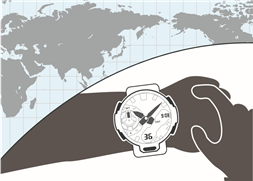
Checking World Time
- Enter the World Time Mode.
After the currently selected World Time City name appears, the watch will display the current time in that city.
- While in World Time Mode, you can display the World Time City by pressing (A).
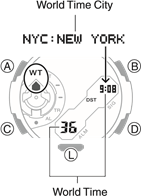
World Time City Setting
Use the procedure in this section to select a World Time city. If you are in an area that observes summer time, you can also configure a summer time setting.
- Enter the World Time Mode.
- Use (B) and (D) to display the city you want to specify as a World Time City.
- Holding down (B) or (D) scrolls through settings at high speed.
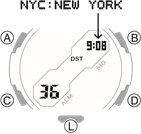
- To change the summer time setting, hold down (A) for at least two seconds.
- Each time you hold down (A) for at least two seconds, the setting will toggle between summer time and standard time.
- [DST] appears whenever the display current time is summer time.
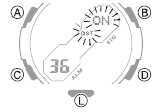
Note
- While the setting is being configured, the watch will exit the setting operation automatically after about two or three minutes of non-operation.
- While [UTC] is selected as the city, you will not be able to change or check the summer time setting.
- The summer time setting you configure is applied to the currently selected city only. It does not affect other cities.
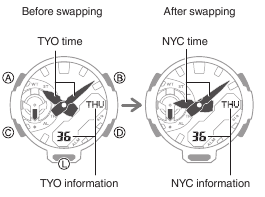
Swapping Your Home Time and World Time
- Enter the Timekeeping Mode.
- Hold down (B) for at least three seconds.
This causes [SWAP] to flash on the display. Next, your Home City Time and World Time will swap with each other.
Example: To swap your Home City
(TYO:TOKYO) and World Time City
(NYC:NEW YORK)
Alarm
The watch will beep when an alarm time is reached. You can set up to five different alarms. The hourly time signal causes the watch to beep every hour on the hour.
Configuring Alarm Settings
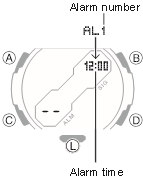
- Enter the Alarm Mode.
- Use (B) and (D) to select the alarm ([AL1] to [AL5]) whose setting you want to change.
- Hold down (A) for at least two seconds. Release the button when the hours digits start to flash.
- This is the setting mode. The hands automatically shift out of the way for easy viewing of the display and other indicators.
- While the setting is being configured, the watch will exit the setting operation automatically after about two or three minutes of non-operation.
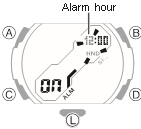
- Use (B) and (D) to change the hour setting.
- Holding down (B) or (D) scrolls through settings at high speed.
- If you are using 12-hour timekeeping, [P] indicates p.m.
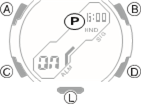
- Press (C).
This causes the minutes digits to flash.
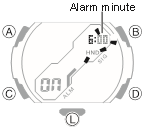
- Use (B) and (D) to set the minute setting.
- Press (A) to exit the setting screen.
- [ALM] is shown on the display while an alarm is set.
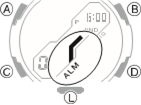
- To stop the alarm
Pressing any button while the beeper is sounding stops it.
Note
- A beeper sounds for 10 seconds when an alarm time is reached.
- The watch will automatically return from the Alarm Mode to the Timekeeping Mode if you do not perform any operation for about two or three minutes.
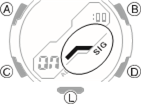
Enabling the Hourly Time Signal
- Enter the Alarm Mode.
- Press (B) or (D) to display the hourly time signal screen ([SIG]).
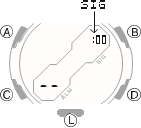
- Press (A) to toggle the hourly time signal between enabled (on) and disabled (off).
- [SIG] is displayed while the hourly time signal is enabled.
Turning Off an Alarm or the Hourly Time Signal
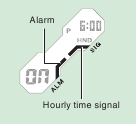
To stop an alarm or the hourly time signal from sounding, perform the steps below to turn it off.
- To have an alarm or hourly time signal sound again, turn it back on.
Note
- Indicators are displayed while any of the alarms or the hourly time signal is turned on.
- The applicable indicators are not displayed while all of the alarms are turned off and/or the hourly time signal is turned off.
- Enter the Alarm Mode.
- Use (B) and (D) to scroll through the alarm
- ([AL1] to [AL5]) and hourly time signal ([SIG]) screens until the one you want to turn off is displayed.
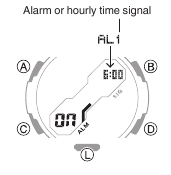
- Press (A) to turn off the displayed alarm or the hourly time signal.
- Each press of (A) toggles between ON and OFF.
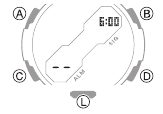
- Turning off all of the alarms and the hourly time signal causes [ALM] and [SIG] to disappear from the display.
Note
- If [ALM] remains on the display, it means that at least one alarm is still turned on. To turn off all of the alarms, repeat steps 2 and 3 until the [ALM] indicator is no longer displayed.
Stopwatch
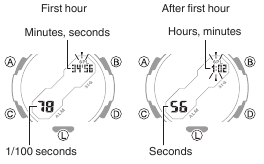
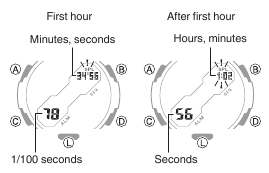
The stopwatch measures elapsed time in 1/100-second units for the first hour, and in 1second units after that for up to 24 hours.
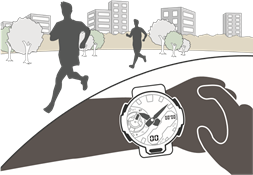
Measuring Elapsed Time
- Enter the Stopwatch Mode.
- Use the operations below to measure elapsed time.
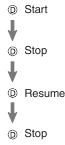
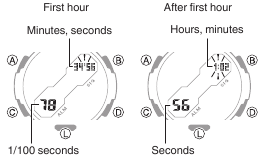
- Elapsed time is shown in 1/100-second units for the first hour of the measurement. After the first hour, elapsed time is shown in one-second units.
- Press (B) to reset the stopwatch to all zeros.
Measuring a Split Time
- Enter the Stopwatch Mode.
- Use the operations below to measure elapsed time.
- Pressing (B) displays the elapsed time from the start of a race up to the point when you pressed the button (split time).
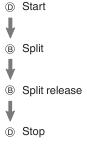
- Elapsed time is shown in 1/100-second units for the first hour of the measurement. After the first hour, elapsed time is shown in one-second units.
- Press (B) to reset the stopwatch to all zeros.
Timing the First and Second Place Finishers
- Enter the Stopwatch Mode.
- Use the operations below to measure elapsed time.
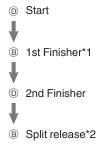
*1 Displays the time of the first finisher.
*2 Displays the time of the second finisher.
- Elapsed time is shown in 1/100-second units for the first hour of the measurement. After the first hour, elapsed time is shown in one-second units.
- Press (B) to reset the stopwatch to all zeros.
Timer
The timer counts down from a start time specified by you. A beeper sounds when the end of the countdown is reached.
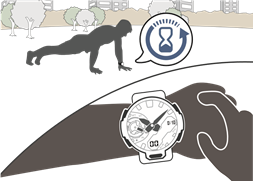
Setting the Countdown Start Time
The countdown start time can be set in 1second units up to 24 hours.
- If a timer countdown operation is in progress, reset the timer to its current start time before performing this operation.
- Enter the Timer Mode.
- Hold down (A) for at least two seconds. Release the button when the hour setting starts to flash.
This causes the hours digit to flash.
- This is the setting mode. The hands automatically shift out of the way for easy viewing of the display and other indicators.
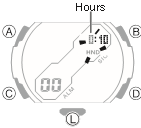
- Use (B) and (D) to change the timer hours setting.
- Holding down (B) or (D) scrolls through settings at high speed.
- Press (C).
This causes the minutes digits to flash.
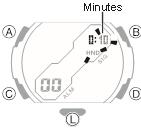
- Use (B) and (D) to change the minutes setting.
- Press (C).
This causes the seconds digits to flash.
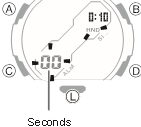
- Use (B) and (D) to change the seconds setting.
- Press (A) to complete the setting operation.
Note
- Setting a start time of [0:00 00] will perform a countdown of 24 hours.
- While the setting is being configured, the watch will exit the setting operation automatically after about two or three minutes of non-operation.
Using the Timer
- Enter the Timer Mode.
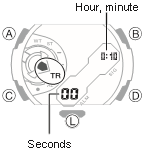
- Use the operations below to perform a timer operation.
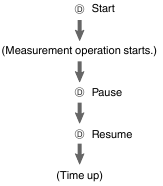
- A beeper will sound for 10 seconds to let you know when the end of a countdown is reached.
- You can reset a paused countdown to its start time, by pressing (B).
- Press any button to stop the tone.
Hand Alignment Adjustment
Strong magnetism or impact can cause the time indicated by the analog hands to become different from the time on the digital display. If this happens, adjust hand alignment.
Adjusting Hand Alignment
- Enter the Timekeeping Mode.
- Hold down (A) for at least five seconds. Release the button when [SUB] starts to flash.
This enables adjustment of mode hand alignment.
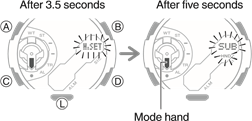
- If the mode hand is not aligned with 6 o’clock, use (B) and (D) to align it.
- Holding down (B) or (D) scrolls through settings at high speed.
- Press (C).
This enables adjustment of the hour and minute hands.
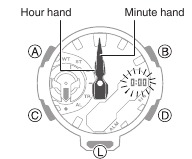
- If the hour and minute hands are not at 12 o’clock, use (B) and (D) to align them.
- Press (A) to complete the setting operation.
Other Settings
This section explains other watch settings you can configure.
Enabling the Button Operation Tone
Use the procedure below to enable or disable the tone that sounds when you press a button.
- Enter the Timekeeping Mode.
- Hold down (A) for at least two seconds. Release the button when the name of the currently selected Home City appears on the display.
- This is the setting mode. The hands automatically shift out of the way for easy viewing of the display and other indicators.
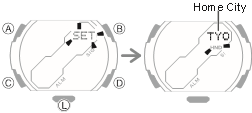
- Press (C) nine times.
This causes [KEY♪] or [MUTE] to flash on the display.
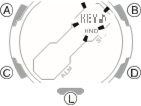
- Use (B) and (D) to select [KEY♪] or [MUTE].
[KEY♪]: Operation tone enabled.
[MUTE]: Operation tone muted.
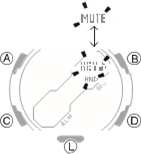
- Press (A) to exit the setting screen.
Note
- While the setting is being configured, the watch will exit the setting operation automatically after about two or three minutes of non-operation.
- Note that alarm and timer tones will still sound even while the operation tone is muted.
Other Information
This section provides non-operational information you also need to know. Refer to this information as required.
City table
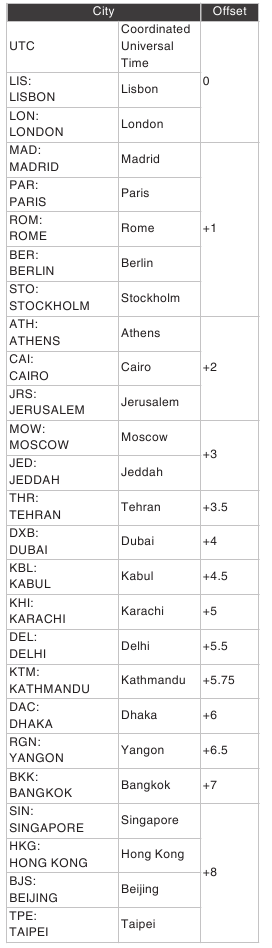
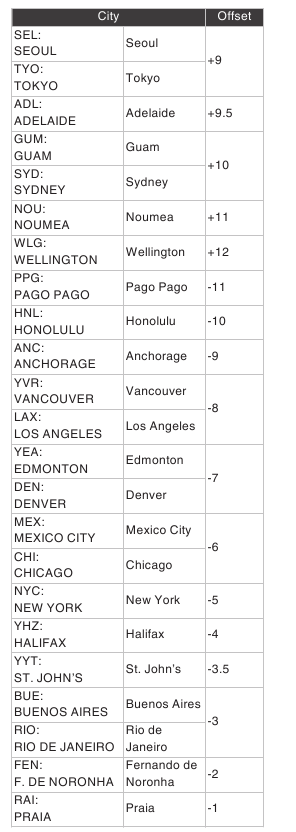
- The information in the above table is current as of July 2020.
- Time zones may change and UTC differentials may become different from those shown in the table above.
Specification
Accuracy at normal temperature:
±15 seconds a month
Timekeeping:
Analog
Hour, minute (moves every 20 seconds)
Digital
Hour, minute, second, month, day, day of the week
a.m./p.m.(P)/24-hour timekeeping
Full Auto Calendar (2000 to 2099) Summer Time
World Time:
48 cities (31 time zones) and Coordinated
Universal Time (UTC)
Summer time
Home Time swapping
Stopwatch:
Measurement unit
1/100 seconds (first hour)
1 second (after first hour)
Measuring capacity: 23:59’59» (24 hours)
Measurement Functions:
Elapsed time, cumulative time, split times, 1st and 2nd place finisher times
Timer:
Measuring unit: 1 second
Measuring range: 24 hours
Time setting unit: 1 second
Time setting range: 1 second to 24 hours 10-second beeper when the end of the countdown is reached
Alarm:
Time alarms
Number of alarms 5
Setting units
Hours, minutes
Alarm tone duration: 10 seconds
Hourly time signal: Beep every hour on the hour
Double LED light:
Face LED light: Super Illuminator, afterglow, selectable illumination duration (approximately 1.5 seconds or 3 seconds)
LCD LED backlight: Super Illuminator, afterglow, selectable illumination duration (approximately 1.5 seconds or 3 seconds)
Other:
Operation tone ON/ OFF; hand shift
Power Supply:
SR726W x 2
Battery life: Approximately 3 years
Conditions:
Alarm: Once (10 seconds)/day
Illumination: Once (1.5 seconds)/day
Specifications are subject to change without notice.
Troubleshooting
Indicators and Current Time
Q1 I don’t know what mode the watch is in
You can determine the current mode by checking the mode hand position. Use (C) to navigate between modes.
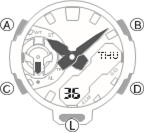
Q2 Why is the current time indicated by the watch is off by a certain amount of time (nine hours, three hours and 15 minutes, etc.)?
The city setting is not correct. Select the correct setting.
Q3 The current time indicated by the watch is off by one hour or 30 minutes.
The summer time setting is not correct. Select the correct setting.
Q4 The time indicated by the hands is different from the digital time.
Strong magnetism or impact can cause the hands to go out of alignment. Adjust hand alignment.
World Time
Q1 The time for a World Time City is not correct.
The summer time setting (standard time/ summer time) is wrong.
Alarm
Q1. The alarm does not sound.
Is the alarm setting turned on? If it isn’t, turn it on so it will sound.
Other
Q1 I can’t find the information I need here.
Visit the website below. https://world.casio.com/support/

Documents / Resources
References
 Support | CASIO
Download manual
Here you can download full pdf version of manual, it may contain additional safety instructions, warranty information, FCC rules, etc.
Download CASIO G-SHOCK GA-2200 — Analog-Digatal Watch Manual

Operation Guide 5590
E-9
To do this: Enter this mode: See:
Set an alarm time Alarm Mode E-35
E-8
Mode Reference Guide
The mode you should select depends on what you want to do.
To do this: Enter this mode: See:
x View the current date in the Home City
x Configure Home City and daylight saving time (DST)
settings
x Configure time and date settings
x View the World Time city and time
x Swap Home Time and World Time information
x Change the display illumination duration setting
x Enable/disable the button operation tone
Timekeeping Mode
E-15
View the current time in one of 48 cities (31 time
zones) around the globe
World Time Mode E-25
Use the stopwatch to measure elapsed time Stopwatch Mode E-28
Use the countdown timer Countdown Timer Mode E-32
E-7E-6
Troubleshooting . . . . . . . . . . . . . . . . . . . . . . . . . . . . . . . . . . . . . . . . . . . . . . . . . E-45
Main Indicators . . . . . . . . . . . . . . . . . . . . . . . . . . . . . . . . . . . . . . . . . . . . . . . . . E-47
Specifications. . . . . . . . . . . . . . . . . . . . . . . . . . . . . . . . . . . . . . . . . . . . . . . . . . . E-48
Operating Precautions . . . . . . . . . . . . . . . . . . . . . . . . . . . . . . . . . . . . . . . . . . . E-51
User Maintenance . . . . . . . . . . . . . . . . . . . . . . . . . . . . . . . . . . . . . . . . . . . . . . . E-62
E-5
Using the Alarm . . . . . . . . . . . . . . . . . . . . . . . . . . . . . . . . . . . . . . . . . . . . . . . . . E-35
To enter the Alarm Mode . . . . . . . . . . . . . . . . . . . . . . . . . . . . . . . . . . . . . . . . E-35
To set an alarm time . . . . . . . . . . . . . . . . . . . . . . . . . . . . . . . . . . . . . . . . . . . E-36
To test the alarm . . . . . . . . . . . . . . . . . . . . . . . . . . . . . . . . . . . . . . . . . . . . . . E-37
To turn an alarm and the Hourly Time Signal on and off . . . . . . . . . . . . . . . . . E-38
To stop the alarm . . . . . . . . . . . . . . . . . . . . . . . . . . . . . . . . . . . . . . . . . . . . . E-38
Illumination . . . . . . . . . . . . . . . . . . . . . . . . . . . . . . . . . . . . . . . . . . . . . . . . . . . . . E-39
To turn on illumination . . . . . . . . . . . . . . . . . . . . . . . . . . . . . . . . . . . . . . . . . . E-39
To change the illumination duration . . . . . . . . . . . . . . . . . . . . . . . . . . . . . . . . E-40
Adjusting Hand Positions . . . . . . . . . . . . . . . . . . . . . . . . . . . . . . . . . . . . . . . . . E-41
Button Operation Tone . . . . . . . . . . . . . . . . . . . . . . . . . . . . . . . . . . . . . . . . . . . E-43
To turn the button operation tone on and off . . . . . . . . . . . . . . . . . . . . . . . . . E-44
E-4
Checking the Current Time in a Different Time Zone . . . . . . . . . . . . . . . . . . . E-25
To enter the World Time Mode. . . . . . . . . . . . . . . . . . . . . . . . . . . . . . . . . . . . E-26
To view the time in another time zone . . . . . . . . . . . . . . . . . . . . . . . . . . . . . . E-26
To specify standard time or daylight saving time (DST) for a city . . . . . . . . . . . E-27
Using the Stopwatch . . . . . . . . . . . . . . . . . . . . . . . . . . . . . . . . . . . . . . . . . . . . . E-28
To enter the Stopwatch Mode . . . . . . . . . . . . . . . . . . . . . . . . . . . . . . . . . . . . E-28
To perform an elapsed time operation . . . . . . . . . . . . . . . . . . . . . . . . . . . . . . E-29
To pause at a split time . . . . . . . . . . . . . . . . . . . . . . . . . . . . . . . . . . . . . . . . . E-29
To measure two finishes . . . . . . . . . . . . . . . . . . . . . . . . . . . . . . . . . . . . . . . . E-29
Countdown Timer . . . . . . . . . . . . . . . . . . . . . . . . . . . . . . . . . . . . . . . . . . . . . . . E-32
To enter the Countdown Timer Mode . . . . . . . . . . . . . . . . . . . . . . . . . . . . . . . E-32
To configure the countdown timer . . . . . . . . . . . . . . . . . . . . . . . . . . . . . . . . . E-33
To perform a countdown timer operation . . . . . . . . . . . . . . . . . . . . . . . . . . . . E-34
To stop the alarm . . . . . . . . . . . . . . . . . . . . . . . . . . . . . . . . . . . . . . . . . . . . . E-34
E-3
Contents
About This Manual . . . . . . . . . . . . . . . . . . . . . . . . . . . . . . . . . . . . . . . . . . . . . . . . E-1
Things to check before using the watch . . . . . . . . . . . . . . . . . . . . . . . . . . . . . . E-2
Mode Reference Guide . . . . . . . . . . . . . . . . . . . . . . . . . . . . . . . . . . . . . . . . . . . . E-8
Timekeeping . . . . . . . . . . . . . . . . . . . . . . . . . . . . . . . . . . . . . . . . . . . . . . . . . . . . E-15
To swap your Home City and World Time City . . . . . . . . . . . . . . . . . . . . . . . . E-17
Configuring Home City Settings . . . . . . . . . . . . . . . . . . . . . . . . . . . . . . . . . . . . E-18
To configure Home City settings . . . . . . . . . . . . . . . . . . . . . . . . . . . . . . . . . . E-18
To change the Daylight Saving Time (summer time) setting . . . . . . . . . . . . . . E-20
Adjusting the Digital Time and Date Settings . . . . . . . . . . . . . . . . . . . . . . . . . E-21
To configure the digital time and date settings . . . . . . . . . . . . . . . . . . . . . . . . E-21
E-2
Things to check before using the watch
1. Check the Home City and the daylight saving time (DST) setting.
Use the procedure under “To configure Home City settings” (page E-18) to configure
your Home City and daylight saving time settings.
Important!
x Proper World Time Mode data depends on correct Home City, time, and date
settings in the Timekeeping Mode. Make sure you configure these settings
correctly.
2. Set the current time.
x See “Adjusting the Digital Time and Date Settings” (page E-21).
The watch is now ready for use.
E-1
About This Manual
x Depending on the model of your watch, display text
appears either as dark figures on a light background, or
light figures on a dark background. All sample displays
in this manual are shown using dark figures on a light
background.
x Button operations are indicated using the letters shown
in the illustration.
x Note that the product illustrations in this manual are
intended for reference only, and so the actual product
may appear somewhat different than depicted by an
illustration.
E
ENGLISH
Congratulations upon your selection of this CASIO watch.
To ensure that this watch provides you with the years of service for which it is
designed, carefully read and follow the instructions in this manual, especially the
information under “Operating Precautions” and “User Maintenance”.
MA1902-EA
2019 CASIO COMPUTER CO., LTD.

Casio Watch Line: G-Shock
Module number: 5590
Manual in PDF: Watch 5590 Online → (without downloading, good for mobile);
English Instruction Manual in PDF: Download
Like your watch? Enjoy our recent news about GA-2000 Series


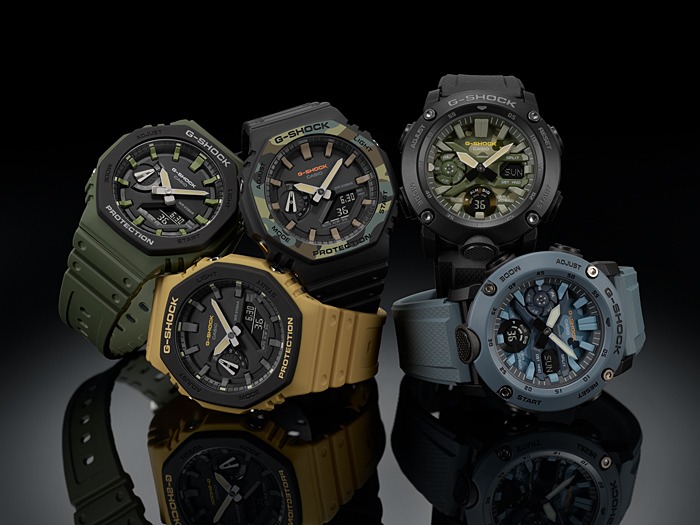
All G-Shock GA-2000 News →
GA-2000 Profile / Casio G-Shock
Average Amazon Price: $125 (yes, we may earn a commission on qualifying purchases from our links to Amazon). Check the Price on Amazon →
Year of first release: 2019
Lineup: STANDART ANA-DIGI (This Line includes Digital and Analog displays on G-Shocks that are the best in “price/quality” category. Usually have traditional digital functions, but with beautiful hands. Don’t worry, the hands won’t prevent you from seeing digits, since there is a special Hand Shift technology that moves them to the neutral position) All G-Shock Standart Ana-Digi Watches →
Best for: Teenagers, Top in G-Shock Lookbooks, Artists, Singers, Dancers…
The most distinctive specs:
– 200-meter water resistance (good for swimming but not for deep diving)
– Carbon Core Guard structure (protects the module by enclosing it in a carbon case. The case is made of fine resin embedded with carbon fibers for outstanding strength and crack resistance)
– Dual Back Cover (GA-2000 features a stainless-steel panel back that keeps the watch airtight, as well as a fine resin glass fibre case back that makes it tough against shocks)
Other colors and full specs: GA-2000 Wiki Page
Only Limited Editions: GA-2000 Limited Editions
G-Shock GA-2000 Rating System

| Size | ★★★★ |
| Weight | ★★★★ |
| Functions | ★★★ |
| Materials | ★★★★★ |
| Battery Years | ★★★ |
| Price | ★★★★★ |
-
Tags
GA-2000