
-
Contents
-
Table of Contents
-
Troubleshooting
-
Bookmarks
Quick Links
7» 4K HDMI On-Camera Monitor
User Manual
Related Manuals for Feelworld FW759
Summary of Contents for Feelworld FW759
-
Page 1
7» 4K HDMI On-Camera Monitor User Manual… -
Page 2
Product Overview Thank you for purchasing our photography, broadcast color LCD Monitor kit. This product adopts proprietary digital signal processing circuit and professional IPS LCD screen. It’s high brightness, low power consumption, stable performance. It’s with HDMI, AV inputs, which make it wide application, casing compact, simple operation, and portable convenient. -
Page 3
Features ● High brightness, contrast, high resolution with sun shade, visible under the sunshine ● Built-in 4K HDMI/ AV inputs, enable for a various of signal ● External remote control, to control the functions of the monitor in distance. ● Optional for external battery plate and various batteries for outdoor usage ●… -
Page 4
1. Product Description 1.1 Front Panel Features 1. Power Indicator light: when power on/standby, it turns red; when signal in, it turns green! : Power on/off 3. F4: Custom button, enter secondary menu item F (self-defined button), then self-define the function that user need 4. -
Page 5
7. MENU: Menu button 8. >: Volume up, in OSD menu to increase the value of analog on the menu. 9. <: Volume down, in OSD menu to decrease the value of analog on the menu. 10. MODE: Signal Switch Button 11. -
Page 6
: Earphone insert 4. AV: AV signal input, to input the AV signal into the monitor through the assorted port 5. HDMI: HDMI(High Definition Multimedia Interface) signal input : DC power input interface, pole of the power should match the image. 7. -
Page 7
1.4 HDMI Lock HDMI locking plate Locking Screw To use HDMI locking plate to lock the plug of HDMI cable, then put the locking plate close to the monitor, and finally bolt the locking screw to lock the plate with the monitor. As the picture below (arrow direction) -
Page 8
1.5 Sunshade Sunshade ② Sunshade Frame ③ Complete Shape ④ Sunshade Application First to open the sunshade ①,and match the sticker on the sunshade inside to the marked part of the sunshade frame,press the side of the sunshade frame,③ smooth and press 3 sides on the sunshade, ④to lock the sunshade with the monitor tight. -
Page 9
Battery Plates in different model as below: F970 LP-E6 D28S ●Sony F970 battery plate for battery of Sony DV: Sony F970 F960 F950 F930 F770 F750 F730 F570 F550 F530 QM91D QM91 QM90D QM90 QM71D QM71 QM70D QM70 QM51D QM51 FM71 FM70 series ●LP-E6 battery plate for battery of Canon DV: Canon LP-E6 ●D28S battery plate for battery of Panasonic DV:… -
Page 10
Remark: Different specifications of the battery, capability is different. The working time for the monitor will be different. Higher capability (working time) will be longer. Please take off the battery from the monitor if you don’t use the monitor in a long time 2. -
Page 11
2.3 After select the items in the secondary menu, then press “<”or“>” button to adjust the item parameters. 2.4 Press “∨/F1”or “∧/F2” button to choose another parameter adjustment after confirm the item adjustment. 2.5 Press “MENU” button to exit the menu. 3. -
Page 12
★ Sharpness: 0~100 Also called ‘Resolution’, is an indicator for the image plane definition and image edge sharpness. If sharpness is higher, then the details contrast on the image is higher, the image is more clearly. ★ Color Temp.: 6500, 9300, User Select image white color temperature of the monitor. -
Page 13
★ No Signal: Blue Screen, Red Screen, Green Screen, Black Screen, White Screen To select the screen background color when no signal. ★ OSD Trans.: Off, Low, Middle, High The transparent of image background when menu display. ★ OSD H: 0~100 To adjust the OSD position in horizontal. -
Page 14
Zoom ★ Nine Grid Zoom: Off, On After turning on the Nine Grid function, then turn on this function, you can press “<” or “>” button to choose a image, and then press “∨/F1” or “∧/F2” button to zoom the image to full screen. -
Page 15
Zoom In or Zoom Out. ★ Scan Mode: Under Scan, Over Scan The scan mode can be selected. Function (Including 3 pages) ★ Center Marker: Off, On To set center mark (cross mark) display. ★ Safe Frames: Off, 80%, 85%, 90%, 96%, 93%, 2.35:1 To select the screen marker. -
Page 16
The current picture still (capture function). ★ Image Flip: Off, H_V Flip, H Flip, V Flip Image Flip function. ★ OSD Flip: Off, On After turning on the Image Flip, turn on this function again to achieve the OSD Flip function. ★… -
Page 17
light, so the user may react to the edge of the single line not too sensitive, at this time to change the auxiliary focal edge line color will improve the sensitivity of the image contour. It is convenient during filming tracking in focus. ★… -
Page 18
Custom Button Setting F1~F4 ★ F1/ F2/F3/F4: Center Marker, Safe Frames, Check Field, Focus Assist, Aspect Ratio, Image Flip, Image Freeze, Histogram, False Colors, Over Exposure, Embedded Audio, Nine Grid, Zoom, Anamorphic To set the 4 shortcut custom button F1, F2, F3, F4 on the panel. -
Page 19
. Technical Parameters Panel Size 7.0 inch Resolution 1280×800 pixels Backlight Dot Pitch 0.11775(W) x 0.11775 (H) mm Aspect Ratio 16:10 Brightness 400cd/㎡ Contrast Ratio 800:1 Response Time 25ms Viewing Angle 89°/89°(L/R) 89°/89°(U/D) Input Signal HDMI/ AV Video Color System PAL-4.43 / NTSC-3.58 480i /480p /576i /576p 720p (60/59.94/50/30/29/25/24/23.98) -
Page 20
Trouble Shooting Only black and white or monochrome picture ① Please check saturation, brightness & contrast adjustment. ② Please check monitor «color» from the menu «monochrome» is in black and white or monochrome image or other condition. NO Image after put on the power ①…
В наличии новая модификация FW74K — поддержка 4К сигнала на входе HDMI.
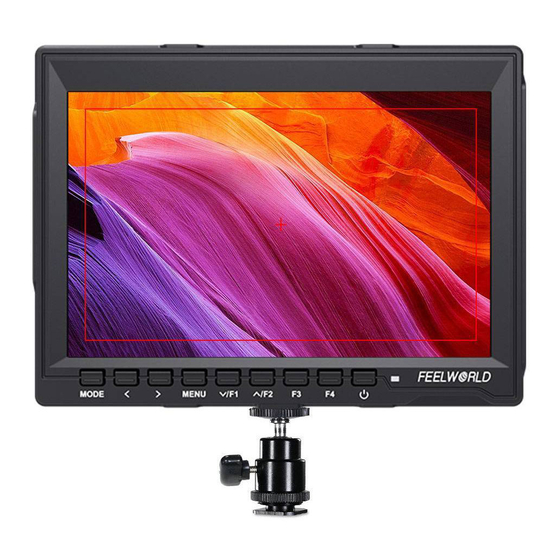
Накамерный монитор FW759 (Olink FM759) является самым бюджетным на рынке монитором с 7” IPS матрицей с разрешением 1280х800 пикселей. Применение HD матрицы с технологией IPS позволило добиться яркого и сочного изображения с хорошей цветопередачей и широкими углами обзора.
Особенности монитора FW759:
- полная поддержка камер BMPCC и BMCC (через конвертер SDI—HDMI)
- высококачественная IPS матрица с разрешением 1280х800 пикселей и LED подсветкой
- яркость 400 кд / м2, контраст 800: 1
- ультратонкий дизайн – всего 17 см
- пикинг фокус – экранный помощник для точной фокусировки
- режим Camera 5D II – растягивание изображения на полный экран для камер с HDMI выходом 480p
- режим перевертывания изображения по вертикали и горизонтали
- пропорции изображения 4:3 и16:9
- «заморозка» изображения
- режим Pixel-to-Pixel
- различные маркеры на экране
- питание от батарей типа Sony NP—F или внешнее питание 7.4V~35V
- вес 400 г
Комплект поставки монитора Feelworld FW759:
- 1x монитор FW759
- 1x HDMI кабель
- 1x фиксатор HDMI кабеля
- 1x крепление для батареи NP—F
- 1x крепление на горячий башмак камеры
- 1x инструкция на английском языке
- 1x козырёк для защиты от яркого света
Пусть ваша видеосъемка станет проще
Широкая цветовая гамма ЖК-панели и разрешение 1280×800 обеспечивают более точное восстановление монитора, превосходное качество изображения и более насыщенный цвет.
FEELWORLD FW759 — это специально разработанный портативный полевой монитор для зеркальной камеры, стабилизатора и gimble. Ультратонкая толщина 17mm. Профессиональная помощь в фокусировке, облегчающая съемку на улице.
FW759 разработан с учетом вашего рабочего процесса, простота использования и гибкость встроены в ядро монитора, что обеспечивает беспроблемный мониторинг независимо от того, какую систему камеры вы используете.
Более широкий угол обзора
Наслаждайтесь последовательными изображениями с любой точки зрения. FW759 использует панель IPS, которая обеспечивает широкий угол обзора 178 ° / 178 ° и выходную яркость вплоть до 400nit. Это означает, что вы сможете видеть точные, последовательные и яркие изображения с любой точки зрения.
Поддерживает широкий спектр
Опции множественного ввода FW759 включают 4K HDMI и AV и поддерживают большинство зеркальных камер и видеокамер
Поддержка 4K HDMI вход
Подключите камеру 4K и многое другое
Оставьте первый отзыв
Помогите другим пользователям с выбором — будьте первым, кто поделится своим мнением об этом товаре.
Есть вопросы о товаре?
Быстро отвечаем на вопросы, а еще отправляем их пользователям, которые уже купили этот товар, чтобы они рассказали о своем опыте.
Видеовходы
1хHDMI, 1хVIDEO
Аудио
стерео наушники 3.5 мм, динамик
Мощность потребления, Вт
5
Типы крепления батарей
Sony F970, F960, F950, F930, F770, F750, F730, F570, F550, F530, QM91D, QM91, QM90D, QM90, QM71D, QM71, QM70D, QM70, QM51D, QM51, FM71, FM70
Тип корпуса монитора
накамерный
Комплектация
монитор, крепление на башмак, HDMI кабель, инструкция
Размер (ШхВхГ), мм
176х130х17