
-
Contents
-
Table of Contents
-
Bookmarks
Quick Links
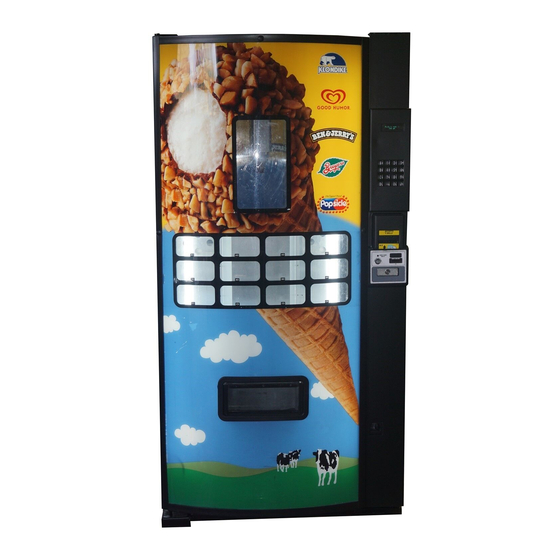
FRI-Z400 ICE CREAM MACHINE
INSTALLATION & SET-UP GUIDE
VERSION 20060508
FOOD AUTOMATION SYSTEMS AND TECHNOLOGIES
60 East Hanover Ave. B2
Morris Plains, NJ 07950
Tel: (973) 455-0400
Fax: (973) 455-7401
Related Manuals for Fastcorp FRI-Z400
Summary of Contents for Fastcorp FRI-Z400
-
Page 1
FRI-Z400 ICE CREAM MACHINE INSTALLATION & SET-UP GUIDE VERSION 20060508 FOOD AUTOMATION SYSTEMS AND TECHNOLOGIES 60 East Hanover Ave. B2 Morris Plains, NJ 07950 Tel: (973) 455-0400 Fax: (973) 455-7401… -
Page 2
FASTCORP (“SELLER”) TERMS AND CONDITIONS OF SALE 1. PRICES. All prices, quotations, shipments and deliveries by Seller are F.O.B. Seller’s facility. All base prices are subject to change upon thirty (30) days notice and all orders are accepted subject to Seller’s price in effect at the time of shipment. -
Page 3: Table Of Contents
TABLE OF CONTENTS SPECIFICATIONS………………………………..………………………………………………………………. A. General Safety Specifications..………………………………………………………………………..……. B. Tool Listing..………………………………………………………………………..…………………………. C. General Specifications & Measurements.…………………………………………………….…………..II. PRODUCT IDENTIFICATION…….………………………………………………………………..……………. A. Serial Number…..…………..……………………………………………….………………..……………… B. Model Number…..…………..……………………………………………….………………..……………… III. UNPACKING & INSTALLATION…..………….…………………………………………………..…………… A-3: A-5 A. Receiving Inspection………………………………………………………………………………..….…….. B. Unpacking……………………………………………………………………………………………………… C. Removing The Cable Ties & Shipping Bracket…………………………………………………………… D.
-
Page 4
TABLE OF CONTENTS …….… F. Programming (Continued) …………………..………..……………………….…………………… A-18: A-29 Menu Items (Continued) …………………………..………………………….…….…..…..……….… A-21: A-29 o. Program Version…..…………..………………………………………………………….…………. A-26 A-26 p. Display Language………………………………………………………………………………….… q. Line Mode….……………………..……………………………………..….…………….……….… A-27 Machine Serial Number……………………………………..……………….……..…………….… A-27 s. Group Sales Option…..…………………..…………………………………..……….………….… A-27 A-28 Tokens & Coupons…………………………..…………………….………………………..…….… A-28 u. -
Page 5: Specifications
TRANSPORT CONSIDERATIONS Always try to keep the FRI-Z400 in the upright position. If the machine must be laid down for delivery purposes, be sure the machine is upright for at least 24 hours before it is plugged into an outlet and powered. This will give the compressor fluid time to re-settle in the freezer compressor.
-
Page 6: Product Identification
PRODUCT IDENTIFICATION SERIAL NUMBER The production date of this FASTCORP product is determined by the date code incorporated in the serial number. The vender serial number takes the form XXXXYYYYZZ. The first 4 digits (XXXX) identify the manufacturing run that the vender was built in.
-
Page 7: Unpacking & Installation
Inspect the vender for any external or internal shipping damage. If there is any damage, have the driver note the damage on the bill of lading and notify FASTCORP. Although the terms of sale are FOB shipping point, which requires the consignee to originate shipping damage claims, FASTCORP will gladly help if you must file a claim.
-
Page 8: Transport Instructions
If the machine will be subject to user misuse or vandalism, it is recommended that the vender be secured to the floor or wall. Please contact FASTCORP Technical Service Department for more information. Due to the large size and weight of the vender, never attempt to move the vender with a hand truck or stair climber.
-
Page 9: Leveling The Machine
MACHINE WILL BE SUBJECT TO USER MISUSE OR VANDALISM, IT IS RECOM- MENDED THAT THE VENDER BE SECURED TO THE FLOOR OR WALL TO MINIMIZE RISK OF INJURY OR DEATH FROM TIPPING. CALL THE FASTCORP TECHNICAL SER- VICE DEPARTMENT AT (888) 441-3278 FOR ASSISTANCE.
-
Page 10: General Maintenance & Cleaning
The freezer does not have to be unplugged to perform this process. FASTCORP recommends keeping a plastic ice scraper (provided with the machine), and a 9” by 11” piece of cardboard or plastic inside the machine. Place the plastic under the area to be scraped to prevent the ice from falling into the bins. This entire process should only take a few minutes.
-
Page 11: Setup Instructions
DEX PORT The FRI-Z400 comes pre-wired for a DEX port located on the inside of the main door. To collect DEX data, insert the DEX plug into the 1/4 phone jack and pull out the vend service interlock switch located adjacent to the T-handle be- hind the main door.
-
Page 12: Bill Acceptor
CARD READERS There are many card readers and similar devices available. FASTCORP has tested many of these devices in order to ensure compatibility with our software. Occasionally, there will be a new product introduced into the market which may require further testing to ensure correct compatibility.
-
Page 13: Initial Power Up (Homing Sequence)
INITIAL POWER UP Make sure that the shipping bracket and cable ties are removed from the robot before plugging the machine into the power source. To avoid the risk of injury, make sure that all body parts are clear of the cabinet before turning on the main power.
-
Page 14: Product Display System (W/ Price Tag Template
PRODUCT DISPLAY SYSTEM 1. Determine what products will be vended and locate the corresponding display card provided by the manufacturer. 2. Affix the correct price label to the front of the card using the template provided on the next page. Make a copy and attach to the inside of the machine for future use.
-
Page 15
PRODUCT DISPLAY SYSTEM CONTINUED- Use the template provided to attach the price label to the Product Cards. If price labels are attached correctly, they will be visible to the right of the selection numbers on the front of the machine door once the once the cards are in- stalled. -
Page 16: Bin Setup/ Product Loading
BIN SETUP / PRODUCT LOADING The FRI-Z400 utilizes a bin system to hold product. The bin system is made up of a number of bins (various shapes and sizes), held together by a plastic bin matrix. The type and size of bin used depends on the size and shape of the product being vended.
-
Page 17
A-13… -
Page 18
A-14… -
Page 19
A-15… -
Page 20
A-16… -
Page 21: Preprogramming Configuration
PREPROGRAMMING CONFIGURATION CONTROL BOARD DIPSWITCH OPTIONS Fig. 12 SWITCH NAME OPTION ESCROW: ON to enable bill acceptor escrow which prevents more than one bill to be inserted per vend; OFF to disabled escrow SELECTION DIGITS: ON to make selection 2 characters; off 1 character FORCE VEND: ON to enable force vend (customer must make selection);…
-
Page 22: Programming
Allows service phone number to be set. The number is displayed when the machine is out-of- 9) SERVICE PHONE #: order. (Do not use FASTCORP’S #) Allows pin code to be set and viewed for machine auditing. Audit data can be viewed without 10) SALES PIN CODE: opening the door.
-
Page 23: Getting Started /Creating Selections
GETTING STARTED: CREATING SELECTIONS 1. Before creating a selection, the front product display must be setup. Product and bins must be preloaded in the machine 2. In Service Mode, press the “ =Next” key on the Customer Keypad and scroll to “4) CREATE SELECTION”. «4) CREATE SELECTION»…
-
Page 24: Programming/Editing After The Machine Has Been Operating
PROGRAMMING/EDITING AFTER THE MACHINE HAS BEEN OPERATING 1. After the machine has been programmed and operating in the field, any sold out or bin errors that have occurred will be displayed once the door is opened (Service Mode). A bin error occurs if the robot has made three unsuc- cessful attempts to retrieve a product from a single bin.
-
Page 25: Menu Items/ Programming Sequence
MENU ITEM PROGRAMMING SEQUENCE 1) CHANGE PRICE Changing the price of programmed selections. Display Programming Instructions 1) CHANGE PRICE a) Press the #=Yes key. *=Next D=Back #=Yes b) Enter the selection number. Edit Selection #:_ _ *=Exit A1 Price: $1.00 c) Type over the price.
-
Page 26: Change Price
3) EDIT SELECTION Choose from three sub-menus: (a) Change Price, (b) Product Height, (c) Edit Bins- adjust bin location and add bins to a selection number. Display Programming Instructions 3) EDIT SELECTION a) Press the #=Yes key *=Next D-Back #=Yes EDIT SELECTION #_ _ b) Enter the selection number that will be edited.
-
Page 27: Create Selection
4) CREATE SELECTION: Create up to eighteen brand new selections, with 1-4 bins per selection. Display Programming Instructions 4) CREATE SELECTION a) Press the #=Yes key to enter create selection menu. *=Next D-Back #=Yes Enter Selection b) Enter the selection number you wish to create. #_ _ *=Exit Enter Selection #A1…
-
Page 28: Delete Selection
5) DELETE SELECTION Delete the selection. Display Programming Instructions 5) DELETE SELECTION* a) Press the #Yes key to enter menu item. *=Next D-Back #=Yes Delete Selection #: A1 (All selections) b) Press the #=Next key to list selection numbers. Press the D=Delete key to delete the selection.
-
Page 29: Set Service Phone
9) SET SERVICE PHONE # Enter, update, or view the service phone number. The programmed number will appear on the display screen in the event that the machine goes out-of-order. Display Programming Instructions 9) SET SERVICE PHONE # a) Press the #=Yes key to enter menu selection. *=Next D-Back #=Yes…
-
Page 30: Vb Pin Code
Day: Mon A=Abort C=Copy (Copies information from i) (C=Copy: copies information from day to day) To copy day to day) D= Delete one day to another press *=Scroll key to the day you want to copy then press the #=Enter key. *=Scroll #=Enter Copy Mon to Tues…
-
Page 31: Line Mode
16) LINE MODE (Not used with the snack machine) If more than one vend is made consecutively, line mode automatically shortens the vend time (the default is ON). Display Programming Instructions 16) LINE MODE a) Press the #=Yes key. *=Next D-Back #=Yes LINE MODE: ON…
-
Page 32: Tokens & Coupons
19) TOKENS & COUPONS The machine will recognize coupons and tokens as free vends when the Promotional Vend feature is enabled. Item and price will be noted as a free vend in the DEX report. Display Programming Instructions 19) TOKENS & COUPONS a) Press to the #=Yes key to enter this menu.
-
Page 33
Keyboard/Buzzer Test f) Press the “4” Key to test the Customer keypad. Press the 4 Key Keyboard/Buzzer Test g) Press the “8” Key to test the Customer keypad. Press the 8 Key Keyboard/Buzzer Test h) Press the “#” Key to test the Customer keypad. Press the # Key Keyboard/Buzzer Test i) Press the “RIGHT ”… -
Page 34
21) U/D TRAVEL LIMITS – SOFTWARE VERSION M5.10/S4.61 or later This feature allows the customer to adjust how deep the Picker Tip will descend into both Tall and Short bins. • Adjustment measurement is in Encoder Pulses. Five Pulses = One Inch. •… -
Page 35: Viewing Freezer Temperature
VIEWING FREEZER TEMPERATURE Fig. 15 While in Vend Mode (indicated by “Please Insert Money” on the digital display), press the “ ” key on the Customer Keypad. The current tem- perature will be displayed on the digital display. TESTING CONSIDERATIONS After programming is complete, it is important to perform a test to make sure that the machine is programmed correctly.
-
Page 36: Component Reference And Identification
COMPONENT REFERENCE AND IDENTIFICATION Fig. 16 (Cabinet, Front) 1. Strip, Breaker (491,020,150.13) 7. SUPP, SPCR, Tank Base (643,030,120.03) 2. Strip. Breaker (491,020,160.13) 8. SUPP, Spacer, Rear, Tank, Base (643,030,140.03) 3. Strip. Breaker (491,020,170.13) 9. Foam, Blocker (803,301,510.01) 4. W/A, Shell, Ext, Cab, (643,020,000.03) 10.
-
Page 37
Fig. 18 Fig. 19 (Inner Door, Front) (Inner Door, Back) 1. Latch, Inner Door (643,000,290.03) 10. Rivet, Domed 1/8” AD46BS (801,100,750.01) 2. Cover, Bill Validator (643,000,540.03) 11. Gasket, Inner Door (801,812,310.01) 3. Chute, Inner Door, Centered (643,000,780.01) 12. Window, Rain (801,818,990.01) 4. -
Page 38
Fig. 20 (Assembly, Power Box) CONTROL BOARD LIGHTS VACUUM MAIN MAIN BREAKER BOTTOM VIEW 1. Screw Hex Wash Slot 8-32 x 3/8 (18909024) 14. Bushing, Insulating (48904554) 2. Screw—SL HEX Wash 8-32 x .500 (18909061) 15. Nut – Hex Keps 10-32 (48909131) 3. -
Page 39: Triac Board
Fig. 21 (Computer Board– Not Compatible with F820 or VFS702 Models) (Master) J-15 JP-1 Jumper J-19 Temperature (Slave Probe Fig. 22 (Triac Board) J-10 J-11 NOT USED IN 24 VAC TO COMPUTER 24 VAC– POWER SINGLE THIS MODEL BOARD J1 HEAT SINK SIGNAL IN VAC MOTOR…
-
Page 40: Service Keypad
Fig. 23 (Service Keypad) (PN19310500) RIGHT, LEFT, FRONT and BACK- Moves robot in the respective direction. UP and DOWN- Drops or raises the picker head. LOAD and CLOSE- Used to clear sold-out bins and bin errors (press Load then Close). 5¢, 10¢, 25¢- Releases coins of specified denomination from the coin tubes in the coin mechanism.
-
Page 41
Fig. 25 (Assembly, Beam-Snack & Frozen) FRONT BACK BOTTOM FRONT BACK BOTTOM Continued On Next Page… A-35… -
Page 42
BOTTOM FRONT BACK 1. Clamp, Loop—3/16 (189,090,020.A) Trigger, Release (492,001,710.C) 2. Screw, Hex Wash slot 1/4-20 X 1/2 (189,090,520.A) 19. Shield, Ribbon Cable (495,000,240.C) 3. Washer, Ext (189,090,550.A) 20. Gear, X and Y (495,004,060) 4. Washer-Lock, Ext Tooth (189,090,590.A) 21. Switch, Plastic Limit (495,005,660.A) 5. -
Page 43
Fig. 26 (Assembly, Carriage—Frozen) 8 24 10 44 48 50 40 45 35 20 29 1. Washer, Ext Tooth Lock #8 (18909008) Grommet , Guide (495004281) 2. Washer, Ext Tooth Lock 1/4 (18909055) 29. Link, Guide Rods (49500435) 3. Washer, Ext Tooth Lock #4 (18909059) 30. -
Page 44
Fig. 27 (Assembly, Picker-Frozen) 1. O-Ring, Picker Frozen (38904180) 11. Spacer, Picker– Frozen (39500397) 2. Cap– Picker Wire Guard– Frozen (38904194) 12. Harness– Picker Switch (39500561) 3. Screw, Pan Phil 6-32 X 3 in (38909170) 13. Switch, Subminiature (39500567) 4. Screw, Pan Phils SEMS 4-40 X 1/2 (38909177) 14. -
Page 45
Fig. 28 (Assembly, Lid Lift– Freezer) TOP VIEW: LEFT OF FREEZER FREEZER LID EXPLODED VIEW 1. Bearing, Nylon, Split (489041450.A) 13. Rack, Lift-Frozen (800503560.01) 2. Brkt, Lid Lift, Motor (643000380.03) 14. Screw Grommet (489041460.A) 3. Brkt, Lid Lift, Pivot (643000370.03) 15. -
Page 46
Fig. 29 (Assembly, Valve Box) 1. Baffle, Valve Box (805,600,480.01) 11. Release Gate, Valve Box (643,000,490.03) 2. Cover, Valve Box (805,600,470.01) 12. Rod, Valve Box (492,000,710.B) 3. Flap, Valve Box (801,306,840.01) 13. Screw, Hex Wash Slot (489,091,040.A) 4. Grommet, Valve Box-Fr (389,041,550.a) 14.
|
Related Devices:
|
Types of Manuals:
The main types of Fastcorp Z-400 instructions:
- User guide — rules of useing and characteristics
- Service manual — repair, diagnostics, maintenance
- Operation manual — description of the main functions of equipment
DC Drives Instructions by Fastcorp:
-
YASKAWA Z1000
YASKAWA AC Drive — Z1000AC Drive for HVAC Fan and PumpUser Manual SupplementMANUAL NO. TOEP YAISUP 04AModels: 200 V Class: 2.2 to 110 kW (3 to 150 HP)400 V Class: 2.2 to 370 kW (3 to 500 HP)Type: CIMR-ZU Models with Software PRG: 1013 and GreaterThis supplement replaces pages in the Z1000 User Manual …
Z1000 DC Drives, 28
-
YASKAWA Sigma-V Series
Multi-Winding Drive Unit Model: JUSP-MD3DASERVOPACK Model: SGDV-101JF1AConverter Model: SGDV-COA5EDAServomotor Model: SGMVV-7EDBRotational MotorMulti-Winding Drive System-V SeriesAC Servo DrivesUSER’S MANUALFor Use with Large-Capacity Models SetupMANUAL NO. SIEP S800001 85C123456Overview of SetupInstall …
Sigma-V Series Servo Drives, 96
-
SOMFY Altus RTS
ORIGINAL INSTRUCTIONSComplete instruction guide available online on www.somfy.info134522134325431 252 s2 sLNx 210 min0.5 sPROG.ONOFF2 sOFF OFFON7 sPROG.5-15 s 2 sONLN230 V 50 HzBrownBlueGreen-YellowPREPROGRAMMING A CONTROL POINT DIRECTION OF ROTATIONEND LIMITS SETTINGYou can goto the stepControl point is temporary …
Altus RTS Controller, 2
-
Trane AFDH
AFDH D-Frame Upgrade AdaptiveFrequency Drive™For Tracer AdaptiView™ Centrifugal ChillerControllersInstallation InstructionsJuly 2020AFDH-SVN005B-ENDirect MountTransition MountRemote MountModels:CVHE, CVHF, CVHGDesign Sequence:F0SAFETY WARNINGOnly qualified personnel should install and service the equipment. The ins …
AFDH Industrial Equipment, 60
-
D+H CDC-BS066-VFI
CDC-BS066-VFI99.882.47 1.4/08/11OriginalanleitungOriginal instructionsNotice originaleManual originalCDC-BS066-VFI1/268 mm75,3 mm39 mm15 mm>40mm75-77 mm7-9 mm*- Bei Montage am Drehflügel und einem Hub von >150 mm, muss die rückensteife Seite der Kette nach oben zeigen- The stiff backside of the chain must point …
CDC-BS066-VFI DC Drives, 2
-
Toshiba T300BMV2
T300BMV2 ADJUSTABLE SPEED MOTOR DRIVE INSTRUCTION MANUAL TOSHIBA INTERNATIONAL CORPORATION Document Number: IF08CZ9 September 2019 MEDIUM VOLTAGE Toshiba Reference File #328 …
T300BMV2 DC Drives, 81
-
Moeller DE6-IOM-ENC
1/4A10/01 AWA8240-1955MontageanweisungInstallation InstructionsNotice d’installationIstruzioni per il montaggioInstrucciones de montajeИнструкция по монтажуLebensgefahr durch elektrischen Strom!Nur Elektrofachkräfte und elektrotechnisch unterwiesene Personen dürfen die im Folgen-den beschriebenen …
DE6-IOM-ENC DC Drives, 4
-
Ismatec BVP Standard
BVP StandardMoteur à vitesse variableISM 444Pour têtes de pompe: Pro 280 / Pro 281Pro 380 / Pro 381360 / 380 / 380 ADCA 4 / CA 8 / CA 12QP Q0 / Q1 / Q2 / Q3Easy-Load / Standard / Quickload MS/CA 4-12 / MS/CA 8-6PTFE Tube 2 mm / 4 mmSB 2V / 3VWM 5 BVP Standard mit variablem AntriebISM 444Für Pumpenköpfe:Pro 280 / Pr …
BVP Standard DC Drives, 36
+7 (495) 215-16-67
8 (800) 333-16-67
с 9:00-19:00 — ежедневно (МСК)
Заказать звонок
×
Обратный звонок
Представьтесь
Номер вашего телефона
Ваш вопрос
я даю согласие Shopozz на обработку персональных данных
в соответствии с Федеральным законом от 27.07.2006 года №152-ФЗ «О персональных данных», на условиях и для целей, определенных Политикой конфиденциальности.
×
Доставка товаров с аукциона eBay и интернет-магазинов США в
Россию (Москва, Санкт-Петербург, Новосибирск, Екатеринбург,
Казань, Нижний Новгород, Челябинск, Красноярск, Самара, Уфа,
Ростов-на-Дону, Омск, Краснодар, Воронеж, Волгоград, Пермь и
другие города).
© Shopozz — сервис покупок за рубежом


1. PRICES. All prices, quotations, shipments and deliveries by Seller are F.O.B. Seller’s facility. All base prices are subject to change upon thirty (30) days notice and all orders
are accepted subject to Seller’s price in effect at the time of shipment.
2. APPLICABILITY, ACCEPTANCE AND MODIFICATION. These terms and conditions apply to all quotations and purchase orders covering the sale of Seller’s products or
services. Seller’s acceptance of Buyer’s order is expressly made conditional on Buyer’s acceptance of the terms and conditions set forth herein. The terms and conditions set
forth herein constitute the complete agreement between the Seller and the Buyer, and may be accepted only in accordance with their terms. They may not be modified except by
written agreement referring specifically to these terms and conditions and signed by a duly authorized officer of Seller. Any provisions of Buyer’s purchase order which are
inconsistent with the foregoing shall be of no force and effect, unless Seller shall have agreed to a modification of these terms and conditions in the manner set forth herein.
Buyer’s failure to dissent from the terms and conditions, or Buyer’s acceptance or use of the Seller’s equipment shall constitute Buyer’s acceptance of these terms and conditions.
Buyer, by these presents and the acceptance of the goods ordered herein represents and warrants the Buyer is solvent and able to pay for the goods in accordance with these
terms and conditions of sale. Any order accepted by Seller shall not be assigned, sold or otherwise transferred by Buyer unless Seller expressly agrees in writing to such sale,
assignment or other transfer.
3. DELIVERY AND DELAYS. Seller’s obligation is to deliver the goods F.O.B. Seller’s facility. Risk of loss passes to Buyer at the moment of delivery. Buyer will inspect the
products within a reasonable time after receipt thereof and if Buyer fails to notify Seller within thirty days after receipt that the products are defective in any respect, Buyer will
have waived any rights or claims against Seller. Orders for products made to Buyer’s specifications are not subject to cancellation by Buyer. Products made to Buyer’s
specifications must be inspected and accepted by Buyer before shipment. After shipment, Buyer shall have no rights or claims against Seller for such products. Delivery dates
appearing on Seller’s order acknowledgment, or given to Buyer in any other manner, are approximate. Seller will not be liable for any delay in the performance hereof or for any
damages suffered by Buyer by reason of such delay it caused or by the occurrence of any contingency beyond the control of Seller including, but not limited to, delays or
nondelivery arising directly or indirectly from fires, floods, substantial damage to its plant, accidents, riots, acts of God, open hostilities, declarations of national emergencies,
war, terrorist acts, governmental interference or embargoes, strikes, labor difficulties, shortage of labor, fuel, power, materials or supplies, or any other cause or causes (whether
or not similar in nature to any of those herein above specified) beyond its control. Seller shall allocate production and deliveries among Seller’s customers in its sole discretion.
4. STORAGE. In the event that Buyer is unable to accept delivery of parts or equipment at the time of completion and of shipment, Seller may invoice for the total purchase
price as if the shipment has been made and; (i) if Seller is able to store such equipment in its own facilities, the Buyer shall pay Seller reasonable handling and storage charges
for the period of such storage; or (ii) if Seller is unable to store such equipment in its own facilities, Seller reserves the right to arrange handling and storage in a suitable
warehouse for the Buyer, at the Buyer’s expense. In cases where handling and storage become necessary, it will become the responsibility of the Buyer to notify Seller when
shipment is to be made and to what destination.
5. ADEQUATE ASSURANCES. Seller may, at any time, suspend performance of any order or require payment from Buyer in cash, security or other adequate assurance
satisfactory to Seller when, in Seller’s sole opinion, the financial condition of Buyer or other grounds for insecurity warrant such action.
6. TAXES. Any tax which the Seller may be required to pay or collect, through assessment or otherwise, under any existing or future law upon or with respect to the sale,
purchase, delivery, transportation, storage, processing, use or consumption of any goods or services provided by Seller to Buyer, including taxes upon or measured by the
receipts from sales or services, shall be for the account of Buyer and may be added to the price of goods or services purchased by Buyer. Buyer shall promptly pay the amount
thereof to Seller upon demand.
7. LIMITED WARRANTY.
(A).
Subject to the limitations specified herein, the Z-400 Frozen Merchandiser manufactured by Seller is warranted for two (2) years from the date of purchase against
defective parts and workmanship and the Z-400 Frozen Merchandiser’s freezer system consisting solely of the compressor, condenser, evaporator and the refrigerant tubing is
warranted for two (2) years from the date of purchase against defective parts and workmanship. Any part or parts which are proven to be defective within the applicable
warranty period will be repaired and/or replaced free of charge, provided that, (i) the return of such part or parts is authorized in writing by Seller’s Warranty Department (the
«Return Authorization»), and (ii) the defective part and a copy of the Return Authorization is returned with transportation charges prepaid to the destination designated by
Seller’s Warranty Department. All labor charges shall be for the account of Buyer.
(B).
The warranties provided pursuant to Section 7(A) apply only to the original purchaser of the Z-400 Frozen Merchandiser and are null and void if the Z-400 Frozen
Merchandiser is sold during the period of warranty.
(C).
Notwithstanding anything contained herein to the contrary, the limited warranties provided for herein do not apply to: (i) electrical components, wiring, or circuits
and/or for all mechanical parts or assemblies damaged as a result of operating the Z-400 Frozen Merchandiser at other than 115 volts, 60 Hertz current; (ii) incandescent lamps,
neon lamps, fluorescent lamps, ballasts, starters, bins and associated components, graphics or other expendable items; (iii) when other manufactured components are installed by
Buyer in the Z-400 Frozen Merchandiser; and (iv) coin mechanisms, bill validators, currency systems, telemetry systems, cashless payment systems, debit card readers, and
other accessories not manufactured by Seller installed at Buyer’s request.
(D).
Seller is not responsible for any cost of service rendered or repairs made by buyer or its agents on merchandise or parts unless authorization to incur expense has been
given in writing by Seller prior to incurring such expense.
(E).
Seller shall not be liable to Buyer under this warranty if Seller determines that the defect was caused by misuse, abuse, vandalism, improper application, improper
operation, improper maintenance, alteration, repair or modification, negligence or use, casualty, fire, flood, storage, handling or any other cause beyond the control of Seller.
(F).
THE WARRANTIES PROVIDED FOR UNDER THIS SECTION 7 ARE EXCLUSIVE AND IN LIEU OF ALL OTHER WARRANTIES, OBLIGATIONS OR
LIABILITIES.
SELLER EXPRESSLY DISCLAIMS AND BUYER HEREBY WAIVES ALL OTHER WARRANTIES, EXPRESSED OR IMPLIED, INCLUDING
WITHOUT LIMITATION, WARRANTIES OF MERCHANTABILITY OR FITNESS FOR A PARTICULAR PURPOSE. THE BUYER ACKNOWLEDGES AND AGREES
THAT NO OTHER REPRESENTATIONS OR WARRANTIES WERE MADE TO OR RELIED UPON BY BUYER WITH RESPECT TO THE QUALITY AND FUNCTION
OF THE GOODS SOLD HEREIN. SELLER DOES NOT AUTHORIZE ANY PERSON, COMPANY OR ENTITY WHATSOEVER TO ASSUME FOR IT ANY
OBLIGATION OR LIABILITY IN CONNECTION WITH THE SALE OF SAID EQUIPMENT OR ANY PART THEREOF.
8. LIMITATIONS OF BUYER’S REMEDIES. Buyer’s remedies with respect to any claim arising out of any order, or Seller’s performance in connection therewith,
including, without limitation, any claim arising out of any defect or alleged defect in any goods or services furnished by Seller, shall be limited exclusively to the repair
and replacement of defective parts as specified in Section 7 herein. Without limiting the foregoing, Seller shall not be liable for breach of contract arising out of or in
connection with a warranty claim. In no event shall Seller be liable for any damages including, but not limited to, lost profits or other incidental or consequential
damages arising out of this agreement or the use or inability to use any of the products including, but not limited to, the Z-400 Frozen Merchandiser, even if Seller has
been advised of the possibility of such damages, or of any claim by Buyer or any other party.
9. WAIVER. Waiver by Seller of any breach by Buyer of any of the terms and conditions set forth herein shall not be construed as a waiver of any other breach or the failure of
Seller to exercise any right arising from any default of Buyer hereunder shall not be deemed to be a waiver of such right, which may be exercised at a subsequent time.
10. GOVERNING LAW. This Agreement shall be governed by the Uniform Commercial Code as adopted by the State of New Jersey in force as of the date hereof. Buyer
consents to the jurisdiction of the state and federal courts within the State of New Jersey. Service of process by certified or registered mail shall be sufficient to commence suit
and obtain a judgment by default. Buyer waives any right to personal service of process. Notwithstanding anything contained herein to the contrary, if Seller so directs, any
controversy or claim arising out of or related to this agreement or the performance or breach thereof shall be resolved by binding arbitration in accordance with the rules and
procedures then obtaining of the American Arbitration Association. Any action or proceeding by Buyer arising out of or in connection with this transaction, including any claim
for Seller’s breach of contract or Seller’s breach of Warranty, must be commenced within two (2) years after the delivery of the equipment to Buyer except in the case of a claim
for Seller’s breach of Warranty relating to the Z-400 Frozen Merchandiser’s freezer system as provided for herein which must be commenced within five (5) years after the
delivery of the equipment to Buyer.
11. Credit. All invoices paid after the due date specified within shall accrue interest at the lesser of 2% per month or the highest rate of interest permitted by law. In the event
that the Buyer pays any invoice with a credit card, Buyer hereby waives, releases, and discharges any all rights that Buyer may have, under the terms of Buyer’s agreement with
the credit card provider, to dispute, challenge and/or protest the payment of any Seller invoice.
FASTCORP («SELLER») TERMS AND CONDITIONS OF SALE
-
Page 1
FRI-Z400 ICE CREAM MACHINE INSTALLATION & SET-UP GUIDE VERSION 20060508 FOOD AUTOMATION SYSTEMS AND TECHNOLOGIES 60 East Hanover Ave. B2 Morris Plains, NJ 07950 Tel: (973) 455-0400 Fax: (973) 455-7401… -
Page 2
FASTCORP (“SELLER”) TERMS AND CONDITIONS OF SALE 1. PRICES. All prices, quotations, shipments and deliveries by Seller are F.O.B. Seller’s facility. All base prices are subject to change upon thirty (30) days notice and all orders are accepted subject to Seller’s price in effect at the time of shipment. -
Page 3: Table Of Contents
TABLE OF CONTENTS SPECIFICATIONS………………………………..………………………………………………………………. A. General Safety Specifications..………………………………………………………………………..……. B. Tool Listing..………………………………………………………………………..…………………………. C. General Specifications & Measurements.…………………………………………………….…………..II. PRODUCT IDENTIFICATION…….………………………………………………………………..……………. A. Serial Number…..…………..……………………………………………….………………..……………… B. Model Number…..…………..……………………………………………….………………..……………… III. UNPACKING & INSTALLATION…..………….…………………………………………………..…………… A-3: A-5 A. Receiving Inspection………………………………………………………………………………..….…….. B. Unpacking……………………………………………………………………………………………………… C. Removing The Cable Ties & Shipping Bracket…………………………………………………………… D.
-
Page 4
TABLE OF CONTENTS …….… F. Programming (Continued) …………………..………..……………………….…………………… A-18: A-29 Menu Items (Continued) …………………………..………………………….…….…..…..……….… A-21: A-29 o. Program Version…..…………..………………………………………………………….…………. A-26 A-26 p. Display Language………………………………………………………………………………….… q. Line Mode….……………………..……………………………………..….…………….……….… A-27 Machine Serial Number……………………………………..……………….……..…………….… A-27 s. Group Sales Option…..…………………..…………………………………..……….………….… A-27 A-28 Tokens & Coupons…………………………..…………………….………………………..…….… A-28 u. -
Page 5: Specifications
TRANSPORT CONSIDERATIONS Always try to keep the FRI-Z400 in the upright position. If the machine must be laid down for delivery purposes, be sure the machine is upright for at least 24 hours before it is plugged into an outlet and powered. This will give the compressor fluid time to re-settle in the freezer compressor.
-
Page 6: Product Identification
PRODUCT IDENTIFICATION SERIAL NUMBER The production date of this FASTCORP product is determined by the date code incorporated in the serial number. The vender serial number takes the form XXXXYYYYZZ. The first 4 digits (XXXX) identify the manufacturing run that the vender was built in.
-
Page 7: Unpacking & Installation
Inspect the vender for any external or internal shipping damage. If there is any damage, have the driver note the damage on the bill of lading and notify FASTCORP. Although the terms of sale are FOB shipping point, which requires the consignee to originate shipping damage claims, FASTCORP will gladly help if you must file a claim.
-
Page 8: Transport Instructions
If the machine will be subject to user misuse or vandalism, it is recommended that the vender be secured to the floor or wall. Please contact FASTCORP Technical Service Department for more information. Due to the large size and weight of the vender, never attempt to move the vender with a hand truck or stair climber.
-
Page 9: Leveling The Machine
MACHINE WILL BE SUBJECT TO USER MISUSE OR VANDALISM, IT IS RECOM- MENDED THAT THE VENDER BE SECURED TO THE FLOOR OR WALL TO MINIMIZE RISK OF INJURY OR DEATH FROM TIPPING. CALL THE FASTCORP TECHNICAL SER- VICE DEPARTMENT AT (888) 441-3278 FOR ASSISTANCE.
-
Page 10: General Maintenance & Cleaning
The freezer does not have to be unplugged to perform this process. FASTCORP recommends keeping a plastic ice scraper (provided with the machine), and a 9” by 11” piece of cardboard or plastic inside the machine. Place the plastic under the area to be scraped to prevent the ice from falling into the bins. This entire process should only take a few minutes.
-
Page 11: Setup Instructions
DEX PORT The FRI-Z400 comes pre-wired for a DEX port located on the inside of the main door. To collect DEX data, insert the DEX plug into the 1/4 phone jack and pull out the vend service interlock switch located adjacent to the T-handle be- hind the main door.
-
Page 12: Bill Acceptor
CARD READERS There are many card readers and similar devices available. FASTCORP has tested many of these devices in order to ensure compatibility with our software. Occasionally, there will be a new product introduced into the market which may require further testing to ensure correct compatibility.
-
Page 13: Initial Power Up (Homing Sequence)
INITIAL POWER UP Make sure that the shipping bracket and cable ties are removed from the robot before plugging the machine into the power source. To avoid the risk of injury, make sure that all body parts are clear of the cabinet before turning on the main power.
-
Page 14: Product Display System (W/ Price Tag Template
PRODUCT DISPLAY SYSTEM 1. Determine what products will be vended and locate the corresponding display card provided by the manufacturer. 2. Affix the correct price label to the front of the card using the template provided on the next page. Make a copy and attach to the inside of the machine for future use.
-
Page 15
PRODUCT DISPLAY SYSTEM CONTINUED- Use the template provided to attach the price label to the Product Cards. If price labels are attached correctly, they will be visible to the right of the selection numbers on the front of the machine door once the once the cards are in- stalled. -
Page 16: Bin Setup/ Product Loading
BIN SETUP / PRODUCT LOADING The FRI-Z400 utilizes a bin system to hold product. The bin system is made up of a number of bins (various shapes and sizes), held together by a plastic bin matrix. The type and size of bin used depends on the size and shape of the product being vended.
-
Page 17
A-13… -
Page 18
A-14… -
Page 19
A-15… -
Page 20
A-16… -
Page 21: Preprogramming Configuration
PREPROGRAMMING CONFIGURATION CONTROL BOARD DIPSWITCH OPTIONS Fig. 12 SWITCH NAME OPTION ESCROW: ON to enable bill acceptor escrow which prevents more than one bill to be inserted per vend; OFF to disabled escrow SELECTION DIGITS: ON to make selection 2 characters; off 1 character FORCE VEND: ON to enable force vend (customer must make selection);…
-
Page 22: Programming
Allows service phone number to be set. The number is displayed when the machine is out-of- 9) SERVICE PHONE #: order. (Do not use FASTCORP’S #) Allows pin code to be set and viewed for machine auditing. Audit data can be viewed without 10) SALES PIN CODE: opening the door.
-
Page 23: Getting Started /Creating Selections
GETTING STARTED: CREATING SELECTIONS 1. Before creating a selection, the front product display must be setup. Product and bins must be preloaded in the machine 2. In Service Mode, press the “ =Next” key on the Customer Keypad and scroll to “4) CREATE SELECTION”. «4) CREATE SELECTION»…
-
Page 24: Programming/Editing After The Machine Has Been Operating
PROGRAMMING/EDITING AFTER THE MACHINE HAS BEEN OPERATING 1. After the machine has been programmed and operating in the field, any sold out or bin errors that have occurred will be displayed once the door is opened (Service Mode). A bin error occurs if the robot has made three unsuc- cessful attempts to retrieve a product from a single bin.
-
Page 25: Menu Items/ Programming Sequence
MENU ITEM PROGRAMMING SEQUENCE 1) CHANGE PRICE Changing the price of programmed selections. Display Programming Instructions 1) CHANGE PRICE a) Press the #=Yes key. *=Next D=Back #=Yes b) Enter the selection number. Edit Selection #:_ _ *=Exit A1 Price: $1.00 c) Type over the price.
-
Page 26: Change Price
3) EDIT SELECTION Choose from three sub-menus: (a) Change Price, (b) Product Height, (c) Edit Bins- adjust bin location and add bins to a selection number. Display Programming Instructions 3) EDIT SELECTION a) Press the #=Yes key *=Next D-Back #=Yes EDIT SELECTION #_ _ b) Enter the selection number that will be edited.
-
Page 27: Create Selection
4) CREATE SELECTION: Create up to eighteen brand new selections, with 1-4 bins per selection. Display Programming Instructions 4) CREATE SELECTION a) Press the #=Yes key to enter create selection menu. *=Next D-Back #=Yes Enter Selection b) Enter the selection number you wish to create. #_ _ *=Exit Enter Selection #A1…
-
Page 28: Delete Selection
5) DELETE SELECTION Delete the selection. Display Programming Instructions 5) DELETE SELECTION* a) Press the #Yes key to enter menu item. *=Next D-Back #=Yes Delete Selection #: A1 (All selections) b) Press the #=Next key to list selection numbers. Press the D=Delete key to delete the selection.
-
Page 29: Set Service Phone
9) SET SERVICE PHONE # Enter, update, or view the service phone number. The programmed number will appear on the display screen in the event that the machine goes out-of-order. Display Programming Instructions 9) SET SERVICE PHONE # a) Press the #=Yes key to enter menu selection. *=Next D-Back #=Yes…
-
Page 30: Vb Pin Code
Day: Mon A=Abort C=Copy (Copies information from i) (C=Copy: copies information from day to day) To copy day to day) D= Delete one day to another press *=Scroll key to the day you want to copy then press the #=Enter key. *=Scroll #=Enter Copy Mon to Tues…
-
Page 31: Line Mode
16) LINE MODE (Not used with the snack machine) If more than one vend is made consecutively, line mode automatically shortens the vend time (the default is ON). Display Programming Instructions 16) LINE MODE a) Press the #=Yes key. *=Next D-Back #=Yes LINE MODE: ON…
-
Page 32: Tokens & Coupons
19) TOKENS & COUPONS The machine will recognize coupons and tokens as free vends when the Promotional Vend feature is enabled. Item and price will be noted as a free vend in the DEX report. Display Programming Instructions 19) TOKENS & COUPONS a) Press to the #=Yes key to enter this menu.
-
Page 33
Keyboard/Buzzer Test f) Press the “4” Key to test the Customer keypad. Press the 4 Key Keyboard/Buzzer Test g) Press the “8” Key to test the Customer keypad. Press the 8 Key Keyboard/Buzzer Test h) Press the “#” Key to test the Customer keypad. Press the # Key Keyboard/Buzzer Test i) Press the “RIGHT ”… -
Page 34
21) U/D TRAVEL LIMITS – SOFTWARE VERSION M5.10/S4.61 or later This feature allows the customer to adjust how deep the Picker Tip will descend into both Tall and Short bins. • Adjustment measurement is in Encoder Pulses. Five Pulses = One Inch. •… -
Page 35: Viewing Freezer Temperature
VIEWING FREEZER TEMPERATURE Fig. 15 While in Vend Mode (indicated by “Please Insert Money” on the digital display), press the “ ” key on the Customer Keypad. The current tem- perature will be displayed on the digital display. TESTING CONSIDERATIONS After programming is complete, it is important to perform a test to make sure that the machine is programmed correctly.
-
Page 36: Component Reference And Identification
COMPONENT REFERENCE AND IDENTIFICATION Fig. 16 (Cabinet, Front) 1. Strip, Breaker (491,020,150.13) 7. SUPP, SPCR, Tank Base (643,030,120.03) 2. Strip. Breaker (491,020,160.13) 8. SUPP, Spacer, Rear, Tank, Base (643,030,140.03) 3. Strip. Breaker (491,020,170.13) 9. Foam, Blocker (803,301,510.01) 4. W/A, Shell, Ext, Cab, (643,020,000.03) 10.
-
Page 37
Fig. 18 Fig. 19 (Inner Door, Front) (Inner Door, Back) 1. Latch, Inner Door (643,000,290.03) 10. Rivet, Domed 1/8” AD46BS (801,100,750.01) 2. Cover, Bill Validator (643,000,540.03) 11. Gasket, Inner Door (801,812,310.01) 3. Chute, Inner Door, Centered (643,000,780.01) 12. Window, Rain (801,818,990.01) 4. -
Page 38
Fig. 20 (Assembly, Power Box) CONTROL BOARD LIGHTS VACUUM MAIN MAIN BREAKER BOTTOM VIEW 1. Screw Hex Wash Slot 8-32 x 3/8 (18909024) 14. Bushing, Insulating (48904554) 2. Screw—SL HEX Wash 8-32 x .500 (18909061) 15. Nut – Hex Keps 10-32 (48909131) 3. -
Page 39: Triac Board
Fig. 21 (Computer Board– Not Compatible with F820 or VFS702 Models) (Master) J-15 JP-1 Jumper J-19 Temperature (Slave Probe Fig. 22 (Triac Board) J-10 J-11 NOT USED IN 24 VAC TO COMPUTER 24 VAC– POWER SINGLE THIS MODEL BOARD J1 HEAT SINK SIGNAL IN VAC MOTOR…
-
Page 40: Service Keypad
Fig. 23 (Service Keypad) (PN19310500) RIGHT, LEFT, FRONT and BACK- Moves robot in the respective direction. UP and DOWN- Drops or raises the picker head. LOAD and CLOSE- Used to clear sold-out bins and bin errors (press Load then Close). 5¢, 10¢, 25¢- Releases coins of specified denomination from the coin tubes in the coin mechanism.
-
Page 41
Fig. 25 (Assembly, Beam-Snack & Frozen) FRONT BACK BOTTOM FRONT BACK BOTTOM Continued On Next Page… A-35… -
Page 42
BOTTOM FRONT BACK 1. Clamp, Loop—3/16 (189,090,020.A) Trigger, Release (492,001,710.C) 2. Screw, Hex Wash slot 1/4-20 X 1/2 (189,090,520.A) 19. Shield, Ribbon Cable (495,000,240.C) 3. Washer, Ext (189,090,550.A) 20. Gear, X and Y (495,004,060) 4. Washer-Lock, Ext Tooth (189,090,590.A) 21. Switch, Plastic Limit (495,005,660.A) 5. -
Page 43
Fig. 26 (Assembly, Carriage—Frozen) 8 24 10 44 48 50 40 45 35 20 29 1. Washer, Ext Tooth Lock #8 (18909008) Grommet , Guide (495004281) 2. Washer, Ext Tooth Lock 1/4 (18909055) 29. Link, Guide Rods (49500435) 3. Washer, Ext Tooth Lock #4 (18909059) 30. -
Page 44
Fig. 27 (Assembly, Picker-Frozen) 1. O-Ring, Picker Frozen (38904180) 11. Spacer, Picker– Frozen (39500397) 2. Cap– Picker Wire Guard– Frozen (38904194) 12. Harness– Picker Switch (39500561) 3. Screw, Pan Phil 6-32 X 3 in (38909170) 13. Switch, Subminiature (39500567) 4. Screw, Pan Phils SEMS 4-40 X 1/2 (38909177) 14. -
Page 45
Fig. 28 (Assembly, Lid Lift– Freezer) TOP VIEW: LEFT OF FREEZER FREEZER LID EXPLODED VIEW 1. Bearing, Nylon, Split (489041450.A) 13. Rack, Lift-Frozen (800503560.01) 2. Brkt, Lid Lift, Motor (643000380.03) 14. Screw Grommet (489041460.A) 3. Brkt, Lid Lift, Pivot (643000370.03) 15. -
Page 46
Fig. 29 (Assembly, Valve Box) 1. Baffle, Valve Box (805,600,480.01) 11. Release Gate, Valve Box (643,000,490.03) 2. Cover, Valve Box (805,600,470.01) 12. Rod, Valve Box (492,000,710.B) 3. Flap, Valve Box (801,306,840.01) 13. Screw, Hex Wash Slot (489,091,040.A) 4. Grommet, Valve Box-Fr (389,041,550.a) 14.