
- Manuals
- Brands
- Competition Electronics Manuals
- IP Access Controllers
- DH16A-52DT
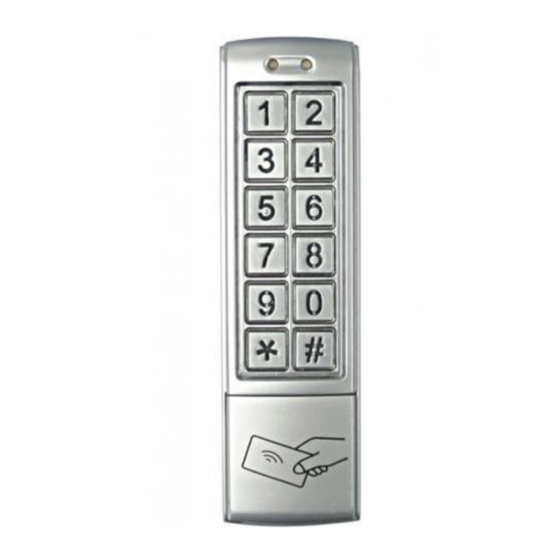
Manuals and User Guides for Competition Electronics DH16A-52DT. We have 1 Competition Electronics DH16A-52DT manual available for free PDF download: Instruction Manual
Casper, Выполнял всё по пунктам инструкции:
Программирование
1. Зоны 1 и 2 могут быть запрограммированы на открытие замка, до 1000 пользователей карт и соответствующих кодов могут быть сохранены в зоне 1, 10 пользовательских карт или кодов могут быть сохранены в зоне 2. Кроме того, зона 1 может быть запрограммирована на 3 режима открытия двери: с только помощью карт; с помощью карты или кода; с помощью и карты, и кода. зона 2 может быть запрограммирована для работы дверного звонка.
2. По умолчанию код 1234.
3. Введите код администратора по умолчанию два раза (1234 +1234).
После пункта 3 led состояния меняет цвет с зеленого на красный (более выглядит оранжевым), светится постоянно 30 сек., ничего программировать не позвояет, далее возвращается на зеленый.
Там же в инстр. вначале пишется: «1. Войдите в режиме настройки — желтый светодиодный индикатор будет мигать.»
Ну и вопрос каким образом войти в режим настройки. Нет в инструкции этого пункта, не описано, как войти в режим настройки.
Изделие новое четыре дня назад ездил на место установки и полчаса тыкал кнопки и перечитывал инструкции.
.
-
Contents
-
Table of Contents
-
Bookmarks
Quick Links
DH16A-12DT/DTQ
DH16A-32DT/DTQ
DH16A-10DT/DTQ
DH16A-20DT/DTQ
Security
Security
2015-V01
Instruction Manual
DH16A-52DT/DTQ
DH16A-62DT/DTQ
DH16A-82DT/DTQ DH16A-83DT/DTQ
DH16A-30DT/DTQ
DH16A-50DT/DTQ
DH16A-60DT/DTQ
Technology
Technology
Vogue
Vogue
Innovation
Innovation
Related Manuals for Competition Electronics DH16A-12DT

Summary of Contents for Competition Electronics DH16A-12DT
-
Page 1
Instruction Manual DH16A-12DT/DTQ DH16A-32DT/DTQ DH16A-52DT/DTQ DH16A-62DT/DTQ DH16A-82DT/DTQ DH16A-83DT/DTQ DH16A-10DT/DTQ DH16A-20DT/DTQ DH16A-30DT/DTQ DH16A-50DT/DTQ DH16A-60DT/DTQ Security Security Technology Technology Vogue Vogue Innovation Innovation 2015-V01… -
Page 3
Description Description Mode indicator Mode indicator Door indicator Door indicator Antenna Antenna Matrix keypads Touch keypads Case screw Case screw Night-lighting indicator Working conditions: temperature: -20 C ~ +50 C Working conditions: RH:≤95% temperature: -20 C ~ +50 C Current and voltage requirements: RH: ≤95% DC input: +12V — +24V… -
Page 4
Description Description Mode indicator Mode indicator Door indicator Matrix keypads Antenna Antenna Matrix keypads Case screw Case screw Working conditions: temperature: -20 C ~ +50 C RH: ≤95% Working conditions: Current and voltage requirements: temperature: -20 C ~ +50 C DC input: +12V — +24V RH: ≤95%… -
Page 5
ZONE 1: up to 1000 passwords & card holders ZONE 1: up to 1000 passwords & card holders ZONE 2: up to 10 passwords OR card holders ZONE 2: up to 10 passwords OR card holders DH16A-12DT DH16A-12DTQ DH16A-60DT DH16A-60DTQ 1. -
Page 6
Description Description Mode indicator Mode indicator Case screw Door indicator Touch keypads Antenna Antenna Matrix keypads Case screw Working conditions: temperature: -20 C ~ +50 C Working conditions: RH: ≤95% temperature: -20 C ~ +50 C Current and voltage requirements: RH: ≤95% DC input: +12V — +24V… -
Page 7
Description Description Mode indicator Mode indicator Door indicator Door indicator Antenna Antenna Matrix keypads Matrix keypads Case screw Case screw Working conditions: Working conditions: temperature: -20 C ~ +50 C temperature: -20 C ~ +50 C RH: ≤95% RH: ≤95% Current and voltage requirements: Current and voltage requirements: DC input:… -
Page 8
Description Mode indicator Door indicator Antenna Notice Matrix keypads Case screw Working conditions: Attention items of disassembly temperature: -20 C ~ +50 C RH: ≤95% (DH16A-10/12/20/30DT DH16A-10/12/20/30DTQ) Current and voltage requirements: DC input: +12V — +24V 1. Please remove the cover carefully following the manual. Not AC input: ~ 12V — 24V standby current: ≤80mA permitted to remove with sudden force. -
Page 9
Applicable model: DH16A-10/20/30/50/60DT Applicable model: DH16A-12/52/62/82/83DT DH16A-10/20/30/50/60DTQ DH16A-12/52/62/82/83DTQ Before installation, position the location where the controller unit is Before installation, position the location where the controller unit is mounted. Please operate it according to the following steps: mounted. Please operate it according to the following steps: 1. -
Page 10
ZONE 1 and 2 relays can be programmed for opening the lock, up to 1000 user cards and correlative codes can be stored into ZONE 1, 10 Applicable model: DH16A-32DT DH16A-32DTQ user cards or codes can be stored into ZONE 2 . In addition, ZONE 1 can be programmed for 3 modes to open the lock: card access(use card Before installation, position the location where the controller unit is only), card and code access(use either card or code), and combined… -
Page 11
Set the length of passwords Delete the user card and code(ZONE 1) In the setting mode: In the setting mode: Enter one set number(3 digits) from 000 to 999 data storage units, Press the button and yellow LED indicator will be flashing, then i f red LED indicator is on, means there is data stored in this set of unit, press press the button and a sound «BI»… -
Page 12
Set the unlocking time for ZONE 1 A. When ZONE 1 relay actived, door indicator will turn green. In the setting mode: B. When ZONE 2 relay actived, door indicator will turn red. Press the button , the mode indicator will flash yellow, enter the number from 00 to 99, the mode indicator will turn yellow in In case forget the a dmin c ode, p ress t he b utton a nd h old o n, t hen… -
Page 13
Group cards added in ZONE 1 Turn on/off the door bell In the setting mode: In the setting mode: Press the button (mode indicator will flash yellow), follow Press the button , the yellow LED indicator will be flashing, with the , a long beep will be heard whilst the mode indicator then press the button , a sound «BI»… -
Page 14
Wiring Diagram Wiring Diagram (Un-networked) (Networked) Red-power DC input: +12V — +24V Red-power DC input: +12V — +24V Black-power AC input:~ 12V — 24V Black-power AC input:~ 12V — 24V Brown-door status detecting Brown-door status detecting Orange-unlocking button 1 Orange-unlocking button 1 Yellow-unlocking button 2 Yellow-unlocking button 2 Green-GND…