
- Manuals
- Brands
- e-survey Manuals
- Receiver
- E300 Pro
- User manual
-
Contents
-
Table of Contents
-
Bookmarks
Quick Links
E300 Pro User Manual
E300 Pro GNSS Receiver
User Manual
V2.0_202011
Web:
www.esurvey-gnss.com
Email: support@esurvey-gnss.com
Related Manuals for e-survey E300 Pro
Summary of Contents for e-survey E300 Pro
-
Page 1
E300 Pro User Manual E300 Pro GNSS Receiver User Manual V2.0_202011 Web: www.esurvey-gnss.com Email: support@esurvey-gnss.com… -
Page 2: Table Of Contents
E300 Pro User Manual Contents Introduction ………………….1 Appearance ………………..1 Indicator ………………….1 Interface ………………….2 Pin definition ………………..2 Power button ………………..3 Web User Interface ………………..3 Position ………………….3 Satellites ………………….4 Information ………………..4 Working Mode ………………..5 Satellite Setting …………………
-
Page 3: Introduction
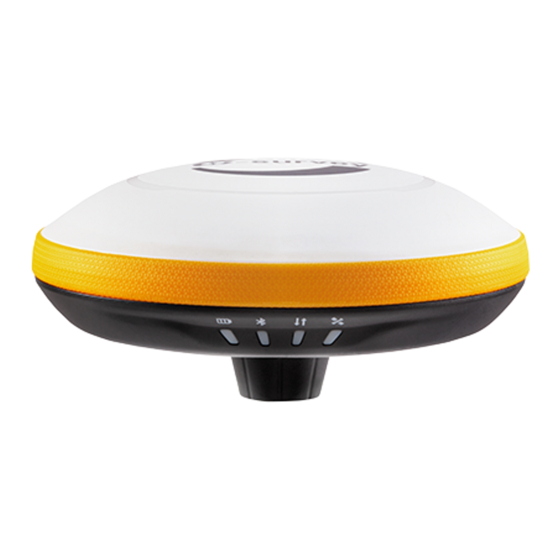
E300 Pro User Manual 1. Introduction This is the user manual for survey E300 Pro GNSS receiver. It gives basic description and operation guide which may help user to operate device properly. 1.1 Appearance The E300 Pro main body is designed with magnesium alloy material to provide durable usage and better heat dispersion as well as light weight 940g.
-
Page 4: Interface
E300 Pro User Manual 1.3 Interface E300 Pro GNSS receive bottom interface is shown as below. The 5-pin port is used to connect external radio and external power, or output NMEA messages. Type-C port can be used for data download (internal storage access) or charging.
-
Page 5: Power Button
E300 Pro User Manual 1.5 Power button There is a power button on E300 Pro control panel, the main function as below: Long press button for three seconds to power on Power On receiver, all the indicators will on. Long press button for two seconds then release, Power Off will hear the voice “Power off?”…
-
Page 6: Satellites
E300 Pro User Manual 2.2 Satellites View satellite list and satellite map, set cut-off angle. 2.3 Information View receiver information: firmware version, GNSS board, and network module. Web: www.esurvey-gnss.com Email: support@esurvey-gnss.com…
-
Page 7: Working Mode
E300 Pro User Manual 2.4 Working Mode Configurate working mode: base, rover or static. 2.5 Satellite Setting Configurate the satellites to be used. “RTK Timeout” setting is for aRTK service (With Hemisphere L-Band service, user cans still keep high accuracy for a period when correction data loses).
-
Page 8: Device Configuration
E300 Pro User Manual 2.6 Device Configuration Configurate receiver settings: User can set time zone. Sensor means MEMS sensor data output. Also, the 5-pin port baud rate is changeable. Speaker “Smart voice broadcast” can be disabled. When SIM card is insert and “WIFI share network” is enabled, PC can surf the internet when connected to device hotspot by using SIM data.
-
Page 9: View Logs
E300 Pro User Manual 2.8 View Logs The log files can be used to diagnose issues. Click “download” to download the files. 2.9 Raw Data Download raw data or convert data to RINEX format. User can use check box, then click “Package”…
-
Page 10: Backup Data
E300 Pro User Manual 2.10 Backup Data The points collected in SurPad4.0 will be backup in receiver storage automatically to avoid data loss. Can restore the data to SurPad software. 2.11 Management User can update receiver and GNSS firmware as well as register device, format internal disk, restore factory setting, restart device.
-
Page 11: Basic Operation
E300 Pro User Manual 3. Basic Operation This part shows user some basic operations to start working with E300 Pro. 3.1 Insert SIM card E300 Pro supports network working mode. Open the cover and insert SIM card. 3.2 Charge the battery E300 Pro is equipped with Type-C charger which support maximum 45w PD quick charge.
-
Page 12: Sensor
E300 Pro User Manual 3.5 Sensor The new E100 supports E-bubble and MEMS. It is determined by the activation code for which sensor is activated. Please note only one of the sensors can be activated. If you purchase E-bubble code, you can update to MEMS later by contacting with salesman.
-
Page 13
E300 Pro User Manual Web: www.esurvey-gnss.com Email: support@esurvey-gnss.com… -
Page 14: Internal Radio
E300 Pro User Manual 4. Internal Radio E300 Pro is equipped with 1-watt internal radio. User can select the transmission power 0.5 watt or 1 watt. There are 8 default channel frequency and the frequency of channel “8” is changeable. With new firmware update, lots of mainly used protocols in survey industrial are supported.
-
Page 15: Standard Accessories
E300 Pro User Manual 5. Standard Accessories E300 Pro base and rover are using the same hard carrying case. Base: Rover: Web: www.esurvey-gnss.com Email: support@esurvey-gnss.com…
-
Page 16: Technical Specifications
E300 Pro User Manual 6. Technical Specifications Web: www.esurvey-gnss.com Email: support@esurvey-gnss.com…
-
Page 17: Warranty Policy
If it is a non-warranty product, and the repair center will handle the maintenance of the extra- fee. After the device is repaired, the same fault is con- firmed by the repair center and e-survey will provide a 3-month free warranty service.
-
Page 18
E300 Pro User Manual Damage to the product is caused by external, including but not limited to, abnormal and unpredictable factors such as satellite systems, geomagnetism, static electricity, physical pressure, etc. Damage caused by force majeure such as earth- quakes, floods, wars, etc.
- Manuals
- Brands
- e-survey Manuals
- Receiver
- E300 Pro
- User manual
-
Contents
-
Table of Contents
-
Bookmarks
Quick Links
E300 Pro
GNSS RECEIVER
USER GUIDE
V2.2
1st Edition
Shanghai eSurvey GNSS Co., Ltd.
Related Manuals for e-survey E300 Pro
Summary of Contents for e-survey E300 Pro
-
Page 1
E300 Pro GNSS RECEIVER USER GUIDE V2.2 1st Edition Shanghai eSurvey GNSS Co., Ltd. -
Page 3
SHANGHAI ESURVEY GNSS CO., LTD. Copyright © Shanghai eSurvey GNSS Co., Ltd. 2021. All rights reserved. No part of this document may be reproduced or transmitted in any form or by any means without prior written consent of Shanghai eSurvey GNSS Co., Ltd. Trademarks and Permissions and other eSurvey trademarks are trademarks of Shanghai eSurvey GNSS Co., Ltd. -
Page 4
SHANGHAI ESURVEY GNSS CO., LTD. -
Page 5: Table Of Contents
SHANGHAI ESURVEY GNSS CO., LTD. Contents Before You Start ………………….1 Precautions for Safe Operation …………….1 1.1.1 Warning ………………….1 1.1.2 Caution ………………….1 Exemptions from Responsibility ……………. 2 E300 at a Glance ………………….3 Appearance ………………….3 Indicator Light …………………. 3 Battery Indicator ………………..
-
Page 6
SHANGHAI ESURVEY GNSS CO., LTD. -
Page 7: Before You Start
Please do not use wet charger, defective power cable, socket or plug, and power cable not specified by e-Survey. Otherwise, fire or electric shock may occur. Please do not put the device close to burning gas or liquid, and do not put it in the fire or high temperature condition.
-
Page 8: Exemptions From Responsibility
SHANGHAI ESURVEY GNSS CO., LTD. Exemptions from Responsibility You are expected to follow all operating instructions and regularly check the performance of this device. We assume no responsibility for any damage and loss of profits caused by the following conditions: …
-
Page 9: E300 At A Glance
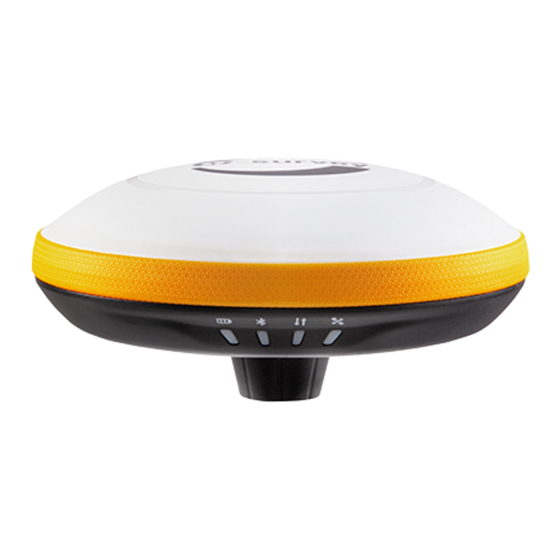
SHANGHAI ESURVEY GNSS CO., LTD. E300 at a Glance The E300 Pro main body is designed with magnesium alloy material to provide durable usage and better heat dispersion and light weight 940g. And when it’s fully charged, it can continuously work for 12h.
-
Page 10: Battery Indicator
SHANGHAI ESURVEY GNSS CO., LTD. Battery Indicator Through the battery indicator, you can know the battery level: Number of green indicator Battery level 75% — 100% 50% — 75% 25% — 50% 0% — 25% Power Button Through the power button, you can achieve the following: …
-
Page 11: Web Ui
SHANGHAI ESURVEY GNSS CO., LTD. Web UI The receiver WIFI can be used as a hotspot, and you can connect to the hotspot with you PC, smart phone or tablet. After connecting to the hotspot, you can manage working status, change working mode, configure basic settings, download raw data, update firmware and register device, etc.
-
Page 12: Position
SHANGHAI ESURVEY GNSS CO., LTD. Position In Position page, you can view the following, and start and stop recording in static mode: System node Coordinates: longitude, latitude, and height Solution status Satellite number PDOP HDOP …
-
Page 13: Datalink
SHANGHAI ESURVEY GNSS CO., LTD. Datalink In Datalink page, you can check the current datalink:…
-
Page 14: Satellites
SHANGHAI ESURVEY GNSS CO., LTD. Satellites In Satellites page, you can do the following: Set cut-off angle View satellites in table or skyplot…
-
Page 15: Information
SHANGHAI ESURVEY GNSS CO., LTD. Information In Information page, you can view the following information: Receiver Antenna GNSS board Network UHF…
-
Page 16: Working Mode
SHANGHAI ESURVEY GNSS CO., LTD. Working Mode In Working Mode page, you can configure the working mode, including base, rover and static:…
-
Page 17: Satellite Settings
SHANGHAI ESURVEY GNSS CO., LTD. Satellite Settings In Satellite Setting page, you can do the following: Configure the satellites to be used, including GPS, GLONASS, Beidou, GALILEO, SBAS and QZSS. Set RTK timeout: with Hemisphere L-Band service, high accuracy can be still kept within the set timeout even if correction data loses.
-
Page 18: Device Configuration
SHANGHAI ESURVEY GNSS CO., LTD. Device Configuration In Device Configuration page, you can do the following: Set time zone. Select whether to enable direct link mode, and IMU sensor data output. Set 5-pin serial port baud rate. …
-
Page 19: Nmea Message
SHANGHAI ESURVEY GNSS CO., LTD. NMEA Message In NMEA Message page, you can do the following: Configure NMEA data output through Bluetooth or 5-pin port. Select whether to enable automatic output GNSS PPP message. Select whether to enable external port output NMEA. …
-
Page 20: View Logs
SHANGHAI ESURVEY GNSS CO., LTD. View Logs In View Logs page, you can do the following for troubleshooting: View App logs and OS logs. Download files of App logs and OS logs.
-
Page 21: Raw Data
SHANGHAI ESURVEY GNSS CO., LTD. 3.10 Raw Data In Raw Data page, you can do the following: Download raw data and NMEA data. Convert data to RINEX format. Download multiple files by checking the target files and clicking Package.
-
Page 22: Backup Data
SHANGHAI ESURVEY GNSS CO., LTD. 3.11 Backup Data The points collected in SurPad software will be automatically backed up in receiver storage to avoid data loss. You can download the data for later use. In Backup Data page, you can do the following: …
-
Page 23: Management
SHANGHAI ESURVEY GNSS CO., LTD. 3.12 Management In Management page, you can do the following: Install new firmware. Register the device. Register the GNSS. Set security: to set password of web UI (192.168.10.1) and receiver WIFI. …
-
Page 24: Basic Operations
SHANGHAI ESURVEY GNSS CO., LTD. Basic Operations It introduces basic process of starting working with the device. Insert a SIM Card The device supports network working mode. To insert a SIM card, open the cover of nano SIM and insert a SIM card. Charge the Battery The device is equipped with Type-C charger which supports maximum 45W PD quick charge.
-
Page 25: Measure Antenna Height
SHANGHAI ESURVEY GNSS CO., LTD. Measure Antenna Height Antenna height refers to the vertical distance between the phase center and the ground. Since the antenna height cannot be directly measured, it is automatically calculated by SurPad software based on the measured height you input and measurement type you select.
-
Page 26: Start Tilt Measurement
SHANGHAI ESURVEY GNSS CO., LTD. Start Tilt Measurement The device can support both E-bubble and IMU, which is determined by the activation code and service you purchase, but you cannot use both of them at the same time. 4.6.1 Start E-bubble Tilt Measurement It is required when tilt measurement is used and E-bubble is used.
-
Page 27
SHANGHAI ESURVEY GNSS CO., LTD. 5. Change the inclined direction and repeat step 4 until 3 tilt points are collected. After 3 tilt points are collected, the following interface shows:… -
Page 28
SHANGHAI ESURVEY GNSS CO., LTD. 6. To save the result, press Save. The following interface shows:… -
Page 29: Start Imu Tilt Measurement
SHANGHAI ESURVEY GNSS CO., LTD. 4.6.2 Start IMU Tilt Measurement It is required when tilt measurement is used and IMU is used. Before starting IMU tilt measurement, to enable IMU tilt measurement, in SurPad software, press main menu Device → Device Setting, and set tilt survey to Pole Tilt Correction. To start IMU tilt measurement in SurPad software, press main menu Survey →…
-
Page 30: Internal Radio
SHANGHAI ESURVEY GNSS CO., LTD. Internal Radio E300 Pro is equipped with 1 W internal radio. You can select the transmission power from 0.5W or 1W. There are 8 default channel frequency in which channel 8 is changeable. With firmware updated, lots of protocols in survey industrial are supported.
-
Page 31: Standard Accessories
SHANGHAI ESURVEY GNSS CO., LTD. Standard Accessories The standard accessories for the base station and rover station are as follows: Items Model Description Base Rover Picture Base √ √ Carrying Carry case Case (1) E300 GNSS √ √ Receiver Charger √…
-
Page 34
To be the leading provider of high-precision professional, solution & service in the global geospatial industry Shanghai eSurvey GNSS Co., Ltd. Address: Building 4, No.651 Wanfang Rd, Pujiang Town, Minhang District, Shanghai, China E-mail: Sales: info@esurvey-gnss.com Support: support@esurvey-gnss.com Hote-line: +86 21 54467213 Website: https://esurvey-gnss.com/…
Высокопроизводительный, компактный, 800-канальный, многочастотный GNSS приёмник, работающий с системами GPS, ГЛОНАСС, Galileo, BeiDou, QZSS, IRNSS и SBAS. В приемник встроены УКВ и GSM/GPRS модемы. Система инклинометров позволяет получать координаты точек в местах с ограниченной видимостью, путем наклона вехи с приемником в сторону, где видимость спутников лучше. Прочный корпус из магниевого сплава выдерживает падение с высоты 3м на твердую поверхность и допускает кратковременное погружение в воду на глубину до 2 м. Водонепроницаемость при погружение до 2 м.
Технические характеристики GNSS приемник E-Survey E300 Pro (IMU/GSM/Radio)
- БрендE-SURVEY
- Гарантия1 год
- Количество каналов800
- GPSL1CA/L1P/L1C/L2P/L2C/L5
- ГЛОНАССL1/L2/L3, P1/P2
- BeiDouB1I, B2I, B3I, B1C, B2a, B2b, ACEBOC
- GalileoE1, E5a, E5b,ALTBOC, E6
- QZSSL1CA/L1C/L2C/L5/LEX
- SBASL1/L5/WAAS/EGNOS/GAGAN/SDCM/MSAS
- NavIC (IRNSS)L5
- Частота обновления данных10 гц (20,50 гц опция)
- L-BandBasic/ H30(опция)/ H10(опция)
- Высокоточная статика2 mm + 0.1 ppm/3 mm + 0.4 ppm
- Точность RTK4 mm + 0.5 ppm/8 mm + 0.5 ppm
- DGPSH: 0.25 m V: 0.45 m
- SBASH: 0.3 m V: 0.6 m
- Надежность инициализации<99.9%
- RTK База NTRIP, прямой IPда
- RTK Ровер NTRIP, прямой IPда
- RTCM2.1, 2.2, 2.3, 3.0, 3.1, 3.2
- CMRCMR, CMR+
- Точность компенсаторадиапазон работы не менее 30 °
- Память8 GB
- Расширение памятинет
- Электронный уровеньесть
- GSM/GPRS модем4G
- Встроенный радиомодем410-470 МГц
- Bluetooth:BT 5.0, BLE
- Wi-Fi802.11 ac/n(HT20)/a/b/g
- SIM карта:Nano SIM card
- Интерфейсыпорт TNС для UHF антенны, Lemo 5-pin для внешнего радиомодема и питания, порт USB 3.0, порт Type-C (для заряда батареи и подк
- БатареяLi-Ion 6800 mAh / 7.2V
- Время работы от батареи12 часов
- Внешнее питание12v
- Вес950 гр
- Размеры158 мм x 53 мм
- Рабочая температура-45 °C до +70 °C
- Температура хранения-55 °C to +85 °C
- ПылевлагозащищенностьIP68
- Погрешность за наклон вехи8 мм + 0.4 мм/градус наклона, угол наклона до 60°
- Световые индикаторы:4 шт.(отслеживание спутников, передача или прием данных, состояние Bluetooth, состояние аккумулятора)
- Напряжение:9-28В постоянного тока с защитой от перенапряжения
- Время работы:12 часов
- Время быстрой зарядки:до 4 часов
- Мощность радиомодема:2W
- Дальность радио:5 км., при идеальных условиях до 10 км.
- Диапазон радио частот:410 — 470 MHz
- Поддерживаемые радиопротоколы:Satel, PCC-GMSK, PCC-4FSK, TrimTalk450S, TrimMark III, South, HiTarget, TrimTalk4800, GEOTALK,GEOMARK,HZSZ.
- Веб интерфейс:наличие
- NMEA:GGA, ZDA, GSA, GSV, GST, VTG, RMC, GLL, Binary
- ПоддержкаiRTK,aRTK
- Холодный старт:<60 сек.
- Теплый старт:< 30 сек.
- Водонепроницаемостьпри погружение до 1.5 м.
- Время инициализации<8 сек.
- Горячий старт:<10 сек.
E-SURVEY E300 PRO IMU – современный, компактный, мультисистемный ГНСС приемник с передовыми технологиями L-band и aRTK. 800 каналов, GSM и УКВ-модемом на борту. Может быть ровером, базой или приемником для статических измерений.
E-SURVEY E300 PRO IMU с 800-т канальной GNSS плате, обладает уникальным сочетанием доступной цены, передовыми техническими характеристиками и отличной производительностью. Позволяет одновременно отслеживать все спутниковые сигналы, включая GPS, ГЛОНАСС, BeiDou, Galileo, QZSS и L-band, что существенно повышает стабильность работы гнсс приемника E300 PRO и повышает надежность получения фиксированных решений.
Благодаря современной и технологичной плате в E300 PRO реализован новейший алгоритм подавления многолучевости сигнала, позволяющий работать в самых сложных условиях повышенных помех.
ГНСС приемник E-SURVEY E300 PRO IMU работает под управлением программного обеспечения SurPad 4.2 Android (входит в комплект поставки) или Carlson SurvCE Windows CE. Обновленное ПО SurPad 4.2 полностью поддерживает функционал RTK сетей с передачей поправок по протоколу 1021-1027 (Геоспайдер) для автоматического перехода в местные системы координат.
Основные преимущества E-SURVEY E300 PRO IMU:
- Компактность и малый вес. Размер E-SURVEY E300 PRO IMU – 158 мм x 53 мм, а вес 0,9 кг. В прочном корпусе приемника максимально оптимизировано сочетание компактного размера, веса и мощных аккумуляторов.
- Приемник E300 PRO оснащен инерциальной системой наклона (IMU), позволяющей с высокой точностью вести съемку при наклонном положении вехи. Помимо экономии времени геодезиста система позволяет удобно вести съемку в в тех местах, где видимость ограничена (под козырьками, углы зданий).
- Встроенный аккумулятор Li-Ion 6800 mAh / 7.2V, который обеспечивает долгий срок работы.
- WI-FI и WEB интерфейс приемника. Веб-интерфейс, позволяет полностью контролировать все состояния приемника, скачивать и загружать проекты, легко и просто создать NTRIP базу, также есть возможность получить доступ к интернету через внешний WI-FI модем или наоборот – использовать приемник как точку доступа в интернет.
- Встроенный радиомодем: TRM101 410-470 МГц. Выходная мощность 1 Вт.
- Встроенный 4G модем. Все возможности высокоскоростного соединения у вас под рукой.
- Степень защиты — IP67. Прочный, усиленный по периметру резиновым бампером корпус из магниевого сплава со степенью защиты IP67. Выдерживает падение на вехе с высоты 2 метра и допускает кратковременное погружение в воду на глубину до 1 метра.
Комплект поставки E-SURVEYE300 PRO IMU:
- GNSS приемник
- Радиоантенна
- Контроллер Geobox Fora G9
- Зарядное устройство
- Кабель передачи данных
- Кейс для переноски
E-SURVEY E300 PRO IMU обеспечивается 2-х летней гарантией с расширенными обязательствами. В случае возникновения гарантийной ситуации на подмену выдается приемник с аналогичными характеристиками.
В Учебном Центре ООО «Геоприбор» можно бесплатно пройти обучение работе с современным GNSS приемником E-SURVEY E300 PRO IMU.
Сомневаетесь? Убедитесь в качестве оборудования, посетив наш офис или заказав демонстрацию E-SURVEY E300 PRO IMU на вашем объекте. Так же очень популярна услуга тестового проката. Стоимость проката оборудования, в данном случае, может быть учтена в случае его выкупа.
По всем техническим вопросам, покупке или демонстрации работы E-SURVEY E300 PRO IMU можно обращаться по телефону +7 (921) 966-22-00.
| Тип приемника | Суперпрочный моноблок |
| Наличие/тип электронного уровня/угол работы | Встроенный датчик наклона IMU |
| Снижение многолучевости | Да |
| Память и SD карта | Да, 16 Гб / нет |
| Тип и дальность работы Bluetooth | V2.1+EDR / V4.1 Dual Mode: Класс 2, до 150 м |
| Наличие Wi-Fi/Web интерфейса | Да / Да (настройка, обмен данными, обновление) |
| ПО для контроллера | SurPad 4.0, Carlson SurvCE |
| Ударопрочность | Выдерживает падение с 2-х метров |
| Функции кнопки | Включение/выключение |
| Голосовой интерфейс | Да |
| Количество каналов | 800 |
| Материал корпуса | Алюминиево-магниевый сплав |
| Размеры, мм | 151х68мм |
| Вес с аккумуляторами, кг | 0,9кг |
| Степень защищенности IP | IP 67 |
| Диапазон рабочих температур | От -40°С до +80°С |
| Индикаторы, светодиоды | 4 индикатора |
Точность и производительность |
|
| Принимаемые сигналы | GPS: L1 C/A, L1C, L1P, L2C, L2P, L5; ГЛОНАСС: G1, G2, G3; BeiDou: B1, B2, B3, ACEBOC; GALILEO: E1, E5A, E5B, ALTBOC, E6; QZSS: L1 C/A, L1C, L2C, L5, L6; IRNSS: L5 |
| Время инициализации | Менее 10 секунд |
| Надежность инициализации | 99.9% |
| Частота позиционирования | 5Гц |
| Статика (план) | 2,5 мм + 0.5 мм/км |
| Статика (высота) | 5 мм + 0.5 мм/км |
| Быстрая статика (план) | 3 мм ± 0.5 мм/км |
| Быстрая статика (высота) | 5 мм ± 0.5 мм/км |
| RTK (план) | 8 мм + 1 мм/км |
| RTK (высота) | 15 мм ± 1 мм/км |
| Разъемы, доступные на корпусе | порты: Два интерфейсных порта. Lemo 5-пин и USB Type-C для зарядки и передачи данных, |
| Высокочастотный разъем | УКВ внешняя радиоантенна (опционально) |
| Наличие / мощность УКВ модема | Да, 1Вт |
| Наличие GSM модема/тип SIM | да, Nano SIM карта |
| Форматы вывода данных | NMEA 0183, GGA, ZDA, GSA, GSV, GST, VTG, RMC, GLL |
| Форматы приема поправок | TCM 2.1, 2.3, 3.0, 3.1, 3.2, 3.3, CMR, CMR+, ROX |
Питание |
|
| Количество аккумуляторов | Встроенный аккумулятор |
| Возможность горячей замены | Нет |
| Тип/напряжение и емкость аккумулятора/интерфейс | Встроенный аккумулятор по 7.2 В – 6800 мАч |
| Внешнее питание | 9-28В DC внешнего питания с защитой от перенапряжения (5 пин Lemo) |
| Время работы, часов (RTK/База УКВ/статика) | до 12 часов |
Гарантия |
|
| 24 месяца расширенной гарантии | Есть |
Дополнительно |
|
| Разъем для EVENT, Событие | Опционально |
| Разъем для подключения внешнего УКВ модема | Есть |
Table of Contents for e-survey E300 Pro:
-
SHANGHAI ESURVEY GNSS CO., LTD. 15 3.10 Raw Data In Raw Data page, you can do the following: Download raw data and NMEA data. Convert data to RINEX format. Download multiple files by checking the target files and clicking Package.
-
SHANGHAI ESURVEY GNSS CO., LTD. 11 3.6 Satellite Settings In Satellite Setting page, you can do the following: Configure the satellites to be used, including GPS, GLONASS, Beidou, GALILEO, SBAS and QZSS. Set RTK timeout: with Hemisphere L-Band service, high accuracy can be still kept within the set timeout even if correction data loses. Set surefix: the Hemisphere technology to increase the reliability of the fixed solution, which means it will be much more difficult to get f
-
SHANGHAI ESURVEY GNSS CO., LTD. 6 3.1 Position In Position page, you can view the following, and start and stop recording in static mode: System node Coordinates: longitude, latitude, and height Solution status Satellite number PDOP HDOP TDOP HRMS VRMS Local time UTC time
-
SHANGHAI ESURVEY GNSS CO., LTD. 14 3.9 View Logs In View Logs page, you can do the following for troubleshooting: View App logs and OS logs. Download files of App logs and OS logs.
-
SHANGHAI ESURVEY GNSS CO., LTD. 8 3.3 Satellites In Satellites page, you can do the following: Set cut-off angle View satellites in table or skyplot
-
SHANGHAI ESURVEY GNSS CO., LTD. 3 2 E300 at a Glance The E300 Pro main body is designed with magnesium alloy material to provide durable usage and better heat dispersion and light weight 940g. And when it’s fully charged, it can continuously work for 12h. 2.1 Appearance The E300 Pro main body is as follows: 2.2 Indicator Light Through the color of the indicator light, you can know the following: Battery status o Green: battery level 30% — 100%. o
-
SHANGHAI ESURVEY GNSS CO., LTD. Copyright © Shanghai eSurvey GNSS Co., Ltd. 2021. All rights reserved. No part of this document may be reproduced or transmitted in any form or by any means without prior written consent of Shanghai eSurvey GNSS Co., Ltd. Trademarks and Permissions and other eSurvey trademarks are trademarks of Shanghai eSurvey GNSS Co., Ltd. All other trademarks and trade names mentioned in this document are the property of their respective holders. Notice The p
-
SHANGHAI ESURVEY GNSS CO., LTD. 22 6. To save the result, press Save. The following interface shows:
-
SHANGHAI ESURVEY GNSS CO., LTD. 4 2.3 Battery Indicator Through the battery indicator, you can know the battery level: Number of green indicator Battery level 4 75% — 100% 3 50% — 75% 2 25% — 50% 1 0% — 25% 2.4 Power Button Through the power button, you can achieve the following: Power on the receiver: long press the button for 3 seconds and release it. All indicator lights will be on. Power off the receiver: long press the button for 3 seconds, release it until you hear the voice Power off?, an
-
SHANGHAI ESURVEY GNSS CO., LTD. 2 1.2 Exemptions from Responsibility You are expected to follow all operating instructions and regularly check the performance of this device. We assume no responsibility for any damage and loss of profits caused by the following conditions: A faulty or intentional usage or misuse. Any disasters, such as earthquakes, storms, floods etc. A change of data, loss of data, an interruption of business etc. Wrong tr
-
SHANGHAI ESURVEY GNSS CO., LTD. 16 3.11 Backup Data The points collected in SurPad software will be automatically backed up in receiver storage to avoid data loss. You can download the data for later use. In Backup Data page, you can do the following: Download point data. Delete point data.
-
SHANGHAI ESURVEY GNSS CO., LTD. 17 3.12 Management In Management page, you can do the following: Install new firmware. Register the device. Register the GNSS. Set security: to set password of web UI (192.168.10.1) and receiver WIFI. Format the internal disk. Do self-testing. Restore factory settings. Reset: to restart the receiver.
-
SHANGHAI ESURVEY GNSS CO., LTD. 23 4.6.2 Start IMU Tilt Measurement It is required when tilt measurement is used and IMU is used. Before starting IMU tilt measurement, to enable IMU tilt measurement, in SurPad software, press main menu Device → Device Setting, and set tilt survey to Pole Tilt Correction. To start IMU tilt measurement in SurPad software, press main menu Survey → Point Survey to enter the main interface of point survey, and do as the prompt in the interface: Status What it means What to do
-
SHANGHAI ESURVEY GNSS CO., LTD. 13 3.8 NMEA Message In NMEA Message page, you can do the following: Configure NMEA data output through Bluetooth or 5-pin port. Select whether to enable automatic output GNSS PPP message. Select whether to enable external port output NMEA. Select whether to record NMEA.
-
SHANGHAI ESURVEY GNSS CO., LTD. 24 5 Internal Radio E300 Pro is equipped with 1 W internal radio. You can select the transmission power from 0.5W or 1W. There are 8 default channel frequency in which channel 8 is changeable. With firmware updated, lots of protocols in survey industrial are supported. The default channel frequency is as follows: Channel Frequency (Unit: MHz) 1 441 2 442 3 443 4 444 5 445 6 446 7 447 8 44
Questions, Opinions and Exploitation Impressions:
You can ask a question, express your opinion or share our experience of e-survey E300 Pro device using right now.