
-
Contents
-
Table of Contents
-
Bookmarks
Quick Links
DT9502
Intrinsically Safe Temperature Meter / Transmitter
Operating Instructions
Related Manuals for Datcon DT9502
Summary of Contents for Datcon DT9502
-
Page 1
DT9502 Intrinsically Safe Temperature Meter / Transmitter Operating Instructions… -
Page 2: Table Of Contents
DT9502 Contents 1. About this document ………….4 1.1. Function ………………. 4 1.2. Target group…………….4 1.3. Symbolism used…………… 4 2. For your safety ……………5 2.1. Authorised personnel …………… 5 2.2. Appropriate use……………. 5 2.3. Warning about misuse …………. 5 …
-
Page 3
DT9502 7. 7. Setting-up …………..26 7.1. Typing the code (password) in ……….26 7.2. The menu …………….28 7.3. Display modes of limit output status……..29 (01. menu item) …………….29 7.4. Setting up the limit outputs (02. & 03. menu items) ….31 … -
Page 4: About This Document
1. About this document 1.1. Function This operating instructions manual has all the information you need for quick set-up and safe operation of DT9502. Please read this manual before you start setup. 1.2. Target group This operating instructions manual is directed to trained personnel.
-
Page 5: For Your Safety
2.4. General safety instructions The DT9502 is a high-tech instrument requiring the strict observance of standard regulations and guidelines. The user must take note of the safety instructions in this…
-
Page 6: Eu Conformity
DT9502 2.5. EU conformity The DT9502 is in conformity with the provisions of the following standards: MSZ EN 60079-0:2013 (ATEX) MSZ EN 60079-0:2013/A11:2014 (ATEX) MSZ EN 60079-11:2012 (ATEX) MSZ EN 61326-1:2013 (EMC) MSZ EN 55011:2016 (EMC) MSZ EN 55011:2016/A1:2017 (EMC)
-
Page 7: Product Description
2. front panel with 3 membrane push buttons 3.2. Principle of operation Application fields The apparatus DT9502 is a loop-powered intrinsically safe temperature meter and transmitter instrument, fed by 4–20 mA loop current. It works with a standard Pt100 measuring probe, which is not an accessory of the instrument.
-
Page 8
(e.g. temperature regulation). Due to the function of DT9502 it can be placed in zone 1, zone 2. The temperature sensor can be in zone 0 too. A current generator (800 A) is connected to the terminal Operating principles pair PI+ and PI-. -
Page 9: Settings
The disposal of the internal foam material is recommended to take place through a company specialised for recycling. Storing in dry places, on room temperature, free from vibrations has beneficial effects on the expectable lifetime of the apparatus DT9502. 20171205-V3…
-
Page 10: Mounting
DT9502 4. Mounting 4.1. General instructions Use the enclosed seal when mounting DT9502 on panel to assure IP 65 protection from the front side. Electrostatic hazard! Clean only a moist cloth and detergent. Mounting positions Select a mounting position you can easily read the display…
-
Page 11: Mounting Procedure
DT9502 4.3. Mounting procedure Preparatory steps 1. Cut-out the panel according to the figure shows below. The cut-out needs special tools, it must be carried out by trained specialist personnel. Cut-out dimensions 2. Put on the enclosed seal onto the instrument case from the rear side and fit it to the instrument front panel back side.
-
Page 12
DT9502 Mounting by the mounting fixtures 4. Put on the two enclosed srew clamps onto the sides of the instrument case (Figure step 1). Fix the instrument by turning the srews in clockwise direction (Figure step 2). Pay attention not to let pointed, sharp metal parts cause accidents. -
Page 13: Connecting
In hazardous areas you should take note of the appropriate regulations, conformity and type approval certificates of the DT9502 and other instruments are connecting in the current loop (e.g. power supply, transmitter, etc.). The connection must be carried out by trained and…
-
Page 14
DT9502 Connection • The shieldings of the cables connected to Pt100 and to 4-wire mode the current loop must be connected with each other. (see also “Application example”) Be careful the polarity of the cables. The most accurate measurement can be achieved by the 4- wire operating mode, as the cable resistances and their possible asymmetry will not cause measuring errors. -
Page 15
DT9502 Connection • The shieldings of the cables connected to Pt100 and to 3-wire mode the current loop must be connected with each other. (see also “Application example”) Be careful the polarity of the cables. The 3-wire operating mode results in less accurate… -
Page 16
DT9502 Wiring plan, connecting the limit outputs (see also “Application example”) Be careful the polarity of the cables. Select connection cable Take note the suitability of the connecting cable. We recommend the use of screened twisted pair cable. The wire cross-section should be 0.25-1.5 mm… -
Page 17
DT9502 The push-in direct connector assemblies used allow a fast connection of the cables. Their proper usage is shown by the following figure: Connecting the cables into the terminal assemblies 1. Push the stripped cable-end until it possible into the terminal assembly. -
Page 18
Check if everything has been done in accordance with chapter 5.1. Connection to the measurement loop. With this you have completed the connection of DT9502. 20171205-V3… -
Page 19: The Display And The Operating Devices
DT9502 6. The display and the operating devices 6.1. The first start-up The display The dispay is shown by the arrow (1). After the apparatus has been installed to its place, the probe Pt100 has been connected in accordance with the…
-
Page 20: Characters And Mnemonics Appearing On The Display
DT9502 6.2. Characters and mnemonics appearing on the display DT9502 has a 7-segment type display. It means that maximum 7 bars are used to form each characters. The numbers can be read easily, some of the letters, marks however, looks unusual: …
-
Page 21
DT9502 Messages of critical errors A/D failure (Service: AD Hardware) EEPROM failure (Service: EEPROM Hardware) EEPROM write error (Service: EEPROM Protected) Calibration error (Service: Calibration) Default factory settings (Service: Default Factory Settings) The last saving was not successful (Error: Last Save) … -
Page 22
DT9502 Minimum-maximum values on the display (▲ button) Minimum value (MINimum) Maximum value (MAXimum) Firmware version (FiRMwareE) Low numeric value not possible to display High numeric value not possible to display Limit values on the… -
Page 23: Manual Controls
DT9502 6.3. Manual controls DT9502 can be adjusted by the membrane push-buttons indicated by (1), (2), and (3) in the drawing. Functions of the push-buttons during measurement (1) MENU button: Entering into the menu. When this button is pressed, the apparatus prompts you to give your code in accordance with chapter 7.1.
-
Page 24
DT9502 How to use it? 1. Press down the ▲ button, and keep it down. The text shows that the minimum value out of all the results measured since the last deletion is going to appear on the display. -
Page 25
DT9502 • The minimum value and the maximum value can be deleted after a supervisor-level entry, by using the menu item No. 14. (Deleting the minimum and the maximum values). (3) ENTER button: presenting the limit output status on the display. -
Page 26: Setting-Up
DT9502 7. 7. Setting-up 7.1. Typing the code (password) in The importance of the You may enter the menu only after you have typed your code code in. The code is made from 3 numeric characters. This solution prevents unauthorised persons from changing the settings of the instrument.
-
Page 27
DT9502 Automatic exit from If no buttons are pressed, the instrument displays the the request for the code mnemonic (Auto Escape) after 1 minute has passed from the last pressing of a button, and it RESTARTS, i. e. goes back to the measuring mode. This… -
Page 28: The Menu
DT9502 7.2. The menu The menu structure 01: Limit-value display 29. page 02: Limit value 1 03: Limit value 2 30. page 04: 4 wire / 3 wire 39. page 05: Temperature 4 mA 40. page 06: Temperature 20 mA 42.
-
Page 29: Display Modes Of Limit Output Status
DT9502 7.3. Display modes of limit output status (01. menu item) Function The state of the limit outputs (whether they are switched on or off) can be displayed. Here you can define the conditions, on which displaying should depend. [Default factory setting: OFF] Sequence of operations 1.
-
Page 30
DT9502 Sequence of operations • : Always on (ON) It always displays the states of limit outputs. If you keep the ENTER button pressed down, the measurement results are displayed. (This operating mode is useful when the states of limit outputs is more important than the measured value.) -
Page 31: Setting Up The Limit Outputs (02. & 03. Menu Items)
DT9502 7.4. Setting up the limit outputs (02. & 03. menu items) Function The instrument has two limit outputs. They are identical with each other, and work independently. Operation: the instrument keeps comparing the displayed physical value with the (adjustable) limit value. It switches the output ON depending whether the displayed value is higher than the limit value.
-
Page 32
DT9502 Setting the operating 6. After you have selected the desired operating mode for mode the limit output, press the MENU button. This takes you out Sequence of operations from the given sub-menu item, and you see this: … -
Page 33
DT9502 14. Pressing the ▲ button you can switch on or off the minus sign. • = 123.4 °C • = -123.4 °C 15. After you have defined the value for the limit, press the MENU button to exit from the sub-menu item, and you see … -
Page 34
DT9502 Hysteresis of the low 17. Enter by pressing the ENTER button. limit 18. You see this Sequence of operations on the display. This is the value of L1.LH. It can be changed between 000 and 999. The digit at the left side is blinking. -
Page 35
DT9502 26. Pressing the ► button you can select the next digit. 27. Pressing the ▲ button you can increase the value of the blinking digit: , etc. 28. When the last digit (right-side) is being selected, and you press the ►… -
Page 36
DT9502 34. You see this on the display. This is the value of L1.HH. It can be changed to any values between 00.0 and 99.9. The digit at the left side is blinking. 35. Pressing the ► button you can select the next digit. -
Page 37: Limit Output Alarm Mode
DT9502 7.5. Limit output alarm mode Function In alarm mode, the limit output is switching on when the limit condition exist. But the output stays switched on (independent from the limit condition) until the ENTER button is pressed (alarm acknowledge). (All these information are described in detail in Chapter 7.4.
-
Page 38
DT9502 Exit from the menu Press the MENU button. First the mnemonic (Save), then the mnemonic (Exit) are shown on the display. With this the storing of the settings is completed. The instrument has exited the menu and goes on with the measurement. -
Page 39: 4-Wire / 3-Wire Operating Modes (04 Menu Item)
DT9502 modes (04 menu item) 7.6. 4-wire / 3-wire operating Function In this menu item you should select either 4 wires or 3 wires for connecting the probe Pt100 to the apparatus. (Factory default setting: 4 wires) Sequence of operations 1. Enter the menu with the supervisor code.
-
Page 40: The Temperature Value Belonging To The 4 Ma Value (05 Menu Item)
DT9502 7.7. The temperature value belonging to the 4 mA value (05 menu item) Function The apparatus regulates the loop current between 4 and 20 mA in proportion with the measured temperature. In this menu item any °C values between -200.0 °C and 600.0 °C could be assigned to the 4 mA loop current.
-
Page 41
DT9502 Exit from the menu item 1. After you have completed the setting, press the MENU button. With this you leave the menu itemt, and you see this: (2. If you want to change the setting you have just… -
Page 42: The Temperature Value Belonging To The 20 Ma Value (06 Menu Item)
DT9502 7.8. The temperature value belonging to the 20 mA value (06 menu item) Function The apparatus regulates the loop current between 4 and 20 mA in proportion with the measured temperature. In this menu item any °C values between -200.0 °C and 600.0 °C could be assigned to the 20 mA loop current.
-
Page 43
DT9502 Exit from the menu item 1. After finishing the setting, press the MENU button to exit from the menu item, and you see this: (2. If you want to change the setting you have done just now, or if you just want to check what you have typed in, go on with the operation from point 3 of the Sequence of operations.) -
Page 44: The Number Of Averaged Measurements (07. Menu Item)
DT9502 7.9. The number of averaged measurements (07. menu item) Function The instrument performs cca. 15 measurements in each seconds. The displayed measurement result is generated as the average of several measurements. Here you can define the number of measurements that should be used for calculating the averaged numerical value.
-
Page 45
DT9502 Sequence of operations • : The displayed value is the same as the last measurement result; the previous measurements do not influence this value. (The display settling time after the stabilisation of the input signal: 0.1 second.) … -
Page 46: Display Refresh Time (08. Menu Item)
DT9502 7.10. Display refresh time (08. menu item) Function The instrument performs cca. 15 measurements in each seconds. It’s too fast to see the changing of the measurement value. Here you can define the time periods by which the instrument displays the new measurement values.
-
Page 47
DT9502 Exit from the menu item 1. After finishing the setting, press the MENU button, to exit the menu item, and you see this: (2. If you want to change the setting you have done just now, or if you just want to check what you have typed in, go on with the operation from point 3 of the Sequence of operations.) -
Page 48: Tests (09. Menu Item)
DT9502 7.11. Tests (09. menu item) Function Checking the display and the limit outputs. Sequence of operations 1. Enter the menu by typing either the user code or the supervisor code. The way the code should be type in is described in Chapter …
-
Page 49
DT9502 Comment: the status you have selected here remains unchanged as long as you exit the menu, and the instrument starts measuring. 10. You can exit from the display test by pressing the MENU button. You see the blinking mnemonic. -
Page 50
DT9502 Exit from the menu Press the MENU button. First the mnemonic (Save), then the mnemonic (Exit) are shown on the display. With this the storing of the settings is completed. The instrument has exited the menu and goes on with the measurement. -
Page 51: Changing The User Code (10. Menu Item)
DT9502 7.12. Changing the user code (10. menu item) Function You can define new codes instead of the factory-defined user code. The code is an optional number within the range between 000 and 999. [Default factory setting: 000] Sequence of operations 1. Enter the menu by typing either the user code or the supervisor code.
-
Page 52
DT9502 Sequence of operations 9. If the codes written in for the first and second time are identical with each other, the device exits from the menu item. You see this on the display. Do not forget the user code you have specified. If you forget it, defining another one is possible only by using a supervisor code for entering into the menu. -
Page 53: Changing The Supervisor Code (11. Menu Item)
DT9502 7.13. Changing the supervisor code (11. menu item) Function You can define new codes instead of the factory-defined supervisor code. The code is an optional number within the range between 000 and 999. [Default factory setting: 100] Sequence of operations 1. Enter the menu by typing the supervisor code.
-
Page 54
DT9502 Sequence of operations 9. If the codes type in for the first and second time are identical with each other, the instrument exits from the menu item. You see this on the display. Do not forget the supervisor code you have specified. If you forget it, defining another one is possible in the service only. -
Page 55: Display Operating Modes (12. Menu Item)
DT9502 7.14. Display operating modes (12. menu item) Function The instrument has a 4-and-a-half-digit display. It is possible to switch it into a 3-and-a-half-digit display mode. In this case the display behaves like a 3-and-a-half-digit display during measurement. (The mnemonics are displayed in four digits).
-
Page 56
DT9502 Exit from the menu Press the MENU button. First the mnemonic (Save), then the mnemonic (Exit) are shown on the display. With this the storing of the settings is completed. The instrument has exited the menu and goes on with the measurement. -
Page 57: Disable Displaying The Leader Zeros (13. Menu Item)
DT9502 7.15. Disable displaying the leader zeros (13. menu item) Function Leader zero: the zeros that stand before an integer of no value. E.g. the instrument displays the value 5.2 together with the leader zeros: (default factory setting), or without the leader …
-
Page 58
DT9502 Exit from the menu Press the MENU button. First the mnemonic (Save), then the mnemonic (Exit) are shown on the display. With this the storing of the settings is completed. The instrument has exited the menu and goes on with the measurement. -
Page 59: Clear Minimum And Maximum Values (14. Menu Item)
DT9502 7.16. Clear minimum and maximum values (14. menu item) Function To clear the measured and stored mimimum and maximum values. Sequence of operations 1. Enter the menu by typing the supervisor code. The way the code should be type in is described in Chapter 7.1.
-
Page 60: Resetting The Default Settings (15. Menu Item)
DT9502 7.17. Resetting the default settings (15. menu item) Function In this case all the settings are deleted, and the default factory setting is restored. Using this function makes sense in that case, when the settings of the instrument have changed so much, that it is easier to start the setting-up process from the default factory setting.
-
Page 61: Fault Rectification
DATCON personnel. In the case of errors, it is recommended to notice of the displayed error message, as well as of the phenomenon seen. These information please communicate to the Datcon service personnel. 9. Dismounting 9.1. Dismounting procedure The steps described in Chapter 4.
-
Page 62: Appendix
DT9502 10. Appendix 10.1. Technical specifications Intrinsic safety data Certification: BKI 15 ATEX 0028 X, BKI 15 ATEX 0028 X/1 Marking: II 1G Ex ia IIC T4 Ga -20 °C < Ta < 60 °C Ex safety data Supply and signal circuit 0…
-
Page 63
DT9502 Output parameters Transmitter output Output signal: 4-20 mA Overdriving: min: ~3.9 mA; max.: ~21 mA Accuracy: 0.02% (Ta=23 °C ±2/°C a kijelzett értékre vonatkoztatva: Limit outputs Output type: optically isolated passive switching transistor Current in OFF condition: I < 0.1mA (at 9 V) Voltage in ON condition: U <… -
Page 64: Application Example
DT9502 10.2. Application example 20171205-V3…
-
Page 65: Error Messages
DT9502 10.3. Error messages The instrument has a sophisticated self-testing function; it is capable of detecting the majority of the errors. All mnemonics (code words) presented on the display comes from English expressions in abbreviated form. A/D overflow (Error: A/D Overflow) …
-
Page 66: Messages Of Critical Errors
10.4. Messages of critical errors Such errors are caused normally by structural injuries or damages. Repair is done by the service of Datcon. In case of error it is recommended to notice of the displayed error message, as well as of the phenomenon seen and communicate to the Datcon service personnel.
-
Page 67: Description Of The Menu Items
DT9502 10.5. Description of the menu items You find a description of the menu items in the following part. A description on the handling of the menu is in Chapter 7. Settings. Display modes of limit output status (Limit Displaying) …
-
Page 68
DT9502 The temperature value belonging to 20 mA Any value may be assigned to it within the temperature Access is possible interval displayable on the display [Default factory setting: by supervisor code only 600.0 °C] Averaging number (Averaging Number) … -
Page 69
DT9502 Changing the Supervisor Code (Supervisor Code) The new Supervisor Code must be typed in twice, in order Access is possible to avoid any typing errors. The mnemonic (Re- by supervisor code only Type) warns you to type the code for the second time, after … -
Page 70: Messages And Error Messages During Setting Up
DT9502 10.6. Messages and error messages during setting up The following mnemonics may displayed when the settings are being performed. The value you have defined is lower than permissible (Low Limit) The instrument has replaced the value you have defined to the permitted lowest value.
-
Page 71: Setting Up The Apparatus (Practical Exercise)
There is a measurement loop, in which the 4 mA current should be assigned to 100°C, and 20 mA should be assigned to 200°C. Let’s have the following settings for DT9502: • The temperature value belonging to the 4 mA current: 100.0 °C.
-
Page 72
DT9502 Setting the temperature 1. Keep stepping with the ▲ button as long as you see this value that belongs to 20 menu item: 2. Enter this menu item by using the ENTER button. 3. By the ▲ button you may increase the value of the blinking digit. -
Page 73: The Limit Outputs (Training Material)
DT9502 10.8. The limit outputs (training material) Outputs The DT9502 has two optically isolated limit outputs that work independently from each other. The two outputs are equivalent. The following information and examples relate to output No.1. All these, however, are applicable for output No.2 too, without modification.
-
Page 74
DT9502 Limit output sub-menu In the menu, the second menu-item ( ) contains all the parameters that relate to the limit output No.1. When you enter the menu, you get into a sub-menu. The menu structure is presented by the figure 7.2. Menu structure. -
Page 75
DT9502 Detailed description of The operating modes define the conditions under which the the operating mode limit output should switch ON depending on the value of the measured and displayed physical signal. Switched OFF The output is always switched OFF. [default factory setting] ≥… -
Page 76
DT9502 Example: Comment: the precondition for the following examples is Hysteresis = 0 that the output is in mode, that is, it switches ON when the measured value ≥ L1.LL (low limit). The input signal has an increasing characteristic, but … -
Page 77
DT9502 Example: If you want the output to switch ON only once in the case of Hysteresis > 0 the signal presented by the previous example, then set the value of the hysteresis higher than 0. In practice the hysteresis value could be depend from two aspects: •… -
Page 78
DT9502 Detailed description of the limit value operating modes • : Switched OFF [this is the default factory setting] Independent of the measured temperature, the limit output is always switched OFF. • : It switches ON, when: measured temperature ≥… -
Page 79
DT9502 • : It switches ON, when the measured temperature < low limit The output switches ON, if the displayed temperature value . is lower than the numerical value defined as the parameter. . In this operating mode the value of the… -
Page 80
DT9502 • : It switches ON, when (measured temperature value ≥ low limit) AND (measured value ≤ high limit) The output switches ON, when the displayed temperature . value ≥ numerical value defined as the parameter AND, besides, it is ≤ numerical value defined as the .… -
Page 81
DT9502 • : It switches ON, when (measured temperature < low limit) OR (measured temperature > high limit) The output switches ON, when the displayed temperature is lower than the numerical value defined as the parameter OR higher than numerical value defined as … -
Page 82
DT9502 Alarm mode The limit output may work in Alarm mode too. This mode is switched ON by the parameter. According to the default factory setting it is switched off ( ). When the Alarm mode is ON (… -
Page 83
DT9502 Example for the practical usage of the limit outputs Task: The limit output No.1 should control a heater, that switches ON when the temperature goes lower than 70 °C, and switches OFF when it goes higher than 90 °C. -
Page 84: Atex Certification
DT9502 10.9. ATEX Certification 20171205-V3…
-
Page 85
DT9502 20171205-V3… -
Page 86
DT9502 20171205-V3… -
Page 87
DT9502 20171205-V3… -
Page 88
DT9502 20171205-V3… -
Page 89
DT9502 20171205-V3… -
Page 90
DT9502 20171205-V3… -
Page 91
DT9502 20171205-V3…
Мультиметр dt9502a инструкция
Мультиметр dt9502a инструкцияСкачать

Обзор мультиметра DT9502A — YouTube
Изучите как пользоваться цифровым мультиметром, и узнаете как измерять ток, напряжение и сопротивление с помощью мультиметра. ИНСТРУКЦИЯ ПОЛЬЗОВАТЕЛЯ. ЦИФРОВОЙ МУЛЬТИМЕТР DT9205A. 1. Мультиметры DT9202/DT9205A предназначены для измерения тока,
Инструкция для мультиметра DT9205A — DALINCOM
20 июл 2011 Подписывайтесь на нашу группу Вконтакте — http://vk.com/chipidip, и Facebook — https://www.facebook.com/chipidip * M9502 — один из 15 янв 2014 обзор цифрового многофункционального мультиметра. прибором, нужно прежде всего прочитать мат. часть (инструкцию), и только 13 дек 2012 Мультиметр DT 838 — http://ali.pub/m7p1n Как пользоваться мультиметром DT 838 инструкция на русском языке, видеоурок от лампового
Инструкция для мультиметра DT9205A — DALINCOM
Цифровой мультиметр — это один из самых важных и нужных приборов, используемых в процессе ремонта разнообразного оборудования. С помощью 2 июл 2013 Мультиметр цифровой DT9205A — это хороший старт для начинающего радиоэлектронщика. Большой экран, измерение основных 20 янв 2014 Мультиметр покупал в обычном магазине радиодеталей, но подобные можна купить и на Aliexpress https://goo.gl/lHH5C9 Ну и ссылка
Дозатор удобрений eheim инструкция
Прошивка gsa t40n
Gmini magicbox hd1200 прошивка
Договор хозяина и рабыни
Обновить все драйвера на компьютере автоматически
А сегодня мы поговорим о том, как и что можно измерять цифровым мультиметром. Для наглядности я буду использовать модель DT9205A. Но все сказанное можно применить к большинству аналогичных моделей, так как они очень похожи и различаются лишь в некоторых функциях.
Итак, мультиметр DT9205A предназначен для измерения:
— постоянного и переменного напряжения;
— постоянного и переменного тока;
— сопротивления;
— емкости конденсаторов;
— прозвонки диодов и транзисторов.
На лицевой панели мы видим дисплей. Максимальное значение, которое он может отобразить — 1999. Под дисплеем имеются две кнопки, одна для включения/выключения (ON/OFF), а вторая для фиксации показаний (HOLD). Маловажно и то, что в мультиметре есть функция автовыключения, т.е. при длительном простое он выключается сам. Далее идет круговой переключатель диапазонов, который мы рассмотрим чуть ниже. Под переключателем расположены гнезда измерения емкости и транзисторов. Ну и в самом низу 4 разъема для подключения щупов.
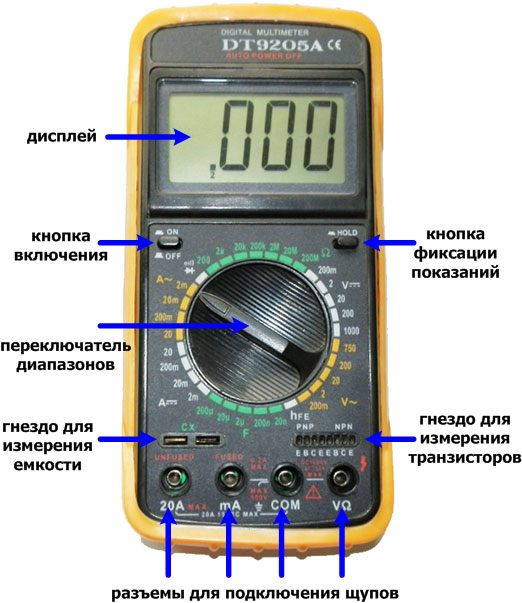
Внутри устройства имеется предохранитель, который частенько перегорает при неправильном выборе диапазона измерения тока. Питание осуществляется от батарейки напряжением 9В, в простонародье именуемой «кроной».
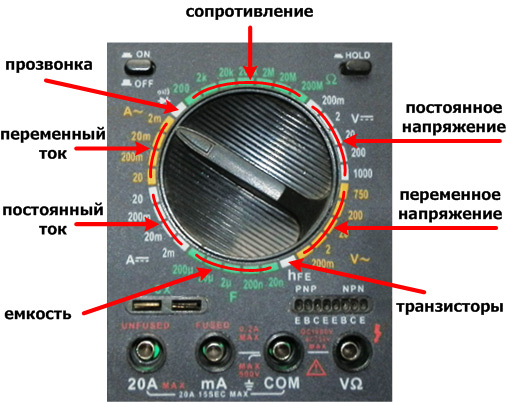
Рассмотрим теперь все более подробно. О кнопках включения/выключения и фиксации показаний, я думаю, стоит только упомянуть, так как с ними все очевидно. Далее, диапазоны. Они бывают как групповые, так и одиночные. Для удобства восприятия они раскрашены в разные цвета. Рассмотрим их последовательно, двигаясь по часовой стрелке.
— Первая группа — сопротивление, она включается в себя поддиапазоны для измерения Ом (Омы), кОм (килоОмы) и Мом (мегаОмы) и обозначается значком Ω.
— Следующая группа — постоянное напряжение. Поддиапазоны позволяют измерять мВ (миллиВольты) и В (Вольты). Обозначается значком V-.
— Прямо за ней идет группа — переменного напряжения. Тут все как в предыдущей группе, можно измерить мВ (миллиВольты) и В (Вольты), НО уже переменного напряжения. Обозначается значком V~.
— Так называемый одиночный диапазон — hFE (так и не нашел как правильно он читается), предназначен для измерения коэффициента усиления по току, для биполярных транзисторов. А прямо под ним расположено гнездо, куда вставляются транзисторы.
— За ним опять группа — емкость. С помощью нее можно измерить конденсаторы. Поддиапазоны позволяют измерить как нФ (наноФарады), так и мкФ (микрофарады). Гнездо для измерения расположено чуть ниже. Обозначается значком F.
— Далее, группа — постоянного тока. Поддиапазоны включают в себя мА (миллиАмперы) и А (Амперы). Обозначаются значком А-.
— Следующая группа похожая на предыдущую, но служит для измерения — переменного тока. Поддиапазоны те же. Обозначаются значком А~.
— И последний диапазон — прозвонка. Он служит для проверки целостности цепей (при этом пищит) и проверки диодов.
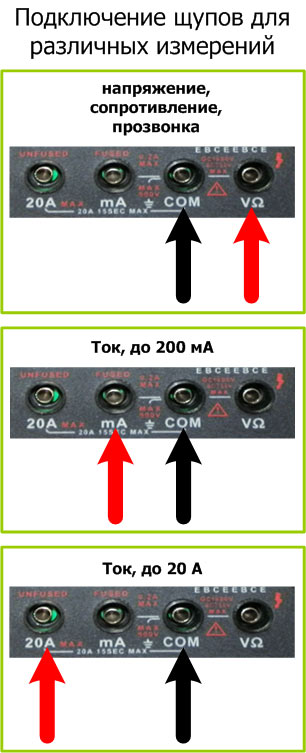
Следующее что мы должны рассмотреть — это нижний ряд гнезд. Работают гнезда в паре, подключаются согласно рисунку. Красная стрелочка — красный щуп, черная — черный.
Что же касается самих измерений, то тут все просто. Выясняем какую величину нам необходимо измерить. Далее, устанавливаем переключатель на максимально возможную величину (либо меньшую, при условии, что максимальное число поддиапазона будет больше измеряемой величины), в случае необходимости переставляем щупы, и производим измерения. Если значение измерения слишком мало, выбираем меньший поддиапазон. К примеру, мы измеряем обычную батарейку напряжением 1,5 Вольта. Перестраховавшись мы выбрали поддиапазон с пределом 20 Вольт, по показаниям очевидно, что можно выбрать более меньший поддиапазон, т.е. 2 Вольта. Тем самым показания будут более точными. Иногда бывает, что в процессе измерения тока на поддиапазоне 200 мА, величина тока оказывается большей, вследствие чего перегорает предохранитель. После чего измерение тока становится невозможным, до тех пор, пока не будет заменен предохранитель.
Ну вот вроде и все, что хотелось сказать про измерения мультиметром. Конечно на рынке много других моделей, но все они похожи, поэтому я думаю, нет смысла описывать их все, так как они все схожи как по функционалу, так и по интерфейсу.
скачать

Форум РадиоКот • Просмотр темы — Мультиметр DT9205A, DT9502A
Сообщения без ответов | Активные темы
| ПРЯМО СЕЙЧАС: |
| Автор | Сообщение |
|---|---|
|
|
Заголовок сообщения: Re: мультиметр 9205а цепь измерения
|
|
Друг Кота
Карма: 68 Рейтинг сообщения: 0
|
я дико извиняюсь за идиотский вопрос……..на чём показать ? |
| Вернуться наверх |
Профиль
|
 |

 Добавлено: Чт фев 14, 2019 20:54:22
| Реклама | |
|
|
|
|
|
Mickle |
Заголовок сообщения: Re: мультиметр 9205а цепь измерения
|
|
Поставщик валерьянки для Кота
Карма: 66 Рейтинг сообщения: 1
|
Оно?
|
| Вернуться наверх | |
|

| Реклама | |
|
|
|
|

|
olesyexe |
Заголовок сообщения: Re: мультиметр 9205а цепь измерения
|
|
Зарегистрирован: Вт июн 15, 2010 00:22:24 Рейтинг сообщения: 0
|
я дико извиняюсь за идиотский вопрос……..на чём показать ? Добавлено after 50 seconds: я дико извиняюсь за идиотский вопрос……..на чём показать ? фото не грузится Добавлено after 18 minutes 39 seconds: Оно?
да , спасибо , только у меня чуть схема другая , не могу фотку загрузить , такой как это тот _http://forum.cxem.net/index.php?/topic/161281-%D0%BE%D1%88%D0%B8%D0%B1%D0%BA%D0%B0-%D0%BF%D1%80%D0%B8-%D0%B2%D0%BA%D0%BB%D1%8E%D1%87%D0%B5%D0%BD%D0%B8%D0%B8-%D0%BC%D1%83%D0%BB%D1%8C%D1%82%D0%B8%D0%BC%D0%B5%D1%82%D1%80%D0%B0-dt9205a/ |
| Вернуться наверх | |
|
|
Mickle |
Заголовок сообщения: Re: DT9205A в чем проблема
|
|
Поставщик валерьянки для Кота
Карма: 66 Рейтинг сообщения: 0
|
Если схема отличается, срисуйте её самостоятельно с платы и приведите здесь. Как по мне, так узел выпрямителя один фиг такой же, только позиционные обозначения компонентов различаются. Зачем было менять LM324 в измерителе ёмкости — не понимаю. |
| Вернуться наверх | |
|
|
SergeyNS |
Заголовок сообщения: Re: DT9205A в чем проблема
|
|
Нашел транзистор. Понюхал.
Зарегистрирован: Вс дек 25, 2016 05:50:21 Рейтинг сообщения: 0
|
У меня два DT9205A. Прозвонка диодов работает, а сопротивление то ли не меряет вообще то ли только в разных диапазонах, причем они вроде меняются. Т.е. 150Ом может померить на диапазоне 200Ом, а может показать чушь, но показать правильно в диапазоне 2000Ом. Но надежнее всего меряет сопротивление в прозвонке диодов… Как можно начать разбираться — почему это, что и как померить ? |
| Вернуться наверх | |
|
| Реклама | |
|
|
|
|
|
Mickle |
Заголовок сообщения: Re: DT9205A в чем проблема
|
|
Поставщик валерьянки для Кота
Карма: 66 Рейтинг сообщения: 0
|
У меня такая же ситуация была с UT10A. Ламели на плате идеальны, а пружинные контакты в ручке в одном месте просто треснули от малоцикловой усталости, а в других погнулись и частично износились. После нескольких попыток почистить, исправить и подогнуть, просто выбросил. |
| Вернуться наверх | |
|
|
SergeyNS |
Заголовок сообщения: Re: DT9205A в чем проблема
|
|
Нашел транзистор. Понюхал.
Зарегистрирован: Вс дек 25, 2016 05:50:21 Рейтинг сообщения: 0
|
у меня эксплуатация была минимальна — раз 50 от силы что-то там мерил и на вид никаких повреждения, помятостей и т.д. не видно |
| Вернуться наверх | |
|
|
olesyexe |
Заголовок сообщения: Re: DT9205A в чем проблема
|
|
Зарегистрирован: Вт июн 15, 2010 00:22:24 Рейтинг сообщения: 0
|
Если схема отличается, срисуйте её самостоятельно с платы и приведите здесь. Как по мне, так узел выпрямителя один фиг такой же, только позиционные обозначения компонентов различаются. Зачем было менять LM324 в измерителе ёмкости — не понимаю. Начитался советов ,вот и поменял . Ничего не могу загрузить , вот по ссылке _ http://tinyurl.com/y6o6h5gn , такой мульт. . Не плате . под чипом с лева, lm358 — это тот же tl 068 ? |
| Вернуться наверх | |
|
|
Mickle |
Заголовок сообщения: Re: DT9205A в чем проблема
|
|
Поставщик валерьянки для Кота
Карма: 66 Рейтинг сообщения: 0
|
… Не плате . под чипом с лева, lm358 — это тот же tl 068 ? Не мучайте себя и прибор. Отдайте специалисту |
| Вернуться наверх | |
|
 ОУ выходит из строя не один, а просто заменять надеясь на чудо — это не правильный подход.
|
olesyexe |
Заголовок сообщения: Re: DT9205A в чем проблема
|
|
Зарегистрирован: Вт июн 15, 2010 00:22:24 Рейтинг сообщения: 0
|
… Не плате . под чипом с лева, lm358 — это тот же tl 068 ? Не мучайте себя и прибор. Отдайте специалисту так можно всё отдать специалисту ,и всё таки , это она ? на плате всего две микрухи |
| Вернуться наверх | |
|
|
Mickle |
Заголовок сообщения: Re: DT9205A в чем проблема
|
|
Поставщик валерьянки для Кота
Карма: 66 Рейтинг сообщения: 0
|
1. М/с нужно менять только тогда, когда она неисправна. |
| Вернуться наверх | |
|
|
olesyexe |
Заголовок сообщения: Re: DT9205A в чем проблема
|
|
Зарегистрирован: Вт июн 15, 2010 00:22:24 Рейтинг сообщения: 0
|
1. М/с нужно менять только тогда, когда она неисправна. Да, похожа на 9208A, всё проверил, целое , подстроечник ни как не реагирует |
| Вернуться наверх | |
|
|
peтр77 |
Заголовок сообщения: Мультиметр DT9502A
|
|
Карма: 3 Рейтинг сообщения: 0
|
Вложение:
Вложение:
Вложение:
Ребят прошу помощи с прибором DT9502A, jобрыл весь интернет, все форумы, но так и не нашел то что искал, проблема сгалетным переключателем , расположение ламелек, моя главная задача испробовал уже много вариантов но не чего не выходит, прошу вас у кого есть такой прибор сфоткайте пожалуйста расположение контактных ламелек, прибор 2002г. на плате номер DT9505-324. так сказать версия платы, мне нужно чтобы дорожки вашей галентки были как у меня. Везде на форумах встречал приборы класса Dt9205a. а вот своего прибора не встречаю. Даже гугл, он не умный. Добавлено after 5 hours 18 minutes 2 seconds: Вот правильное расположение DT-9205A: Вы по ссылке заходили? Там водоснабжение и канализация. И вообще многие ссылки выдают, в теме, Not found 404 |
| Вернуться наверх | |
|

 Вообщем прошу обладателей такого прибора, показать расположение ламелек, жалко прибор рабочий достался мне, повыпадали у хозяина шарики на галентке он его я так понял разобрал, и повыпадали ламельки а правильно собрать уже не получилось ,вот такие дела
  Этот прибор не смд исполнение Может у кого ни буть есть прибор DT9505 сделайте фотку ламелек, пожалуйста.
|
agn |
Заголовок сообщения: Re: Мультиметр DT9205A, DT9502A
|
||
Карма: 14 Рейтинг сообщения: 0
|
Вложение:
Переключатель DT9205A. |
||
| Вернуться наверх | |||
|

|
Yuriy_King |
Заголовок сообщения: Re: Мультиметр DT9502A
|
||
Карма: 10 Рейтинг сообщения: 0
|
|||
| Вернуться наверх | |||
|

|
savum71 |
Заголовок сообщения: Re: Мультиметр DT9205A, DT9502A
|
||
Карма: 2 Рейтинг сообщения: 0
|
Привет Коты!! Может у кого завалялся сгоревший DT9205A тестер. Мне шлейф надо с него на экран. Приму в подарок)) Ну или куплю не за дорого. |
||
| Вернуться наверх | |||
|
|
Александр 65 |
Заголовок сообщения: Re: Мультиметр DT9205A, DT9502A
|
||
Карма: 2 Рейтинг сообщения: 0
|
Приветствую всех сюда входящих. Господа, не посоветуете ли по такой проблеме. Неудачно померил высокое напряжение тестером DT9205A, тот который до 200 Мом и 20 nf. Умерла клякса ICL7106. Недавно прислали с Али 44 ногую. В нете нашел переходник с 44 ног на 46. Вощем все заработало (тестер был донором деталей, пришлось повозиться чтобы восстановить), единственное что не подебил это точки. Как не изгалялся не хотят загораться, хотя если резисторы 470Ком с одного конца подключить к + то они зажигаются. Второй конец резисторов идет на вывод ВР кляксы. Кроме DT9205A поменял кляксу в DT890G там благодаря нету, точки и знаки режимов зажглись подключением общего вывода на «-» батареи питания ( правда зуммер не работает и нет индикации разряда батареи- не предусмотрены в дешевой 44 ногой микрухе). Всю репу изломал. Кто-нибудь может объяснить как в тестере 9205 зажигаются точки и как переделать зажигание точек с 46 ногой кляксы на 44 ногую микруху. |
||
| Вернуться наверх | |||
|

|
Александр 65 |
Заголовок сообщения: Re: Мультиметр DT9205A, DT9502A
|
||
Карма: 2 Рейтинг сообщения: 5
|
Приветствую всех входящих. Проблема решена. Как я говорил ранее решение было простое. При переходе с 46 на 44 ноги, 23 нога 46-ногой кляксы выдает на переключатель режима работы «-» батареи питания, видимо в противофазе с 21 ногой. Решение было просто соединить неподключеную контрактную площадку 23 ноги кляксы на «-» т.е на 29 ногу. |
||
| Вернуться наверх | |||
|
|
Макс Безумный |
Заголовок сообщения: Re: Мультиметр DT9205A, DT9502A
|
|
Зарегистрирован: Сб апр 24, 2021 16:33:25 Рейтинг сообщения: 0
|
Мир вашему дому,господа!Может-подскажете -проблемка есть в кстати новом DT9205A : при замере переменного напряжения на пределе 20в пишет совсем не то.Даже запятая не переносится вправо(на постоянке переносится).Т.е. включаю прибор : 0,00.Предел ставлю ~20в.Подаю переменку 15в с транса зарядки АКБ.Пишет 4,55 — ну такое примерно.А диапазон-то 20в!Те же 15 в он прекрасно видит на пределах ~200 и ~750 в.Может — сталкивался кто с таким — помогите разобраться !! |
| Вернуться наверх | |
|
|
georg2592 |
Заголовок сообщения: Re: Мультиметр DT9205A, DT9502A
|
|
Зарегистрирован: Вс апр 18, 2021 16:41:26 Рейтинг сообщения: 0
|
Дорого дня ! ИМХО у приборов этой серии (92хх) главная проблема в подвижном контакте Дорожки — Переключатель.Часто с ними сталкивался,даже новые приборы глючат на 3-4 десятке кругов переключателя диапазонов.При более доскональном обследовании налицо стёртые дорожки,ламели — видимо : слишком мягкий металл их изготовления.Отсюда вылазят неверные показания,запятая скачет куда угодно или вообще — после каждой цифры стоит.И подозреваю,что это влияет и на электронную часть.После разных манипуляций по восстановлению тестера он всё равно несёт чушь.А порой и не включается. |
| Вернуться наверх | |
|
| Вы не можете начинать темы Вы не можете отвечать на сообщения Вы не можете редактировать свои сообщения Вы не можете удалять свои сообщения Вы не можете добавлять вложения |
Войдите в ОК
Популярные видео
- Скопировать ссылку
- Скопировать ссылку
Обзор мультиметра DT9502A
Похожие видео
- Скопировать ссылку
- Скопировать ссылку
Обзор и установка мода на топливо на ГТА 5
- Скопировать ссылку
- Скопировать ссылку
Обзор планшета Digma Optima 7.11
- Скопировать ссылку
- Скопировать ссылку
Обзор на новую минифигурку лего 15серии/lego minifigures
- Скопировать ссылку
- Скопировать ссылку
Обзор Stadoff : Multiplayer на андроиде
- Скопировать ссылку
- Скопировать ссылку
ОБЗОР НАШЕГО ZOMBIE СЕРВЕРА
- Скопировать ссылку
- Скопировать ссылку
Обзор игры — ХК Легион VS ХК Ветераны — Турнир по хоккею Легенды Новгородского хоккея 20/21
- Скопировать ссылку
- Скопировать ссылку
Обзор карты боевых действий на Юго-Востоке Украины-НОВОРОССИИ. 24.01.2015 на 18 00
- Скопировать ссылку
- Скопировать ссылку
Обзор однокомнатной квартиры 34 кв.м. Дизайн интерьера бизнес-класса
- Скопировать ссылку
- Скопировать ссылку
Обзор игры survarium,первые килы
- Скопировать ссылку
- Скопировать ссылку
Обзор MK4577 сжато
- Скопировать ссылку
- Скопировать ссылку
Лидеры России и Турции рассказывают об итогах переговоров в Сочи
- Скопировать ссылку
- Скопировать ссылку
Концерт «Будь с городом!» в ЦПКиО имени Кирова. Онлайн-трансляция
- Скопировать ссылку
- Скопировать ссылку
Добрый вечер 🥰
- Скопировать ссылку
- Скопировать ссылку
Полтора спортсмена. Тизер выпуска №4
- Скопировать ссылку
- Скопировать ссылку