
Страницы и текст этой инструкции
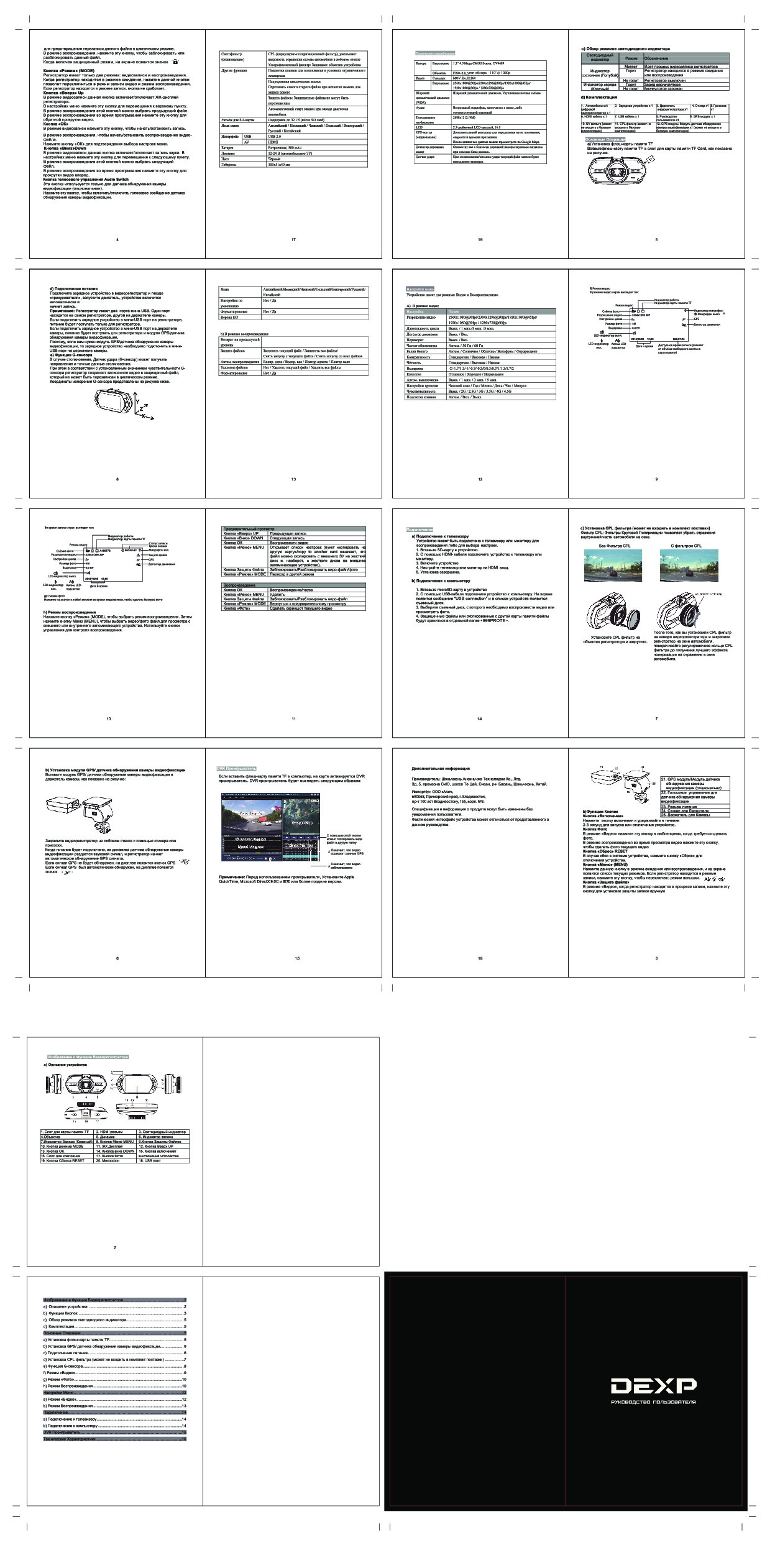 Инструкция автовидеорегистратора DEXP EV-710
 Информация отображена на картинке
Как использовать наш сайт инструкций OnlineManuals.ru
Наша цель состоит в том, чтобы предоставить вам быстрый доступ к содержанию инструкции для автовидеорегистратора DEXP EV-710.
С помощью онлайн просмотра, Вы можете быстро просмотреть содержимое инструкции и найти решение проблемы с автовидеорегистратора DEXP EV-710.
Для Вашего удобства
Если листать руководство пользователя автовидеорегистратора DEXP EV-710 прямо на сайте, не очень удобно для Вас, есть два возможных решения:
• Просмотр в полноэкранном режиме — легко просмотреть руководство пользователя (без загрузки его на свой компьютер), Вы можете использовать режим полноэкранного просмотра.
Для просмотра инструкции пользователя автовидеорегистратора DEXP EV-710 на полном экране, используйте кнопку «Открыть в Pdf-viewer».
• Загрузка на компьютер — Вы можете также скачать Инструкция автовидеорегистратора DEXP EV-710 на свой компьютер и сохранить его в файлах.
Многие люди предпочитают читать документы не на экране, а в печатной версии.
Возможность печати руководства пользователя также была предусмотрена на нашем сайте,
и вы можете использовать ее, нажав на иконку «печать» в Pdf-viewer.
Нет необходимости печатать все руководство автовидеорегистратора DEXP EV-710, можно выбрать только нужные страницы инструкции.
| Языки: |
Русский |
|---|---|
| Страницы: | 1 |
| Описание: | Автовидеорегистратор |
Стр.
из
результат(ов) по запросу ««
×
|
|
NoDevice
Loading…
-
« Назад
Ctrl + ←
-
Вперёд »
Ctrl + →
Мануал подходит для устройств
-
DEXP EV-710
Categories
Last downloads
If the manuals for DEXP EV-710 are not complete or you need additional information about this device, if you need additional files: drivers,
additional user guides (manufacturers often make several different technical
assistance documents and manuals for each product, including DEXP EV-710, the
latest version of the firmware, then you can ask the administrators or all users of the site, everyone
will try to respond quickly to your request and help you as quickly as possible.
Category
Dashboard camera
Download the user manuals for EV-710
| Type | Name | Count |
|---|---|---|
| User’s manual | EV-710_manuals.pdf | 3 |
| Certificate of conformity | EV-710_certificate_Conformity.pdf | 1 |
Useful files and SOFTWARE EV-710
For many products, to work with the EV-710, you may need various
additional files: drivers, patches, updates, installation programs, a list of error codes, an electronic diagram or a photo.
You can download these files online for a specific model EV-710 or add your own for free download by other visitors.
| Name | Type | Count |
|---|---|---|
| N/A | Drivers | 1 |
| N/A | Electronic circuit | 0 |
| N/A | Photos | 1 |
| N/A | Installation scheme | 3 |
| N/A | Datasheet | 1 |
Specifications EV-710
| Main characteristic | The design of the DVR | with camera, with screen |
| The number of recording channels video/audio | 1/1 | |
| Video recording | 2304×1296 at 30 fps, 1920×1080 at 60 fps | |
| Recording mode | cyclic | |
| Functions | impact sensor( G-sensor), a motion detector in the frame | |
| Record | time and date | |
| Sound | integrated microphone | |
| Camera | Matrix | 1/2. 7″ 4 million pixels. |
| Viewing angle | 170? (diagonally) | |
| Night mode | Yes | |
| Photo mode | Yes | |
| Video recording | The duration of the clip | 5 min |
| Food | Food | from the battery, from the vehicle’s on-Board network |
| The format of the battery | own | |
| Battery life | 30 min. | |
| Battery capacity | 500 mAh | |
| Connection | Exits | HDMI |
| Connecting to a computer via USB | Yes | |
| Data storage | Memory card support | microSD (microSDHC) up to 32 GB |
| Additionally | Features | suction Cup mount |
| Operating temperature | -10 — 50 ?C | |
| Dimensions (width x height x thickness) | 103x51x41 mm |
Write your impressions and then download all files
Similar products
- Brand: BlackVue
- The design of the DVR : with a camera, without a screen
- Matrix : CMOS 2.40 million pixels.
- The duration of the clip : 1 min, 2 min, 3 min
- Food : from the vehicle’s onboard network
- Entrances : video composite x1
- Memory card support : microSD (microSDHC) up to 64 GB
- Features : voice prompt
- Brand: DEXP
- The design of the DVR : with camera, with screen
- Matrix : 3 million pixels.
- The duration of the clip : 1 min, 2 min, 3 min, 5 min, 10 min
- Food : from the vehicle’s onboard network
- Diagonal : 1.5″
- Connecting to a computer via USB : Yes
- Memory card support : microSD (microSDHC)
- Features : suction Cup mount
- Brand: Mio
- The design of the DVR : with camera, with screen
- Matrix : 2 million pixels.
- Food : from the battery, from the vehicle’s on-Board network
- Diagonal : 2.4″
- Connecting to a computer via USB : Yes
- Memory card support : microSD (microSDHC) up to 32 GB
- Features : suction Cup mount
- Brand: SUPRA
- The design of the DVR : with camera, with screen
- Matrix : CMOS 2 million pixels.
- The duration of the clip : 1 min, 3 min, 5 min
- Food : from the battery, from the vehicle’s on-Board network
- Diagonal : 2″
- Exits : HDMI, video composite, audio
- Memory card support : microSD (microSDHC) up to 32 GB
- Features : suction Cup mount, voice prompts, radar detector
- Brand: Mio
- The design of the DVR : with camera, with screen
- Matrix : 1/3″ 4 million pixels.
- Modes : autostart recording
- Food : from the battery, from the vehicle’s on-Board network
- Diagonal : 2.7″
- Connecting to a computer via USB : Yes
- Memory card support : microSD (microSDHC) up to 128 GB
- Features : suction Cup mount
- Brand: Mio
- The design of the DVR : with camera, with screen
- Matrix : 1/3″ 4 million pixels.
- Modes : autostart recording
- Food : from the battery, from the vehicle’s on-Board network
- Diagonal : 2.7″
- Connecting to a computer via USB : Yes
- Memory card support : microSD (microSDHC) up to 128 GB
- Features : suction Cup mount