
-
Contents
-
Table of Contents
-
Troubleshooting
-
Bookmarks
Quick Links
EVD
4
Driver for electronic expansion valve
User manual
Related Manuals for Carel EVD4
Summary of Contents for Carel EVD4
-
Page 1
Driver for electronic expansion valve User manual… -
Page 3
User manual… -
Page 4
CAREL, its employees or its branch offi ces/affi liates be responsible for possible lack of earnings or sales, loss of data and information, cost of substitute goods or services, damage to things or persons,… -
Page 5: Table Of Contents
3.5 Application with supervisor (EVD000*42* and EVD000*45*) via RS485……..22 3.6 Application with Modbus® protocoll (EVD0001460) via RS485 ……..24 4. TECHNICAL AND CONSTRUCTIONAL SPECIFICATIONS 5. TROUBLESHOOTING APPENDIX I. INSTALLING AND USING THE EVD4-UI PROGRAM I.I Installation …………………………32 I.II Preparing the connections……………………32 I.III Preparing the user interface …………………..32 I.IV Saving the data ……………………….32…
-
Page 7: Introduction
Controller with tLAN serial already confi gured for operation with µChiller (address 2) for CAREL valves EVD000044* Controller with RS485 serial already confi gured for operation with pCO via pLAN (address 30) for CAREL valves EVD000045* Controller with RS485 serial already confi gured for operation with supervisor (address 250) for CAREL valves…
-
Page 8: Connecting To The Main Serial Port
1.3 Operation of the service serial port The service serial port (par. 2.5) is used to access all the EVD4 parameters even when the instrument is already installed and operating; to do this, the special converter is required (CVSTDUTTL0 or CVSTD0TTL0), plus a PC with USB or RS232 serial port.
-
Page 9: Power Supply, Sensors, Digital I/O
2. INPUTS AND OUTPUTS Below is a description of the connectors supplied with the EVD00004*0 or purchased in separate packages (EVD400CON0 for the EVD00004*1). The drawings represent the connectors as seen after having been fi tted on the EVD 2.1 Power supply, sensors, digital I/O MOLEX ®…
-
Page 10: Relay
Fig. 2.6 2.5 Service serial port Allows access to the functions of the EVD4; via PC. To access this connector: 1) Remove the cover by levering it with a screwdriver on the central notch (Fig. 2.7). 2) Locate the white 4-pin connector and insert the special converter cable (Fig. 2.8).
-
Page 11: Application With Μc 2 And Μc 2 Se (Evd000*40* And Evd000*43*) Via Tlan
APPLICATIONS: CONNECTIONS, LIST OF PARAMETERS AND OPERATING MODE Below is a description of the connections, confi guration parameters, UI graphics and operating modes of the six codes available for the EVD4 in the different applications. 3.1 Application with µC and µC…
-
Page 12
3.1.2 List of parameters Below is the list of parameters visible on the EVD4-UI, divided into write and read; the meaning of each parameter is described in APPENDIX II, while APPENDIX III shows a list of the values of the reference parameters in relation to certain typical applications. -
Page 13
3.1.3 according to the application and/or systems used. The parameters can be accessed for read and write even if the EVD4 is not powered, as the converter or the programming key provide the power supply to the driver, excluding the valve. -
Page 14: Application With Pco (Evd000*40* And Evd000*43*) Via Tlan
Below is the list of parameters; the meaning of each is detailed in APPENDIX II, while APPENDIX III shows a list of the values of the reference parameters in relation to the most common applications. In the standard application, the EVD4 read and write parameters are organised into three groups, accessible from a pCO terminal: input/output, maintenance and manufacturer The SYSTEM SET level must be compiled, as this contains the information on what is physically installed in the system.
-
Page 15
Key: = Main parameters required to start operation; = Secondary parameters required for optimum operation; — = Advanced parameters. MANUFACTURER group SYSTEM SET Parameter name Description EVD type model of EVD used, from pCO EVD probes type number indicating the combination of sensors used to calculate the superheat Valve type number that defi… -
Page 16
INPUT/OUTPUT group Parameter name Descriprion DriverX mode operating mode of the X-th driver, from pCO EEV mode man. enable/disable manual valve positioning EEV position calculated electronic expansion valve opening position Power request cooling capacity, from pCO RXXX refrigerant confi gured for the REFRIGERANT parameter Superheat superheat value measured Saturated temp. -
Page 17: Application As Positioner (Evd000*40* And Evd000*43*)
CVSTDUTTL0 Fig. 3.12 3.3.2 List of parameters Below is the list of parameters visible on the EVD4-UI, divided into read and write; the meaning of each Key: parameter is detailed in APPENDIX II. Service serial port Main serial port Key: = Main parameters required to start operation;…
-
Page 18
3.3.3 EVD4_UI user interface The EVD4_UI user interface is based on the CAREL supervisor protocol and is designed for the easy and intuitive reading or confi guration of the control parameters. The program can be started in different confi gurations so as to display the set of parameters that is suitable for the type of installation the EVD ;… -
Page 19: Application With Pco (Evd000041* And Evd000044*) Via Plan
Below is the list of parameters; the meaning of each is detailed in APPENDIX II, while APPENDIX III shows a list of the values of the reference parameters in relation to the most common applications. In the standard application, the EVD4 read and write parameters are organised into three groups, accessible from a pCO terminal: input/output, maintenance and manufacturer The SYSTEM SET level must be compiled, as this contains the information on what is physically installed in the system.
-
Page 20
Minimum steps minimum control steps — Maximum steps — maximum control steps Closing steps — steps completed in total closing Opening extra steps enable extra steps in opening — Custom valve confi guration Closing extra steps — enable extra steps in closing Phase current —… -
Page 21
MAINTENANCE group Parameter name Description Manual mng. EEV Mode electronic expansion valve control mode, read EEV mode man. driver ‘X’ Requested steps required motor position in manual control. EEV position calculated electronic expansion valve opening position Driver ‘X’ status Go ahead enable restart following error Probes offset S1 correction of the lower limit of S1… -
Page 22: Application With Supervisor (Evd000*42* And Evd000*45*) Via Rs485
SPKT*R* Fig. 3.20 probes type” parameter and see technical leafl et. 3.5.2 List of parameters Below is the list of parameters visible from the EVD4-UI, divided into write and read; the meaning of each is convertitore / converter for code:…
-
Page 23
The program can be started in different confi gurations so as to display the set of parameters that is suitable for the type of installation the EVD4 is used in; to do this, make the connection using the name of the required confi guration. -
Page 24: Application With Modbus® Protocoll (Evd0001460) Via Rs485
Temperature Digital input Ratiometric Below is the list of parameters visible from the EVD4-UI, divided into write and read; the meaning of each is NTC*WF* pressure SPKT*R* detailed in APPENDIX II, while APPENDIX III shows a list of the values of the reference parameters in relation to For other types of probes or connections, change the value of certain applications.
-
Page 25
The Modbus address can be selected using the “EVD4_UI Address” connection as described in “Ap- pendix I – Installing and using the EVD4-UI program”, within the envisaged range. Values from 248 to 255 are reserved. If set to one of these values or 0, the FW sets the default value without modifying the parameter in the E2prom. -
Page 26
51 to 84 DIGITAL (R/W) The correspondence between the Carel supervisor addresses of the variables and the ModBus device addresses is as follows (for a complete description of the parameter corresponding to the variables, see “APPENDIX II DESCRIPTION OF THE PARAMETERS”):… -
Page 27
REGISTER REGISTER REGISTER REGISTER REGISTER REGISTER REGISTER REGISTER REGISTER REGISTER REGISTER REGISTER REGISTER REGISTER REGISTER REGISTER REGISTER REGISTER REGISTER REGISTER REGISTER REGISTER REGISTER REGISTER REGISTER REGISTER REGISTER REGISTER REGISTER REGISTER REGISTER REGISTER REGISTER REGISTER REGISTER REGISTER REGISTER REGISTER REGISTER REGISTER REGISTER REGISTER REGISTER… -
Page 28
REGISTER REGISTER REGISTER REGISTER REGISTER REGISTER REGISTER REGISTER REGISTER REGISTER REGISTER REGISTER REGISTER REGISTER REGISTER REGISTER COIL COIL COIL COIL COIL COIL COIL COIL COIL COIL COIL COIL COIL COIL COIL COIL COIL COIL COIL COIL COIL COIL COIL COIL COIL COIL COIL… -
Page 29
The program can be started in different confi gurations so as to display the set of parameters that is suitable for the type of installation the EVD4 is used in; to do this, make the connection using the name of the required confi guration. -
Page 30: Technical And Constructional Specifications
Use a class II safety transformer rated to at least 20 VA. Average current input at 24 Vac: 60 mA with the motor not operating (control logic only); 240 mA with CAREL motor operating (240 mA peak at 18 Ω).
-
Page 31: Troubleshooting
5. TROUBLESHOOTING The following table lists a series of possible malfunctions that may occur when starting and operating the driver and the electronic valve. These cover the most common problems and are provided with the aim of offering an initial response for resolving the problem. Problem Cause Solution…
-
Page 32: Appendix I. Installing And Using The Evd4-Ui Program
APPENDIX I. INSTALLING AND USING THE EVD4-UI PROGRAM Below is a description of how to install and use the EVD4-UI confi guration and monitoring program I.I Installation To install the program: — download the required EVD4_UI*.zip fi le from http:\KSA.Carel.com;…
-
Page 33: Loading The Data
I.V Loading the data Pressing will open a dialogue box to read a fi le with the extension *.CFG: choose a fi le and press , all the data will be displayed in the various windows of the EVD400UI program. To transfer the data to the EVD press , the…
-
Page 34: Appendix Ii. Description Of The Parameters
EEPROM memory Fault in the EEPROM memory, the system may request a GO AHEAD; contact the error Carel technical service if the origin of the error is not clear Alarm HiT asp active in conditions with excessive…
-
Page 35
Capacity control macroblock parameter that defi nes “According to the type of compressor control selected, the macroblock calculates the the type of compressor control proportional factor, which will be entered indiscriminately for the parameters CH- Proportional gain, HP-Proportional gain and DF-Proportional gain. Multiple choice: — “”none or stages””… -
Page 36
Dynamic proportio- attenuation coeffi cient with change in Parameter active for each change in capacity of the circuit: when the driver pre-posi- nal gain capacity tions the valve (see CH-Circuit/EEV Ratio, HP-Circuit/EEV Ratio, and DF-Circuit/EEV Ratio); the difference between the initial and the fi nal position is multiplied by value of this parameter, between 0 and 1, and the effect of the change in capacity on the SH is attenuated. -
Page 37
HP-Proportional PID proportional factor in HP mode This is the PID proportional factor for operation in HP mode, increasing the value in- gain creases the reactivity of the valve and therefore of SH control, however for high values control may become unstable. This depends on the ratio between circuit capacity and valve capacity and on the maximum number of valve control steps. -
Page 38
Power request cooling capacity Reading of the cooling capacity, from pCO Probes offset S1 correction of S1 Correction of the value measured by sensor S1 Probes offset S2 correction of S2 Correction of the value measured by sensor S2 Probes offset S3 correction of the lower limit of S3 Correction of the value measured by sensor S3 Refrigerant… -
Page 39
“Number that defi nes the type of electronic valve used and selects the motor opera- nic valve used ting parameters from a table. The following valves are supported: 0 = CAREL E2V 1 = Sporlan SEI 0.5-20 2 = Sporlan SEI 30 3 = Sporlan SEH 50-250… -
Page 40: Appendix Iii. Parameter Settings
Max [bar] EEV ratio” set [°C] time [sec] time [sec]” Chiller CAREL E2V = 4 Alco Ex5/6 = 7 NB consider double CH Sporlan 0.5/20, Alco Ex7 = 10 Proportinal Gain in case Sporlan 30, Alco Ex8, Danfoss of Inverter or Stepless…
-
Page 41: Appendix Iv. Summary Of Pid Control
APPENDIX IV. SUMMARY OF PID CONTROL IV.I Symbols used In this introduction to PID control, reference is made to the following block diagram, which is a simpli- fi ed representation of an cycle control individual: y° P(s) Fig. 1 With the following symbols: symbol meaning y°(t)
-
Page 42: Integral Action
intense the action on the process so as to bring the controlled variable to the desired value. It is important to note that this has a value other than zero only if the error is not zero: therefore, in steady operation this is ideally zero. In reality, in steady operation (stable at the set point) it still follows the fl…
-
Page 43: Derivative Action
integral action. It is almost always the integral action that dominates the way in which the system reaches steady operation. The integral action by defi nition does not make “jumps” and therefore is the slowest to react. Indeed, it has almost no effect during the initial transient periods: these periods are dominated by the other two actions.
-
Page 45
NOTE __________________________________________________________________________________ _______________________________________________________________________________________ _______________________________________________________________________________________ _______________________________________________________________________________________ _______________________________________________________________________________________ _______________________________________________________________________________________ _______________________________________________________________________________________ _______________________________________________________________________________________ _______________________________________________________________________________________ _______________________________________________________________________________________ _______________________________________________________________________________________ _______________________________________________________________________________________ _______________________________________________________________________________________ _______________________________________________________________________________________ _______________________________________________________________________________________ _______________________________________________________________________________________ _______________________________________________________________________________________ _______________________________________________________________________________________ _______________________________________________________________________________________ _______________________________________________________________________________________ _______________________________________________________________________________________ _______________________________________________________________________________________ _______________________________________________________________________________________ _______________________________________________________________________________________ _______________________________________________________________________________________ _______________________________________________________________________________________ _______________________________________________________________________________________ _______________________________________________________________________________________ _______________________________________________________________________________________ _______________________________________________________________________________________ _______________________________________________________________________________________ _______________________________________________________________________________________ _______________________________________________________________________________________ _______________________________________________________________________________________ _______________________________________________________________________________________ _______________________________________________________________________________________ _______________________________________________________________________________________ _______________________________________________________________________________________ _______________________________________________________________________________________ _______________________________________________________________________________________ _______________________________________________________________________________________ _______________________________________________________________________________________… -
Page 46
NOTE __________________________________________________________________________________ _______________________________________________________________________________________ _______________________________________________________________________________________ _______________________________________________________________________________________ _______________________________________________________________________________________ _______________________________________________________________________________________ _______________________________________________________________________________________ _______________________________________________________________________________________ _______________________________________________________________________________________ _______________________________________________________________________________________ _______________________________________________________________________________________ _______________________________________________________________________________________ _______________________________________________________________________________________ _______________________________________________________________________________________ _______________________________________________________________________________________ _______________________________________________________________________________________ _______________________________________________________________________________________ _______________________________________________________________________________________ _______________________________________________________________________________________ _______________________________________________________________________________________ _______________________________________________________________________________________ _______________________________________________________________________________________ _______________________________________________________________________________________ _______________________________________________________________________________________ _______________________________________________________________________________________ _______________________________________________________________________________________ _______________________________________________________________________________________ _______________________________________________________________________________________ _______________________________________________________________________________________ _______________________________________________________________________________________ _______________________________________________________________________________________ _______________________________________________________________________________________ _______________________________________________________________________________________ _______________________________________________________________________________________ _______________________________________________________________________________________ _______________________________________________________________________________________ _______________________________________________________________________________________ _______________________________________________________________________________________ _______________________________________________________________________________________ _______________________________________________________________________________________ _______________________________________________________________________________________ _______________________________________________________________________________________… -
Page 48
Agenzia / Agency: CAREL S.p.A. Via dell’Industria, 11 — 35020 Brugine — Padova (Italy) Tel. (+39) 049.9716611 — Fax (+39) 049.9716600 e-mail: carel@carel.com — www.carel.com…
Сегодня всё большее число прецизионных кондиционеров оборудуется электронными ТРВ, принцип работы и множество преимуществ которых были описаны ранее (ссылки). Один из плюсов электронных ТРВ заключается в возможности мониторинга их состояния и управления ими удаленно. Именно эту их отличительную черту мы и рассмотрим подробнее.
Электронные ТРВ могут управляться как своим собственным контроллером, так и тем, что управляет работой кондиционера в целом. Однако, следует отметить, что на данный момент далеко не все производители сменили линейку используемых ими контроллеров для кондиционеров на новую, позволяющую следить и управлять электронным ТРВ — пока ещё чаще используется отдельный контроллер. В случае производителя Carel это контроллер EVD4.
Контроллер EVD4
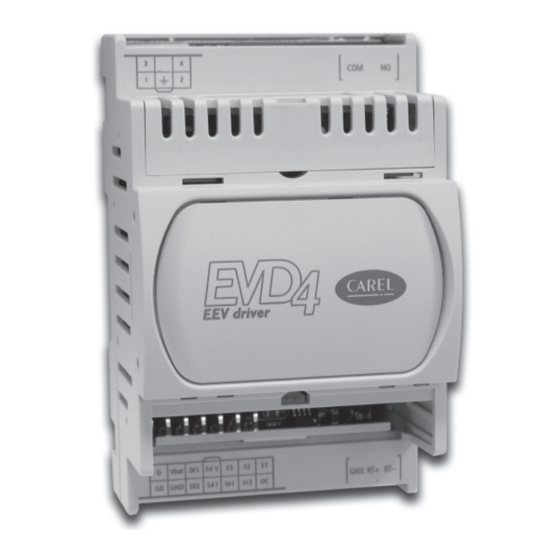
Контроллер EVD4 является устройством, контролирующим положение электронного ТРВ. Существует несколько его вариантов исполнения:
- Модификации EVD*400, *401 и *402 выпускаются с заранее установленными протоколами связи с контроллерами рС и рСО (tLAN), pCO (pLAN) и системой диспетчерского контроля или PlantVisor (RS485) и предназначены для управления самыми разнообразными электронными регулировочными вентилями от разных производителей.
- Модификации EVD*430, *440 и *450 выпускаются с такими же заранее установленными протоколами, но предназначены только для работы с вентилями, производимыми Carel.
EVD4 оборудован цифровым входом для пуска/останова устройства и соединениями для датчиков давления и температуры и для электронного регулировочного вентиля. В EVD4 используются пропорциональные датчики давления, постоянного байпаса и алгоритмы регулировки, а также большое количество вариантов конфигураций.
Кроме того, EVD4 может работать как простое устройство позиционирования, использующее ставший стандартным входной аналоговый сигнал 4 — 20 мА или 0 ~ 10 В.
«Горячей» связь с электронным ТРВ
Благодаря EVD4 электронным ТРВ можно управлять и следить за ним с компьютера. Для мониторинга работы ТРВ в «горячем» режиме используется специальный USB-конвертор, имеющий разъем USB с одной стороны и провод с четырехконтактным разъемом для подключения в EVD4 с другой стороны. Размеры и масса устройства соизмеримы с коробкой спичек.
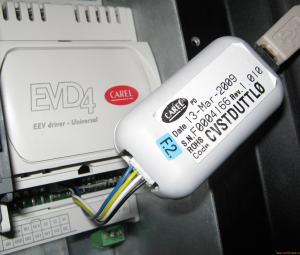
Соединение контроллера EVD4 с компьютером через USB-конвертер
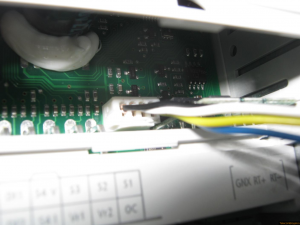
Подключение четырехжильного кабеля в контроллере EVD4
На компьютере или ноутбуке, куда подключается USB-кабель от конвертора необходимо установить соответствующий драйвер и запустить программу для управления электронным ТРВ.
Для связи с контроллером следует установить правильный COM-порт, соответствующий USB-соединению с конвертором. COM-порт отображается в Диспетчере устройств (Мой компьютер -> Свойства -> Оборудование -> Диспетчер устройств -> Порты (COM и LPT)).
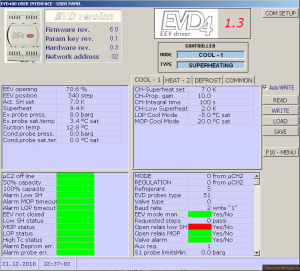
Внешний вид программы для контроллера EVD4
В левой верхней области окна программы отображается текущее состояние ТРВ, где указывается степень его открытия в процентах и соответствующее ей число шагов управляющего вентилем шагового электродвигателя, заданный и текущий перегрев, давление и температура испарителя и температура на входе в компрессор. Датчики конденсатора, как видно из рисунка, не подключены.
В правую верхнюю область окна программы сведены возможные настройки ТРВ. Здесь можно задать перегрев, коэффициенты регулирования и предельные значения параметров системы.
Обе нижние области информируют о текущей ситуации, ошибках, авариях и т.д.
Благодаря компактному и информативному дизайну перед глазами видна сразу вся картина работы электронного ТРВ и динамика её изменений во времени.
Автор: Хомутский Юрий
EVD0000E**
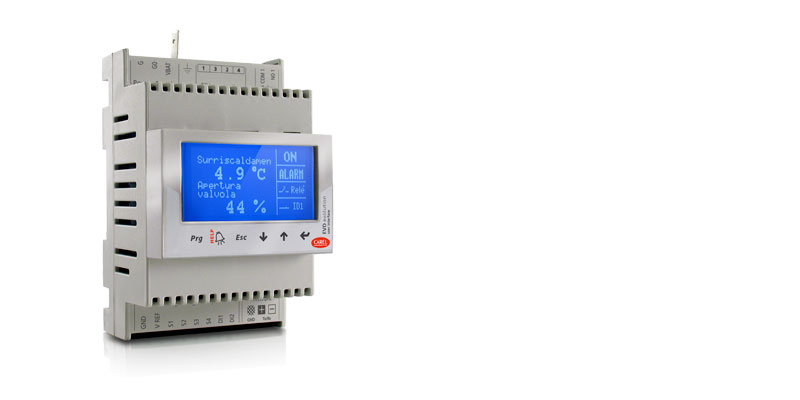
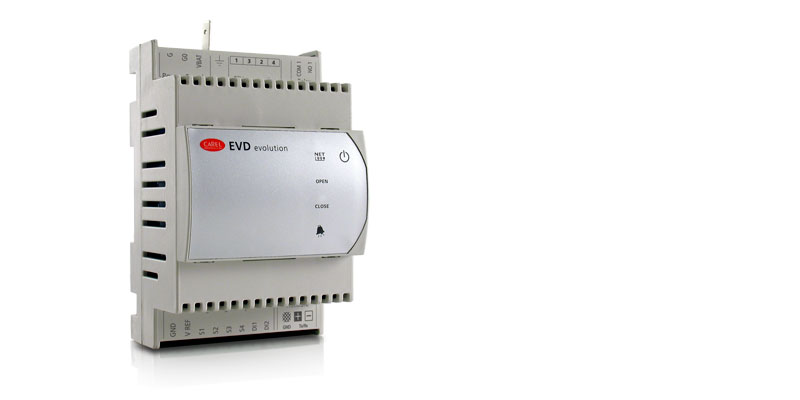
Общие характеристики
Драйверы электронных ТРВ серии EVD Evolution — это новейшие драйверы последнего поколения, выпускаемые компанией CAREL для регулирования перегрева.
В отличие от обычных драйверов EVD они поддерживают самые современные функции и получили новый графический терминал, который делает процесс настройки и работы с драйвером еще проще.
Драйвер настолько прост в настройке, что при наличии графического дисплея весь процесс ввода в эксплуатацию ограничивается настройкой буквально четырех параметров (или всего трех параметров, если драйвер будет управлять вентилями Carel): тип хладагента, тип вентиля, тип датчика давления и управляемый агрегат (холодильная машина, холодильная витрина и т.д.). Все параметры находятся в экранном меню драйвера.
Основные достоинства:
- регулирование перегрева и защита от недостаточного перегрева, низкого давления и высокого давления
- быстрый и простой ввод в эксплуатацию (достаточно настроить всего 4 параметра)
- схема соединений выводится на дисплее драйвера
- съемный жидкокристаллический дисплей, поддерживающий многоязычный интерфейс, справку по настройке параметров, единицы измерения СИ и британские
- разграничение уровней доступа паролями
- копирование параметров конфигурации с одного драйвера семейства EVD на другой (в памяти дисплея)
- светодиодные индикаторы для контроля основных параметров
- поддержка малопотребляющих логометрических датчиков давления со встроенным преобразователем и выходным сигналом тока 4 — 20мА (один датчик может использоваться несколькими драйверами)
- второй цифровой вход для управления оттайкой
- поддержка резервных датчиков
Драйверы EVD Evolution в сочетании с электронными терморасширительными вентилями CAREL семейства ExV представляют собой готовую интегрированную систему управления для обеспечения оптимальной работы испарителей и сокращения расходов на электроэнергию.
Документация
Technical
-
2D/3D модели
Код Описание Язык Дата * Выпуск Код
EVD Evolution Single.zipОписание
2D-3D drawingsЯзык
ALLДата
17/03/2023
Выпуск
R0
Код
EVD Evolution Single w Display.zipОписание
2D-3D drawingsЯзык
ALLДата
09/03/2023
Выпуск
R0
-
Инструкции по применению
Код Описание Язык Дата * Выпуск Код
+0300005DEОписание
EVD evolution
Treiber für elektronisches ExpansionsventilЯзык
GERДата
16/02/2023
Выпуск
4.0
Код
+0300005ENОписание
EVD evolution
electronic expansion valve driverЯзык
ENGДата
16/02/2023
Выпуск
4.0
Код
+0300005ESОписание
EVD evolution
driver para válvula de expansión electrónicaЯзык
SPAДата
16/02/2023
Выпуск
4.0
Код
+0300005FRОписание
EVD evolution
pilote pour vanne d’expansion électroniqueЯзык
FREДата
16/02/2023
Выпуск
4.0
Код
+0300005ITОписание
EVD evolution
driver per valvola di espansione elettronicaЯзык
ITAДата
16/02/2023
Выпуск
4.0
Код
+0300005PTОписание
EVD evolution
driver para válvula de expansão eletrônicaЯзык
PORДата
16/02/2023
Выпуск
4.0
Код
+0300005RUОписание
EVD evolution
Привод электронного расширительного вентиляЯзык
RUSДата
16/02/2023
Выпуск
4.0
Код
+0300005CSОписание
EVD evolution
Ovladač elektronického expanzního ventiluЯзык
CZEДата
16/02/2023
Выпуск
4.0
Код
+0300005JAОписание
EVD evolution
電子膨張弁ドライバーЯзык
JAPДата
16/08/2013
Выпуск
3.3
-
Руководства по эксплуатации
Код Описание Язык Дата * Выпуск Код
+050004150Описание
EVD*, EVDIS* — EVD evolution — Driver per valvola di espansione elettronica e display grafi co/ Electronic expansion valve driver and graphic displayЯзык
ENG
FRE
ITA
SPAДата
13/02/2023
Выпуск
3.0
Код
+050004151Описание
EVD*, EVDIS* — EVD evolution — Electronic expansion valve driver and graphic displayЯзык
CHI
GER
POR
RUSДата
13/02/2023
Выпуск
3.0
Commercial
-
Other related documentation
Код Описание Язык Дата * Выпуск Код
+800004030Описание
Soluzioni per Unità Trattamento Aria: Tecnologia e competenza per la qualità dell’aria e il risparmio energeticoЯзык
ITAДата
05/04/2023
Выпуск
1.2
Код
+800004031Описание
Solutions for Air Handling Units: Technology and expertise for indoor air quality and energy savingЯзык
ENGДата
05/04/2023
Выпуск
1.2
Images
-
High resolution images
Код Описание Язык Дата * Выпуск Код
PH08LEV301-EVD-evo-singleОписание
CAREL EVD Evolution — Expansion valve driver — EEV TechnologyЯзык
ALLДата
11/03/2022
Выпуск
R.0
Посмотреть инструкция для Carel EVD Evolution бесплатно. Руководство относится к категории без категории, 2 человек(а) дали ему среднюю оценку 7.7. Руководство доступно на следующих языках: русский. У вас есть вопрос о Carel EVD Evolution или вам нужна помощь? Задайте свой вопрос здесь
Не можете найти ответ на свой вопрос в руководстве? Вы можете найти ответ на свой вопрос ниже, в разделе часто задаваемых вопросов о Carel EVD Evolution.
Инструкция Carel EVD Evolution доступно в русский?
Да, руководствоCarel EVD Evolution доступно врусский .
Не нашли свой вопрос? Задайте свой вопрос здесь
Carel
EVD evolution драйвер для электронных расширительных клапанов с шаговым двигателем является PID контроллером, который управляет перегревом в контуре хладогента. Руководство по зксплуатации и монтажу.
Скачать
Pdf 3.23 Mb
Язык: RU, EN, IT, CN