


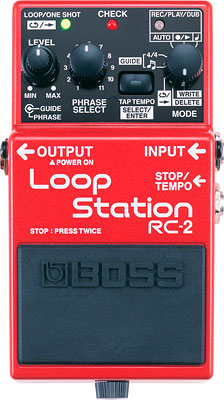
Благодарим Вас за покупку BOSS RC-2 Loop Station.
Прежде чем приступить к работе с прибором, ознакомьтесь с информацией, приведенной в разделах: “USING THE UNIT SAFELY” (“Безопасное использование прибора” и “Важные замеча- ния”), которые прилагаются отдельно. Там находятся важные сведения, касающиеся корректной эксплуатации прибора.
Также для того, чтобы гарантировать долгую бесперебойную эффективную работу прибора внимательно ознакомьтесь со всем руководством. Не теряйте его. Оно может пригодиться в дальнейшем.
В комплект поставки входит батарейка. Однако срок ее службы непродолжителен, поскольку ее основная задача – проверка работоспособности прибора при его покупке.
Copyright © 2006 BOSS CORPORATION
Все права защищены. Полное или частичное воспроизведение материалов данного руководства
без письменного разрешения компании BOSS CORPORATION запрещено.
2

n“…%»…/ .=!=*2 !,“2,*,
●RC-2 – компактный прибор, позволяющий быстро и просто создавать зацикленные фразы нужной длины.
●Возможность записи 11 фраз общей продолжительностью 16 минут.
●Возможность изменения в реальном времени темпа воспроизведения, без изменения его высоты.
●Функции Undo и Redo, позволяющие отменять и восстанавливать результаты последней записи, что очень удобно для исправления ошибок исполнения во время записи с наложением.
●Автоматическое определение длины фразы после записи с помощью функции Loop Quantize, обеспечивающей оперативное создание циклов, соответствующих заданным установкам темпа.
●Вход AUX IN, обеспечивающий возможность записи аудиосигналов с CD- и других цифровых аудиоплейеров.
●Встроенный справочник со множеством паттернов различных музыкальных стилей, обеспечи- вающий ритмический аккомпанемент во время создания и воспроизведения фраз.
●Возможность использования ножных переключателей (опциональных FS-5U или FS-6) для останова исполнения, задания темпа и выбора фраз.
4

nC,“=…, C=… ë,
1 2 3
6
7
8
1. Гнездо AC Adaptor
Используется для подключения адаптера сети переменного тока (опциональные адаптеры BOSS PSA-серии). Адаптер позволяет работать без батареек.
*Используйте адаптеры только серии PSA.
*Если при установленной в RC-2 батарейке он питается от сети, то при сбоях в ней прибор автоматически переходит на питание от батарейки.
2.Индикатор CHECK
Отображает состояние батарейки.
*Если индикатор горит неярко или погас совсем, то это говорит о том, что необходимо поменять батарейку. Соответствующая процедура описана на странице 38.
3.Âõîä AUX IN
Используется для коммутации с разъемом для наушников CDили другого цифрового аудиоплейера.
*Если задействован вход INPUT, то вход AUX IN автомати- чески мьютируется.
*В соответствии с заводскими установками RC-2 корректирует сигнал на входе AUX IN, чтобы он должным образом воспроизводился на стандартном гитарном усилителе. При использовании RC-2 с полнодиапазонной акустической системой эту коррекцию необходимо отключить (стр. 22).
4.Выход OUTPUT
Коммутируется с гитарным усилителем или мониторами.
5

Пустые треки
Описание панели
*Выход OUTPUT дублирует выключатель питания.
При коммутации OUTPUT питание включается, при рассоединении – отключается. Чтобы предотвратить разрядку батарейки, раскоммутируйте гнездо OUTPUT, если RC-2 не используется.
*Не подключайте к гнезду OUTPUT наушники. В противном случае они могут выйти из строя.
5.Âõîä INPUT
Используется для подключения гитары, бас-гитары и т.д.
6. Âõîä STOP/TEMPO
Используется для подключения ножного переключателя (опциональные FS-5U или FS-6). Они применяются для останова исполнения, регулировки темпа и выбора фраз (стр. 28).
С помощью опционального кабеля Roland PCS-31 к прибору можно подключить два FS-5U или FS-6.
7. Педальный переключатель
•Если два раза быстро нажать на этот переключатель, то текущая операция RC-2 прерывается (Запись, воспроизведение, запись с наложением).
Запись → Воспроизведение → Запись с наложением
Ввод темпа → Запись → Воспроизведение → Запись с наложением (Если регулятор MODE установлен в
“  ”)
”)
|
Треки с данны- |
Воспроизведение → Запись с наложе- |
|
ìè |
íèåì |
•Для останова записи, воспроизведения или записи с наложением нажмите быстро два раза на эту педальку.
Для зацикленных фраз: интервал между нажатиями должен быть не больше 1 с.
Для однократно воспроизводящихся фраз: интервал между нажатиями должен быть не больше 0.5 с.
Š .…,*= %“2=…%»=
Пример: Необходимо остановиться в конце такта размером 4/4
Нажмите на педаль один раз в начале четвертой доли, а затем второй раз в начале первой доли следующего такта.
*Для зацикленных фраз интервал между нажатиями не должен превышать 1 с, для однократно воспроизводящихся – 0.5 с.
6

Описание панели
8. Барашек
Ослабьте его, чтобы открыть педаль и получить доступ к отсеку батарейки.
* Более подробная информация находится на странице 38.
|
9 |
10 |
11 |
12 |
13 |
14 |
15 |
|||
9. Регулятор PHRASE LEVEL
Определяет громкость воспроизведения.
*Регулятор не воздействует на уровень сигналов входов INPUT и AUX IN, а также на громкость воспроизведения встроенных паттернов.
10. Регулятор GUIDE LEVEL
Определяет громкость воспроизведения встроенных паттернов.
11. Индикатор LOOP/ONE SHOT
Горит, если на выбранный трек была сохранена фраза.
Зеленый: зацикленная фраза
Красный: однократно воспроизводящаяся фраза
*Мигающий индикатор свидетельствует о недостатке памяти для записи (простой или с наложением, стр. 31).
*Если свободная память для записи фраз в RC-2 заканчи- вается, индикатор начинает быстро мигать.
*Индикатор быстро мигает при считывании фраз из памяти. Не допускайте отключения питания, пока данный процесс не завершится.
*Индикатор быстро мигает при удалении фразы из временной памяти (стр. 31). Если на текущем треке нет данных, то индикатор становится желтым.
12. Регулятор PHRASE SELECT
Используется при выборе трека для сохранения или воспроизведения.
7

Описание панели
13. Кнопка TAP TEMPO/SELECT/ENTER
Используется для определения темпа, редактирования значений параметров, стирания или записи данных. Функциональное назначение определяется регулятором MODE.
|
Регулятор MODE |
Описание |
|||
|
, |
, AUTO |
Для определения темпа нажимайте с соответствующей скоростью на эту кнопку (стр. 35). |
||
|
Индикатор мигает в соответствии с текущим темпом. |
||||
|
4/4 |
Определяет метр такта (стр. 36). |
|||
|
Метр такта должен быть определен до начала записи. |
||||
|
Используется для выбора паттернов (стр. 36). |
||||
|
Режим воспроизведения трека – обычный или зацикленный (стр. 27). |
||||
|
Функция доступна только для треков, содержащих данные. |
||||
|
DELETE |
Стирание выбранного трека (стр. 33). |
|||
|
Если регулятор MODE установлен на DELETE, индикатор кнопки мигает или горит желтым цветом. |
||||
|
WRITE |
Сохранение записанной фразы на выбранный трек (стр. 32). |
|||
|
Если регулятор MODE установлен на WRITE, индикатор кнопки мигает или горит красным цветом. |
||||
14. Индикатор REC/PLAY/DUB
Горит или мигает во время записи (обычной или с наложением) и воспроизведения.
|
Горит |
Быстро мигает |
|
|
Красный |
Запись |
Состояние готовности к записи |
|
Зеленый |
Воспроизведение |
Ïîcледовательный выбор фраз (стр. 29) |
|
Желтый |
Запись с наложением |
Выполнение функций UNDO и REDO (стр. 15) |
8

Описание панели
15. Регулятор MODE
Выбор режима работы RC-2.
|
Регулятор MODE |
Описание |
||
|
Педальный переключатель используется для определения темпа, а также для управления запи- |
|||
|
сью (простой или с наложением) и воспроизведением (стр. 18). |
|||
|
Педальный переключатель используется для управления записью (простой или с наложением) |
|||
|
и воспроизведением (стр. 13). |
|||
|
Стандартный режим работы RC-2. |
|||
|
AUTO |
После перевода RC-2 с помощью педали в режим готовности к записи, она автоматически за- |
||
|
пускается при появлении сигнала на входе INPUT или AUX IN (стр. 16). |
|||
|
4/4 |
Позволяет определять метр паттерна кнопкой TAP TEMPO/SELECT/ENTER (стр. 36). |
||
|
Позволяет выбирать паттерны с помощью кнопки TAP TEMPO/SELECT/ENTER (стр. 36). |
|||
|
Позволяет выбирать режимы воспроизведения паттерна (простой, зацикленный) кнопкой TAP |
|||
|
TEMPO/SELECT/ENTER (ñòð. 27). |
|||
|
DELETE |
Позволяет стирать фразы выбранного трека с помощью кнопки TAP TEMPO/SELECT/ENTER (стр. |
||
|
33). |
|||
|
WRITE |
Позволяет сохранять фразы на выбранный трек с помощью кнопки TAP TEMPO/SELECT/ENTER |
||
|
(ñòð. 32). |
|||
9

j%ìì32=ö,
10

Коммутация
*При коммутации выхода OUTPUT включается питание прибора.
*Громкость усилителя увеличивайте только после включения питания всех скоммутированных с ним устройств.
*Прибор потребляет достаточно много энергии. Поэтому рекомендуется использовать сетевое питание. Если используются батарейки, то рекомендуются щелочные.
*Чтобы предотвратить выход из строя динамиков, перед коммутацией установите в минимум регуляторы громкости приборов и отключите их от сети.
*Перед выключением питания устанавливайте регулятор громкости в минимум. Даже в этом состоянии при включенном питании может быть слышен звук. Это не является признаком неисправной работы прибора.
*Для коммутации используйте кабели компании Roland. При использовании кабелей других производителей обращайте внимание на следующие моменты.
•В некоторых кабелях имеются резисторы. Для коммутации данного устройства их использовать не рекомендуется. Это может привести к существенному снижению уровня громкости. За информацией, касающейся технических характеристик кабелей, обращайтесь к соответствующему производителю.
*При включении питания придерживайтесь описанной ниже последовательности. Несоблюдение этого порядка может привести к выходу из строя динамиков акустической системы.
Включение питания: В последнюю очередь включается питание гитарного усилителя. Выключение питания: В первую очередь выключается питание гитарного усилителя.
*При работе от батарейки при ее разрядке индикатор CHECK темнеет. Это говорит о том, что необходимо как можно скорее сменить батарейку.
*Более подробно ножные переключатели, коммутируемые со входом STOP/TEMPO описаны на странице 28.
*Подключать наушники к выходу OUTPUT запрещается. Это может привести к выходу их из строя.
Замечание (размещение)
В зависимости от материала и температуры поверхности, на которой размещается прибор, его нижняя резиновая поверхность может изменить цвет или испачкать поверхность. Чтобы этого не произошло, подкладывайте под прибор войлочную или матерчатую подкладки. При этом необходимо следить, чтобы прибор случайно не соскользнул вниз и не упал.
11

b*ëþ÷ …, /»/*ëþ÷ …, C,2=…,
|
b*ëþ÷ …, C,2=…, |
b/*ëþ÷ …, C,2=…, |
|
|
Скоммутируйте кабель с гнездом OUTPUT. |
Раскоммутируйте гнездо OUTPUT. |
*Прибор оборудован защитным контуром. Поэтому ему необходимо около секунды, чтобы после включения питания войти в штатный режим работы.
b=›…% ƒ=ì ÷=…,
Если при включении питания выбран трек с записанными данными (горит индикатор LOOP/ONE SHOT), начинают последовательно мигать индикаторы лицевой панели, а также несколько секунд быстро мигает индикатор LOOP/ONE SHOT.
Если выключить питание при быстро мигающем индикаторе LOOP/ONE SHOT, то могут пропасть все сохраненные данные.
Никогда не делайте этого!
Чтобы избежать этой проблемы, при включении/выключении питания выбирайте пустой трек.
■ g=ì ÷=…, %2…%“,2 ëü…% «/*ëþ÷ …, C,2=…,
Прежде чем выключить питание (раскоммутировать гнездо OUTPUT), убедитесь, что выполнены следующие условия.
При некорректном отключении питания все данные могут быть потеряны.
●t!=ƒ= … ƒ=C,“/»= 2“ /… «%“C!%,ƒ»%ä,2“ /… ƒ=C,“/»= 2“ » ! ›,ì …=ë%› …, (h…ä,*=2%!/ REC/PLAY/DUB ã%! 2ü … ä%ë›…/)
●p ã3ë 2%! MODE … 3“2=…%»ë … » AUTO, 
 ,ë,
,ë, 
●h…ä,*=2%! LOOP/ONE SHOT … ì,ã= 2 K/“2!%
12

q%ƒä=…, ƒ=ö,*ë ……/. -!=ƒ C32 ì ƒ=C,“, ã,2=!/ ,ë, K=“-ã,2=!/
* Описание останова воспроизведения и записи с наложением описано на странице 6.
Процесс записи исполнения при воспроизведении ранее записанных данных называется записью с наложением.
13

Создание зацикленных фраз путем записи гитары или бас-гитары
1.Регулятором PHRASE SELECT выберите пустой трек (1 — 11).
Если трек пустой, то индикатор LOOP/ONE SHOT не загорается.
Если чистых треков нет или мигает индикатор LOOP/ ONE SHOT, сигнализируя о том, что память переполнена, сотрите ненужные фразы, чтобы освободить память (стр. 33).
2.Установите регулятор MODE в 
 .
.
Для записи в нужном темпе нажмите несколько раз с соответствующей частотой на кнопку TAP TEMPO. После выбора темпа включается функция квантования Loop Quantize (стр. 34).
После того, как темп определен, запускается воспроизведение паттерна. Отрегулируйте его громкость регулятором GUIDE.
* Детально определение темпа описано на странице 35.
*Темп можно определять с помощью входа STOP/TEMPO (стр. 28).
*Если необходимо выбрать метр, отличный от 4/4, сделайте это сейчас (стр. 36).
3.Нажмите на педаль для запуска записи.
Если темп не задан, то запись стартует при нажатии на педаль. Если же темп установлен, запись начинается че- рез такт после нажатия на педаль.
* Если во время воспроизведения этого такта нажать на педаль еще раз, запись прервется
4.Нажмите на педаль для останова записи.
Сразу же запускается воспроизведения записанной фразы.
*Если был задан темп, функция квантования Loop Quantize автоматически определяет длину фразы, округляя ее до ближайшего такта (стр. 34). Поэтому может пройти некоторое время, прежде чем запись остановится после нажатия на педаль.
*Минимальная длина зацикленной фразы составляет около 1.5 с. При попытке записать более короткую фразу ее длина устанавливается автоматически, после чего воспроизведение останавливается.
5.Для записи поверх записанной фразы нажмите на педаль.
При нажатии на педаль происходит переключение между режимами воспроизведения и записи с наложением.
*Для записанных в последний раз фраз доступны функции Undo/Redo (стр. 15).
14
 Loading…
-
Страница 1
Owner’ s Manual DC AC AC & BATTERY POWERED FET RC-2_e.book 1 ページ 2006年10月27日 金曜日 午前10時31分[…]
-
Страница 2
2 Thank you, and congratulations on your choice of the BOSS RC-2 Loop Station. Before using this unit, carefully read the sections entitled: “USING THE UNIT SAFELY” and “IMPORTANT NOTES” (supplied on a separate sheet). These sections provide important in- formation concerning the proper operation of the unit. Additionally, in order to feel […]
-
Страница 3
3 Main Features…………………………………………………………………………………………. 4 Panel Descriptions …………………………………………………………………………………. 5 Connections ………………………………………………………………………………………..[…]
-
Страница 4
4 Main Features ● The RC-2 is a compact performance tool that enables anyone to create loop phrases of exact lengths—simply and easily. ● Up to 11 different loop phrases can be saved, with a maximum total length of 16 minutes. ● Phrase playback tempo can be controlled in real time without changing the phrase’s pitch. ● Undo and Redo fun[…]
-
Страница 5
5 Panel Descriptions fig.01 1. AC Adaptor Jack Accepts connection of an AC Adaptor (optionally available BOSS PSA-series). By using an AC Adaptor, you can play without be- ing concerned about how much battery power you have left. * Use only the specified AC adaptor (PSA-series). * If there is a battery in the unit while an AC adaptor is being used,[…]
-
Страница 6
6 Panel Descriptions 4. OUTPUT Jack Connect a guitar amp or monitor speaker here. * The OUTPUT jack also doubles as a power switch. Inserting a plug into the OUTPUT jack switches on the power; pull out the plug to switch the power off. To avoid unnecessary depletion of the battery, pull out the plug connected to the OUTPUT jack when you’re not us[…]
-
Страница 7
7 Panel Descriptions 8. Thumbscrew Loosen this thumbscrew to open the pedal and facilitate bat- tery replacement. * For instructions on replacing the battery, refer to “Changing the Battery” ; p. 38. fig.02 9. PHRASE LEVEL Knob This adjusts the volume level of the phrase being played back. * This knob does not adjust the input level of the INPU[…]
-
Страница 8
8 Panel Descriptions 13 . TAP TEMPO/SELECT/ENTER Button Use this when setting tempos, changing parameter values, and deleting and writing data. The function changes according to the position of the MODE knob. 14 . REC/PLAY/DUB Indicator This lights or flashes during recording, playback, and overdubbing. MODE Knob Position Description , , AUTO Set t[…]
-
Страница 9
9 Panel Descriptions 15 . MODE Knob Use this knob to switch between the RC-2’s operating modes. MODE Knob Position Description The pedal switch can be used to set the tempo as well as control recording, playback, and overdubbing (p. 18). The pedal switch is used to control recording, playback, and overdubbing (p. 13). (This is the RC-2’s normal[…]
-
Страница 10
10 Connections Footswitches (sold separately) CD/digital audio player Electric guitar/bass A C adaptor (sold separately) Guitar amp Jack type AUX IN jack: Stereo miniatur e phone STOP/TEMPO jack: Stereo 1/4-inch phone INPUT jack, OUTPUT jack: 1/4-inch phone Headphones Jack PCS-31 Stereo 1/4” phone plugs at both ends or RC-2_e.book 10 ページ ?[…]
-
Страница 11
11 Connections * Inserting a connecting plug into the OUTPUT jack turns on the power to the unit. * Raise the amp volume only after turning on the power to all connected devices. * The use of an AC adaptor is recommended as the unit’s power consumption is relatively high. Should you prefer to use batteries, please use the alkaline type. * To prev[…]
-
Страница 12
12 Turning the Power On/Off Turning On the Power Insert the plug of the connection cable into the OUTPUT jack. * This unit is equipped with a protection circuit. A brief interval (a few seconds) after power up is required before the unit will operate normally. Turning Off the Power Remove the plug of the connection cable from the OUTPUT jack. Impor[…]
-
Страница 13
13 Creating Loop Phrases by Recording Guitar or Bass Performances * For instructions on how to stop playback or overdubbing, refer to “Technique for Stopping Operation” (p. 6). On the RC-2, the process of recording an additional performance while a recorded performance plays back is called overdubbing. 3. Press the pedal to start recording. Lig[…]
-
Страница 14
14 Creating Loop Phrases by Recording Guitar or Bass Performances 1. Turn the PHRASE SELECT knob to select an empty phrase track (1-11). The LOOP/ONE SHOT indicator remains off when a phrase track is empty. If there are no empty phrase tracks, or when the LOOP/ ONE SHOT indicator flashes to indicate that the memo- ry is full, delete any unnecessary[…]
-
Страница 15
15 Creating Loop Phrases by Recording Guitar or Bass Performances * Recording or overdubbing may stop before you are finished if the RC-2’s memory runs out. If this occurs, delete any unnecessary phrases (p. 33) and try the operation again. 6. When you are finished with playback or overdubbing, press the pedal twice. * Be sure to press the pedal […]
-
Страница 16
16 Using AUTO Mode to Automatically Start Phrase Recording with Audio Input * For instructions on how to stop playback or overdubbing, refer to “Technique for Stopping Operation” (p. 6). INPUT 4. Pla y (recording begins when the RC-2 receives audio input). 2. T urn the MODE knob to A UT O . 3. Press the pedal to s witch to recording standby mod[…]
-
Страница 17
17 Using AUTO Mode to Automatically Start Phrase Recording with Audio Input 1. Turn the PHRASE SELECT knob to select an empty phrase track (1-11). 2. Set the MODE knob to AUTO. If recording in time with the tempo, you can press the TAP TEMPO button several times to set the tempo. (Loop Quantize (p. 34) is enabled after the tempo is set.) When the t[…]
-
Страница 18
18 Recording After Setting the Tempo with the Pedal * For instructions on how to stop playback or overdubbing, refer to “Technique for Stopping Operation” (p. 6). 2. T urn the MODE knob to . INPUT 1. Select an empty phrase track. 6. Press the pedal to stop recording (the phrase plays back after you stop). Lights in green Play . Lights in yellow[…]
-
Страница 19
19 Recording After Setting the Tempo with the Pedal 1. Turn the PHRASE SELECT knob to select an empty phrase track (1-11). 2. Set the MODE knob to . You are now ready to set the tempo with the pedal. 3. Press the pedal several times in time with the tempo. Loop Quantize (p. 34) is enabled after the tempo is set. The guide starts playing in time wit[…]
-
Страница 20
20 Creating Loop Phrases by Recording Audio from a CD/Digital Audio Player * For instructions on how to stop playback, refer to “Technique for Stopping Operation” (p. 6). AUX IN 5. Press the pedal to switch to recording standby mode. Lights in red 3. Pla y back the CD or digital audio play er , and adjust the volume. 6. Pla y back the CD or Dig[…]
-
Страница 21
21 Creating Loop Phrases by Recording Audio from a CD/Digital Audio Player 1. Turn the PHRASE SELECT knob to select an empty phrase track (1-11). The LOOP/ONE SHOT indicator remains off when a phrase track is empty. If there are no empty phrase tracks, or when the LOOP/ONE SHOT indicator flashes to indicate that the memory is full, delete any unnec[…]
-
Страница 22
22 Creating Loop Phrases by Recording Audio from a CD/Digital Audio Player 8. When you are finished with playback, press the pedal twice. * Be sure to press the pedal two times within an interval of one second. * For more details on saving, refer to “Saving Phrases (WRITE)” (p. 32). Be sure to connect the CD or digital audio player to the AUX I[…]
-
Страница 23
23 Playing/Overdubbing Along with a Saved Phrase * For instructions on how to stop playback or overdubbing, refer to “Technique for Stopping Operation” (p. 6). 3. Press the pedal to start playback. Play . Play . 1. Select the phrase trac k containing the sav ed phrase you w ant to play along with. 2. T urn the MODE knob to . Lights in green INP[…]
-
Страница 24
24 Playing/Overdubbing Along with a Saved Phrase 1. Turn the PHRASE SELECT knob to select the phrase track in which the desired phrase is saved. The LOOP/ONE SHOT indicator flashes rapidly while the phrase is read from memory. * You cannot overdub while the LOOP/ONE SHOT indicator is flashing rapidly. 2. Set the knob to . If you want to change the […]
-
Страница 25
25 Recording and Performing Along with the Guide The RC-2 has a built-in guide that can be used as a rhythmic accompaniment during recording, playback, and overdubbing. A variety of guide patterns are pro- vided, covering many different musical styles. * The guide does not play during phrase recording if the tempo is not set ahead of time. However,[…]
-
Страница 26
26 Using the RC-2 for Practicing—Phrase Trainer While a saved phrase is playing back, its tempo can be adjusted without changing its pitch. This func- tionality is great for slowing down musical phras- es—such as fast guitar solos recorded from a CD/ digital audio player—making them easier to learn and practice with. Changing the Tempo for Pr[…]
-
Страница 27
27 Playing a Phrase Only Once (One-Shot Playback) When a phrase is saved to a phrase track (1-11), it’s initially set to loop playback. After is has been saved, turning the MODE knob to allows you to use the TAP TEM- PO/SELECT/ENTER button to toggle between loop play- back (LOOP/ONE SHOT indicator: green) and One-Shot playback (LOOP/ONE SHOT indi[…]
-
Страница 28
28 Operating the RC-2 with an External Footswitch You can use FS-5U or FS-6 footswitches (optional) to stop re- cording, playback, and overdubbing, set tempos, clear the temporary memory, and switch phrases (Phrase Shift). When Connecting an FS-5U Connect the FS-5U to the STOP/TEMPO jack. * Some switches manufactured by other companies may operate […]
-
Страница 29
29 Operating the RC-2 with an External Footswitch ● When the FS-5U connected using the plug with the white stripe or the FS-6’s B pedal is pressed • Pressing the footswitch during recording, playback, or overdubbing stops the RC-2. • While the RC-2 is stopped, you can set the tempo by repeatedly pressing the footswitch at the desired speed.[…]
-
Страница 30
30 Operating the RC-2 with an External Footswitch • You can advance to any phrase while the current phrase is playing by pressing the pedal switch the corresponding number of times. * Empty phrase tracks are disregarded. For example, when you press the pedal switch one time while Phrase Track 1 is playing, if Phrase Track 2 is empty, the RC-2 wil[…]
-
Страница 31
31 Saving and Deleting Phrases About Memory The memory of the RC-2 is divided into two areas: Phrase tracks 1-11 and the temporary memory. A phrase that you record or overdub is first stored in temporary memory. The phrase stored in temporary memory is temporary, and is erased when the following operations occur: • When you turn off the power •[…]
-
Страница 32
32 Saving and Deleting Phrases Saving Phrases (WRITE) When you have finished recording or overdubbing, or after you have edited the tempo or other settings of a phrase, you can then save the phrase. When you save a phrase, the tempo and beat settings current at that time are stored in the selected guide pattern. A phrase that has not been saved wil[…]
-
Страница 33
33 Saving and Deleting Phrases Erasing a Saved Phrase (DELETE) 1. Turn the MODE knob to DELETE. 2. Turn the PHRASE SELECT knob to select the phrase track that you wish to delete. When you turn the PHRASE SELECT knob, any record- ed data that has not been saved is deleted. 3. Press the SELECT/ENTER button. The indicator flashes in yellow, and the RC[…]
-
Страница 34
34 About the Tempo and Time Signature The RC-2 allows you to set the tempo and time signature sepa- rately for each phrase track. These settings also determine how the guide tone will play, and how loop quantization will occur. This means that setting the tempo and time signature before re- cording makes it easy to create a correct, accurate loop p[…]
-
Страница 35
35 About the Tempo and Time Signature Setting the Tempo When you wish to record to an empty phrase track, you can set the tempo before recording. You can also change the playback tempo when playing back saved phrase tracks. * If you save a phrase after changing the playback tempo, the phrase is then saved with the modified tempo. If you do not save[…]
-
Страница 36
36 About the Tempo and Time Signature Setting the Time Signature (4/4) for the Guide In addition to 4/4, the RC-2 allows you to set a 3/4 time signature. If you want to record a phrase with a time signature of 3/4, set this time signature before you start recording. * It is not possible to change the time signature after recording. 1. Set the MODE […]
-
Страница 37
37 About the Tempo and Time Signature Guide Pattern List BEAT No. PATTERN 3/4 1 Beat1 2 Beat2 BEAT No. PATTERN 4/4 1 8Beat1 2 8Beat2 3 8Beat3 4 16Beat 5 Triple 6 Shuffle1 7 Shuffle2 8 Rock1 9 Rock2 10 Rock3 11 Rock4 12 Metal1 13 Metal2 14 Blues1 15 Blues2 16 Blues3 17 Pop BEAT No. PATTERN 4/4 18 Surf Beat 19 Down Beat 20 Funk1 21 Funk2 22 Groove 23[…]
-
Страница 38
38 Changing the Battery When the indicator goes dim or no longer lights, it means that the battery is nearly dead and must be replaced. Replace the battery following the steps below. * The use of an AC adaptor is recommended as the unit’s power consumption is relatively high. Should you prefer to use batteries, please use the alkaline type. fig.1[…]
-
Страница 39
39 Troubleshooting Power does not turn on/CHECK indicator does not light • Is the correct AC adaptor (PSA-series; sold separately) properly connected? Check once more to confirm the adaptor is connected (p. 10). * Never use any AC adaptor other than the adaptor specified. • Has the battery run down? Replace with a new battery (p. 38). * The bat[…]
-
Страница 40
40 Troubleshooting The LOOP/ONE SHOT indicator flashes even though there should be time remaining for recording • In the situations listed below, temporary memory for overdubbing (p. 31) is allocated separately from the phrase. As the maximum available recording time also includes time used in temporary memory, the LOOP/ONE SHOT indicator may fla[…]
-
Страница 41
41 Specifications RC-2: Loop Station Nominal Input Level ………………… INPUT: -20 dBu AUX IN: -10 dBu Input Impedance………………………. INPUT: 1 M Ω AUX IN: 47 k Ω Nominal Output Level ……………… -20 dBu Output Impedance …………………… 1 k Ω Recommended Load Impedance …… 10 k Ω or greater Internal Memory […]
-
Страница 42
42 Specifications Power Supply …………………………… DC 9 V: Dry battery/9 V type (6F22 (carbon), 6LR61 (alkaline)) , AC Adaptor (PSA-series: optional) Current Draw …………………………… 50 mA (DC 9 V) * Expected battery life under continuous use: Carbon: 2 hours, Alkaline: 6 hours These figures will vary depending on the ac[…]
-
Страница 43
This product complies with the requirements of European Directive 89/336/EEC. For EU Countries For Canada This Class B digital apparatus meets all requirements of the Canadian Interference-Causing Equipment Regulations. Cet appareil numérique de la classe B respecte toutes les exigences du Règlement sur le matériel brouilleur du Canada. NOTICE A[…]
-
Страница 44
G6027115R1 RC-2_e.book 44 ページ 2006年10月27日 金曜日 午前10時31分[…]
������� ������ �������� �� ������ ����������� �������� ��������. �������� ����� �� ����� ���� ��������� �������� ������� ������ RC-20XL � ������ ��� ���� RC-50. ������ ��������� � ��������� ������ � ���� ���������: RC-2. � ������� ������� ���������� ������, RC-2 �������� �������� ����� ������������ ����� ������� ������.
 Loading…
-
Страница 1
Owner’ s Manual DC AC AC & BATTERY POWERED FET RC-2_e.book 1 ページ 2006年10月27日 金曜日 午前10時31分[…]
-
Страница 2
2 Thank you, and congratulations on your choice of the BOSS RC-2 Loop Station. Before using this unit, carefully read the sections entitled: “USING THE UNIT SAFELY” and “IMPORTANT NOTES” (supplied on a separate sheet). These sections provide important in- formation concerning the proper operation of the unit. Additionally, in order to feel […]
-
Страница 3
3 Main Features…………………………………………………………………………………………. 4 Panel Descriptions …………………………………………………………………………………. 5 Connections ………………………………………………………………………………………..[…]
-
Страница 4
4 Main Features ● The RC-2 is a compact performance tool that enables anyone to create loop phrases of exact lengths—simply and easily. ● Up to 11 different loop phrases can be saved, with a maximum total length of 16 minutes. ● Phrase playback tempo can be controlled in real time without changing the phrase’s pitch. ● Undo and Redo fun[…]
-
Страница 5
5 Panel Descriptions fig.01 1. AC Adaptor Jack Accepts connection of an AC Adaptor (optionally available BOSS PSA-series). By using an AC Adaptor, you can play without be- ing concerned about how much battery power you have left. * Use only the specified AC adaptor (PSA-series). * If there is a battery in the unit while an AC adaptor is being used,[…]
-
Страница 6
6 Panel Descriptions 4. OUTPUT Jack Connect a guitar amp or monitor speaker here. * The OUTPUT jack also doubles as a power switch. Inserting a plug into the OUTPUT jack switches on the power; pull out the plug to switch the power off. To avoid unnecessary depletion of the battery, pull out the plug connected to the OUTPUT jack when you’re not us[…]
-
Страница 7
7 Panel Descriptions 8. Thumbscrew Loosen this thumbscrew to open the pedal and facilitate bat- tery replacement. * For instructions on replacing the battery, refer to “Changing the Battery” ; p. 38. fig.02 9. PHRASE LEVEL Knob This adjusts the volume level of the phrase being played back. * This knob does not adjust the input level of the INPU[…]
-
Страница 8
8 Panel Descriptions 13 . TAP TEMPO/SELECT/ENTER Button Use this when setting tempos, changing parameter values, and deleting and writing data. The function changes according to the position of the MODE knob. 14 . REC/PLAY/DUB Indicator This lights or flashes during recording, playback, and overdubbing. MODE Knob Position Description , , AUTO Set t[…]
-
Страница 9
9 Panel Descriptions 15 . MODE Knob Use this knob to switch between the RC-2’s operating modes. MODE Knob Position Description The pedal switch can be used to set the tempo as well as control recording, playback, and overdubbing (p. 18). The pedal switch is used to control recording, playback, and overdubbing (p. 13). (This is the RC-2’s normal[…]
-
Страница 10
10 Connections Footswitches (sold separately) CD/digital audio player Electric guitar/bass A C adaptor (sold separately) Guitar amp Jack type AUX IN jack: Stereo miniatur e phone STOP/TEMPO jack: Stereo 1/4-inch phone INPUT jack, OUTPUT jack: 1/4-inch phone Headphones Jack PCS-31 Stereo 1/4” phone plugs at both ends or RC-2_e.book 10 ページ ?[…]
-
Страница 11
11 Connections * Inserting a connecting plug into the OUTPUT jack turns on the power to the unit. * Raise the amp volume only after turning on the power to all connected devices. * The use of an AC adaptor is recommended as the unit’s power consumption is relatively high. Should you prefer to use batteries, please use the alkaline type. * To prev[…]
-
Страница 12
12 Turning the Power On/Off Turning On the Power Insert the plug of the connection cable into the OUTPUT jack. * This unit is equipped with a protection circuit. A brief interval (a few seconds) after power up is required before the unit will operate normally. Turning Off the Power Remove the plug of the connection cable from the OUTPUT jack. Impor[…]
-
Страница 13
13 Creating Loop Phrases by Recording Guitar or Bass Performances * For instructions on how to stop playback or overdubbing, refer to “Technique for Stopping Operation” (p. 6). On the RC-2, the process of recording an additional performance while a recorded performance plays back is called overdubbing. 3. Press the pedal to start recording. Lig[…]
-
Страница 14
14 Creating Loop Phrases by Recording Guitar or Bass Performances 1. Turn the PHRASE SELECT knob to select an empty phrase track (1-11). The LOOP/ONE SHOT indicator remains off when a phrase track is empty. If there are no empty phrase tracks, or when the LOOP/ ONE SHOT indicator flashes to indicate that the memo- ry is full, delete any unnecessary[…]
-
Страница 15
15 Creating Loop Phrases by Recording Guitar or Bass Performances * Recording or overdubbing may stop before you are finished if the RC-2’s memory runs out. If this occurs, delete any unnecessary phrases (p. 33) and try the operation again. 6. When you are finished with playback or overdubbing, press the pedal twice. * Be sure to press the pedal […]
-
Страница 16
16 Using AUTO Mode to Automatically Start Phrase Recording with Audio Input * For instructions on how to stop playback or overdubbing, refer to “Technique for Stopping Operation” (p. 6). INPUT 4. Pla y (recording begins when the RC-2 receives audio input). 2. T urn the MODE knob to A UT O . 3. Press the pedal to s witch to recording standby mod[…]
-
Страница 17
17 Using AUTO Mode to Automatically Start Phrase Recording with Audio Input 1. Turn the PHRASE SELECT knob to select an empty phrase track (1-11). 2. Set the MODE knob to AUTO. If recording in time with the tempo, you can press the TAP TEMPO button several times to set the tempo. (Loop Quantize (p. 34) is enabled after the tempo is set.) When the t[…]
-
Страница 18
18 Recording After Setting the Tempo with the Pedal * For instructions on how to stop playback or overdubbing, refer to “Technique for Stopping Operation” (p. 6). 2. T urn the MODE knob to . INPUT 1. Select an empty phrase track. 6. Press the pedal to stop recording (the phrase plays back after you stop). Lights in green Play . Lights in yellow[…]
-
Страница 19
19 Recording After Setting the Tempo with the Pedal 1. Turn the PHRASE SELECT knob to select an empty phrase track (1-11). 2. Set the MODE knob to . You are now ready to set the tempo with the pedal. 3. Press the pedal several times in time with the tempo. Loop Quantize (p. 34) is enabled after the tempo is set. The guide starts playing in time wit[…]
-
Страница 20
20 Creating Loop Phrases by Recording Audio from a CD/Digital Audio Player * For instructions on how to stop playback, refer to “Technique for Stopping Operation” (p. 6). AUX IN 5. Press the pedal to switch to recording standby mode. Lights in red 3. Pla y back the CD or digital audio play er , and adjust the volume. 6. Pla y back the CD or Dig[…]
-
Страница 21
21 Creating Loop Phrases by Recording Audio from a CD/Digital Audio Player 1. Turn the PHRASE SELECT knob to select an empty phrase track (1-11). The LOOP/ONE SHOT indicator remains off when a phrase track is empty. If there are no empty phrase tracks, or when the LOOP/ONE SHOT indicator flashes to indicate that the memory is full, delete any unnec[…]
-
Страница 22
22 Creating Loop Phrases by Recording Audio from a CD/Digital Audio Player 8. When you are finished with playback, press the pedal twice. * Be sure to press the pedal two times within an interval of one second. * For more details on saving, refer to “Saving Phrases (WRITE)” (p. 32). Be sure to connect the CD or digital audio player to the AUX I[…]
-
Страница 23
23 Playing/Overdubbing Along with a Saved Phrase * For instructions on how to stop playback or overdubbing, refer to “Technique for Stopping Operation” (p. 6). 3. Press the pedal to start playback. Play . Play . 1. Select the phrase trac k containing the sav ed phrase you w ant to play along with. 2. T urn the MODE knob to . Lights in green INP[…]
-
Страница 24
24 Playing/Overdubbing Along with a Saved Phrase 1. Turn the PHRASE SELECT knob to select the phrase track in which the desired phrase is saved. The LOOP/ONE SHOT indicator flashes rapidly while the phrase is read from memory. * You cannot overdub while the LOOP/ONE SHOT indicator is flashing rapidly. 2. Set the knob to . If you want to change the […]
-
Страница 25
25 Recording and Performing Along with the Guide The RC-2 has a built-in guide that can be used as a rhythmic accompaniment during recording, playback, and overdubbing. A variety of guide patterns are pro- vided, covering many different musical styles. * The guide does not play during phrase recording if the tempo is not set ahead of time. However,[…]
-
Страница 26
26 Using the RC-2 for Practicing—Phrase Trainer While a saved phrase is playing back, its tempo can be adjusted without changing its pitch. This func- tionality is great for slowing down musical phras- es—such as fast guitar solos recorded from a CD/ digital audio player—making them easier to learn and practice with. Changing the Tempo for Pr[…]
-
Страница 27
27 Playing a Phrase Only Once (One-Shot Playback) When a phrase is saved to a phrase track (1-11), it’s initially set to loop playback. After is has been saved, turning the MODE knob to allows you to use the TAP TEM- PO/SELECT/ENTER button to toggle between loop play- back (LOOP/ONE SHOT indicator: green) and One-Shot playback (LOOP/ONE SHOT indi[…]
-
Страница 28
28 Operating the RC-2 with an External Footswitch You can use FS-5U or FS-6 footswitches (optional) to stop re- cording, playback, and overdubbing, set tempos, clear the temporary memory, and switch phrases (Phrase Shift). When Connecting an FS-5U Connect the FS-5U to the STOP/TEMPO jack. * Some switches manufactured by other companies may operate […]
-
Страница 29
29 Operating the RC-2 with an External Footswitch ● When the FS-5U connected using the plug with the white stripe or the FS-6’s B pedal is pressed • Pressing the footswitch during recording, playback, or overdubbing stops the RC-2. • While the RC-2 is stopped, you can set the tempo by repeatedly pressing the footswitch at the desired speed.[…]
-
Страница 30
30 Operating the RC-2 with an External Footswitch • You can advance to any phrase while the current phrase is playing by pressing the pedal switch the corresponding number of times. * Empty phrase tracks are disregarded. For example, when you press the pedal switch one time while Phrase Track 1 is playing, if Phrase Track 2 is empty, the RC-2 wil[…]
-
Страница 31
31 Saving and Deleting Phrases About Memory The memory of the RC-2 is divided into two areas: Phrase tracks 1-11 and the temporary memory. A phrase that you record or overdub is first stored in temporary memory. The phrase stored in temporary memory is temporary, and is erased when the following operations occur: • When you turn off the power •[…]
-
Страница 32
32 Saving and Deleting Phrases Saving Phrases (WRITE) When you have finished recording or overdubbing, or after you have edited the tempo or other settings of a phrase, you can then save the phrase. When you save a phrase, the tempo and beat settings current at that time are stored in the selected guide pattern. A phrase that has not been saved wil[…]
-
Страница 33
33 Saving and Deleting Phrases Erasing a Saved Phrase (DELETE) 1. Turn the MODE knob to DELETE. 2. Turn the PHRASE SELECT knob to select the phrase track that you wish to delete. When you turn the PHRASE SELECT knob, any record- ed data that has not been saved is deleted. 3. Press the SELECT/ENTER button. The indicator flashes in yellow, and the RC[…]
-
Страница 34
34 About the Tempo and Time Signature The RC-2 allows you to set the tempo and time signature sepa- rately for each phrase track. These settings also determine how the guide tone will play, and how loop quantization will occur. This means that setting the tempo and time signature before re- cording makes it easy to create a correct, accurate loop p[…]
-
Страница 35
35 About the Tempo and Time Signature Setting the Tempo When you wish to record to an empty phrase track, you can set the tempo before recording. You can also change the playback tempo when playing back saved phrase tracks. * If you save a phrase after changing the playback tempo, the phrase is then saved with the modified tempo. If you do not save[…]
-
Страница 36
36 About the Tempo and Time Signature Setting the Time Signature (4/4) for the Guide In addition to 4/4, the RC-2 allows you to set a 3/4 time signature. If you want to record a phrase with a time signature of 3/4, set this time signature before you start recording. * It is not possible to change the time signature after recording. 1. Set the MODE […]
-
Страница 37
37 About the Tempo and Time Signature Guide Pattern List BEAT No. PATTERN 3/4 1 Beat1 2 Beat2 BEAT No. PATTERN 4/4 1 8Beat1 2 8Beat2 3 8Beat3 4 16Beat 5 Triple 6 Shuffle1 7 Shuffle2 8 Rock1 9 Rock2 10 Rock3 11 Rock4 12 Metal1 13 Metal2 14 Blues1 15 Blues2 16 Blues3 17 Pop BEAT No. PATTERN 4/4 18 Surf Beat 19 Down Beat 20 Funk1 21 Funk2 22 Groove 23[…]
-
Страница 38
38 Changing the Battery When the indicator goes dim or no longer lights, it means that the battery is nearly dead and must be replaced. Replace the battery following the steps below. * The use of an AC adaptor is recommended as the unit’s power consumption is relatively high. Should you prefer to use batteries, please use the alkaline type. fig.1[…]
-
Страница 39
39 Troubleshooting Power does not turn on/CHECK indicator does not light • Is the correct AC adaptor (PSA-series; sold separately) properly connected? Check once more to confirm the adaptor is connected (p. 10). * Never use any AC adaptor other than the adaptor specified. • Has the battery run down? Replace with a new battery (p. 38). * The bat[…]
-
Страница 40
40 Troubleshooting The LOOP/ONE SHOT indicator flashes even though there should be time remaining for recording • In the situations listed below, temporary memory for overdubbing (p. 31) is allocated separately from the phrase. As the maximum available recording time also includes time used in temporary memory, the LOOP/ONE SHOT indicator may fla[…]
-
Страница 41
41 Specifications RC-2: Loop Station Nominal Input Level ………………… INPUT: -20 dBu AUX IN: -10 dBu Input Impedance………………………. INPUT: 1 M Ω AUX IN: 47 k Ω Nominal Output Level ……………… -20 dBu Output Impedance …………………… 1 k Ω Recommended Load Impedance …… 10 k Ω or greater Internal Memory […]
-
Страница 42
42 Specifications Power Supply …………………………… DC 9 V: Dry battery/9 V type (6F22 (carbon), 6LR61 (alkaline)) , AC Adaptor (PSA-series: optional) Current Draw …………………………… 50 mA (DC 9 V) * Expected battery life under continuous use: Carbon: 2 hours, Alkaline: 6 hours These figures will vary depending on the ac[…]
-
Страница 43
This product complies with the requirements of European Directive 89/336/EEC. For EU Countries For Canada This Class B digital apparatus meets all requirements of the Canadian Interference-Causing Equipment Regulations. Cet appareil numérique de la classe B respecte toutes les exigences du Règlement sur le matériel brouilleur du Canada. NOTICE A[…]
-
Страница 44
G6027115R1 RC-2_e.book 44 ページ 2006年10月27日 金曜日 午前10時31分[…]
������� ������ �������� �� ������ ����������� �������� ��������. �������� ����� �� ����� ���� ��������� �������� ������� ������ RC-20XL � ������ ��� ���� RC-50. ������ ��������� � ��������� ������ � ���� ���������: RC-2. � ������� ������� ���������� ������, RC-2 �������� �������� ����� ������������ ����� ������� ������.
������ �� 16 ����� �����
����������� Loop Quantize ��� �������� ������ �������������� ����
���������� ������������ ������� ��������� ��������� ��������� � ���� ������
������ � �������� ��������� ������ � ��������� �� ��������
������� ������ � �������� Undo/Redo
����� ���� ��������� 11 ����.
�������������� ���� AUX ��������� �������� ����� � �������� �����-����������
���� ��� ������� ������
�����������, ������������, ��������������� � ����������
RC-2 ����� �������� � ��������� �� 16 ����� ��������������� ����� �� ��� � ��� � ������ �����������, ��� � ������� �������� ����������, ������ ��� ����� ��� �������� MP3. ������ ��� ���� �������������� ����� ����� ���� ��������� � ����� �� 11 ���������� ����� ������.
������� ��������
������ ��������� �������� �����, �������� ����� ���� �� �����, ������������ ��. �� ����� �����, RC-2 ���� �������� ����� �������� � ������� �������, ����� ��� ����� Rhythm Guide, ���������� Auto Start, ����������� ������ ���� ������������� �� ������ Tap Tempo, ������������ �����, � ����� �������� ��������� �������� Undo/Redo.
������ ���������
�������� �� �������� ������ �������, ���������� RC-2 ����� � �������, ��� ����������� ��� BOSS. ��������� ���� ���������� ������� � ������, RC-2 ���� ������ ������ �� ���� ����� ��������, �� ������� ���������� ������� �������� ���� ��� �������� ����������.
�������� ��������� � ����������� ����� BCB
������ ���������� �� ���� ���� ���������� ����������� ����� BCB ��� ��������������� � �������� ���������� �������. ��� ��� RC-2 ����� ����������� ������� ���������� ������, ��� ������� ���������� � ���� ����������. ����� ������ ��� ��������� � ���������.
������� ������ ��������� RC
����, � ���������� RC-2 ������ ���������� ������� loop station ��� ����� ������������ � ��� ������ ��������. ������ �� ���� RC-50 �������� ����� ������, ������� ������ RC-20XL ����� �������� ������� ������, � RC-2 ������������ ������ ����������� � ���������� ����� ����� ���������.
����������� ��������������:
����������: ��������� �������������, ����� ������ PHRASE LEVEL, ����� ������ ����� GUIDE LEVEL, ����� ������ ����� PHRASE SELECT, ������ ��������� ����� TAP TEMPO (ENTER/SELECT), ����� ��������� ������ MODE.
����������: �������� CHECK, ������ ��� ����������� ��������������� LOOP/ONE SHOT, ������/���������������/��������� REC/PLAY/DUB, ��������� ����� / ����� / ���� TAP TEMPO / SELECT / ENTER.
�������: ������� ������ INPUT, �������� ������ OUTPUT, ������ ��� ������������� STOP / TEMPO, �������������� ������� ������ AUX IN, ������ ��� �������� ������� AC Adapter (���������� ���������� 9 �)
����������� ������� �������: -20 dBu
������� �������������: 1 ���
����������� �������� �������: -20 dBu
�������� �������������: 1 ���
������������� ������������� ��������: 10 ��� ��� ����
�������: �� ������� ���� ������ ��� �������� ������� (���� PSA, � �������� �� ������)
������������ ���: 50 �� (���������� ��� 9 �).
����� ������ �� �������: ���������� � 2 ����, ����������� � 6 �����.
� ���������: �����������, ������� � ���������� �������������, ������� �������.
������: 7,3 ��
�������: 12,9 ��
������: 5,9 ��
���: 400 �.

 |
|
|
|
 |
 |
|
|

|
|



249 ₽
Инструкция (руководство пользователя) на Станция создания сэмплов BOSS RC-2
Артикул: boss-rc-2
Категория: BOSS
-
Описание
-
Детали
Описание
Инструкцию по эксплуатации BOSS RC-2 на русском языке можно будет скачать в личном кабинете после оформления и оплаты заказа.
Детали
| Формат файла |
|
|---|---|
| Размер инструкции в кб |
2176 |

Русский
- Bedienungsanleitung Boss RC-2
- Boss RC-2 User Manual
- Manual Usuario Boss RC-2
- Mode d’emploi Boss RC-2
- Istruzioni Boss RC-2
- инструкция Boss RC-2
- Boss RC-2の取扱説明書
- Handleiding Boss RC-2
- Manual de uso Boss RC-2
Вам нужна инструкция? Мы поможем Вам ее найти и сэкономить Ваше время.
- 44 stron
- 2.01 mb
Изделие Boss RC-2, а также другие, которыми Вы пользуетесь ежедневно, наверняка вы получили в комплекте с инструкцией обслуживания. Из опыта наших пользователей мы знаем, что большинство из Вас не уделили этому особого внимания. Большая часть инструкций, сразу же после покупки попадает в корзину для мусора вместе с коробкой — это ошибка. Ознакомьтесь с информацией, касающейся инструкции Boss RC-2, которая поможет Вам в будущем сэкономить нервы и избежать головной боли.
Важная подсказка — не забывайте хотя бы раз прочитать инструкцию Boss RC-2
Если вы не хотите каждый раз читать информационные брошюры, касающиеся, тех или Boss RC-2 иных изделий, достаточно, прочитать их раз — сразу же после покупки устройства. Вы получите основное знания, касающиеся поддержания изделия Boss RC-2 в хорошем эксплуатационном состоянии, так, чтобы без проблем достигнуть его планируемого цикла работы. Затем инструкцию можно отложить на полку и вернуться к ней только в случае, если вы не уверены, правильно ли проводится техобслуживание изделия. Правильный уход является необходимым элементом Вашего удовольствия Boss RC-2.
Раз в году пересмотрите шкафчик, в котором держите инструкции для всех устройств, — выбросите те, которыми вы уже не пользуетесься. Это поможет Вам сохранять порядок в своей домашней базе инструкций обслуживания.
Summary of Contents for Boss RC-2
Что находится в инструкции Boss RC-2? Почему стоит ее прочитать?
- Гарантия и подробности, касающиеся техобслуживания изделия
Хорошей идеей будет прикрепить чек к странице инструкции. Если что-то плохое случится во время использования Boss RC-2, у вас будет комплект документов, необходимый для гарантийного ремонта. В этой части инструкции вы найдете информацию об авторизованных сервисных центрахBoss RC-2 а также, как самостоятельно правильно ухаживать за оборудованием — так, чтобы не потерять гарантийных прав. - Указания по монтажу и Setup
Не терять нервов и времени на самостоятельную попытку установки и первого запуска изделия. Воспользуйтесь рекомендациями производителя Boss RC-2 чтобы правильно запустить изделие, без лишнего риска повреждения оборудования. - Информация, касающаяся дополнительных запчастей (входящих в комплект а также являющихся опцией)
Пересматривая эту часть документа вы сможете проверить, доставлен ли ваш Boss RC-2 с полним комплектом аксессуаров. Вы также сможете узнать, какие дополнительные запчасти или аксессуары для Boss RC-2 Вы сможете найти и докупить к своему устройству. - Troubleshooting
Самые частые проблемы, касающиеся Boss RC-2 и методы их решения. Это очень полезная часть руководства по обслуживанию — она позволит Вам сэкономить много времени на поиск решений. 90% проблем с Boss RC-2 повторяется у многих пользователей. - Требования, касающиеся питания и энергетический класс
Информация, касающаяся количества потребляемой энергии, а также рекомендации, касающиеся установки и питания Boss RC-2. Прочитайте, чтобы оптимально пользоваться Boss RC-2 и не использовать большего количества ресурсов, нежели это необходимо для правильной работы изделия. - Специальные функции Boss RC-2
Здесь вы можешь узнать, как персонализировать изделие Boss RC-2. Вы узнаете, какие дополнительные функции могут помочь Вам удобно использовать продукт Boss RC-2 а также, какие функции Вашего устройства оптимальны для выполнения конкретной деятельности.
Как видите в инструкции вы найдете информацию, которая реально поможет Вам в использовании Вашего изделия. Стоит с ней ознакомиться, чтобы избежать разочарований, возникающих из более короткого, нежели предусматривалось, периода исправности изделия Boss RC-2. Если все же вы не хотите копить инструкции в своем доме, наш сайт поможет Вам в этом — вы должны найти у нас руководство по обслуживанию большинства из своих устройств, а также Boss RC-2.