
Bose S1 Pro Manual Multi-position PA System Manual

Important Safety Instructions
Please read and keep all safety and use instructions.
- Read these instructions.
- Keep these instructions.
- Heed all warnings.
- Follow all instructions.
- Do not use this apparatus near water.
- Clean only with a dry cloth.
- Do not block any ventilation openings. Install in accordance with the manufacturer’s instructions.
- Do not install near any heat sources such as radiators, heat registers, stoves, or other apparatus (including amplifiers) that produces heat.
- Do not defeat the safety purpose of the polarized or grounding-type plug. A polarized plug has two blades with one wider than the other. A groundingtype plug has two blades and a third grounding prong. The wider blade or third prong is provided for your safety. If the provided plug does not fit in your outlet, consult an electrician for replacement of the obsolete outlet.
- Protect the power cord from being walked on or pinched, particularly at plugs, convenience receptacles, and the point where it exits from the apparatus.
- Only use attachments/accessories specified by the manufacturer.
 Use only with the cart, stand, tripod, bracket, or table specified by the manufacturer or sold with the apparatus. When a cart is used, use caution when moving the cart/apparatus combination to avoid injury from tip-over.
 - Unplug this apparatus during lightning storms or when unused for long periods of time.
- Refer all servicing to qualified personnel. Servicing is required when the apparatus has been damaged in any way such as power-supply cord or plug is damaged, liquid has been spilled or objects have fallen into the apparatus, the apparatus has been exposed to rain or moisture, does not operate normally, or has been dropped.
This symbol on the product means there is uninsulated, dangerous voltage within the product enclosure that may present a risk of electrical shock.
This symbol on the product means there are important operating and maintenance instructions in this guide.
 Contains small parts which may be a choking hazard. Not suitable for children under age 3.
 This product contains magnetic material. Consult your physician on whether this might affect your implantable medical device.
- All Bose products must be used in accordance with local, state, federal and industry regulations. It is the installer’s responsibility to ensure installation of the product is performed in accordance with all applicable codes, including local building codes and regulations. Consult the local authority having jurisdiction before installing this product.
- To reduce the risk of fire or electrical shock, do NOT expose the product to rain, liquids, or moisture. Not applicable for products rated IPX4-9.
- Do NOT expose this product to dripping or splashing and do not place objects filled with liquids, such as vases, on or near the product. Not applicable to products rated IPX4-9.
- Keep the product away from fire and heat sources. Do NOT place naked flame sources, such as lighted candles, on or near the product.
- Do NOT use a power inverter with this product.
- Do NOT use in vehicles or boats.
- Do NOT make unauthorized alterations to this product.
- Do NOT expose products containing batteries to excessive heat (e.g. from storage in direct sunlight, fire, or the like).
- The battery accessory provided with this product may present a risk of fire or chemical burn if mishandled.
- Where the mains plug or appliance coupler is used as the disconnect device, the disconnect device shall remain readily operable.
- Only use genuine Bose batteries with this product. Contact Bose customer service for replacement batteries.
- Do NOT use the Bose S1 Pro system with a tripod/stand that is unstable. The loudspeaker is only designed for use on a 35 mm post, and the tripod/stand must be capable of supporting a speaker with a minimum weight of 7 kg (15 lbs) and an overall size of 241 x 279 x 330 mm (9.5 x 11 x 13 inches). Using a tripod/stand that is not designed to support the size and mass of the S1 Pro system may lead to an unstable and hazardous condition that could result in injury.
Charging temperature range: 0°C — 42°C (32°F — 108°F)
Discharging temperature range: –20°C — 45°C (–4°F — 113°F)
Regulatory Information
This device complies with part 15 of the FCC Rules and with Industry Canada licenseexempt RSS standard(s). Operation is subject to the following two conditions: (1) This device may not cause harmful interference, and (2) this device must accept any interference received, including interference that may cause undesired operation.
 Bose Corporation hereby declares that this product is in compliance with the essential requirements and other relevant provisions of Directive 2014/53/EU and all other applicable EU directive requirements. The complete declaration of conformity can be found at: www.Bose.com/compliance.
Frequency band of operation 2402 to 2480 MHz.
Bluetooth: Maximum transmit power less than 20 dBm EIRP.
Bluetooth Low Energy: Maximum power spectral density less than 10 dBm/MHz EIRP.
This product meets all EN55103-2 immunity requirements for E2 electromagnetic environment.
This equipment should be installed and operated with a minimum distance of 20 cm between radiator and your body
Shielded cables are required to maintain regulatory compliance
Changes or modifications not expressly approved by Bose Corporation could void the user’s authority to operate this equipment.
Information About Products That Generate Electrical Noise (FCC Compliance Notice for US)
Note: This equipment has been tested and found to comply with the limits for a Class A digital device, pursuant to part 15 of the FCC Rules. These limits are designed to provide reasonable protection against harmful interference when the equipment is operated in a commercial environment. This equipment generates, uses, and can radiate radio frequency energy and, if not installed and used in accordance with the instruction manual, may cause harmful interference to radio communications. Operation of this equipment in a residential area is likely to cause harmful interference in which case the user will be required to correct the interference at one’s own expense.
Management Regulation for Low-power Radio-frequency Devices
Article XII
According to «Management Regulation for Low-power Radio-frequency Devices», without permission by the NCC, any company, enterprise, or user is not allowed to change frequency, enhance transmitting power, or alter original characteristics, as well as performance, to an approved low power radio-frequency device.
Article XIV
The low power radio-frequency devices shall not influence aircraft security and interfere with legal communications; If found, the user shall cease operating immediately until no interference is achieved. The said legal communications means radio communications in compliance with the Telecommunications Act.
The low power radio-frequency devices must be susceptible with the interference from legal communications or ISM radio wave radiated devices.
For Denmark, Finland, Norway, and Sweden:
Provide an earth connection or ensure the socket outlet incorporates a protective earthing connection before connecting the plug to the mains socket outlet.
Names and Contents of Toxic or Hazardous Substances and Elements
| Toxic or Hazardous Substances and Elements | ||||||
| Part Name | Lead (Pb) |
Mercury (Hg) |
Cadmium (Cd) |
Hexavalent (CR(VI)) |
Polybrominated Biphenyl (PBB) |
Polybrominated diphenylether (PBDE) |
| PCBs | X | O | O | O | O | O |
| Metal parts | X | O | O | O | O | O |
| Plastic parts | O | O | O | O | O | O |
| Speakers | X | O | O | O | O | O |
| Cables | X | O | O | O | O | O |
| This table is prepared in accordance with the provisions of SJ/T 11364. O: Indicates that this toxic or hazardous substance contained in all of the homogenous materials for this part is below the limit requirement of GB/T 26572. X: Indicates that this toxic or hazardous substance contained in at least one of the homogenous materials used for this part is above the limit requirement of GB/T 26572. |
 |
 This symbol means the product must not be discarded as household waste, and should be delivered to an appropriate collection facility for recycling. Proper disposal and recycling helps protect natural resources, human health, and the environment. For more information on disposal and recycling of this product, contact your local municipality, disposal service, or the shop where you bought this product.
 Please dispose of used batteries properly, following local regulations. Do not incinerate.

Introduction
Quick Setup Guide
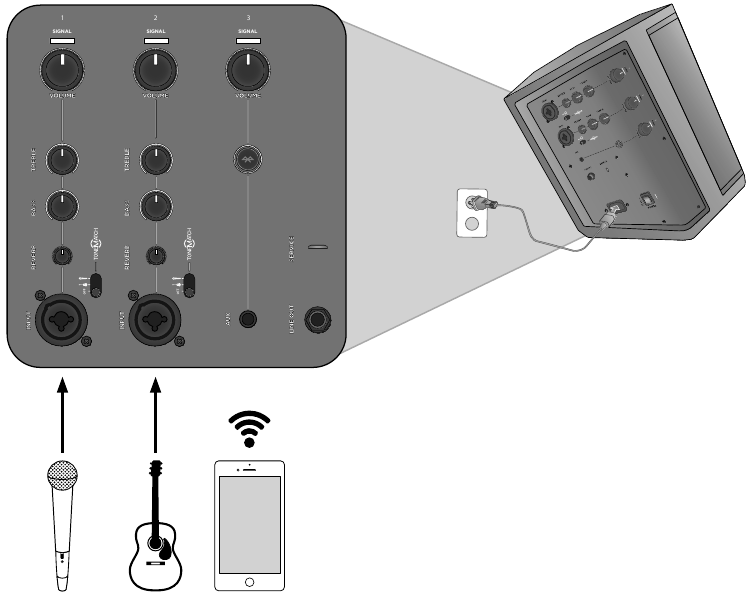
Note: For use of the Bose® S1 Pro Multi-Position PA system with an optional rechargeable battery (not included), see the battery accessory owner’s guide on http://www.Bose.com.
Product Overview
Sound great anywhere with the ultra-portable Bose S1 Pro Multi-Position PA system. Designed for musicians, DJs and general PA use, the S1 Pro is the ultimate all-in-one PA, floor monitor, practice amplifier and primary music system.
Multiple positions with Auto EQ allow the S1 Pro to be set down on the floor, up on a table or even mounted on a tripod stand, ensuring that you always sound your best. And with a 3-channel mixer, reverb, Bluetooth® streaming and ToneMatch® processing onboard, it’s always ready to become your go-anywhere music system for nearly any occasion.
Features and Benefits
- Lightweight & Portable – Weighing about 15 lbs (6.8 kg), the rugged S1 Pro is designed to transport effortlessly from the car to the event.
- Versatility meets Simplicity – The S1 Pro comes with a full-featured, 3-channel mixer with reverb and Bluetooth streaming. Sound great quickly with ToneMatch® processing for microphones and acoustic guitars, while playing music wirelessly using your mobile device. Perform nearly anywhere with the optional rechargeable Li-ion battery for the ultimate portability.
- Adaptable – Multiple positions give you the best coverage options for your application, while Auto EQ maintains optimum sound in any orientation.
- Impressive size-to-performance ratio – The S1 Pro delivers high-output in a small package, ready to serve as your ultimate all-in-one PA, floor monitor, practice amplifier or primary music system.
Accessories
In-Box Accessories
The S1 Pro carton contains an S1 Pro system and one each of the following accessories:

AC power cord

Cover
Optional Accessories
- Battery
- Backpack
- Colored Slip Cover
For a complete list of optional equipment and accessories, please visit www.Bose.com.
System Configurations
The versatile Bose® S1 Pro Multi-Position PA system operates in four unique modes. With Auto EQ, the system automatically updates to maintain optimum tonal balance for each coverage pattern. Use the examples below to quickly identify the best mode for your application.
Elevated Surface
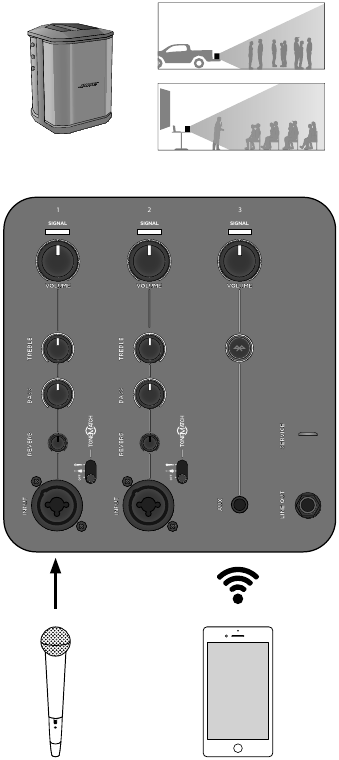
Position the S1 Pro on a surface. This projects sound clearly and evenly throughout the audience, and ensures that audience members enjoy the full frequency range of the system.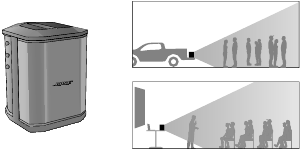
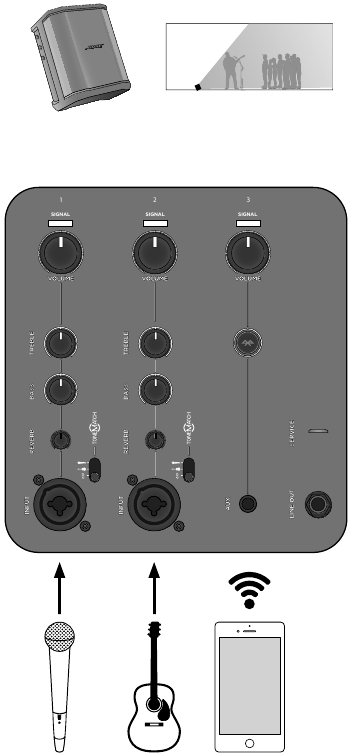
Tilt-Back
For performances where your audience is close to you, tilt the S1 Pro onto its back edge. For best results, the performer should stand or sit to one side of the loudspeaker to avoid blocking sound from the audience.
Monitor
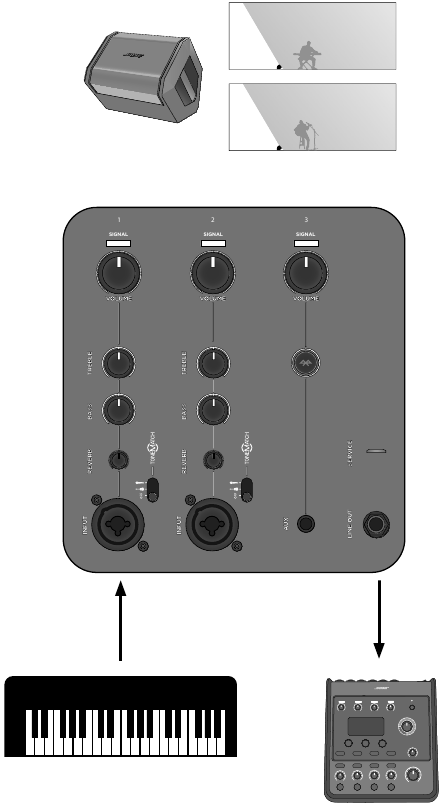
To use the S1 Pro as a personal floor monitor, place it on the ground horizontally, in front of and pointing toward the performer. Tilt the loudspeaker onto its side edge.
Speaker Stand
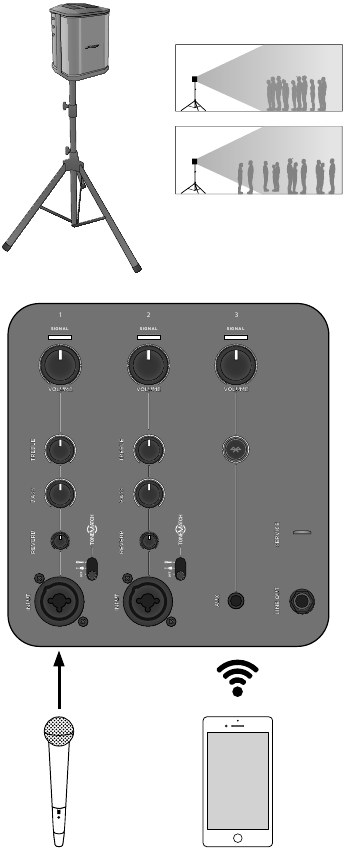
Place one or two S1 Pro systems on speaker stands (sold separately) for general-purpose sound reinforcement.
 Note: Rotate the Bose logo counterclockwise to match your chosen mode.
Operating Information
Connections and Controls
The Bose® S1 Pro control panel provides the necessary connectors, controls and indicators for operation.
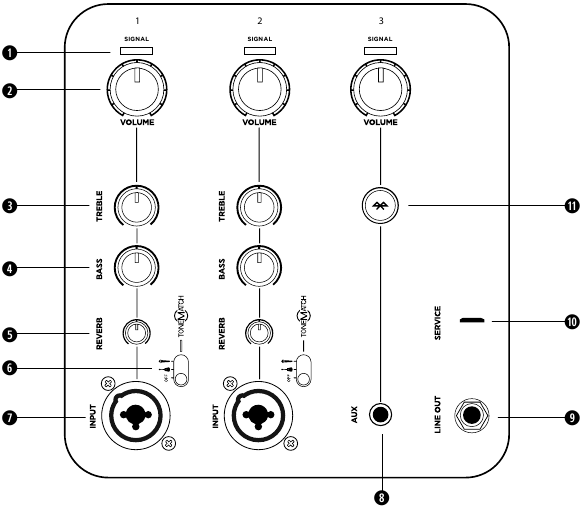
Use Channel 1 and 2 inputs for microphones and musical instruments. Integrated ToneMatch® signal processing allows microphones and instruments to sound their best. Use Channel 3 for Bluetooth® connectivity and line-level inputs.
- SIGNAL/CLIP INDICATOR – Displays the input signal status in color.
- Green: Signal present
- Red: Signal clipping
- Note: Reduce the corresponding volume control to prevent steady red operation.
- VOLUME CONTROL – Adjust the volume of your microphone, instrument or audio source.
- TREBLE CONTROL – Adjust the high-frequency balance of your microphone or instrument.
- BASS CONTROL – Adjust the low-frequency balance of your microphone or instrument.
- REVERB CONTROL – Adjust the amount of reverb applied to your microphone or instrument.
- TONEMATCH SWITCH – Move the switch to the
 or
or  position to enable the ToneMatch preset.
 - SIGNAL INPUT – Analog input for connecting microphone (XLR) and instrument (TS unbalanced) cables.
- AUX INPUT – Use a 3.5 mm TRS cable to connect a line-level audio source. Note: This input is muted when Bluetooth connectivity is active.
- LINE OUTPUT – Use a ¼» TRS cable to connect the line-level output to the Aux Input of a second S1 Pro, to create a mono twoloudspeaker setup. Note: Line Out is post mix.
- SERVICE PORT – Micro-USB connector for Bose service use only.
- BLUETOOTH PAIR BUTTON – Used to set up pairing with Bluetooth-capable devices, such as mobile phones, tablets, and laptops (see «Bluetooth Pairing»).
System Setup
Connect Power
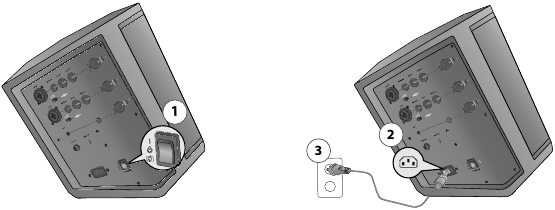
- Make sure the power switch is in Standby (
 ).
). - Plug one end of the power cord into the connector on the S1 Pro.
- Plug the other end of the power cord into a live electrical outlet.
- Connect sound sources before turning the system on. See «Connect Sources» below.
- Once the sound sources are connected, turn the system on by moving the power switch to On (I).
Note: The Quick Charge (  ) power setting is for use with the battery accessory only. For more information, see the battery accessory owner’s guide, available at www.Bose.com.
Connect Sources
Before plugging in a sound source, adjust all channel Volume controls fully counterclockwise.
Set Channel 1 & 2 Controls
Channel 1 and 2 are for use with dynamic microphones, guitars, keyboards or other instruments.
- Before connecting your microphone or instrument, adjust the Volume control for the appropriate channel fully counterclockwise.
- Channels 1 and 2 are equipped with an integrated ToneMatch® preset to automatically optimize the sound of your microphone or instrument. If desired, apply the ToneMatch preset by moving the ToneMatch switch for the appropriate channel to for microphones or for other instruments.
- While speaking into the microphone or playing your instrument, adjust the volume to the desired level by slowly turning the Volume control clockwise.
- Adjust the Treble, Bass, and Reverb controls to make further refinements based on your personal preference. While speaking into the microphone or playing your instrument, slowly adjust the control until desired effect is achieved.
Set Channel 3 Controls
Channel 3 is for use with Bluetooth®-capable devices and line-level audio inputs.
Bluetooth Pairing
- On your device, turn on the Bluetooth feature. Note: The Bluetooth feature is usually in the Settings menu.
- Press and hold the
 button for two seconds. Select your Bose® S1 Pro from the device list. While the device is pairing, the
  flashes white. When the device pairs successfully, the will turn solid white.
Note: If pairing is unsuccessful, repeat steps 1 and 2 until the devices are synced. - Press play and turn up the Volume on the S1 Pro until indicator light is green, or the desired volume level is reached. If the volume indicator steadily glows red, decrease the volume.
Bluetooth Behaviors
- The most recently paired Bluetooth device will automatically sync when the S1 Pro is turned on.
- The S1 Pro can only be paired with one device at a time; to pair to a new device, repeat «Bluetooth Pairing».
- If your paired phone receives a call, any music playing will be paused and the ring will come through the phone; no calls or notifications will come through the S1 Pro.
AUX Input
- Connect a 3.5 mm (⅛») cable to a line-level sound source. Make sure that the volume is turned up on the sound source.
Note: Anything connected via the AUX input will automatically override any device paired via Bluetooth connectivity. - Turn up the Volume on the S1 Pro until the indicator light is green, or the desired volume level is reached. If the volume indicator steadily glows red, decrease the volume.
Using a Speaker Stand
The bottom of the S1 Pro system includes a pole cup for mounting the loudspeaker on a speaker stand. The pole cup fits a standard 35 mm post. When the S1 Pro is placed on a speaker stand, the EQ automatically updates to maintain optimum tonal balance.
Do NOT use the Bose S1 Pro system with a tripod/stand that is unstable. The loudspeaker is only designed for use on a 35 mm post, and the tripod/stand must be capable of supporting a speaker with a minimum weight of 7 kg (15 lbs) and an overall size of 241 x 279 x 330 mm (9.5 x 11 x 13 inches). Using a tripod/stand that is not designed to support the size and mass of the S1 Pro system may lead to an unstable and hazardous condition that could result in injury.
Connection Scenarios
There are four primary ways to use the S1 Pro. The following pages show examples of typical setup scenarios.
Elevated Surface
Place the S1 Pro on a tabletop in the front of a room to give a business presentation or place it in the bed of your pickup truck for a tailgate party. Plug in a microphone and narrate over a multimedia presentation or get your friends pumped up before the game while listening to music wirelessly via your Bluetooth® capable mobile device.
Tilt-Back
Place the S1 Pro in Tilt-Back position on the ground behind you for live musical performances. Tilting the loudspeaker onto it’s back edge creates a higher vertical coverage pattern, perfect for small audiences and passersby. Cue your backing tracks via Bluetooth® streaming and play along with a microphone and guitar.
Monitor
Place the S1 Pro on its horizontal side edge to use as a floor monitor. Face it toward the performer to be used as a personal monitor or send your mix to a main PA system, then dial in your equalization and reverb preferences for your performance.
Speaker Stand
Using a conventional speaker stand, you can use your S1 Pro as a PA system. Connect a microphone and give a toast or sing a song while cuing the music wirelessly via Bluetooth® streaming. Use the line out to daisy-chain your S1 Pro into multiple units for more output and coverage.
General Purpose PA
Use a mixer with two S1 Pro systems as a conventional PA system. The wide and consistent coverage of the system ensures that the entire audience can easily hear the performance throughout the room.
Stereo
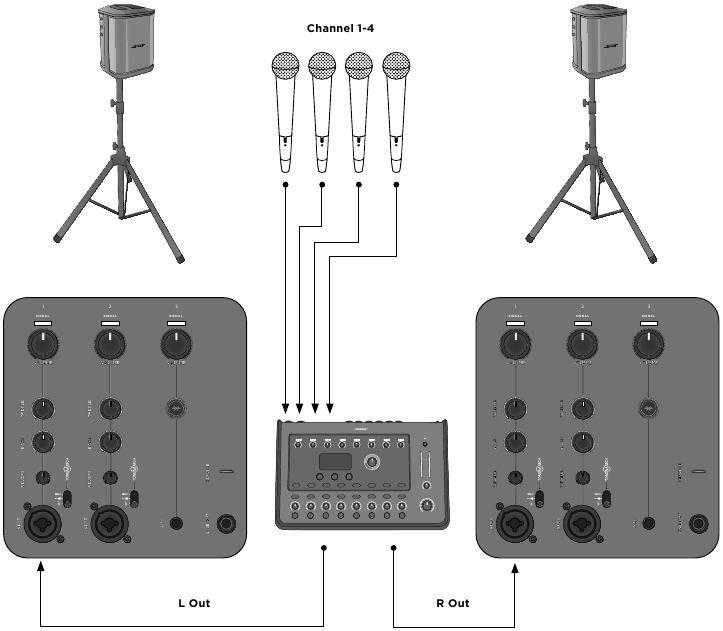
Note: When used as a conventional PA, reverb and ToneMatch® should be turned off.
Mono / Daisy-Chain
Link two S1 Pro systems together in mono by using a TRS ¼» cable. Take the line out of the primary unit and plug it into the secondary S1 Pro system. Turn the channel volume up until both units are at desired volume.
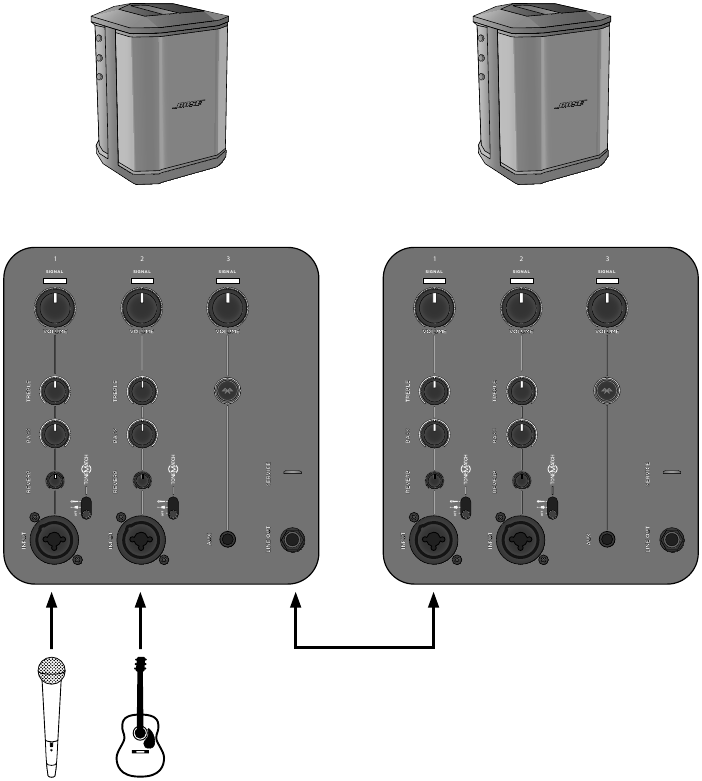
Note: On secondary units, set ToneMatch® and reverb to off and leave tone controls at center detent position.
Care and Maintenance
Troubleshooting
If you experience problems while using this product, try the following solutions. If you still cannot solve the problem, seek online help at www.Bose.com/livesound. If you cannot find answers to your questions there, please call the Bose Product and Technical Support Team directly at (877) 335-2673.
| Problem | What to do |
System is plugged in, power switch is on, but power LED is off |
• Make sure you have power at the AC outlet. Try operating a lamp or other equipment from the same AC outlet or test the outlet using an AC outlet tester. |
Power LED is on (blue), but no sound |
• Make sure your instrument is plugged into the signal input. • Make sure the volume control is turned up on your source. • Make sure the volume control is turned up on the S1 Pro. • Make sure your Signal/Clip indicator is lit. • Plug your instrument into a different amplifier to make sure the source is working. |
Power LED is red |
• Please call Product and Technical Support at (877) 335-2673. |
With nothing plugged into the S1 Pro, a slight hum or buzz is heard |
• Using an AC outlet tester, test the AC outlet the S1 Pro is plugged into for reversed or open (hot, neutral, and/or ground) contacts. • If using an extension cord, plug the S1 Pro directly into the outlet. |
Instrument or audio source sounds distorted |
• Turn volume down on the source; if your audio source volume cannot be adjusted, «input pads» are available from your preferred instrument retailer. • Try a different source or instrument. |
Microphone is encountering feedback |
• Turn volume down. • Orient the microphone so that it is not pointing directly at the loudspeaker. • Try a different microphone. • Try a different position for the loudspeaker and/or vocalist on stage. • Increase the distance from the loudspeaker to the microphone. • If using a vocal effects processor, make sure it is not contributing to the feedback problem. |
Paired Bluetooth® device will not connect to the speaker |
• If your device requires a passcode, make sure the one you entered is correct. • Make sure Bluetooth functionality is turned on or enabled on your source device. • Your Bluetooth device may be out of range; try moving it closer to the speaker. • If possible, turn off all other nearby Bluetooth devices or disable their Bluetooth functionality. • Clear the speaker memory or pair to new device by pressing and holding the Bluetooth button for ten seconds. Pair the Bluetooth device and the speaker again. • Turn the power off and back on; then try re-pairing your device. |
Excessive hum when daisy-chaining multiple units |
• Make sure you’re using a ¼» TRS cable; do not use a ¼» TS (guitar) cable. |
Caring For Your Product
Cleaning
- Clean the product enclosure using only a soft, dry cloth.
- Do not use any solvents, chemicals, or cleaning solutions containing alcohol, ammonia, or abrasives.
- Do not use any sprays near the product or allow liquids to spill into any openings.
- If necessary, you may carefully vacuum the grille of the loudspeaker.
Bose® S1 Pro Specifications
| Enclosure | |
| Enclosure Material | Polypropylene plastic |
| Finish | Textured plastic |
| Grille | Steel with black powder-coat |
| Dimensions (H x W x D) — mm | 330 x 241 x 286 |
| Dimensions (H x W x D) — inches | 13 x 9.5 x 11.2 |
| Net Weight | 15 lbs (6.8 kg) |
Additional Information
Contact Information
Visit us on the web at Bose.com.
Americas
(USA, Canada, Mexico, Central America, South America)
Bose Corporation
Framingham, MA 01701 USA
Corporate Center: 508-879-7330
Americas Professional Systems,
Technical Support: 800-994-2673
Australia
Bose Pty Limited
Unit 3/2 Holker Street
Newington NSW Australia
61 2 8737 9999
Belgium
Bose N.V. / S.A
Limesweg 2, 03700
Tongeren, Belgium 012-390800
China
Bose Electronics (Shanghai) Co Ltd
25F, L’Avenue
99 Xianxia Road
Shanghai, P.R.C. 200051 China
86 21 6010 3800
France
Bose S.A.S
26-28 avenue de Winchester
78100 St. Germain en Laye, France
01-30-61-63-63
Germany
Bose GmbH
Max-Planck Strasse 36D 61381
Friedrichsdorf, Deutschland
06172-7104-0
Hong Kong
Bose Limited
Suites 2101-2105, Tower One, Times Square
1 Matheson Street, Causeway Bay, Hong Kong
852 2123 9000
India
Bose Corporation India Private Limited
Salcon Aurum, 3rd Floor
Plot No. 4, Jasola District Centre
New Delhi – 110025, India
91 11 43080200
Italy
Bose SpA
Centro Leoni A – Via G. Spadolini
5 20122 Milano, Italy
39-02-36704500
Japan
Bose Kabushiki Kaisha
Sumitomo Fudosan Shibuya Garden Tower 5F
16-17, Nanpeidai-cho
Shibuya-Ku, Tokyo, 150-0036, Japan
TEL 81-3-5489-0955
www.bose.co.jp
The Netherlands
Bose BV
Gorslaan 60
1441 RG Purmerend
The Netherlands
0299-390139
United Kingdom
Bose Ltd
1 Ambley Green, Gillingham Business Park
KENT ME8 0NJ
Gillingham, England
0870-741-4500
See website for other countries
Importer Information
European Union
Bose Products B.V., Gorslaan 60, 1441 RG
Purmerend, The Netherlands
China
Bose Electronics (Shanghai) Company
Limited, Part C, Plan 9, No. 353 North
Riying Road, China (Shanghai) Pilot Free
Trade Zone
Taiwan
Bose Taiwan Branch, 9F-A1, No. 10, Section
3, Minsheng East Road, Taipei City 104,
Taiwan
Tel: +886-2-2514 7676
Mexico
Bose de México, S. de R.L. de C.V., Paseo
de las Palmas 405-204, Lomas de Chapultepec, 11000 México, D.F.
Tel: +5255 (5202) 3545
Limited Warranty and Registration
Your speaker is covered by a limited warranty. Visit our website at pro. Bose.com for details of the limited warranty.
The warranty information provided with this product does not apply in Australia and New Zealand. See our website at www.bose.com/au/warranty or www.bose.com/nz/warranty for details of the Australian and New Zealand warranty.
The Bose® S1 Pro is covered by patents issued or pending in the U.S. and other countries.
Additional Information
To request a printed copy of this owner’s guide, use the phone numbers provided.
The Bluetooth® word mark and logos are registered trademarks owned by Bluetooth SIG, Inc. and any use of such marks by Bose Corporation is under license.
Date of Manufacture
The eighth digit in the serial number indicates the year of manufacture; «6» is 2006 or 2016.

©2017 Bose Corporation, All rights reserved.
Framingham, MA 01701-9168 USA
www.Bose.com
All trademarks are the property of their respective owners
AM807173 Rev. 00
September 2017
Videos
Unboxing And Setup Video
Documents / Resources
References
Download manual
Here you can download full pdf version of manual, it may contain additional safety instructions, warranty information, FCC rules, etc.
Download Bose S1 Pro Manual Multi-position PA System Manual
Инструкцию для Bose S1 Pro system, Black на русском языке, в формате pdf можно скачать с нашего сайта. Наш каталог предоставляем Вам инструкцию производителя фирмы Bose, которая была взята из открытых источников. Ознакомившись с руководством по эксплуатации от Bose, Вы на все 100% и правильно сможете воспользоваться всеми функциями устройства.
Для сохранения инструкции «Беспроводная акустика Bose S1 Pro system, Black» на русском языке на вашем компьютере либо телефоне, нажмите кнопку «Скачать инструкцию». Если активна кнопка «Инструкция онлайн», то Вы можете просмотреть документ (manual), в своём браузере онлайн.
Если у Вас нет возможности скачать инструкцию по эксплуатации либо просмотреть её, Вы можете поделиться ссылкой на эту страницу в социальных сетях и при удобном моменте скачать инструкцию. Либо добавьте эту страницу в закладки Вашего браузера, нажав кнопку «Добавить страницу в закладки браузера».
Bose S1 Pro
Ультра-портативная мультипозиционная акустическая система PA Bose S1 Pro — профессиональный звук в любом месте.
Система Bose S1 Pro – это универсальная акустическая система PA «все в одном»: напольный монитор, усилитель и просто беспроводная музыкальная система, разработанная для музыкантов, ди-джеев и больших компаний.
Легкая и портативная
Ультрапортативная система S1 Pro очень легкая, ее вес всего 7,1 кг). Прочный корпус системы оснащён удобной ручкой для переноски, что очень удобно при транспортировки, например, от автомобиля до места проведения мероприятия или вечеринки. Благодаря дополнительной перезаряжаемой батарее, используемой в системе S1 Pro, музыка может играть в любом месте и звучать часами.
Функциональность и простая в использовании
Система S1 Pro оснащена полнофункциональным 3-канальным микшером, регуляторами тембра и линейными выходами для подключения к другим системам. Благодаря Bluetooth передатчику, можно легко проигрывать музыку с вашего мобильного устройства через Bluetooth® и быстро обеспечивать отличное качество звука с помощью встроенной системы обработки сигналов ToneMatch для микрофонов и акустических гитар. Проводите выступления и вечеринки практически в любом месте с дополнительной перезаряжаемой батареей для максимальной мобильности.
Адаптируемость
Множественные варианты расположения предназначены для обеспечения превосходного звучания системы. Установите ли вы систему S1 Pro на полу, на столе или даже закрепите её в стойке (стакане), система обеспечит наилучшее покрытие для каждого помещения. Кроме того, автоматическая эквализация (Auto EQ) позволяет поддерживать оптимальный звук в любом направлении.
Впечатляющее соотношение размеров и производительности
Небольшая по размеру система S1 Pro обеспечивает высокую производительность и готова служить в качестве вашей универсальной акустической системы PA, напольного монитора, усилителя и музыкальной системы.
- Система S1 Pro
- шнур питания переменного тока
- Инструкция по началу работы
! Аккумулятор докупается отдельно
Руководство (Bose_S1_Pro_.pdf, 4,666 Kb) [Скачать]
1964 год стал годом рождения компании Bose, и с тех пор они продолжали расти. По состоянию на 2019 год Bose создал очень прочную и целостную основу в линейке продуктов для слухового оборудования. Компания Bose выпустила ряд широко известных динамиков и наушников и продолжает это делать. В течение последнего десятилетия или около того они вкладывали свои новаторские умы в разработку портативных акустических систем. Помимо просто фантастического качества звука, эти портативные колонки компактны и, как правило, очень хорошо построены. Эта изобретательность позволила создать новые динамики Bose S1 Pro.
Лучшая беспроводная акустическая система
- Два S1 Pro могут быть подключены гирляндой вместе с помощью Bluetooth
- Функция Tone Match обеспечивает максимальную оптимизацию для всех целей
- Минимум горячих точек, так как звук тоже рассеивается по бокам
- Три канала для ввода помогают приспосабливаться к вокалу и гитаре
- Нет прямого индикатора того, на сколько хватит заряда аккумулятора

Частотный диапазон: 62 Гц – 17 кГц | Чувствительность: 98 дБ | Тип рожка: Klipsch Tractrix | Bluetooth: есть | Частота кроссовера: 600 Гц | Динамики: 3 динамика и 1 низкочастотный динамик
ВЕРДИКТ: Компактный, хорошо продуманный корпус с мощным звуком. Акустические системы Bose S1 Pro – идеальный партнер практически для любых целей – будь то презентация или выступление в дороге. Качество звука феноменальное, а время работы от батареи отличное. S1 Pro – почти идеальное решение для ваших нужд PA.
Колонки Bose S1 Pro – это новое дополнение к линейке портативных громкоговорителей этой компании. Это очень компактное устройство с невероятной мощностью. Этот небольшой корпус впечатляет не только своей потрясающей энергоэффективностью, но и уровнем громкости. Нам также очень понравился дизайн и качество сборки S1 Pro. Звукоусиление Bose хорошо известно своим широким звуковым покрытием, однако с S1 Pro оно занимает несколько ступеней. По бокам также есть решетки, что означает, что звук распространяется не только спереди, но и с обоих концов. Более того, после нескольких настроек эквалайзера звук остается стабильным и доминирующим во всей комнате. И самое приятное то, что он может использоваться как динамик Bluetooth, а также с автономными батареями.
Рок с Bose S1 Pro где угодно и когда угодно!
Колонки Bose S1 Pro почти идеальны. Они предлагают широкий спектр преимуществ и невероятное качество звука для портативных колонок. Однако не все в этой стране чудес. Что нас беспокоило в S1 Pro, так это индикатор уровня заряда батареи. Перед включением аккумулятор необходимо разбудить. К сожалению, нет четкого указания, на сколько прослужат динамики. Есть световые индикаторы уровня заряда батареи, но нет соответствующей литературы о том, сколько часов хватит на зарядку.
При всем вышесказанном, нам еще очень многое предстоит сделать. Так что продолжайте читать и узнавайте наши мысли о Bose S1 Pro в деталях.
Дизайн
Bose S1 Pro с первого взгляда
Акустические системы S1 Pro компактны и легки – всего 15 фунтов – обладают достаточной мощностью для различных ситуаций. Сразу же вы заметите, что драйверы ориентированы не только на вывод звука спереди. Вместо этого решетки слегка наклонены по бокам, что обеспечивает более широкий охват помещения для более эффективного рассеивания звука. Эти динамики состоят из трех 2,25-дюймовых динамиков и одного 6-дюймового сабвуфера. Этот сабвуфер представляет собой мощный сабвуфер, управляемый встроенным усилителем мощности. Корпус для S1 Pro разработан для различных вариантов монтажа, включая укладку на пол, наклон назад, подставку для динамика или даже на возвышенную поверхность.
S1 Pro – это многоцелевая и многопозиционная акустическая система с 2 входными каналами с разъемами XLR и эквалайзером Tone Match. Мало того, оба этих входных канала также имеют регуляторы высоких, низких частот и реверберации. Все порты расположены на задней панели с очень удобным расположением каждого порта для максимальной эффективности прокладки кабелей. Наряду с входными каналами штангового разъема XLR, есть также порты AUX и линейный выход. Рядом с каналом AUX находится кнопка подключения Bluetooth. Для регуляторов громкости ручки расположены по бокам, ими очень легко управлять, и они просто великолепны. Сзади находится главный порт питания с номиналами 100 – 240 В, 50/60 Гц, 150 Вт. Зарядка литиевой батареи осуществляется через главный порт питания.
Содержимое коробки
Переверните S1 Pro, и вы увидите синие световые индикаторы уровня заряда батареи внизу. При беспроводном использовании эти индикаторы показывают оставшийся заряд литиевых батарей. Внутри этого плохого парня кроссовер размещен очень удобно, так что достигается максимальная артикуляция и голосовая проекция. Как говорилось ранее, S1 Pro работает практически с любой ориентацией. И в дополнение к этому есть внутренние датчики положения, которые работают независимо от того, как вы позиционируете S1 Pro. Фактически, он также имеет функцию автоматического эквалайзера, которая автоматически регулирует эквализацию в зависимости от того, как размещены динамики. Если перевернуть, то окажется, что металлическая пластина удерживается на месте двумя винтами. Отверните эти два винта, и вот где должна быть добавлена батарея. Отсек для этого находится внизу.
Функции
Bose S1 Pro имеет 3 канала для ввода. Первый – это два тактовых входа XLR для акустической гитары или подключения инструментов. Второй – универсальный вспомогательный порт, а третий – соединение Bluetooth для беспроводного использования. К каждому входу штекерного разъема XLR подключена технология Bose Tone Match. Это трехпозиционный переключатель с ВЫКЛ, символами гитары и микрофона на слайдере. OFF просто посылает прямой сигнал через динамик. Гитара и микрофон оптимизируют Tone Match для акустической гитары или вокала соответственно. Кроме того, его также можно использовать в качестве клавишного усилителя с переключателем Tone Match, установленным в положение OFF.
Элементы управления и функции
Все это просто великолепно и невероятно удобно. Настройка не просто проста и быстрая, но звук четкий и идеально подходит практически для любой среды. Возможно, лучшая особенность S1 Pro – это возможность подключения по Bluetooth. Мы протестировали его и соединили с телефоном, чтобы опробовать некоторые из наших плейлистов и посмотреть, как это работает. Излишне говорить, что нам очень понравилось время работы от батареи. Литиевые дополнительные батареи способны обеспечивать питание динамиков S1 Pro в течение 11 часов, как утверждает Bose. Эта батарея поставляется в спящем режиме, поэтому напряжение сохраняется. Чтобы запустить его, сдвиньте его в нижний отсек и подключите кабель питания к S1 Pro. После подачи первоначального питания аккумулятор начнет работать как шарм.
Bluetooth-соединение S1 Pro является третьим источником входных сигналов. Сопряжение с устройствами происходит быстро, без проблем и без задержек. Очень легко подключить телефоны или другие устройства и использовать S1 Pro для потоковой передачи музыки прямо через него. Это быстрое решение для презентаций, выступлений и многого другого. Эта беспроводная связь вместе с возможностью работы от аккумулятора делает S1 Pro невероятно гибким и портативным решением для громкой связи. Одна особенность, которая нам очень понравилась, – это способность S1 Pro подключаться к другому динамику того же типа. Используя Bluetooth, вы можете одновременно подключить два динамика S1 Pro PA и использовать их, чтобы добиться большего погружения и, в некоторых случаях, громкого звука.
Спектакль
S1 Pro – это очень стильный и элегантно выглядящий аппарат, который выглядит очень профессионально в любом сценарии. Не только внешний вид так хорошо спроектирован, но и интерьер и производительность поразили нас. Во-первых, настройка S1 Pro была легкой. Честно говоря, самая сложная часть – установить S1 Pro в нужном месте, и это о чем-то говорит. Этот набор динамиков обеспечивает слышимый, громкий и четкий звук с действительно яркими и детализированными звуками. Мы проверили качество звука, проиграв музыку разных жанров. Звук был хорошим, чистым и удивительно громким, учитывая размер S1 Pro.
Внутренности
Особенность звука S1 Pro заключается в том, что он не предлагает особого сладкого места. Вместо этого он предлагает широкий диапазон, в котором он полностью рассеивает звук с впечатляюще сбалансированным тоном.
S1 Pro также имеет, как любит называть Bose, функцию Tone Match. С помощью трех ползунков Tone Match позволяет мгновенно оптимизировать звук вокала или гитар для создания очень красивого и насыщенного звука. Звуки были без искажений, невероятно четкими и очень хорошо оптимизированными. Если честно, с качеством звука динамиков S1 Pro почти нет ничего плохого. И, обладая феноменальным слуховым восприятием и множеством удобных функций, Bose почти не пожалел средств на создание привлекательного продукта. Элементы управления эквалайзером, басами, высокими частотами и реверберацией помогают еще больше улучшить все эти впечатления. Все это в сочетании с внутренними датчиками положения помогает заполнить всю комнату равномерными покрытиями, поскольку сводит к минимуму количество горячих точек.
Вердикт
Боковой воздушный порт
Динамики Bose S1 Pro PA, без сомнения, являются одним из лучших доступных решений. Их можно использовать не только в качестве динамиков, но и для работы в качестве усилителей. Они компактны, легки и обладают невероятно громким и четким звуком. А внутренние датчики положения автоматически оптимизируют уровни эквалайзера в зависимости от расположения динамиков. Подводя итог, мы очень приятно удовлетворены тем, насколько хорошо работает S1 Pro PA. Это одно из самых доступных решений PA, выпущенных Bose, и они вообще не идут на компромисс в отношении качества звука.
Независимо от того, являетесь ли вы гитаристом, вокалистом или сольным исполнителем, вы обнаружите, что S1 Pro практически подойдет для любой конкретной ситуации. Как будто этого было недостаточно, функция Tone Match помогает оптимизировать звук для любых целей, для которых вы используете динамики. Аккумулятора хватит на 11 часов работы, так что это идеальный компаньон для путешествий. Перейдите по ссылке на колонки S1 Pro, и, поверьте, вы не пожалеете о покупке.
Цена на момент обзора: 600 долларов США.
Дизайн
Функции
Качественный
Спектакль
Ценить
Рейтинг пользователей: 3.37 (5 голосов)