
Узнавай о новинках и акциях первым
Вы успешно зарегистрированы на сайте.
Вам доступен личный кабинет пользователя.
Перейти к покупкам
Ваш пароль воcстановлен!
Теперь вы можете полноценно пользоваться
всеми возможностями нашего интернет-магазина.
Здравствуйте, Ваша претензия принята и зарегистрирована.
В течение 3-х рабочих дней Вам, на электронную почту, будет дан письменный ответ. В случае возникновения дополнительных вопросов, менеджер претензионного отдела свяжется с Вами.
Перейти к покупкам

Ваше сообщение об ошибке на сайте успешно отправлено.
Большое спасибо!
Добавить отзыв о магазине
Торг для данного товара сейчас не возможен!
Сколько вы готовы заплатить за этот товар?
Введите ваше ценовое предложение
Мы согласны с вашим предложением
Мы принимаем вашу цену, и вы можете купить товар по цене:
0 руб.

Information regarding Free and Open Source Software
This product includes software components that are licensed by the copyright holders as free software or open source software. The applicable license texts are printed below.
Warranty Disclaimer
The open source software in this product is distributed in the hope that it will be useful, but WITHOUT ANY WARRANTY, without even the implied warranty of MERCHANTABILITY or FITNESS FOR A
PARTICULAR PURPOSE. See the applicable licenses for more details.
The source code will be made available to you on request.
To file a request, please email to
ossrequest@bshg.com
or send a written request to
BSH Hausgeräte GmbH
Carl-Wery-Str.34
D-81739 München
Reference „OSSREQUEST“
The cost of performing your request will be charged to you. This offer is valid three years from the date of purchase or at least as long as we offer support and spare parts for the product.
Information regarding Free and Open Source Software
The license texts are displayed below the copyright statement at the end of this document.
PACKAGE NAME: acl
LICENSE: LGPLv2.1
Copyright statements:
Copyright (c) 2000-2006 Silicon Graphics, Inc. All Rights Reserved.
Copyright (C) 2007 Free Software Foundation, Inc. Antonio Trueba atrueba@users.sourceforge.net, 2007.
Copyright (C) 2006 Free Software Foundation, Inc. Daniel Nylander po@danielnylander.se, 2006.
Copyright (C) 2005 Free Software Foundation, Inc. Sylvain Archenault sylvain.archenault@laposte.net, 2005.
Copyright (C) 2004 Free Software Foundation, Inc. Jakub Bogusz qboosh@pld-linux.org, 2004.
Copyright (C) 1996, 1997, 1998, 1999, 2000, 2001, 2003, 2004, 2005, 2006, 2007, 2008, 2009, 2010, 2011 Free Software Foundation, Inc. Written by Gordon Matzigkeit, 1996
Copyright (C) 1989, 1991-2012 Free Software Foundation, Inc.
(C) 1999-2011 Andreas Gruenbacher
PACKAGE NAME: attr
LICENSE: LGPLv2.1
Copyright statements:
Copyright (c) 1999-2008 Silicon Graphics, Inc. All Rights Reserved.
Copyright (C) 2008 Petr Pisar petr.pisar@atlas.cz
Copyright (C) 2007 Antonio Trueba atrueba@users.sourceforge.net
Copyright (C) 2006 Daniel Nylander po@danielnylander.se
Copyright (C) 2005 Guilhelm Panaget guilhelm.panaget@free.fr
Copyright (C) 2004, 2005 Jakub Bogusz qboosh@pld-linux.org
Copyright (C) 2004 Luk Claes luk.claes@ugent.be
Copyright (C) 2000-2009 Andreas Gruenbacher agruen@suse.de
Copyright (C) 1996-2012 Free Software Foundation, Inc.
PACKAGE NAME: avahi
LICENSE: GPLv2.0 , LGPLv2.1
Copyright statements:
Copyright © 2004 Scott James Remnant scott@netsplit.com.
Copyright 2010 Lennart Poettering
Copyright 2009 Johan Dahlin dnl
Copyright 2004-2015 by the Avahi developers.
Copyright 2003, 2004, 2004 Porchdog Software. All rights reserved.
Copyright 2003, 2004 Porchdog Software. All rights reserved.
Copyright 2003, 2004 Porchdog Software, Inc. All rights reserved.
Copyright 1999-2007 Gentoo Foundation Distributed under the terms of the GNU General Public License v2
Copyright 1991-2015 Free Software Foundation, Inc.
Copyright (c) 2003-2004, Apple Computer, Inc. All rights reserved.
Copyright (C) 2009 Avahi’s COPYRIGHT HOLDER Bruce Cowan bcowan@fastmail.co.uk
Copyright (C) 2006-2007 Collabora Ltd.
Copyright (C) 2004-2008 Rodney Dawes dobey.pwns@gmail.com
Copyright (C) 2004 Oren Ben-Kiki This file is distributed under the same terms as the Automake macro files.
Copyright (C) 2004 Oren Ben-Kiki This file is distributed under the same terms as the Autoconf macro files.
Copyright (C) 2001 Eazel, Inc. Author: Maciej Stachowiak mjs@noisehavoc.org Kenneth Christiansen kenneth@gnu.org
Copyright (C) 2000-2003,2004 Red Hat, Inc.
Copyright (C) 1999 Tom Tromey
Copyright (C) 1995, 1996, 1997 by Ulrich Drepper drepper@gnu.ai.mit.edu
Copyright (C) 1994 X Consortium
PACKAGE NAME: backport-brcmfmac
BSH Hausgeräte GmbH 1 / 266
|
Код: 153175 Извините, товара сейчас нет в наличии
Бесплатная доставка
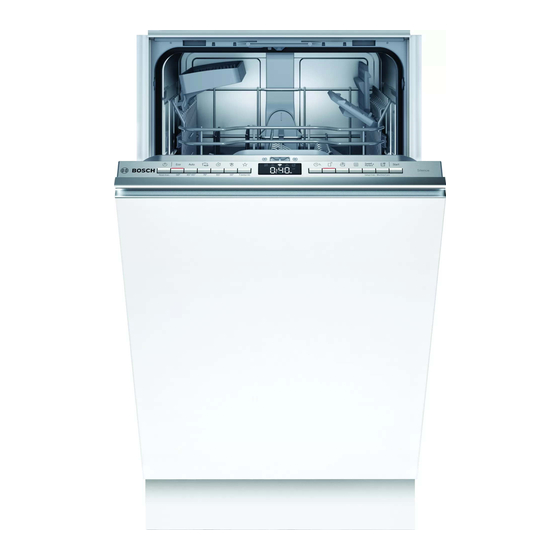
Извините, товара сейчас нет в наличии Сравнить Услуги:Установка и подключение посудомоечной машины Новости интернет-магазина «Лаукар»:28.03.2023 22.02.2023 13.02.2023 Дополнительная информация в категории Встраиваемая посудомоечная машина:Встраиваемые посудомоечные машины — разбираемся в терминах Таблица Авторизованных сервисных центров по брендам. Описание Инструкция Отзывы (0) В интернет-магазине бытовой техники «Лаукар» Вы можете скачать инструкцию к товару Встраиваемая посудомоечная машина Bosch SPV4XMX20E совершенно бесплатно. Все инструкции, представленные на сайте интернет-магазина бытовой техники «Лаукар», предоставляются производителем товара. Для того чтобы скачать инструкцию, Вам необходимо нажать на ссылку «скачать инструкцию», расположенную ниже, а в случае, если ссылки нет, Скачать инструкцию Смотреть инструкцию
Фирма-производитель оставляет за собой право на внесение изменений в конструкцию, дизайн и комплектацию товара: Встраиваемая посудомоечная машина Bosch SPV4XMX20E. Пожалуйста, сверяйте информацию о товаре с информацией на |





- Manuals
- Brands
- Bosch Manuals
- Dishwasher
- SPV4EKX20E
- User manual
-
Contents
-
Table of Contents
-
Troubleshooting
-
Bookmarks
Quick Links
Dishwasher
SPV4EKX20E
[en]
User manual
Related Manuals for Bosch SPV4EKX20E
Summary of Contents for Bosch SPV4EKX20E
-
Page 1
Dishwasher SPV4EKX20E [en] User manual… -
Page 2: Table Of Contents
Table of contents Safety ………. 4 Folding prongs ……. 22 General information…… 4 Knife shelf…….. 22 Intended use…….. 4 Basket heights…….. 22 Restriction on user group…. 4 Before using for the first time .. 23 Safe installation …….. 4 Performing the initial configura- Safe use ……….. 6 tion………. 23 Damaged appliance …… 7 Risk to children …….. 8…
-
Page 3
Customer Service…… 56 Terminate programme…. 32 Product number (E-Nr.), produc- Switching off appliance …. 33 tion number (FD) and consecut- Basic settings…….. 34 ive numbering (Z-Nr.) ….. 57 Overview of basic settings ….. 34 AQUA-STOP guarantee …. 57 Changing basic settings…. 36 Technical specifications…. 57 Home Connect …… -
Page 4: Safety
en Safety Safety Observe the following safety instructions. General information ¡ Read this instruction manual carefully. ¡ Keep the instruction manual and the product information safe for future reference or for the next owner. ¡ Do not connect the appliance if it has been damaged in transit. Intended use Only use this appliance: ¡…
-
Page 5
Safety en WARNING ‒ Risk of electric shock! ¡ Incorrect installation is dangerous. ▶ Connect and operate the appliance only in accordance with the specifications on the rating plate. ▶ Always use the supplied power cable for the new appliance. ▶ Connect the appliance to a power supply with alternating current only via a properly installed socket with earthing. -
Page 6: Safe Use
en Safety WARNING ‒ Risk of injury! Hinges move when opening and closing the appliance door and can cause injury. ▶ If built-under or integrable appliances are not in a cavity so that one side is accessible, the hinge area must be covered at the side.
-
Page 7: Damaged Appliance
Safety en WARNING ‒ Risk of injury! ¡ Leaving the appliance door open may result in injury. ▶ Only open the appliance door to load or unload tableware in order to prevent accidents, e.g. through tripping. ▶ Do not sit or stand on the appliance door when open. ¡…
-
Page 8: Risk To Children
en Safety ▶ Never pull on the power cord to unplug the appliance. Al- ways unplug the appliance at the mains. ▶ If the appliance or the power cord is damaged, immediately unplug the power cord or switch off the fuse in the fuse box and turn off the water tap.
-
Page 9
Safety en WARNING ‒ Risk of crushing! With higher-level appliances, children can become crushed between the appliance door and cabinet doors underneath. ▶ Keep an eye on children when opening and closing the ap- pliance door. WARNING ‒ Risk of chemical burns! Rinse aid and detergent may cause chemical burns to the mouth, throat and eyes. -
Page 10: Preventing Material Damage
en Preventing material damage Only use the water hoses sup- ▶ Preventing material damage Preventing material dam- plied with the appliance or genu- ine spare hoses. Never re-use water hoses that ▶ have been used before. Preventing material damage Safe installation ¡…
-
Page 11: Environmental Protection And Saving Energy
Environmental protection and saving energy en To prevent corrosion, do not use litres. In the automatic programmes ▶ sponge cloths on dishwashers the temperature and run time are ad- with a stainless steel front or ditionally adjusted to the level of soil- rinse such cloths thoroughly ing.
-
Page 12: Installing And Connecting The Appliance
en Installation and connection The delivery consists of the following: Drainage connection ¡ Dishwasher Connect your appliance to drainage ¡ Operating instructions connection so dirty water is dis- ¡ Installation Instructions charged via the wash cycle. ¡ Further information documents ¡ Installation material Installing the drainage connection ¡…
-
Page 13: Electrical Connection
Installation and connection en Electrical connection Connect your appliance to the power supply. Connecting the appliance to the electricity supply Notes ¡ Please follow the «Safety instruc- tions» → Page 4. ¡ Connect the appliance to alternat- ing current only, in the range of 220 — 240 V and 50 Hz or 60 Hz.
-
Page 14: Familiarising Yourself With Your Appliance
en Familiarising yourself with your appliance Familiarising yourself with your appliance Familiarising yourself with your appliance Familiarising yourself with your appliance Appliance You can find an overview of the parts of your appliance here. Rating plate Rating plate with «E number and FD number» → Page 57.
-
Page 15: Controls
Familiarising yourself with your appliance en «Detergent» → Page 27 is added to the detergent Detergent dispenser dispenser. «Bottom basket» → Page 21 Bottom basket «Filter system» → Page 40 Filter system Dispenser for special salt Add the special salt to the dispenser for special salt. → «Water softening system», Page 23 Tablet collecting tray During the wash cycle tablets automatically fall out of the detergent dispenser into the tablet collecting tray…
-
Page 16
en Familiarising yourself with your appliance 3 4 5 6 «Switching on the appliance» → Page 31 ON/OFF button and reset button «Switching off the appliance» → Page 33 «Terminating the programme» → Page 32 «Programmes» → Page 17 Programme buttons «Water softening system» → Page 23 Special salt refill indicator «Rinse aid system»… -
Page 17: Programmes
Programmes en Programmes Programmes You can find an overview of the pro- runtime will change if the rinse aid Programmes grammes that can be selected here. system is switched off or rinse aid Different programmes, which can be needs to be added. found on the control panel of your The consumption values can be appliance, are available depending…
-
Page 18: Information For Test Institutes
en Programmes Programme: Programme sequence Additional func- tions Tableware: Reduced noise: → «Additional ¡ Cleaning mixed table- ¡ Pre-Rinse Silence 50 ware and cutlery. functions», ¡ Cleaning 50 °C Level of soiling: Page 19 ¡ Intermediate rinse ¡ Removing common ¡ Final rinse 65 °C household food remnants ¡…
-
Page 19: Additional Functions
Additional functions en a The selected programme and the Additional func- additional function will flash. tion flashes. ¡ Switch on with mixed a The programme and the additional loads containing table- function are saved. IntensiveZone ware with different soil- Tip: To reset the programme, either ing levels, e.g.
-
Page 20: Features
en Features Press in the levers on the right and Features Features left on the outside of the basket. You can find an overview of the pos- Features sible features of your appliance and how to use them here. These features depend on the model of your appliance.
-
Page 21: Bottom Basket
Features en Bottom basket Cutlery basket Arrange pans and plates in the bot- Arrange cutlery in the cutlery basket, tom basket. always without sorting it and with the sharp points downwards. Cutlery basket Large plates up to a diameter of Etagere 31 cm can be arranged in the bottom basket as shown.
-
Page 22: Folding Prongs
en Features Push the lever forwards and fold Folding prongs down the prongs . Use the folding prongs to position tableware securely, e.g. plates. To use the prongs again, fold them back up. a The prongs audibly click into posi- You can fold the prongs down to po- tion.
-
Page 23: Before Using For The First Time
Before using for the first time en Setting Top basket Bottom basket 3 max. ø 27 cm 25 cm «Set the amount of rinse aid to be Before using for the first time Before using for the dispensed.» → Page 26 first time «Add detergent»…
-
Page 24: Setting The Water Softening System
en Water softening system Water hardness °E Hardness range mmol/l Setting value 16 — 20 Medium 2.2 — 2.9 21 — 26 Hard 3.0 — 3.7 27 — 38 Hard 3.8 — 5.4 39 — 62 Hard 5.5 — 8.9 Note: Set the water hardness determ- gramme starts.
-
Page 25: Switching Off The Water Softening System
Water softening system en Note: Only use special salt for erally only be used up to a water dishwashers. hardness of 26 °E without adding Do not use salt tablets. special salt. Do not use table salt. ¡ The water hardness is 0 — 8 °E. You do not need to use special Add the special salt to the dis- salt.
-
Page 26: Rinse Aid System
en Rinse aid system Add rinse aid up to the max mark. Additional water consumption in litres Additional power consumption in 0.05 The consumption values specified are laboratory measurements determ- ined in accordance with the currently applicable standard and using the Eco 50°…
-
Page 27: Switching The Rinse Aid System Off
Detergent en To save the settings, press starch and remove protein. Oxygen- for 3 seconds. based bleaching agents are generally used to remove coloured marks, e.g. tea or ketchup. Switching the rinse aid sys- tem off Note: Follow the manufacturer’s in- structions for each detergent. If you find the rinse aid refill indicator Detergent Description…
-
Page 28: Unsuitable Detergents
en Detergent Separate detergents Unsuitable detergents Separate detergents are products Do not use detergent which could that do not contain components other cause damage to the appliance or than detergent, e.g. powder deter- present a risk to health. gent or liquid detergent. With powder and liquid detergent the Detergent Description…
-
Page 29: Adding Detergent
Tableware en ¡ The function of rinse aid is limited Close the lid of the detergent dis- with combined detergents. You will penser. generally get better results using rinse aid. ¡ Use tablets with a special drying performance. Adding detergent To open the detergent dispenser, press the locking latch.
-
Page 30: Damage To Glass And Tableware
en Tableware Damage to glass and table- Cause Recommendation ware The water temperat- Select a programme ure of the programme with lower temperat- Avoid damage to glass and table- is too high. ures. ware. After the programme has ended, take glass- Cause Recommendation ware and cutlery out…
-
Page 31: Removing Tableware
Basic operation en To save resources, do not pre- Removing tableware rinse tableware under running wa- ter. WARNING Observe the following when arran- Risk of injury! ging tableware: Hot tableware can cause burns to the – Put heavily soiled tableware in skin.
-
Page 32: Setting A Programme
en Basic operation Setting a programme Starting the programme To adjust the wash cycle to the soil- Press ▶ ing level of the tableware, select a a The programme has ended when suitable programme. the display shows «0h:00m». Press the right programme button. ▶…
-
Page 33: Switching Off Appliance
Basic operation en Press for approx. 4 seconds. Close the appliance door. a All displays light up. a As soon as the displays are off, the display shows «0h:01m» and the residual water is pumped out. a The programme is cancelled and ends after approx.
-
Page 34: Basic Settings
en Basic settings Basic settings Basic settings You can configure the appliance to meet your needs. Basic settings Overview of basic settings The basic settings depend on the features of your appliance. Basic setting Display text Selection Description Water hardness H00 — H07 Set the water softening system to your water hardness.
-
Page 35
Basic settings en Basic setting Display text Selection Description InfoLight I00 — I01 Switch InfoLight on or off. While the programme is running, a spot of light is projected onto the floor below the appliance door. This light will not be visible if the appli- ance is installed at eye level with the cabinet front fitted flush. -
Page 36: Changing Basic Settings
en Home Connect Basic setting Display text Selection Description Remote Start rc0 — rc2 Activate or deactivate → «Remote Start «, Page 37. The following settings are possible: ¡ With the setting «rc0», the func- tion is permanently deactivated. ¡ With the setting «rc1», the func- tion can be selected via the button.
-
Page 37: Home Connect Quick Start
Home Connect en The Home Connect app guides you With the help of the Home Connect through the entire login process. Fol- App scan the QR code. low the instructions in the Home Con- nect app to configure the settings. Tips ¡ Please consult the documents sup- plied by Home Connect.
-
Page 38: Remote Diagnostics
en Cleaning and servicing Press . ¡ Security certificate of the Wi-Fi ▶ communication module (to ensure If you open the appliance door, the a secure data connection). function is automatically deactiv- ¡ The current software and hardware ated. version of your appliance. button lights up.
-
Page 39: Cleaning Products
Dishwasher Care and Ma- ance to malfunction. To avoid such chine Cleaner for Dishwashers online faults and reduce odours, we recom- at https://www.bosch-home.com/ mend cleaning your appliance at reg- store or from customer service. ular intervals. Machine Care is a programme which…
-
Page 40: Filter System
en Cleaning and servicing Notes Filter system ¡ Run the Machine Care programme The filter system removes coarse without any tableware in the dish- soiling from the dishwashing cycle. washer. ¡ Only use machine care products and machine cleaners specially designed for dishwashers. ¡…
-
Page 41: Cleaning Spray Arms
Cleaning and servicing en Pull down the micro filter to re- Cleaning spray arms move. Limescale and soiling in the dish- washing water may block the nozzles and bearings on the spray arms. Clean the spray arms regularly. Unscrew the upper spray arms and pull down to remove Press the locking catches gether and lift the coarse filter out…
-
Page 42: Troubleshooting
en Troubleshooting Troubleshooting Troubleshooting You can rectify minor faults on your appliance yourself. Read the troubleshoot- Troubleshooting ing information before contacting after-sales service. This will avoid unneces- sary costs. WARNING Risk of electric shock! Incorrect repairs are dangerous. Repairs to the appliance should only be carried out by trained specialist ▶…
-
Page 43: Error Code / Fault Display / Signal
Troubleshooting en Fault Cause Troubleshooting Appliance door opens too Door is not correctly adjus- Adjust the appliance door as de- ▶ wide at the end of the pro- ted. scribed in the installation instruc- gramme. tions. The door gap must be at least 70 mm — 100 mm.
-
Page 44
en Troubleshooting Fault Cause Troubleshooting E:32-00 will light up altern- Remove the filter from the supply ately or indicator for water hose supply lights up. Clean the filter. Re-insert the filter in the supply hose. Screw the water connection back Check the water connection for leaks. -
Page 45: Washing Results
Troubleshooting en Fault Cause Troubleshooting A different error code ap- A technical fault is present. Press . pears in the display window. Unplug the appliance or switch off the fuse. E:01-00 to E:90-10 Wait at least 2 minutes. Insert the mains plug of the appli- ance in a socket or switch on the fuse.
-
Page 46
en Troubleshooting Fault Cause Troubleshooting Tableware is not dry. Use a different combined detergent with a better drying performance. Extra Dry not activated to im- Activate Extra Dry. ▶ prove drying performance. Tableware removed too Wait until the programme ends. early or drying process not Only remove tableware 30 minutes yet ended. -
Page 47
Troubleshooting en Fault Cause Troubleshooting Remnants of food on table- Filters are soiled. Clean the filters. ▶ → «Cleaning filters», Page 40 ware. Filters are inserted incor- Insert the filters properly. → «Filter system», Page 40 rectly and/or not engaged. Engage the filters. Washing programme selec- Select a more intensive washing ▶… -
Page 48
en Troubleshooting Fault Cause Troubleshooting Water marks on plastic Due to laws of physics Select a more intensive pro- ▶ parts. droplet formation on plastic gramme. → «Programmes», Page 17 surfaces is unavoidable. After drying water marks are Position tableware at an angle. ▶… -
Page 49
Troubleshooting en Fault Cause Troubleshooting Tea residue or lipstick marks Too little detergent is being Use a suitable «Detergent » ▶ → Page 27 and follow the manufac- on tableware. used or is unsuitable. turer’s instructions for the amount to be used. Tableware has been pre- Only remove large remnants of food ▶… -
Page 50
en Troubleshooting Fault Cause Troubleshooting Plastic parts are discol- Tableware has been pre- Only remove large remnants of food ▶ oured. cleaned too intensely. The and do not prerinse tableware. sensors chose a weaker pro- gramme. Stubborn soiling cannot be entirely removed. Removable streaks are Amount of rinse aid to be Set the rinse aid system to a lower… -
Page 51: Home Connect Problem
Troubleshooting en Fault Cause Troubleshooting Rust spots on cutlery. Cutlery is not sufficiently Use rust-resistant tableware. ▶ rust-resistant. Knife blades are often more severely af- fected. Cutlery may also rust if Do not wash rusting items. ▶ washed together with rust- ing items.
-
Page 52: Information On Display Panel
en Troubleshooting Information on display panel Fault Cause Troubleshooting Add «Special salt» → Page 24. Special salt refill indicator Insufficient special salt. ▶ lights up. Sensor does not detect spe- Do not use special salt tablets. ▶ cial salt tablets. Refill indicator for special Water softening system is Setting the water softening system ▶…
-
Page 53: Mechanical Damage
Troubleshooting en Fault Cause Troubleshooting Appliance does not start. Mains cable is not inserted. Check whether the socket works. Check whether the mains cable is properly inserted in the socket and on the rear of the appliance. Appliance door is not closed Close the appliance door.
-
Page 54: Noise
en Troubleshooting Noise Fault Cause Troubleshooting Filling valves making knock- Caused by the domestic in- Can only be remedied in the do- ▶ ing noises. stallation. No appliance fault mestic installation. present. Does not affect functioning of the appliance. Knocking or rattling noise. Spray arm is striking table- Arrange tableware so that the spray ▶…
-
Page 55: Clean Wastewater Pump
Transportation, storage and disposal en Insert the pump cover and press Clean wastewater pump down . Large remnants of food or foreign bodies can block the waste water pump. As soon as the rinsing water no longer drains properly, the waste water pump must be cleaned.
-
Page 56: Protect Appliance From Frost
en Customer Service Protect appliance from frost Disposing of old appliance If there is a risk of frost where the ap- Valuable raw materials can be re- pliance will be standing, e.g. in a holi- used by recycling. day home, empty the appliance com- pletely.
-
Page 57: Product Number (E-Nr.), Produc- Tion Number (Fd) And Consecut- Ive Numbering (Z-Nr.)
Technical specifications en least 10 years from the date on from water damage, the appliance which your appliance was placed on must be connected to the power the market within the European Eco- supply. nomic Area. ¡ The liability guarantee is valid for the service life of the appliance.
-
Page 58: Information Regarding Free And Open Source Software
(Please search on the product web- A detailed Declaration of Conformity site for your appliance model and ad- can be found online at www.bosch- ditional documents). Alternatively, home.co.uk among the additional you can request the relevant informa- documents on the product page for tion from ossrequest@bshg.com or…
-
Page 59
Declaration of Conformity en UK (NI) 5 GHz WLAN (Wi-Fi): For indoor use only. 5 GHz WLAN (Wi-Fi): For indoor use only. -
Page 60
Expert advice for your Bosch home appliances, help with problems or a repair from Bosch experts. Find out everything about the many ways Bosch can support you: www.bosch-home.com/service Contact data of all countries are listed in the attached service direct- ory.