
-
Contents
-
Table of Contents
-
Bookmarks
Quick Links
DM8
HIGH-DEFINITION DRUM MODULE
WITH DYNAMIC ARTICULATION
OPERATOR’S MANUAL
Related Manuals for Alesis DM8
Summary of Contents for Alesis DM8
-
Page 1
HIGH-DEFINITION DRUM MODULE WITH DYNAMIC ARTICULATION OPERATOR’S MANUAL… -
Page 2: Table Of Contents
UTILITY MENU ………………………..30 GENERAL ………………………….30 METRONOME (F1) ……………………..30 MIDI (F2) …………………………32 TRIG (F3) …………………………33 SYS (F4) …………………………33 UPDATING THE MODULE ………………………34 MIDI SETUP…………………………35 RESTORING BACKUP SYSEX FILES ………………….36 MIDI IMPLEMENTATION CHART ……………………37 DM8 KITS …………………………38 DM8 SEQUENCES ……………………….39 DM8 INSTRUMENTS ……………………….40…
-
Page 3: Introduction
This manual details all the DM8 module’s features. If you want to learn fast so you can dive right into playing, refer to the included Quickstart Guide.
-
Page 4: Getting Started
Since the initial release of this module, we may have released new firmware or sound ROM files. To ensure your DM8 module has the latest sounds and software features, we recommend checking the «Docs & Downloads» tab of www.alesis.com/dm8 for available updates. See the UPDATING THE MODULE chapter for more information.
-
Page 5: The Basics
INSTRUMENTS chapter. Important: At any given time, the DM8 module has a Kit selected and a Sequence selected. If you change the Sequence, this will change your current Kit to the one that is associated with that Sequence. If you change the Kit, this will NOT change the current Sequence.
-
Page 6: Voices: Layers & Instruments
For more information on using the sequencer, see the SEQUENCES chapter. Important: At any given time, the DM8 module has a Kit selected and a Sequence selected. If you change the Sequence, this will change your current Kit to the one that is associated with that Sequence.
-
Page 7: Storing Data
The Utility Menu lets you control global settings such as the output routing as well as metronome, MIDI, and tempo settings. You can also transmit SysEx data in this menu as well as re-initialize the DM8 (i.e., return it to its factory settings).
-
Page 8: Rear Panel Features
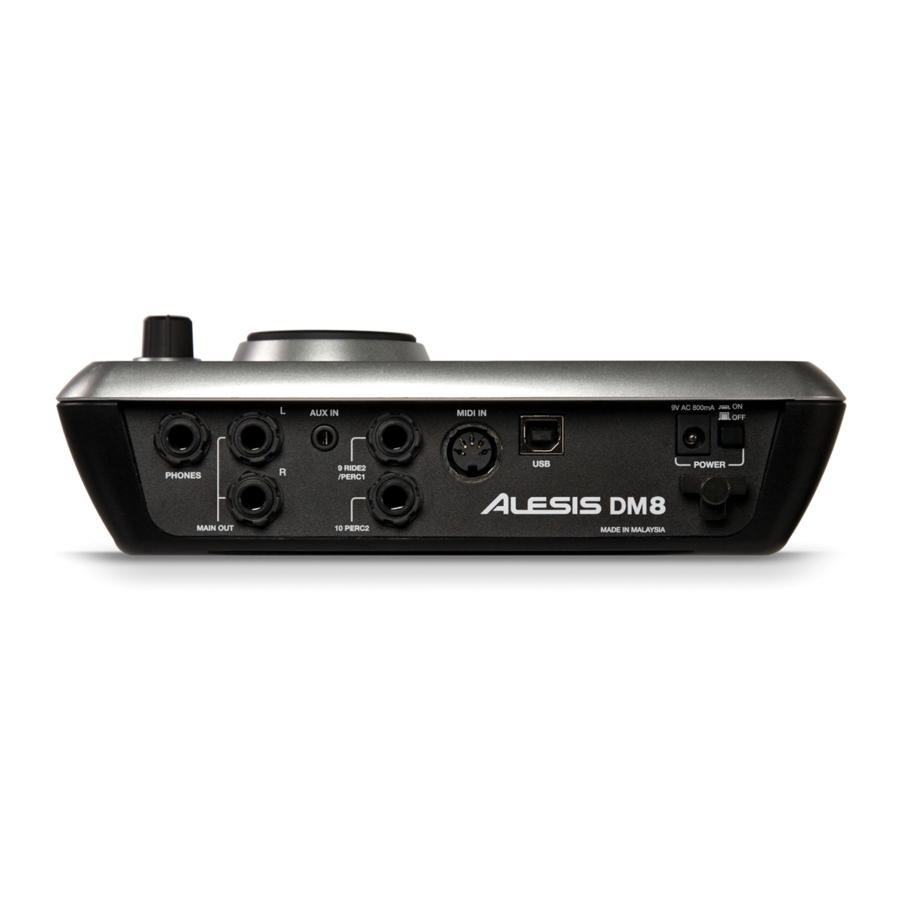
WARNING: Use only the included Alesis power supply with the DM8 module. MAIN OUT – Use 1/4″ TRS cables to connect these outputs to an amplifier or speaker system. The volume of these outputs is controlled by the VOLUME knob on the top panel.
-
Page 9
PREVIEW – Press this button to preview the sound of the current trigger. This can be useful when programming the DM8 if it is not connected to your drum kit, if it is not convenient to strike the pads, etc. -
Page 10: Kits, Voices, Accompaniment & Instruments
The DM8 Module has 100 Preset Kits and 100 User Kits, which you can select from the Main Screen. Each Kit is a collection of Voices – or drum sounds – that are assigned to each trigger on the DM8. When a trigger is struck, that Voice will sound.
-
Page 11: Editing Accompaniment In A Kit
EDITING ACCOMPANIMENT IN A KIT When you are in the Kit whose Accompaniment you want to edit, press EDIT ACCOMP. The screen will show: the number of the Kit whose Accompaniment you will be editing the Layer (the Accompaniment consists of two layers, each with its own Instrument) the Category (the type or «class»…
-
Page 12: Editing Voice & Accompaniment Parameters
FX (F3, 1st page): Reverb: The amount of reverb on the Voice (00- 99). Effects: The Voice volume level sent to the DM8’s effects processor (00-99). EQ/Comp: This sends the Voice to the DM8’s equalizer and compressor («ON» or «OFF»).
-
Page 13
«MEDIUM,» or «HIGH.» «Polyphony» is the simultaneous sounding of Instruments (e.g., if you strike multiple triggers at the same time, like the hi-hat, snare, and kick drum). The DM8 has 64-voice polyphony, meaning up to 64 voices can sound at the same time. After exceeding that limit, Voices or Accompaniment with lower polyphony priority may be silenced so the ones with higher priority can sound. -
Page 14: Editing Midi Parameters
EDITING MIDI PARAMETERS This page allows you to edit various MIDI-related settings for each trigger. To edit them, Press DRUM KIT to go to the Main Screen. Press EDIT INST. The top of the screen will show the number and name of the Kit whose Instruments (drum voices) you will be editing.
-
Page 15: Editing Effects Parameters
– are as follows: FLANGER: Flanging is a kind of phasing or phase-shifting. The DM8’s flangers have the same editable parameters. Mono Flanger: Traditional flanging effect. Stereo Flanger: Flanger with a simulated stereo effect, creating a «wider» sound.
-
Page 16
Level: The volume level of the vibrato. DELAYS: A delay effect is a kind of echo, which varies depending on the size of the room it emulates and the rate, volume, and decay of the echo. The DM8’s delay effects have some common… -
Page 17
Damp (damping): The amount of low- and high-frequency dampening of the echo. At negative values, the sound of the echo gets progressively duller. At positive values, the sound of the echo gets progressively thinner. Level: The volume level of the delayed signal. XOver Delay: This delay has a stereo effect. -
Page 18: Drum Kit Setup
(When set to «OFF,» the other parameters below will not be displayed.) You will need to set this properly when using the DM8 module to play sounds on another module. Ext Prog#: The Program Change number the module will send out (00-99).
-
Page 19: Sequences
To hear a demo Sequence, simply hold down SEQ and press PLAY. Important: At any given time, the DM8 module has a Kit selected and a Sequence selected. • If you change the Sequence, this will change your current Kit to the one that is associated with that Sequence.
-
Page 20: Recording Sequences
RECORDING SEQUENCES Press SEQ to enter the main screen of the Sequencer. Press the REC tab (F1). Use the CURSOR UP / DOWN buttons to select settings to edit for that Sequence. Use the VALUE UP / DOWN buttons or the VALUE DIAL to change the settings: •…
-
Page 21: Editing Sequences (Accompaniment)
As you move down the table, you move DM8’s sequencer, which defines its through the Sequence. resolution. The DM8’s resolution is • Note: The MIDI note being sent. (See next page for an…
-
Page 22: Setting Up The Click Track
EXIT or any button that will enter another screen (e.g., DRUM KIT, UTILITY, etc.). Your edits will be retained in the Sequence. How the DM8 module’s sequencer refers to MIDI note numbers: When editing the Accompaniment track of a Sequence, you may notice the «Note» column contains the names of musical notes –…
-
Page 23: Editing Quantization Settings
• Metro (Metronome): Indicates when the click track will be heard. When set to «REC ONLY,» the click track will only be heard while recording a Sequence. When set to «REC + PLAY,» the click track will be heard while recording a Sequence and while playing back a Sequence. When set to «MANUAL,»…
-
Page 24: Storing & Copying Data
STORING & COPYING DATA The DM8 module will «remember» changes to your Kit, Sequence, or Utility settings during a single session, but you will lose changes you have made once you turn the module’s power off. To save your settings so you can recall them in future sessions, you need to «store»…
-
Page 25: Copying Instruments
COPYING INSTRUMENTS This page allows you to copy an Instrument from one Kit to an Instrument in another Kit. (You can also copy it to the same Kit, which effectively stores that Instrument in that Kit.) Use the CURSOR UP / DOWN buttons to select the field you want to edit, and use the VALUE UP / DOWN buttons or VALUE DIAL to select a new entry in that field.
-
Page 26: Ext. Trig Menu
EXT. TRIG MENU The DM8’s Ext. Trig Menu contains several pages of parameters related to triggering (striking pads, cymbals, trigger sensitivity, etc.). The settings in these pages affect ALL Kits. TRIGGER INPUT PARAMETERS The INP page of the Ext. Trig Menu contains some parameters that affect the triggers’ sensivity and function within the module.
-
Page 27: Triggering Parameters
For instance, if you strike the snare drum hard enough, it is possible for the crash cymbal to sense the vibration of your hit (especially if they are mounted on the same rack) and trigger as well. This unintentional triggering can be reduced or elimintated by adjusting the DM8 module’s crosstalk («Xtalk») settings.
-
Page 28: Velocity Curve
VELOCITY CURVE The CURV page lets you set the velocity curve for the triggers, which determines how a sound’s volume is affected by how hard you strike it – that is, how responsive the triggers’ dynamics are to changes in your playing.
-
Page 29: Hi-Hat Calibration
EXPLORING OPTIMAL SENSITIVITY AND THRESHOLD SETTINGS We created the DM8 module’s default settings to allow for great playability right out of the box, but we recommend experimenting with different triggers settings – particularly sensitivity and threshold – so you can find the settings that best suit your playing style.
-
Page 30: Utility Menu
UTILITY MENU The DM8’s Utility Menu contains several pages of parameters that affect the module’s overall operation as well as system-related information and functions. GENERAL The main page of the Utility Menu contains some global parameters that affect the kit as well as the module itself.
-
Page 31
SUBDIVISION (F2) This page lets you adjust settings for the subdivision metronome. This is similar to the regular metronome but while the regular metronome sounds every beat, the subdivision metronome sounds during smaller intervals of each measure. Press UTILITY to enter the main Utility Menu. Press MTRO (F1) to access the metronome settings. -
Page 32: Midi (F2)
MIDI (F2) Pressing MIDI (F2) from the Main Utility menu lets you access pages that contains the module’s MIDI settings. INPT (F1) This page controls the module’s MIDI input settings. Press UTILITY to enter the main Utility Menu. Press MIDI (F2) to access the MIDI settings. The first page to appear will be INPT (F1).
-
Page 33: Trig (F3)
TRIG (F3) Pressing TRIG (F3) from the Main Utility menu lets you access a page that contains the various trigger settings for the module. TRIG Press UTILITY to enter the main Utility Menu. Press TRIG (F3) to access the trigger settings. Use VALUE UP / DOWN or the VALUE DIAL to adjust the settings: Trig Sens:…
-
Page 34: Updating The Module
«MIDI Interface» dropdown menu. Mac users: The DM8 module will be automatically selected. Drag the appropriate file onto the application, or click «File» then «Open» and select the file. You can upload SysEx (.syx) files – such as sound ROM files or firmware files – in this fashion.
-
Page 35: Midi Setup
MIDI controllers – to trigger sounds from the DM8’s own extensive sound library instead of (or in addition to) the electronic drum kit. To use the DM8 in these ways, you will need to set it up to communicate with your external device(s) via MIDI. Here are a couple examples of how to do this.
-
Page 36: Restoring Backup Sysex Files
Prog Chng: «RECEIVE» (so the DM8’s Kits can be selected via Program Change messages from the external device). Clock In: «OFF» (if you want the DM8 to run off its own internal clock) or «RECEIVE» (if you want to sync the DM8’s clock to the clock of your external device).
-
Page 37: Midi Implementation Chart
MIDI IMPLEMENTATION CHART Transmit/Export Recognize/Import Remarks 1. Basic Information Drums: 10 (default) MIDI channels 1-16 1-16 Accomp: 1 (default) Drums: 28-91 Note numbers 0-127 Accomp: 0-127 *Used for selecting Program change 0-99 0-99* active kit *0: Kits 0-99, 1: Kits Bank Select response? Yes* 100-199…
-
Page 38: Dm8 Kits
DM8 KITS Name Name Name Fusion 9 OH 9 Guitar Jam Big Mellow Flim Flam Techno CableSnare SquareBdge VocalDrums Bop Brush Old SKool Med Room Big Wet Hiss Hop Funky Drmr Clav Jam Nu Jack ConcertTom Wood Pop Pop Brush…
-
Page 39: Dm8 Sequences
DM8 SEQUENCES Name Name Name Jalapeño Med House Funx Rox Slow Metal Industro Jbass Groov Surf Punk Discotron 6 Idol Rock 70sHardRock Afro-Cuban Dark Rock Texas Blues Mozambesque Punx J-Bon BassGroover Shuff Drive Indie Rock MedSlowBlu Shuffle On Blues Shuff…
-
Page 40: Dm8 Instruments
DM8 INSTRUMENTS KICKS 70s Rock FunkPlus Pop 2 80s Rock Fusion Quarter Head 90s Rock Gr 90s 20″ RocKik Ambient Garage Rocker Ambient Rock Growl Room Banger HR16 Rock Round Bass N Kick Hard Head Round Blues Big 26″ Hard Rock 1…
-
Page 41
TOMS 70s 10″ Roto 12″ Dn Temp Mute16″ 70s 12″ Roto 12″ Up Temp Mute18″ 70s 14″ Roto 14″ Temp Rim 70s 16″ Roto 14″ Dn Y 12×14 MCA G 14×14 Roto 14″ Up Y 14×16 MCA G 8×10 Roto 16″ Y 7×8 MCA G 8×12 Roto 16″… -
Page 42
CHINA Big China Hi China Stk WChnaRvt 18″ China China SChnaMal 18″ WSplash Flange China SSplash 12″ WSplash 10″ Gong China WChina 17″ Z Stick 8″ ELECTRC KICK 08 Kick Long HipHop Kik 4 SDS Kick 2 08 Kick Shrt HipHop Kik 5 SDS Kick 3 09 Kick Long… -
Page 43
LATIN PERC 2way Cowbell Cowbell 2 SmTriangleO Agogo Cowbell 3 Stick Click Agogo Hi Crasher Surdo 1 Agogo Lo Cuica Dn Surdo 2 Agogo Lo 2 Cuica Up Syn Shakr Bead Shaker Drum Stix Tamb Mute BellTree Dn Guiro 1 Tamb Open BellTree Up Guiro 2… -
Page 44
BASS Bass Harm Jazz Upright Rattle Bass Ch Pick MellowUprght Rattle VSw ChrsFretless Open Jazz Slap Bass 1 Crunch Bass Pick Bass 1 Slap Bass 2 Damp Pick Pick Bass 2 Slap Bass 3 ElectrcBass1 Pick Bass 3 SlapNPop 1 ElectrcBass2 Pick Bass 4 SlapNPop 2… -
Page 45
HITS 70sHR Gtr 1 C El Gtr 03 HipHp1 Gtr05 70sHR Gtr 2 C El Gtr 04 HipHp1 Gtr06 70sHR Gtr 3 C El Gtr 05 HipHp1 Gtr07 70sHRcombo 1 C El Gtr 06 HipHp1 Gtr08 70sHRcombo 2 C El Gtr 07 HipHp1 Gtr09 70sHRcombo 3 FJ EP 01… -
Page 46
HITS (cont.) Jz GtHn F#m R&G VSyn 1 SM Gtr 15 Jz GtHn FMj7 R&G VSyn 2 StankyClav 1 Jz GtrHrn A R&G VSyn 3 StankyClav 2 Jz GtrHrn Bb R&G VSyn 4 StankyClav 3 Jz GtrHrn C R&G VSyn 5 StankyClav 4 Jz GtrHrn D R&G Vox 1… -
Page 47
THIS DEVICE COMPLIES WITH PART 15 OF THE FCC RULES. OPERATION IS SUBJECT TO THE FOLLOWING TWO CONDITIONS: (1) THIS DEVICE MAY NOT CAUSE HARMFUL INTERFERENCE, AND (2) THIS DEVICE MUST ACCEPT ANY INTERFERENCE RECEIVED, INCLUDING INTERFERENCE THAT MAY CAUSE UNDESIRED OPERATION. -
Page 48
7-51-0333-A…
Руководства Alesis DM8 USB KIT Размер файлов: 8173 KB, Язык: English, Формат: pdf, Платформа: Windows/Linux, Дата: 2017-03-28
На данной странице вы можете скачать руководства Alesis DM8 USB KIT. Мы предлагаем вам ознакомиться с руководством пользователя, инструкцией по сервисному обслуживанию и ремонту.
Также здесь вы найдете список заказных номеров на комплектующие Alesis DM8 USB KIT.
Все файлы предоставляются исключительно в ознакомительных целях. И не являютя руководством по ремонту, а направлены лишь на то чтобы помочь вам более детально ознакомиться с принципом построения устройства.
Содержимое представленных здесь руководств требуют от вас знания технического английского языка.
Если вы собираетесь скачать руководство по сервисному обслуживанию Alesis DM8 USB KIT, иными словами сервис мануал, вы дожны обладать хотя бы минимальными познаниями в области электроники и пониманием базовых принципов работы электромеханических устройств.
Для просмотра руководств вам понадобится Adobe Acrobat Reader версии 9 и выше либо другая программа для просмотра pdf файлов.
В связи с популярностью информации представленной на сайте и ее бесплатного предоставления конечному пользователю, убедительная просьба использовать специальные программные продукты для многопотокового скачивания файлов.
Руководства для Alesis DM8 USB KIT
- Руководство пользователя (User manual)
- Руководство по сервисному обслуживанию (Service manual)
- Руководство по ремонту (Repair manual)
- Перечень комплектующих (PartList)
249 ₽
Инструкция (руководство пользователя) на Барабанный модуль Alesis DM8
Артикул: alesis-dm8
Категория: Alesis
-
Описание
-
Детали
Описание
Инструкцию по эксплуатации Alesis DM8 на русском языке можно будет скачать в личном кабинете после оформления и оплаты заказа.
Детали
| Формат файла |
|
|---|---|
| Размер инструкции в кб |
2878 |
Mapex777
рейтинг: 50
Ребята, может кто встречал русский мануал, подскажите пожалуйста где найти, а то с модулем до конца не могу разобраться.
27.10.11 14:33:37
Millikam
рейтинг: 71
http://www.muztorg.ru/cat/details/A031494/
Однако логично….
и по сборке, и по модулю.
27.10.11 14:44:44
Mapex777
рейтинг: 50
Спасибо!!!!!!
27.10.11 18:50:15
Dimoncha
рейтинг: 0
Да, я тоже пытаюсь найти. Только полную инструкцию, а это краткая… Полная есть только на английском…
11.01.12 01:40:24
Drumsteve
рейтинг: -75
Почти досконально изучил модуль Alesis DM8, могу ответить на интересующий вопрос, пишите 426565352
18.01.12 14:07:50
Dimoncha
рейтинг: 0
Вот, появилась полная инструкция на русском:
http://www.alesis.ru/products/?t=A031494
http://www.muztorg.ru/news/cat_files/dm8_module___operator__s_manual___reva_ru[1].pdf
28.06.12 11:24:42
Страницы: 1
Если у вас отсутствует техническая возможность для скачивания Инструкция по эксплуатации для Alesis DM8
вы можете прочесть документ прямо на нашем сайте или
Скачать Alesis DM8 Инструкция по эксплуатации
BB кодПрямая ссылка
 1
1 2
2

- 1
- 2
- 3
Инструкции для прочих Alesis DM8
-

Alesis DM8 Инструкция по эксплуатации
Популярность:
0 просмотры
Подсчет страниц:
1 страницы
Тип файла:
PDF
Размер файла:
99 Kb
Скачать (PDF 99 Kb) Читать онлайн (1 страницы)
Инструкции для прочих Alesis Барабаны
-

Alesis 7-51-0266-A Инструкция по эксплуатации
Популярность:
1712 просмотры
Подсчет страниц:
1 страницы
Тип файла:
PDF
Размер файла:
126 Kb
Скачать (PDF 126 Kb) Читать онлайн (1 страницы)
-

Alesis ELECTRONIC DRUM KIT DM5 Список запчастей
Популярность:
1751 просмотры
Подсчет страниц:
1 страницы
Тип файла:
PDF
Размер файла:
250 Kb
Скачать (PDF 250 Kb) Читать онлайн (1 страницы)
-

Alesis USB Studio Drum Kit Инструкция по эксплуатации
Популярность:
1834 просмотры
Подсчет страниц:
1 страницы
Тип файла:
PDF
Размер файла:
81 Kb
Скачать (PDF 81 Kb) Читать онлайн (1 страницы)
-

Alesis HR-16:B Инструкция по эксплуатации
Популярность:
4304 просмотры
Подсчет страниц:
72 страницы
Тип файла:
PDF
Размер файла:
2.95 Mb
Скачать (PDF 2.95 Mb) Читать онлайн (72 страницы)
-

Alesis HR-16 Инструкция по эксплуатации
Популярность:
4640 просмотры
Подсчет страниц:
72 страницы
Тип файла:
PDF
Размер файла:
2.95 Mb
Скачать (PDF 2.95 Mb) Читать онлайн (72 страницы)
-

Alesis DM7 Инструкция по эксплуатации
Популярность:
7610 просмотры
Подсчет страниц:
16 страницы
Тип файла:
PDF
Размер файла:
260 Kb
Скачать (PDF 260 Kb) Читать онлайн (16 страницы)
-

Alesis SR-18 Инструкция по эксплуатации
Популярность:
8230 просмотры
Подсчет страниц:
1 страницы
Тип файла:
PDF
Размер файла:
171 Kb
Скачать (PDF 171 Kb) Читать онлайн (1 страницы)
-

Alesis PERFORMANCE PAD PRO Инструкция по эксплуатации
Популярность:
8894 просмотры
Подсчет страниц:
68 страницы
Тип файла:
PDF
Размер файла:
2.33 Mb
Скачать (PDF 2.33 Mb) Читать онлайн (68 страницы)
-

Alesis SR18 Инструкция по эксплуатации
Популярность:
12845 просмотры
Подсчет страниц:
76 страницы
Тип файла:
PDF
Размер файла:
3.55 Mb
Скачать (PDF 3.55 Mb) Читать онлайн (76 страницы)
-

Alesis DM6 Руководство по монтажу
Популярность:
13468 просмотры
Подсчет страниц:
2 страницы
Тип файла:
PDF
Размер файла:
3.15 Mb
Скачать (PDF 3.15 Mb) Читать онлайн (2 страницы)
Инструкции для прочих Alesis
-

Alesis Жесткие диски D4 Инструкция по эксплуатации
Популярность:
0 просмотры
Подсчет страниц:
11 страницы
Тип файла:
PDF
Размер файла:
463 Kb
Скачать (PDF 463 Kb) Читать онлайн (11 страницы)
-

Alesis CD-плееры MMT-8 Инструкция по эксплуатации
Популярность:
0 просмотры
Подсчет страниц:
44 страницы
Тип файла:
PDF
Размер файла:
213 Kb
Скачать (PDF 213 Kb) Читать онлайн (44 страницы)
-

Alesis Микшеры 8FX Инструкция по эксплуатации
Популярность:
1 просмотры
Подсчет страниц:
11 страницы
Тип файла:
PDF
Размер файла:
1.7 Mb
Скачать (PDF 1.7 Mb) Читать онлайн (11 страницы)
-
![Автомобильные усилители Alesis F: [401] 658.3640 Таблица технических условий](http://manualboom.ru/images/f-401-658-3640/specification-sheet.gif)
Alesis Автомобильные усилители F: [401] 658.3640 Таблица технических условий
Популярность:
1203 просмотры
Подсчет страниц:
1 страницы
Тип файла:
PDF
Размер файла:
66 Kb
Скачать (PDF 66 Kb) Читать онлайн (1 страницы)
-
![Автомобильные усилители Alesis P: [401] 658.5760 Таблица технических условий](http://manualboom.ru/images/p-401-658-5760/specification-sheet.gif)
Alesis Автомобильные усилители P: [401] 658.5760 Таблица технических условий
Популярность:
1230 просмотры
Подсчет страниц:
1 страницы
Тип файла:
PDF
Размер файла:
66 Kb
Скачать (PDF 66 Kb) Читать онлайн (1 страницы)
-

Alesis Сетевые фильтры 7-51-0265-A Инструкция по эксплуатации
Популярность:
1280 просмотры
Подсчет страниц:
1 страницы
Тип файла:
PDF
Размер файла:
114 Kb
Скачать (PDF 114 Kb) Читать онлайн (1 страницы)
-

Alesis Наушники DMPhones Инструкция по эксплуатации
Популярность:
1304 просмотры
Подсчет страниц:
1 страницы
Тип файла:
PDF
Размер файла:
88 Kb
Скачать (PDF 88 Kb) Читать онлайн (1 страницы)
-
Alesis Теле/видео аксессуары 6FX Инструкция по эксплуатации
Популярность:
1480 просмотры
Подсчет страниц:
11 страницы
Тип файла:
PDF
Размер файла:
1.7 Mb
Скачать (PDF 1.7 Mb) Читать онлайн (11 страницы)
-

Alesis MP3-плееры i04 Инструкция по эксплуатации
Популярность:
1488 просмотры
Подсчет страниц:
1 страницы
Тип файла:
PDF
Размер файла:
95 Kb
Скачать (PDF 95 Kb) Читать онлайн (1 страницы)
-

Alesis Звукоусилители для музыкальных инструментов WILDFIRE 15 Инструкция по эксплуатации
Популярность:
1534 просмотры
Подсчет страниц:
16 страницы
Тип файла:
PDF
Размер файла:
1.15 Mb
Скачать (PDF 1.15 Mb) Читать онлайн (16 страницы)